Deactivated MailPlus Server accounts retain their email data after deactivation the mailbox is preserved, login access is blocked. On MailPlus Server 3.x and 4.x (DSM 7), deactivated accounts appear in the admin export interface alongside active accounts and are exported as PST files via Account then User then Import/Export. No reactivation is needed. On MailPlus Server 1.x and 2.x (DSM 6), the export produces MBOX files via Storage then Back Up, and reactivation may be required. On MailPlus Server 1.x and 2.x (DSM 6), the export may require temporarily reactivating the account first. Convert the MBOX output using Univik Synology MailPlus Converter to produce a PST or PDF archive accessible independently of the NAS.
Deactivated vs Deleted: An Important Distinction
MailPlus Server distinguishes between deactivated accounts and deleted accounts. Getting this right matters before any export attempt.
A deactivated account has its login access blocked the user cannot log in, receive new email or access the MailPlus web client. But the mailbox remains intact on the NAS. All email, all folder structure and all attachments are preserved. The account still occupies a licence slot and still consumes storage.
A deleted account removes the mailbox entirely. Email data is deleted along with the account. There is no export possible from a deleted account the data is gone.
If you need to export a former employee’s email, confirm the account status first. In MailPlus Server admin, go to User and check whether the account appears in the user list with a deactivated or disabled status. If it has been fully deleted, the only recovery path is from a pre-deletion MBOX backup or Hyper Backup snapshot.

“We run MailPlus in our own lab, so the deactivated-account case is one we can set up and test rather than guess at. The largest migration we have done from a Synology held 11 TB of mail in roughly 3,246 mailboxes.”
Nick Rogers
|Founder, Univik, building file conversion tools since 2013
Which MailPlus Server Version You Have Matters
The export process for deactivated accounts differs between major MailPlus Server versions. Check your version before following the steps below.
| MailPlus Server Version | DSM Version | Deactivated Account Export |
|---|---|---|
| 3.x and 4.x | DSM 7 | ✅ Deactivated accounts visible in export interface no reactivation needed |
| 1.x and 2.x | DSM 6 | ⚠️ Deactivated accounts may not appear reactivation may be required first |
To check your version: in DSM, open Package Center then Installed and find MailPlus Server. The version number is displayed next to the package name.
Exporting a Deactivated Account on MailPlus Server 3.x and 4.x
On DSM 7 with MailPlus Server 3.x or 4.x, deactivated accounts are included in the admin export interface alongside active accounts. No special handling is required.
Open MailPlus Server and go to Account then User. Log into DSM as an administrator. Open MailPlus Server from the main menu. In the left sidebar, click Account then select User. All mailboxes are listed here, both active and deactivated accounts.
Locate the deactivated account. Deactivated accounts appear in the same list as active ones, marked with an inactive or disabled status indicator. Scroll or use the search to find the specific account.
Select the account and click Import/Export then Export. Tick the checkbox next to the deactivated account. Click Import/Export in the top action bar. Select Export from the dropdown.
Select the mailbox, tick Include sub-mailboxes and click Export. A dialog opens. Choose the mailbox from the dropdown. Tick Include sub-mailboxes to export all folders, not just the Inbox. Click Export. The PST file downloads directly to your browser’s download folder.
Save the PST to a secure location off the NAS. Move the downloaded PST to a dedicated archive folder on a Windows machine or external drive. Do not leave the only copy on the machine that accesses DSM. A deactivated employee’s email archive should be stored independently of the NAS in case the account is later deleted or the NAS fails.
Exporting a Deactivated Account on MailPlus Server 1.x and 2.x
On DSM 6 with MailPlus Server 1.x or 2.x, the export interface may not display deactivated accounts in the account selection list. If the deactivated account does not appear, you have two options.
Option A: Temporarily Reactivate the Account
In MailPlus Server admin, go to User and reactivate the account. Login is re-enabled but you do not need to notify the user or change their password. The account now appears in the export interface. Run the export, then deactivate the account again immediately after. This is the simplest path if a brief reactivation is acceptable under your security policy.
Option B: Access the Mailbox Files Directly
MailPlus Server stores mailbox data in a specific folder on the NAS volume. On DSM 6, this is typically under the MailPlus shared folder in a per-user directory. The MBOX files are accessible via File Station as an admin. This is not the supported export path but works if reactivation is not possible. Confirm the copied files are valid MBOX by loading them in Univik Synology MailPlus Converter before deleting any originals.
Upgrading to DSM 7 before exporting
If the NAS is still on DSM 6 and you plan to upgrade to DSM 7 anyway, upgrading first and then exporting via the cleaner MailPlus Server 3.x interface is a reasonable sequence. But only if the upgrade is planned regardless do not upgrade DSM solely to access the deactivated account export interface. See our DSM 6 to DSM 7 email migration guide for the full upgrade implications before proceeding.
What the Export Produces
The export output depends on your DSM version. On DSM 7 (MailPlus Server 3.x and 4.x), the export produces a single PST file downloaded to your browser. On DSM 6 (MailPlus Server 1.x and 2.x), the export produces a folder of MBOX files with one file per mailbox folder. The DSM 6 MBOX structure looks like this:
└── john.smith@company.com/ ← deactivated account
├── INBOX.mbox
├── Sent.mbox
├── Drafts.mbox
└── [custom folders].mbox
All folders are exported not just the Inbox. Sent items, drafts, custom folders and subfolders are all included. Attachments are embedded within the MBOX files as they were in the original mailbox.
After Export: Convert and Archive
The exported file is ready to convert or archive. On DSM 7 you have a PST file. On DSM 6 you have MBOX files. Either way, Univik Synology MailPlus Converter accepts both PST and MBOX as input and produces the archive format your organisation needs:
PST for import into Microsoft 365 or Outlook. A manager or HR team needing to access the former employee’s email can open the PST in Outlook directly without requiring any server access.
PDF for compliance archiving. One PDF per email, stored in the original folder structure. Suitable for long-term retention where the email must be preserved but not actively used.
EML for platform-agnostic access or legal review tools. Many eDiscovery and legal review platforms accept EML files natively.
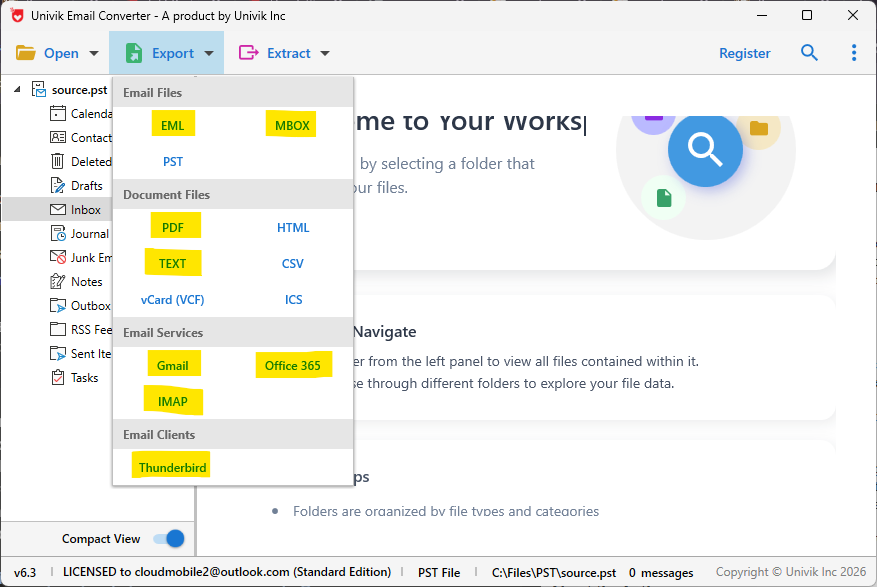
Univik Synology MailPlus Converter accepts both PST (DSM 7) and MBOX (DSM 6) input and exports to PDF, EML, MSG and more
The converter works entirely offline. The NAS does not need to remain connected once the export file (PST or MBOX) is saved to a Windows machine. This is relevant for deactivated account archives that may be processed days or weeks after the initial export or after the NAS has been decommissioned.
Compliance and Legal Hold Considerations
Deactivated account exports most commonly arise in two contexts: routine offboarding archiving and legal hold or eDiscovery requests. The compliance requirements differ between these scenarios and affect how the archive should be stored and handled.
Routine offboarding archiving. When an employee leaves, export their mailbox and store the MBOX or converted archive for the organisation’s standard retention period. The export should happen before the account is deleted not weeks or months later when the data may be harder to access or already gone. Build this into the standard offboarding checklist.
Legal hold. If a deactivated account is subject to a legal hold a formal instruction to preserve data for potential litigation do not delete the account, do not modify its content and do not alter the MBOX export after creation. Store the exported MBOX files in a read-only location with access logging. Consult with your legal team before taking any action on accounts under a legal hold. Legal hold overrides normal retention and deletion schedules.
eDiscovery requests. If the email is needed for litigation or regulatory investigation, the format of the archive matters. Many legal review platforms accept PST or EML natively. PDF is suitable for production to opposing counsel but is less useful for internal review workflows. Confirm with your legal team which format is required before converting the conversion should happen once, to the correct format, not multiple times.
GDPR and data retention. Under GDPR, personal data should not be retained indefinitely after employment ends. Email archives of former employees are personal data. Your organisation’s privacy policy and retention schedule determine how long the archive can be kept. If the retention period has passed and there is no legal hold, deletion of the archive may be required rather than optional.
Do not delete the account before confirming the export is complete
Deleting a MailPlus Server user account removes the mailbox and all email permanently. There is no recycle bin for deleted MailPlus accounts. Confirm the export has completed, the MBOX files are copied off the NAS and the converted archive is verified before deleting the account. This sequence is non-negotiable for any account where the email may have legal or compliance value.
Frequently Asked Questions
Does deactivating a MailPlus Server account delete the email?
No. Deactivating an account blocks login access but preserves the mailbox and all its contents email, folders and attachments all remain intact on the NAS. Email data is only removed when an account is fully deleted. Deactivation is the correct procedure for departed employees when you need to preserve the email for archiving or compliance purposes.
How long does the email of a deactivated account remain accessible?
Indefinitely as long as the account is not deleted and the NAS is operational. Deactivated accounts persist with their full email data until an administrator deletes the account. They continue to consume storage and occupy a licence slot during this time. There is no automatic expiry of a deactivated account’s mailbox.
Can I export just specific folders from a deactivated account?
The MailPlus Server admin export exports the entire mailbox of selected accounts there is no folder-level selection in the admin export interface. To extract specific folders after export, load the full MBOX export into Univik Synology MailPlus Converter or Thunderbird with ImportExportTools NG and work with the specific folders from there. The full export is always the starting point.
What happens to a deactivated account’s licence slot?
The licence slot remains occupied as long as the account exists in MailPlus Server active or deactivated. Deactivating an account does not free the licence. To free the licence, the account must be deleted. For organisations managing licence costs, the timing of account deletion relative to the email archive process is a relevant operational consideration.
Can I search the email of a deactivated account before exporting?
On MailPlus Server 3.x and 4.x, administrators can access and search deactivated account mailboxes through the MailPlus Server admin search function useful for identifying whether specific email exists before committing to a full export. On 1.x and 2.x, admin mailbox search for deactivated accounts is more limited. In either case, the MBOX export captures everything regardless of what the search shows.
The Short Version
Deactivated MailPlus Server accounts hold all their email intact until explicitly deleted. On current MailPlus Server versions (3.x and 4.x), exporting them is the same process as exporting active accounts they appear in the same admin export interface without any special handling required.
The critical sequence is always: export before delete. An exported archive of a former employee’s email provides a recoverable record for as long as your retention policy requires. A deleted account has no recovery path without a prior backup.
Is the export for routine archiving or is there a legal hold or compliance requirement involved? That distinction determines the format to convert to and the access controls to put around the resulting archive.