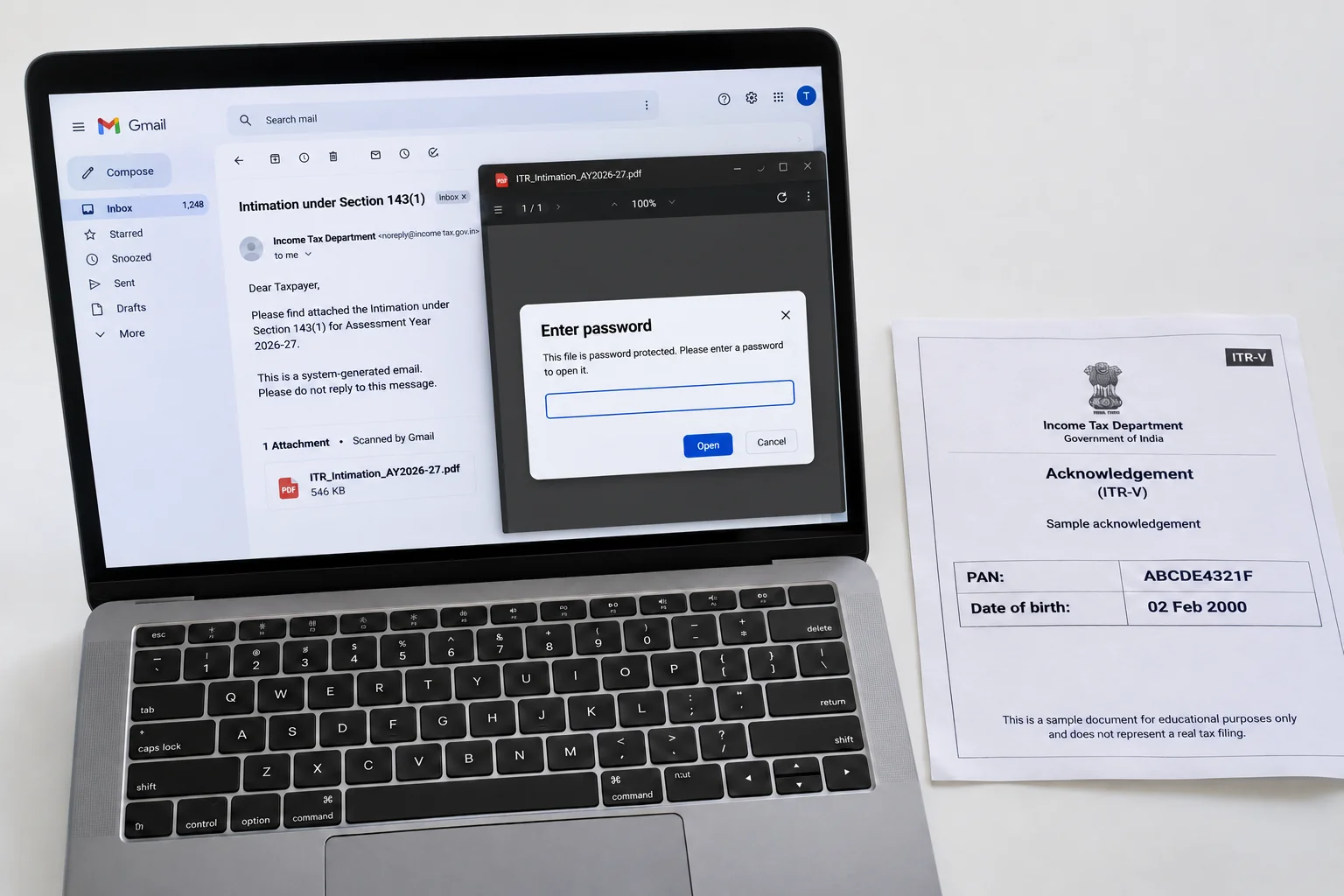
Your ITR intimation password is the lower case PAN with the DDMMYYYY birth date stuck on the end. PAN ABCDE4321F and a birthday of 2 February 2000 give abcde4321f02022000.
The same eighteen characters open the intimation under section 143(1) that arrives after processing and your ITR-V acknowledgement generated when you file. A HUF, a firm or a company uses its date of incorporation. Either PDF, once opened, can be saved without the lock so it stops prompting.
Two PDFs follow every income tax return. The ITR-V acknowledgement appears the moment your return is submitted and the intimation under section 143(1) arrives weeks or months later once the Centralised Processing Centre has matched your figures against its own. Both land as locked attachments and both open with the same eighteen characters built from your PAN and your birth date.
The 143(1) format comes first on this page, then the reason the two notices look different but unlock alike and where Univik PDF Unlocker fits when the notices for a whole family or a client list need opening without a password prompt.
What Is the ITR Intimation Password Format?
The intimation password format joins two items with no gap: the PAN (all ten characters in small letters) and your birth date as DDMMYYYY. PAN ABCDE4321F and a birth date of 2 February 2000 give abcde4321f02022000. Small letters are required for the PAN even though the notice itself shows it in capitals and a date like 2 February keeps both zeros as 0202. A Hindu undivided family, a partnership firm, an LLP or a company replaces your birth date with its date of incorporation or formation.
I checked three published guides on 9 November 2026 and each gives the same rule for both your 143(1) intimation and your ITR-V acknowledgement: PAN in lower case, then your birth date as DDMMYYYY. The rule matches the one the Income Tax Department uses for the Annual Information Statement, so a taxpayer who has opened an AIS already knows this password.
| PAN and date | ITR intimation password |
|---|---|
| ABCDE4321F, born 2 February 2000 | abcde4321f02022000 |
| LOIPF0943Z, born 1 May 1981 | loipf0943z01051981 |
| AAHFM2210K, firm formed 18 June 2010 | aahfm2210k18062010 |
The ITR-V for the same PAN opens with the same row. One value covers both notices for a given year.
Why Is the 143(1) Intimation Password Protected?
The intimation under section 143(1) sets your declared income beside the figures the department computed, line by line. It ends with a refund, a demand or a nil result. The ITR-V repeats your PAN, your total income and the acknowledgement number. Either document in an open inbox would give a stranger your tax position for the year. So the department seals both with an open password, keeping every page hidden until the right value arrives and tying that value to two facts only you should hold.
The lock is routine and doesn't hint at the outcome inside. A demand notice and a refund notice carry the same password.
How Do You Open the 143(1) Intimation or the ITR-V PDF?
Open your attachment from the department email or download either file from the e-filing portal under e-File, then Income Tax Returns, then View Filed Returns, where each year offers the acknowledgement and the intimation once processed. In Adobe Acrobat Reader or Microsoft Edge, type the PAN in small letters and the eight-digit birth date straight after it, with no space. Then press Enter. The intimation opens on the comparison table and your ITR-V on the acknowledgement page.
Read the intimation to the last line, because the section that matters, the refund or the demand, sits at the end.
How Do You Remove the ITR Intimation Password?
A chartered accountant receives intimations for every client in the same few weeks after processing, each wanting its own eighteen-character value before it can be checked against the return that was filed. A taxpayer who keeps seven years of acknowledgements has fourteen locked files. The practical fix is to open each notice once and save a copy with no password. Univik PDF Unlocker handles that without an upload.
Add the intimations and acknowledgements, give each one its PAN and date value in the Password column, press Check and watch for the accepted status, then press Unlock. Unlocked copies land in your chosen folder and the department originals are left as sent.
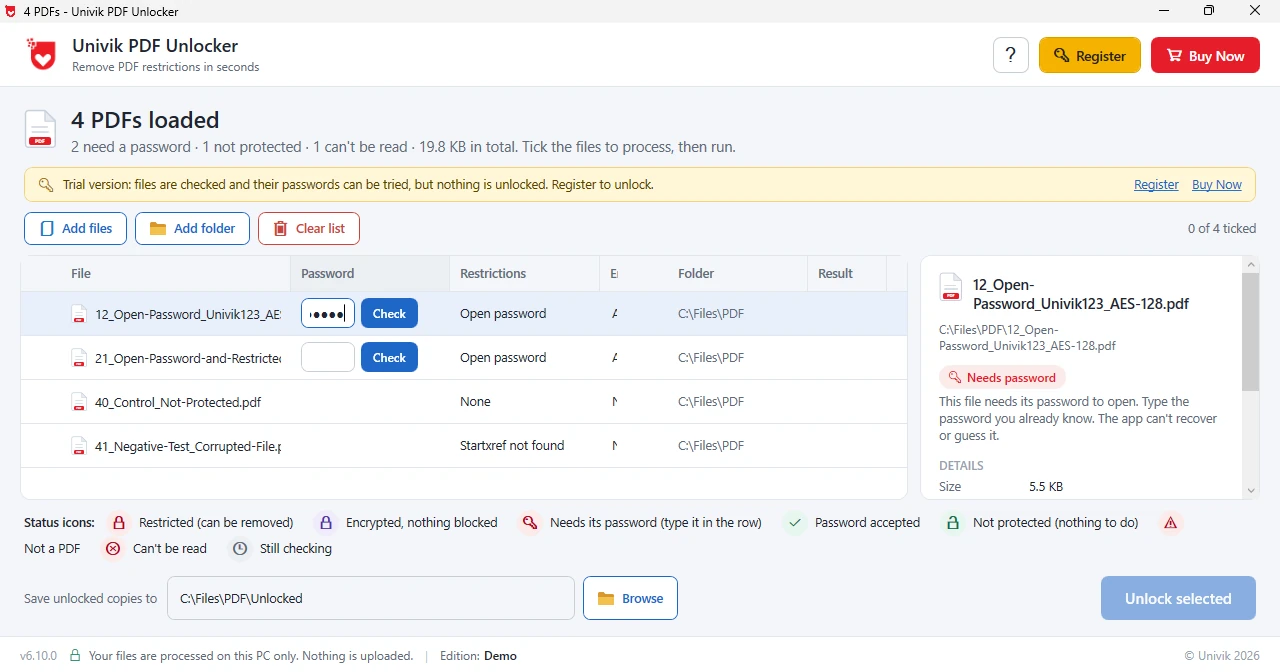
Give Univik PDF Unlocker the PAN and date value once per notice and keep copies that open on a click. A season of client intimations goes through in one pass.
Free Download See all featuresITR Intimation Password Not Working?
When your intimation refuses the password, start with the case. Every letter of your PAN must be lower case, which is the opposite of how the PAN card prints it. Also confirm the date sequence, which is day, month and a four-digit year, so 2 February 2000 becomes 02022000 rather than 20000202, with a zero kept before a one-digit day or month. A HUF, a firm or a company types its incorporation date instead.
If the value still fails, the e-filing profile shows your birth date the department has on record, which may not be the one you typed. Compare the two and try the portal date. A notice forwarded by someone else is still keyed to the PAN on that notice, not to yours. Nothing here needs recovering, since the rule is public and there's no secret to crack and no software removes a password from a notice that has not yet been opened with it.
- The ITR intimation password is the lower case PAN with the DDMMYYYY birth date after it.
- PAN ABCDE4321F with a birth date of 2 February 2000 gives abcde4321f02022000.
- The ITR-V acknowledgement opens with the same value as your 143(1) intimation.
- A HUF, a firm or a company types its incorporation date where an individual types a birth date.
- A rejected value usually hides a capital letter in the PAN or a year typed first.
- Unlock each notice once and keep the clean copy with that year of tax records.

ITR Intimation Password Questions
What is the ITR intimation password?
The lower case PAN followed by the DDMMYYYY birth date. PAN ABCDE4321F with a birthday of 2 February 2000 gives abcde4321f02022000.
Is the ITR-V acknowledgement password the same as the intimation password?
Yes. The ITR-V generated when you file and your 143(1) intimation sent after processing both open with your PAN in lower case plus your birth date as eight digits.
What is the intimation password for a HUF, a firm or a company?
The PAN in lower case followed by the formation or incorporation date as DDMMYYYY. A firm formed on 18 June 2010 with PAN AAHFM2210K types aahfm2210k18062010.
Why does your 143(1) PDF say the password is incorrect?
A capital letter in the PAN or a year typed first causes most rejections. Retype in small letters, day before month, zeros kept. Still refused? The e-filing profile shows your birth date on record, which may differ from yours.
How do I remove a password from an ITR intimation PDF?
Add the notice to Univik PDF Unlocker, enter the PAN and date value, Check it and Unlock it. That clean copy lands in your chosen folder while the department original stays as sent.
Can an accountant unlock intimations for many clients at once?
Yes. Every row in the list takes its own value, so a client list of intimations can be checked one by one and unlocked together, with no notice leaving the office PC.
Is unlocking a tax intimation safe?
Yes, as long as it happens offline. A 143(1) notice states your income and your tax position for the year, which isn't a file to hand to a website. Unlocking a notice issued to you is ordinary record keeping.

Leena Taylor Paul researched this intimation guide at Univik, a Windows utility studio active since 2013. The rule was cross-checked across three published tax guides and matches the Income Tax Department rule for the AIS. People land here holding a 143(1) notice or an ITR-V that refuses to open, so the format leads and the lasting fix is the second half. Verified November 2026. Still shut out of a notice? Contact our support team.