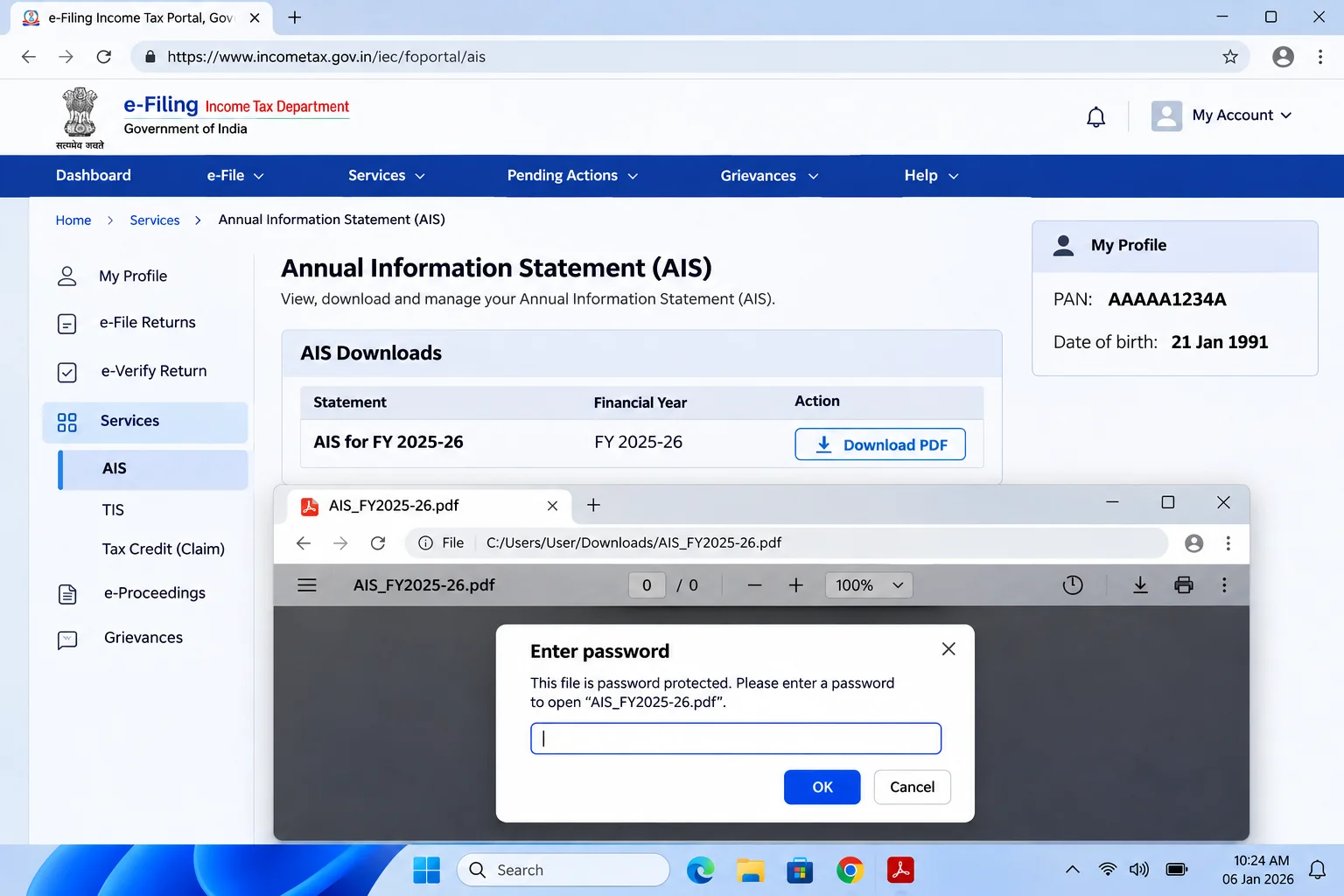
Your AIS password is your PAN in lower case followed by your date of birth as DDMMYYYY. PAN AAAAA1234A with a birth date of 21 January 1991 becomes aaaaa1234a21011991.
The Income Tax Department sets this one rule for the Annual Information Statement PDF and for the Taxpayer Information Summary that sits beside it. A company or a firm swaps your birth date for its date of incorporation.
Download the Annual Information Statement from the compliance portal and the PDF halts at a password box before any line of interest, dividend or sale shows. The Income Tax Department builds that password from two things every taxpayer already carries: the PAN and your date of birth. Type them in the right case and order and the AIS opens. Once it's open, Univik PDF Unlocker can write out a copy that carries no password, so the statement you file from and share with your accountant stops asking.
What Is the AIS Password Format?
Your AIS password format runs PAN first and birth date second: ten PAN characters typed small, then eight digits for day, month and year, with nothing in between. A PAN of AAAAA1234A and a birthday on 21 January 1991 become aaaaa1234a21011991, which is the exact example the Income Tax Department prints on its AIS access page. Your PAN letters drop to lower case here, even though every card and form shows them in capitals. Zeros stay in, so 5 March is written 0503 rather than 53.
I checked the Income Tax Department page on accessing AIS information on 9 November 2026 and the note there reads PAN in lower case plus your date of birth. For a company, a firm, a trust or any other non-individual PAN the second half is the date of incorporation or formation in the same DDMMYYYY shape.
| PAN and date | AIS password |
|---|---|
| AAAAA1234A, born 21 January 1991 | aaaaa1234a21011991 |
| BXYPK5678Q, born 5 March 1984 | bxypk5678q05031984 |
| AACCM9012L, company formed 1 April 2015 | aaccm9012l01042015 |
Every row follows the same eighteen-character pattern. Swap in your PAN and your date and the value is ready.
Why Does the Income Tax Department Lock the AIS PDF?
The Annual Information Statement lists your salary credits, bank interest, dividends, share sales, property deals and high-value spends for the whole year in one place. A file like that in an open inbox would hand a stranger a full financial profile. The department therefore wraps the AIS in an open password, the kind that won't show a page until the right eighteen characters are typed. The password isn't a sign of an error in your record.
The same lock sits on the Taxpayer Information Summary, the shorter TIS that the portal offers next to the AIS and on the Form 26AS tax credit statement, though 26AS uses only your birth date.
How Do You Open the AIS PDF?
Sign in to the e-filing portal, open the AIS tile, choose Proceed and the compliance portal loads. Pick the financial year, then download your Annual Information Statement as a PDF. The JSON download exists for the offline utility and is not the file people struggle with. Then open the PDF in Adobe Acrobat Reader, Microsoft Edge or any other viewer and type your PAN in lower case straight into the box, then your date of birth as eight digits with no space.
Press Enter and the AIS opens at Part A, the general information block. If your reader has a caps lock warning, mind it, because one capital letter in the PAN is the usual reason the file refuses the value.
How Do You Remove the AIS Password for Good?
An accountant who handles thirty clients downloads thirty AIS files every filing season and each one wants its own eighteen-character password before it can be read, matched against the books or attached to a working file. The practical fix is to open each AIS once with the right password and save an unlocked copy next to it. Univik PDF Unlocker does that on your own Windows PC.
You type the password in that row for your file, press Check and once the status turns to accepted the Unlock button writes a clean copy to your output folder. A folder of AIS files for different clients can go in together, each with its own password typed in its own row.
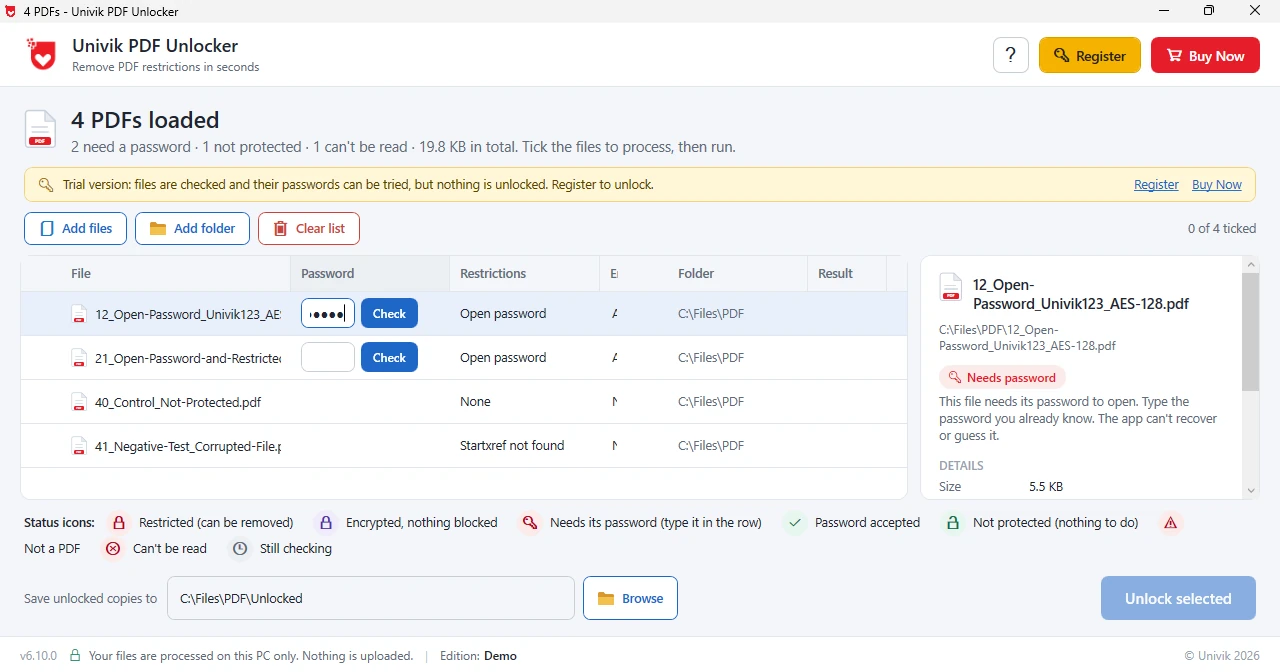
Univik PDF Unlocker takes your AIS password once and hands back a copy that never asks for it. A whole season of client statements fits in one run of the list.
Free Download See all featuresAIS Password Not Working?
When your AIS PDF refuses the password, the case is the first thing to check. Also, the PAN must be in lower case, every letter, even though the department prints it in capitals everywhere else. Next look at how the date is ordered: day, then month, then a four-digit year, which makes 21 January 1991 into 21011991 and never 1991 first, with a zero padding any one-digit day or month. For a company, a firm or a trust, the incorporation date takes the place of a birth date.
Should the password still fail, the department may hold a different birth date from the one you typed. Open your profile on the e-filing portal and read the date shown under personal details, then try that. Because the AIS rule is public there's nothing to recover and an unlocker only works on an AIS that has already opened.
- The AIS password puts your lower case PAN in front of your DDMMYYYY birth date, eighteen characters in all.
- PAN AAAAA1234A with a birth date of 21 January 1991 gives aaaaa1234a21011991.
- Companies and firms swap the birth date for their incorporation date.
- The Taxpayer Information Summary PDF opens with the same value.
- A refused AIS password nearly always means a capital letter crept into the PAN or the date went in year first.
- Unlock the AIS once and file the clean copy so those eighteen characters are never typed twice.

AIS Password Questions
What is your AIS password for your Annual Information Statement PDF?
Your AIS password is the PAN written in lower case with the DDMMYYYY birth date straight after it. PAN AAAAA1234A and a birthday of 21 January 1991 give aaaaa1234a21011991.
Does the Taxpayer Information Summary use the same AIS password?
Yes. The TIS PDF that the compliance portal offers next to the AIS opens with the same PAN plus date value. Form 26AS is the exception in that family, since it asks for your date of birth alone.
What AIS password does a company or a firm use?
A non-individual PAN pairs your PAN in lower case with the date of incorporation or formation as DDMMYYYY. A company formed on 1 April 2015 with PAN AACCM9012L types aaccm9012l01042015.
Why does your AIS PDF say the password is incorrect?
Usually a capital letter slipped into the PAN or the date went in year first. Retype the PAN in lower case, put the day before the month and keep every zero. If the AIS still refuses, check the birth date shown on your e-filing profile against the one you used.
How do I remove your AIS password so the file opens without it?
Load the AIS into Univik PDF Unlocker, type the PAN and date value, press Check and then Unlock. That unlocked copy lands in your chosen folder while the portal download is left as it was.
Can an accountant unlock many AIS files in one run?
Yes. Add the whole client folder, give each AIS row its own PAN and date value, press Check row by row and finish with Unlock. Each accepted AIS comes out as a clean copy in the same pass, with no file leaving your PC.
Is it safe to remove a password from an AIS PDF?
Yes, provided the work stays on your own computer. An AIS holds a year of income and investment data, which is why an offline unlocker beats any upload site for this file. Taking the password off your own statement is a routine part of filing.

Leena Taylor Paul at Univik, a Windows utility studio running since 2013, checked this AIS guide against the Income Tax Department page on accessing AIS information. Most readers arrive needing your Annual Information Statement open for a return or a reconciliation, so the format comes first and the lasting fix follows. Verified November 2026. Stuck on an AIS that still refuses? Contact our support team.