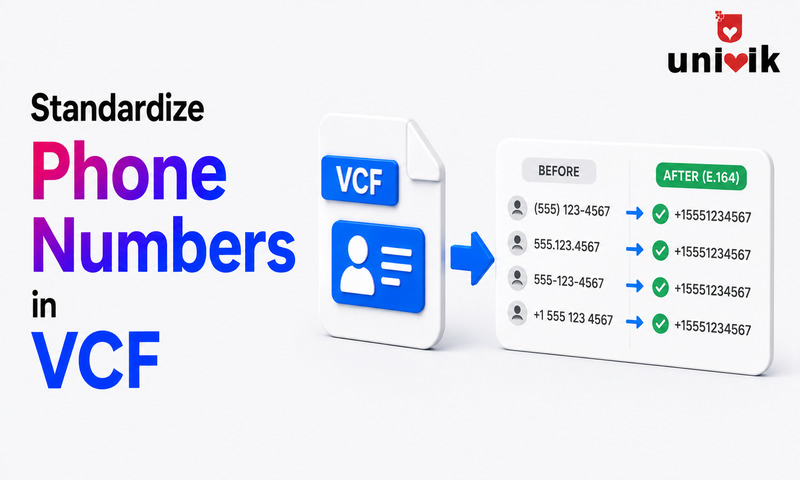
VCF files store phone numbers using the TEL property with optional TYPE labels (WORK, HOME, CELL, FAX). Inconsistent formatting mixing (555) 123-4567 with +15551234567 and 555.123.4567 in the same file causes CRM import failures, duplicate contact detection misses and caller ID mismatches. The international standard is E.164 format: a plus sign followed by the country code and number with no spaces or punctuation, for example +447911123456. For a 500-contact VCF, standardize by converting the file through a VCF converter that normalises phone formatting as part of the process.
Why Inconsistent Phone Numbers Cause Real Problems
The safest way to make this change is a VCF editor that lets you edit fields, fix contact photos and re-save the file without corrupting it.
A phone number written as (555) 123-4567 in your contacts and +15551234567 in a CRM are the same number. A human recognises them instantly as identical. Most software does not.
CRM deduplication runs on exact-match or near-match algorithms. When the same contact appears in two imports with differently formatted phone numbers, the CRM creates two records one for each format. Your contact count inflates. Sales reps get duplicate leads. Outreach automation sends two emails to the same person.
Caller ID matching has the same problem. When an inbound call arrives with a number in E.164 format (+15551234567) and the contact in your system is stored as (555) 123-4567, your CRM or phone system cannot make the match. The call shows as unknown. The contact has no call history.
Standardising phone numbers in a VCF file before import prevents these problems from reaching the system in the first place.

“Our test files come from many phones and services, so the same person can appear with three different number formats. We check numbers on real contacts in the target application after every conversion, not in the raw file.”
Nick Rogers
|Founder, Univik, building file conversion tools since 2013
How VCF Files Store Phone Numbers
In a VCF file, each phone number is stored on a separate line starting with the TEL property. The basic format is:
TEL;TYPE=CELL:+44 7911 123456
TEL;TYPE=HOME:(555) 123-4567
The TEL keyword identifies this as a phone number property. The TYPE parameter specifies what kind of number it is. The value after the colon is the actual number which can be formatted any way the exporting system chose.
There is no enforcement of phone number format in the vCard specification. The format is entirely up to the exporting application. This is why VCF files collected from multiple sources phones, CRMs, email clients almost always contain a mix of formats.
The TEL TYPE System: Labels That Travel With the Number
The TYPE parameter on the TEL property is what tells the receiving application whether a number is a mobile, work landline, home phone or fax. This is important because different apps use these labels differently.
| TYPE Value | Meaning | Notes |
|---|---|---|
WORK |
Work phone number | Maps to Work Phone in Outlook, Salesforce, most CRMs |
HOME |
Personal home phone | Maps to Home Phone |
CELL |
Mobile phone | Also written as MOBILE. iPhone exports use CELL; Android exports vary |
FAX |
Fax number | Often combined: TYPE=WORK,FAX |
VOICE |
Default if no TYPE specified | vCard 3.0 default; treated as generic phone by most importers |
PREF |
Preferred number | Combined with other types: TYPE=CELL,PREF marks the default number |
When you import a VCF into a CRM, it maps TYPE values to field slots. If a contact has three numbers WORK, CELL and HOME the CRM puts each in the corresponding field. If the TYPE is missing or wrong, numbers land in unexpected places. A mobile number with no TYPE tag often ends up in the Work Phone field because that is the first available slot.
Before standardising phone number formatting, check that the TYPE labels are also correct for each number. Fixing the format without fixing the labels gives you correctly formatted numbers in the wrong fields.
E.164: The International Standard Format
E.164 is the international standard defined by the ITU (International Telecommunication Union) for phone number formatting. It is the format CRMs, VoIP systems and SMS platforms use internally because it is unambiguous every E.164 number can only be dialled one way.
The format is:
Examples:
+14155552671 (USA, San Francisco)
+447911123456 (UK, mobile)
+33612345678 (France, mobile)
+61291234567 (Australia, Sydney)
The rules are simple:
Always starts with a plus sign (+). The plus represents the international dialling prefix. Never replace it with 00 or a local prefix.
Country code immediately after the plus. USA and Canada: 1. UK: 44. Australia: 61. Germany: 49. France: 33. No spaces between the plus and the country code.
No spaces, dashes, brackets or punctuation. Digits only after the plus sign. Maximum 15 digits total including the country code.
Drop the leading zero from national numbers. A UK mobile stored as 07911 123456 becomes +447911123456 in E.164. The national leading zero is dropped when adding the country code.
Common Phone Number Problems in VCF Files
Mixed local and international formats in the same file. Some contacts stored as +1 (415) 555-2671 and others as 415-555-2671. The same number in two formats causes CRM deduplication to treat them as different contacts.
Missing country code. Numbers exported from local apps often have no country code 07911 123456 instead of +447911123456. These import into CRMs as-is and fail to match inbound calls that arrive in E.164 format.
Punctuation and spacing variations. The same number exported from different systems: (555) 123-4567, 555.123.4567, 555 123 4567 and 5551234567. All represent the same number. None will match the others in a CRM exact-match deduplication check.
Extensions embedded in the main number. Some systems export extensions directly in the phone field: +1 (555) 123-4567 ext. 892. Most CRMs and phone systems cannot parse this format correctly. The extension should be in a separate field or in a standard format like +15551234567;ext=892.
Wrong or missing TEL TYPE labels. Numbers exported without TYPE tags or with incorrect types land in the wrong fields after import. A mobile number tagged as WORK will appear in the Work Phone field in every CRM that uses the TYPE tag for mapping.
How to Standardize Phone Numbers in a VCF File
The right method depends on the size of your contact list and how badly the numbers need cleaning.
Small Files: Text Editor Find and Replace
For a VCF file with under 100 contacts, open it in Notepad or TextEdit. Use Find and Replace to remove common punctuation: replace (555) with 555, remove all hyphens from phone lines and add country codes where missing. This takes 10 to 20 minutes for a small file.
Medium Files: Convert to CSV and Clean in Excel
Convert the VCF to CSV using Univik VCF Converter. In Excel, use the SUBSTITUTE function to strip punctuation and a concatenation formula to add the country code. When clean, convert the CSV back to VCF for import.
Large Files: Normalise During Conversion
When converting between VCF versions or formats, a good converter normalises phone number formatting as part of the process. Load the VCF into Univik VCF Converter, select the output format and the normalisation options and the output file contains standardised numbers throughout.
Before Cleaning: Inspect First
Load the VCF into Univik VCF Viewer to see all phone numbers displayed per contact before deciding on a standardisation approach. This shows you the mix of formats present and which contacts have missing country codes or wrong TYPE labels.
How Different Platforms Handle Inconsistent Formats
| Platform | How It Handles Inconsistent Formats |
|---|---|
| Google Contacts | Imports as-is. Does not reformat. Numbers displayed exactly as stored, which can look inconsistent in the contacts list. |
| iPhone / iOS | Reformats numbers to match the device locale after import. A US iPhone will display +14155552671 as (415) 555-2671 automatically. |
| Salesforce | Stores as-is. Deduplication matches on exact string by default. +14155552671 and 415-555-2671 are treated as different numbers. |
| HubSpot | Has a phone number normalisation feature that attempts to standardise to E.164 on import. Can still miss numbers with missing country codes. |
| Outlook | Stores as-is. Displays exactly as entered. No normalisation. |
| Requires E.164 format for contact matching. Numbers without country codes cannot be matched to WhatsApp accounts. |
Frequently Asked Questions
What is the best phone number format for VCF files?
E.164 format a plus sign followed by the country code and number with no spaces or punctuation. Example: +14155552671 for a US number, +447911123456 for a UK mobile. This format is recognised universally by CRMs, VoIP systems and SMS platforms. It eliminates ambiguity and ensures consistent deduplication matching.
What does TEL TYPE mean in a VCF file?
TEL TYPE is the label that identifies what kind of phone number is stored in a vCard entry. Common values are WORK (office landline), HOME (personal home), CELL or MOBILE (mobile phone), FAX and PREF (preferred number). CRMs use the TYPE value to decide which field to put the number in during import. A number with no TYPE tag is treated as a generic voice number and may land in an unexpected field.
How do I add country codes to phone numbers in a VCF file?
For a small file, open it in a text editor and manually add the country code to each TEL line. For a larger file, convert the VCF to CSV using Univik VCF Converter, use an Excel formula to prefix the correct country code to each phone number column, then convert back to VCF. For UK numbers, remember to drop the leading 0 from the national number when adding the +44 country code 07911 123456 becomes +447911123456, not +4407911123456.
Will inconsistent phone number formats prevent VCF import?
No most platforms import whatever format is present. The problems appear after import: CRM deduplication fails to match the same number in two formats, caller ID matching breaks when an inbound call arrives in E.164 format but the contact is stored locally and reports on call volume or contact coverage show inconsistent data because the same contact appears twice in different format variants.
How do I check what phone number formats are in my VCF file?
Open the file in a text editor and look at the TEL lines search for TEL to find all phone entries. Alternatively, load the file into Univik VCF Viewer to see all contacts displayed in a readable format with phone numbers visible per contact. This makes it easy to spot which contacts have inconsistent formats or missing country codes before deciding on a standardisation approach.
The Short Version
Inconsistent phone numbers in a VCF file do not break the import. They create problems that surface later duplicate contacts in the CRM, missed caller ID matches and unreliable deduplication. Standardising to E.164 before import prevents all three.
The TEL TYPE labels matter as much as the number format itself. For a focused walkthrough on correcting mislabeled HOME, WORK and CELL tags, see our guide to fixing phone number labels in a vCard. A correctly formatted number in the wrong TYPE field ends up in the wrong CRM slot. Check both before importing.
Are the inconsistencies in your VCF coming from multiple export sources combined into one file or from a single platform that exports in a non-standard format? That usually determines whether you need to fix the format, the TYPE labels or both.