The Univik SQL Server log analyzer reads a .ldf transaction log without SQL Server and turns it into a court-ready forensic report. It shows what changed, on which table, in what order, with evidence hashes that prove the file was not touched.
What the Analyzer Reads
A Look Inside
See the Analyzer at Work
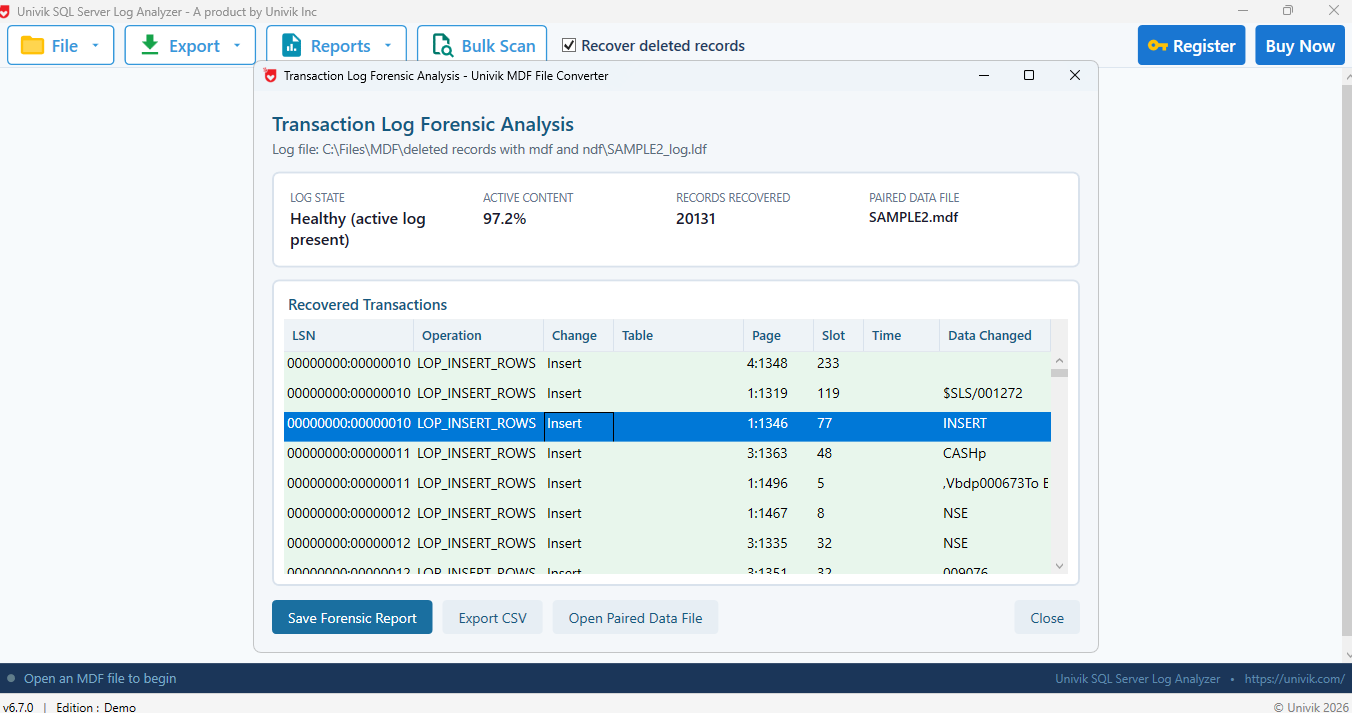
Point the SQL Server transaction log analyzer at an .ldf and it reads the log read only, then lays out every recovered operation for review.
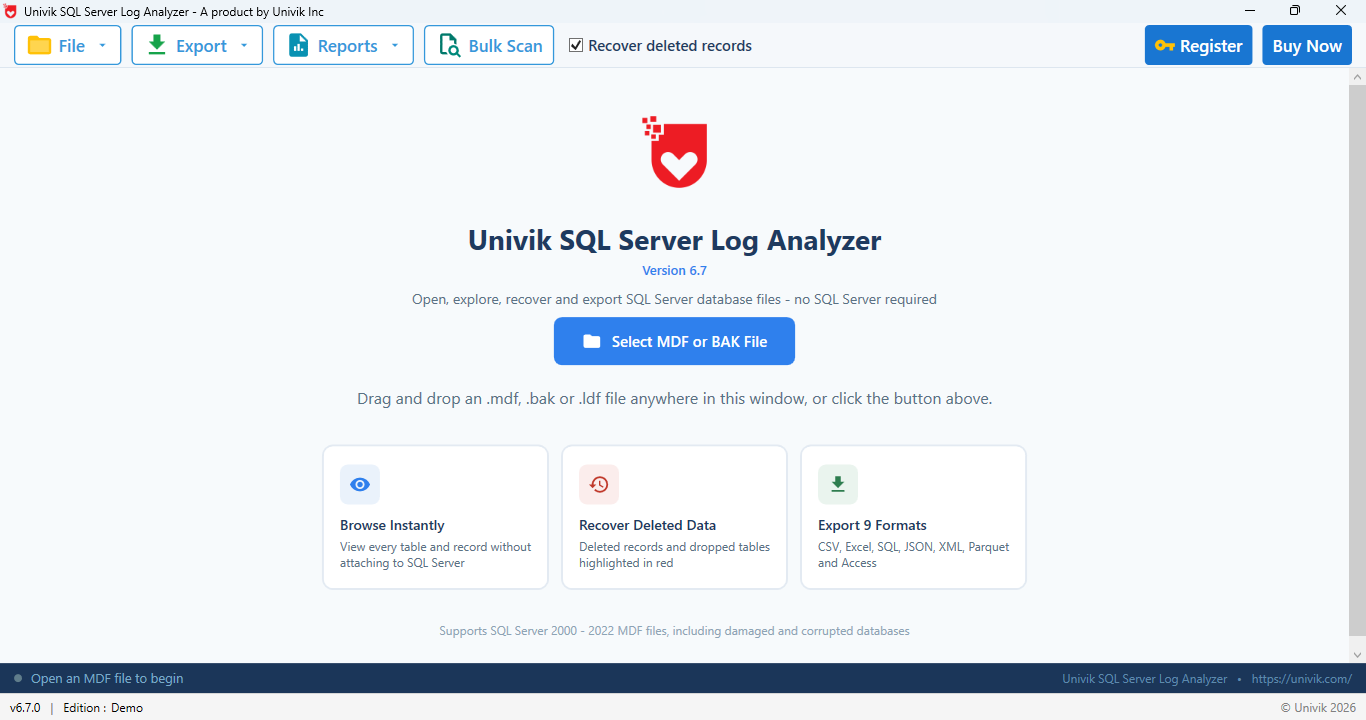
Open an .ldf read only to start the analysis
Review, sort and filter every operation by table, page or time
A Read-Only Evidence Chain
Every step is built to keep the source file trustworthy, from the first hash to the final report. The workflow follows the four-phase forensic process described in NIST SP 800-86: collection, examination, analysis and reporting.
Key Features
Everything you need to read a transaction log for an investigation, from evidence hashes to a report you can hand over.
Read the Log Without SQL Server
Open a SQL Server .ldf straight from disk and read it read only. No instance, no attach and no undocumented functions to run. The log format is decoded on any Windows computer, even one that never had SQL Server.
Recover Transaction Records
Each change is recovered as a record with its log sequence number, operation, table, page, slot and time, plus data fragments where the log preserves them. A single log can hold tens of thousands of records, each read in full.
Operation Breakdown
Every log operation is counted by its type, from LOP_INSERT_ROWS and LOP_MODIFY_ROW to LOP_DELETE_ROWS. A plain-English meaning sits next to each code, so the mix of inserts, updates and deletes is clear at a glance.
Activity by Table
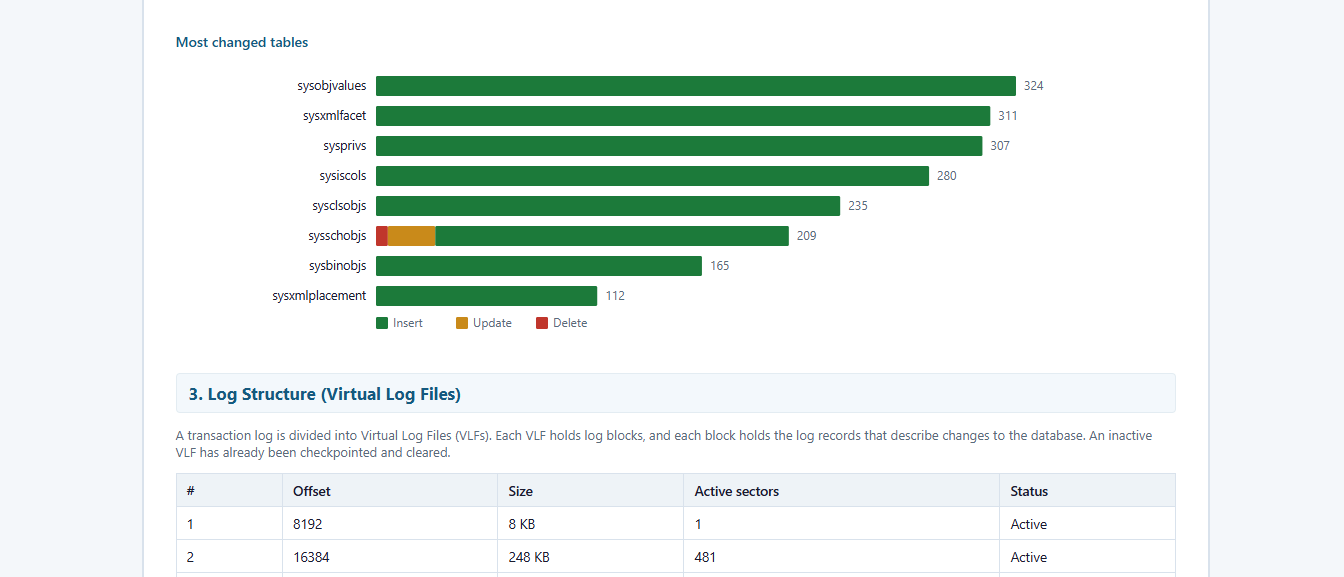
See inserts, updates and deletes counted per table, with the most changed tables ranked. A concentrated burst of deletes on one table is exactly what an investigation wants to find fast.
Detect Schema Changes
Changes to the object catalog are flagged as data definition events. A dropped object stands out here, which matters because a table is sometimes removed to hide what happened to its rows.
Evidence Integrity
Before anything is read, the .ldf and its paired MDF are hashed with SHA-256 and MD5. Re-hash the file later and the values must match, which shows the evidence was never altered. The source is only ever opened read only.
Visual Analysis
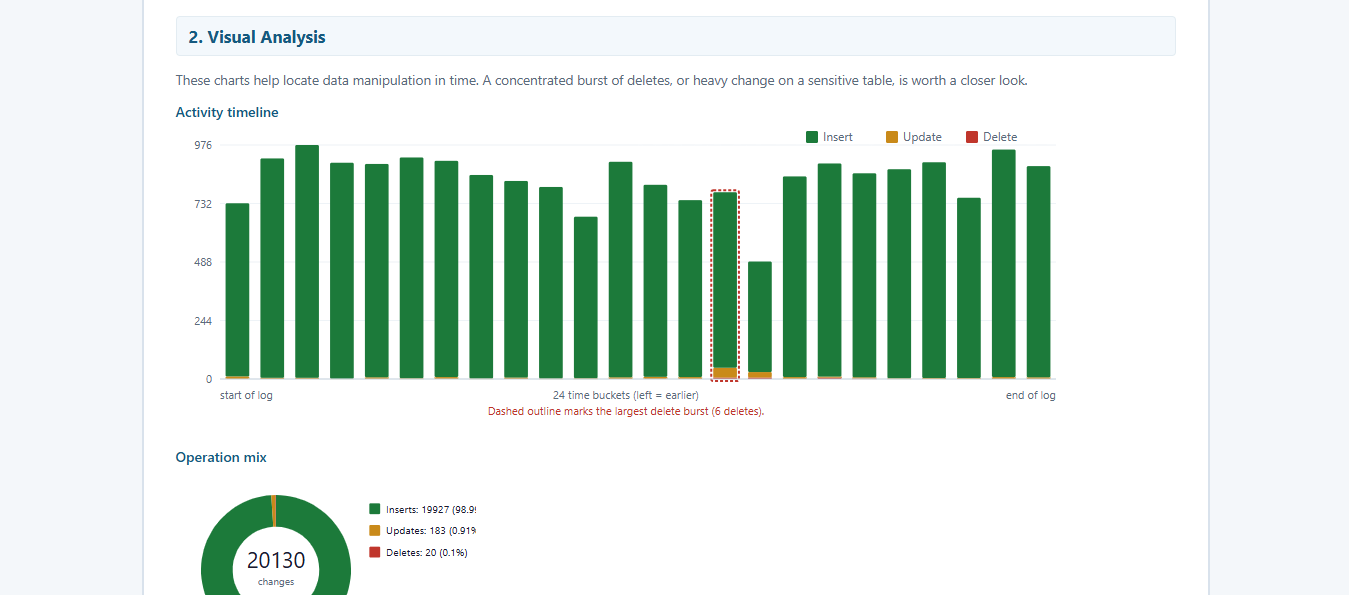
Charts place the activity in time. An activity timeline marks the largest delete burst. An operation mix shows the split of inserts, updates and deletes. A bar chart ranks the most changed tables.
Pairs With the MDF
It finds the matching MDF beside the log, even a corrupt or detached one, then correlates each change with the real table it changed. The report also reads the database origin, its version, collation and compatibility level, plus the allocation map that shows where deleted rows may still sit.
Simple Steps
Four steps take you from a raw .ldf to a report you can attach to a case.
1. Open the Log
Open the .ldf read only. It is hashed with SHA-256 and MD5 before anything is read.
2. Decode the Log
Records are read at the binary level and identified by their signatures.
3. Resolve Tables
The paired MDF maps each change to its real table name and origin.
4. Export the Report
Save the HTML forensic report and print it to PDF for a case file.
The manual way vs the analyzer. Inside SQL Server you can read the log with the undocumented fn_dblog function, but it needs a live instance and returns raw records that are hard to read. The analyzer reads the same log from the file with no SQL Server, then decodes and reports it.
The Forensic Report
The report is a single HTML file you can print to PDF. It reads as a full examination record, section by section.
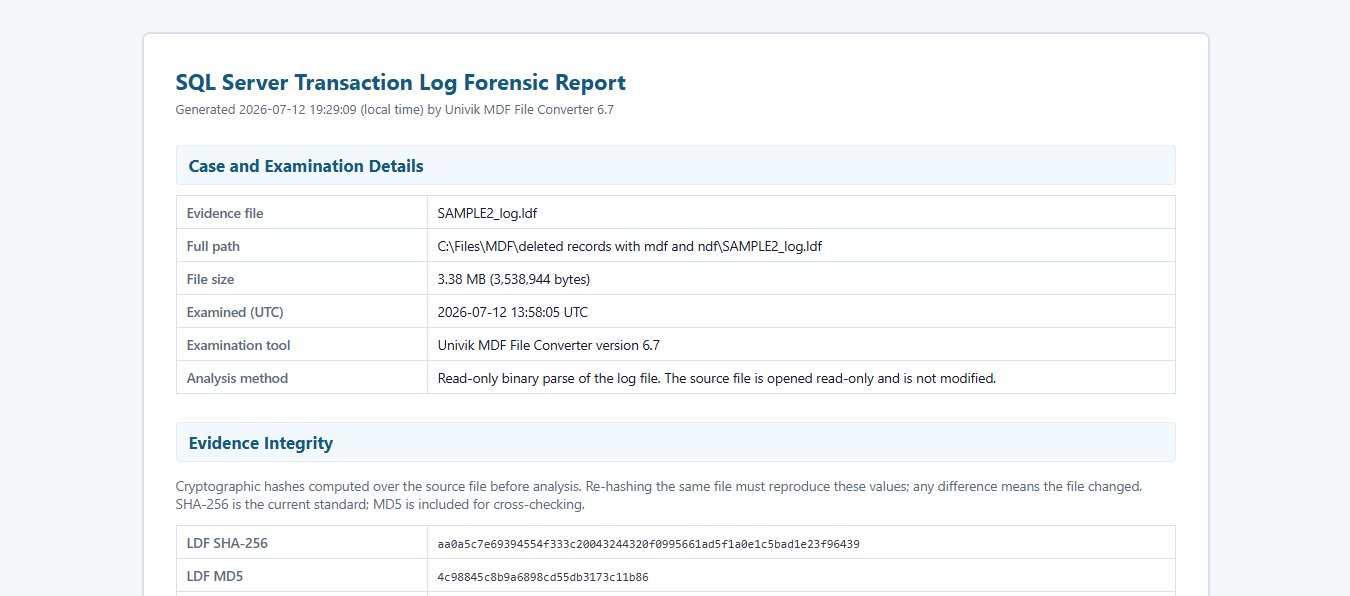
Case details, evidence hashes and the visual analysis charts
Case and Examination Details
Evidence file name, full path and size, the examination time in UTC and the read-only method used, so the report opens like a proper case record.
Evidence Integrity
SHA-256 and MD5 hashes of both the .ldf and the paired MDF, taken before analysis. Re-hashing must reproduce them, which proves the file was not changed.
Log File Summary
The log state, whether the header page is valid, how much of the log is active and the total count of transaction records recovered.
Database Origin
Read from the paired MDF boot page: database name, the SQL Server version that created it and last wrote it, compatibility level, collation and the secondary NDF references.
Data File Allocation Map
The page free space map from the MDF, which flags unallocated pages. Those pages are the main place where deleted rows can still be found.
Visual Analysis
An activity timeline that marks the largest delete burst, an operation mix chart and a ranking of the most changed tables.
A deleted row is flagged as a ghost and its space is reused later. Until cleanup runs, the analyzer can still read it.
The virtual log file map, activity by table and the operation breakdown
Log Structure (VLFs)
The virtual log files that make up the .ldf, each with its offset, size, active sector count and whether it is still active or already cleared.
Activity by Table
A table listing inserts, updates and deletes per object, so the tables that saw the most change stand out immediately.
Schema Changes (DDL)
Entries logged as changes to the object catalog, such as an object created or dropped. A dropped object can point to a table removed to hide activity.
Operation Breakdown
Each LOP operation with its meaning and count, from inserted and modified rows to deleted rows and transaction boundaries.
Recovered Transaction Records
The detailed list: log sequence number, operation, table, page, slot, time and any data the record preserved. Values are decoded with the right data type and collation, so dates, unique identifiers and international text read correctly. That covers advanced types like datetime2, datetimeoffset, sql_variant, hierarchyid, geometry and geography.
Change Sequence by Page
Pages changed several times, in log order. Reading down a page shows the sequence, such as a row deleted and its slot later reused.
Recovered transaction records with LSN, operation, table, page and slot
Method and Limitations, stated plainly
The report ends with how the analysis was done and what it cannot promise. The log was read at the binary level and hashed before analysis. Table names are resolved by matching each record against the paired MDF catalog. The internal log-record body format is undocumented and changes between versions, so full before and after values are not always available. And because SQL Server writes to the log before the data file, a committed change can reach the log before it reaches the table; the analyzer reads both, so that gap is not mistaken for missing data. Being honest about this is what makes the report hold up.
Deleted Data
Recover Deleted Records
The transaction log is often the first place a deleted row shows up. The analyzer finds the delete, then carves the row from the pages that still hold it.
1. Spot the delete
Every LOP_DELETE_ROWS operation is listed with its table, page and time, so you see exactly what was removed and when.
2. Carve the row
The allocation map flags unallocated pages where a ghost row can still be carved, which is where a recent delete usually sits.
3. Rebuild it
The analyzer reports the delete. To bring the row back into a working table, hand the database to SQL Database Recovery.
New to transaction logs? A SQL Server .ldf records every change before it reaches the data file, in write-ahead order, across virtual log files. For the full picture read the SQL LDF File Guide.
Accuracy
Transaction log analysis is only as good as the data behind it. Every result the analyzer produces can be traced back and verified.
Read only and hash-verified
The .ldf and its paired MDF are hashed with SHA-256 and MD5 before analysis and opened read only. Re-hash the file later and the values must match, so nothing is taken on faith.
Checked against known databases
The binary reader is regression tested against ground-truth SQL Server databases, where the recovered output is matched against the live source record by record.
Limits stated in every report
The report ends with its method and what it cannot promise. The log-record body format is undocumented and changes between versions, so data fragments are reported only where the log preserves them.
How we tested it
Records are identified by their fixed-length signatures and confirmed by the operation byte, then table names are resolved against the paired MDF catalog. To check that end to end, we ran controlled tests across several clean SQL Server environments:
Every deletion and dropped table we made was surfaced and matched to the right table on each version. When we recovered the deleted rows, the analyzer returned 1,000 of 1,000 records, with the values and timestamps lining up exactly against our record. On a larger examination the same reader recovered 20,131 records from a 3.38 MB log.
A truncated sample of the SQL script we used, mixing many data types before the rows were deleted
Use Cases
Wherever a change to a database needs to be explained and proven.
Financial-Fraud Investigation
When the numbers in a table do not add up, trace each change back to the transaction behind it to see how the data was altered.
Incident Response
After a suspected breach, data leak or insider action, read the log read only and keep the evidence hashes for the record.
Compliance and Audit
Produce a record of database activity for an auditor or an e-discovery request, backed by charts and a per-table breakdown.
Law-Enforcement Casework
Work fully offline on a seized file, with read-only handling and hashes suited to a chain of custody.
Data-Change Disputes
Show exactly when a value changed and in what order, to settle a dispute over what happened to the data.
DBA Root-Cause
Trace a bad change that put a table in a strange state back to the operation and transaction that caused it.
Which Tool Do I Need?
The free viewer is for a quick read. The analyzer is for an investigation you can defend.
| Task | Log Analyzer | LDF Viewer |
|---|---|---|
| Read the log without SQL Server | Yes | Yes |
| Browse operations in a grid | Yes | Yes |
| Forensic HTML report | Yes | No |
| Evidence hashes (SHA-256 and MD5) | Yes | No |
| Activity charts and delete-burst detection | Yes | No |
| Activity by table and operation breakdown | Yes | No |
| Schema change detection | Yes | No |
| Pair with the MDF for table names and origin | Yes | No |
| Export to CSV, SQL script or live SQL Server | Yes | CSV only |
| Price | From $99 | Free |
Technical Details
System Requirements
| Operating System | Windows 11, 10, Server 2016 and later |
| Processor | 1 GHz or faster |
| RAM | 4 GB recommended |
| Disk Space | 100 MB for installation |
| .NET Framework | 4.8 or higher |
Software Information
| Version | 6.7 (Latest) |
| File Size | 15.6 MB |
| License | From $99 |
| Support | Email & Live Chat |
| Tested On | SQL Server 2000 to 2025 |
Supported Capabilities
SQL Server Versions
Analysis
Output
Customer Reviews
Rahul N.
Digital Forensic Examiner
"The evidence hashes and read-only handling are what I needed. I could examine a seized .ldf offline and produce a report that stood up to review."
Elena M.
Incident Responder
"The activity timeline pointed me straight at the delete burst. Pairing the MDF gave me the real table names, which saved a lot of guesswork."
David S.
Database Administrator
"I used the change sequence by page to see a row deleted and its slot reused. That level of detail settled a dispute we had been going back and forth on."
Help & Support
Yes. The .ldf is opened read only and is never changed. Both the log and its paired MDF are hashed with SHA-256 and MD5 before analysis, so you can prove the evidence was not altered.
No. The analyzer reads the .ldf as a file on any Windows computer, with no SQL Server, no attach and no instance running.
Case and evidence details, file hashes, a log summary, database origin from the paired MDF, activity charts, the virtual log file map, activity by table, schema changes, an operation breakdown and the recovered transaction records.
It shows what changed, on which table and page, in what order and when. The transaction log records the operations, not the login behind them, so the analyzer reports the change itself rather than a user name.
No, the .ldf can be read on its own. Pairing the matching MDF adds the real table names, the database origin and the map of pages where deleted rows may still sit.
Yes. It reports delete operations and schema changes such as a dropped object. It also points to unallocated pages where deleted rows can still live. Rebuilding the rows themselves is a job for SQL Database Recovery.
Transaction logs from SQL Server 2000 through 2025 are read from the file. The version that created the database is read from the paired MDF boot page.
Yes. The report is an HTML file you can open in any browser and print to PDF, which makes it easy to attach to a case file or share.
The free LDF Viewer is for a quick read of the log operations. The Log Analyzer adds the forensic report, evidence hashes, activity charts and MDF pairing for investigation and casework.
Two ways work. Inside SQL Server the undocumented fn_dblog function reads it. Or open the .ldf with a reader like Univik, which decodes the file directly with no SQL Server and lays out each operation with its table and time.
Read the transaction log. It records every insert, update and delete in order. The analyzer turns those records into a readable report of what changed, on which table and when.
The free demo opens your .ldf and previews the full analysis, so you can see every recovered operation before paying. Exports are limited to 10 records per table. The full version removes that limit.
Yes. The workflow maps to the four-phase forensic process in NIST SP 800-86, the Guide to Integrating Forensic Techniques into Incident Response. The file is collected read only with its integrity preserved by hashing, examined at the binary level, analyzed against the paired MDF and reported with the method and its limits stated.
Turn a Transaction Log Into Evidence
Read your .ldf read only and build a forensic report you can print, hand over and defend.
Just need a quick read of the log?
The free SQL LDF Viewer opens a transaction log and lists its operations. New to the format? Start with the SQL LDF File Guide. To rebuild deleted rows from the database itself, use SQL Database Recovery.
Related Products
Explore More Univik Tools
Open a SQL Server transaction log and read its operations by LSN, table and transaction, free.
Learn MoreRepair corrupt MDF files and bring back deleted records and dropped tables from a damaged database.
Learn MoreLearn what a SQL Server .ldf transaction log is, what sits inside it and how it records every change.
Learn More