Repair Corrupt MDF Files
Reverse torn page protection bits and read past damaged pages so a corrupt MDF file opens and gives up its rows.
 Univik SQL Database Recovery
Repair Corrupt MDF Files and Recover Lost SQL Server Data
Univik SQL Database Recovery is a Windows desktop tool that repairs corrupt and suspect SQL Server MDF files at the binary level and brings back data that SQL Server has lost. Recover deleted records, rebuild dropped tables and read past torn pages with no SQL Server, no attach and no LDF log file. When the data is back, export or restore it in a click.
*Free trial lets you load a damaged file and preview the recovered tables. A license unlocks unlimited recovery, starting from $99.


VirusTotal Verified Safe
Certified clean by 70+ antivirus engines. No malware, spyware or adware.
 Recovers Data From Every SQL Server Version

SQL Server 2025
SQL Server 2022
SQL Server 2019
SQL Server 2017
SQL Server 2016
SQL Server 2014
SQL Server 2012
SQL Server 2008 R2
SQL Server 2008
SQL Server 2005
SQL Server 2000
 Product Screenshots
See the Recovery In Action
A quick look at the app as it opens a damaged file, brings back deleted records and dropped tables, then hands the data over for export.
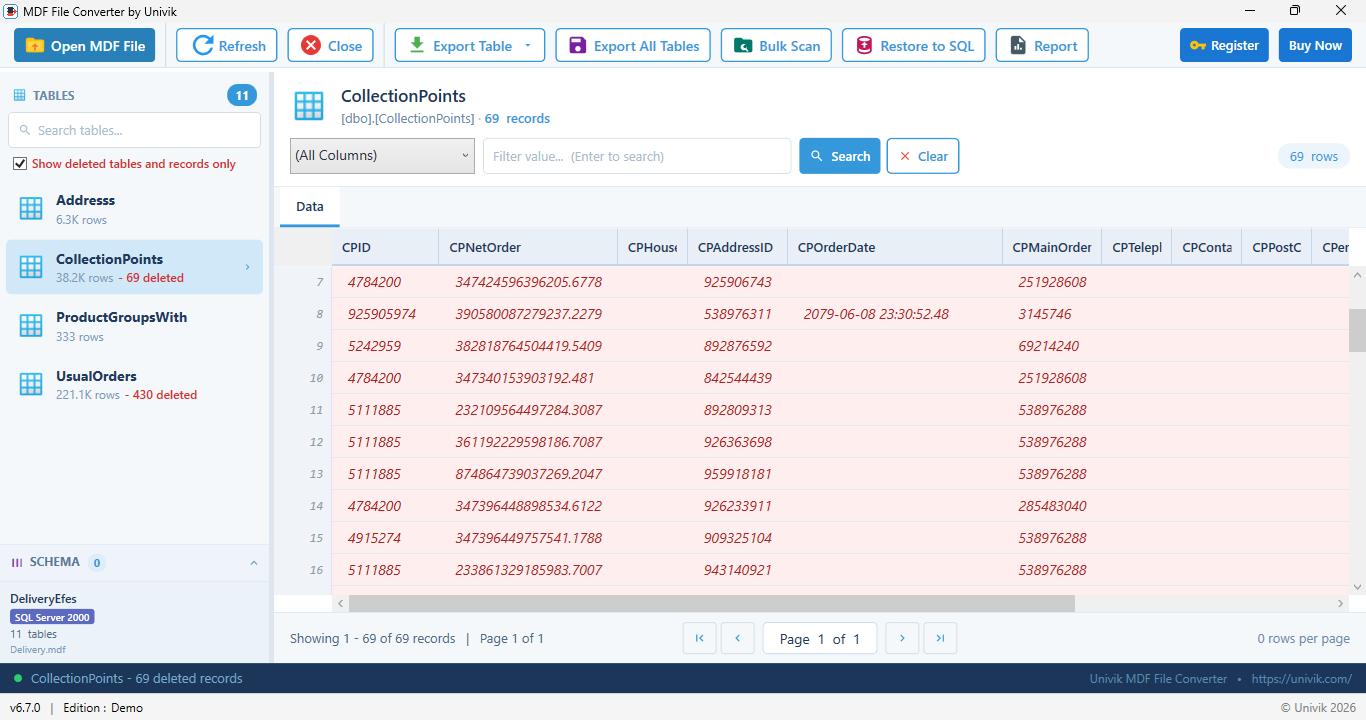
Deleted records recovered and shown in red, with a per table count
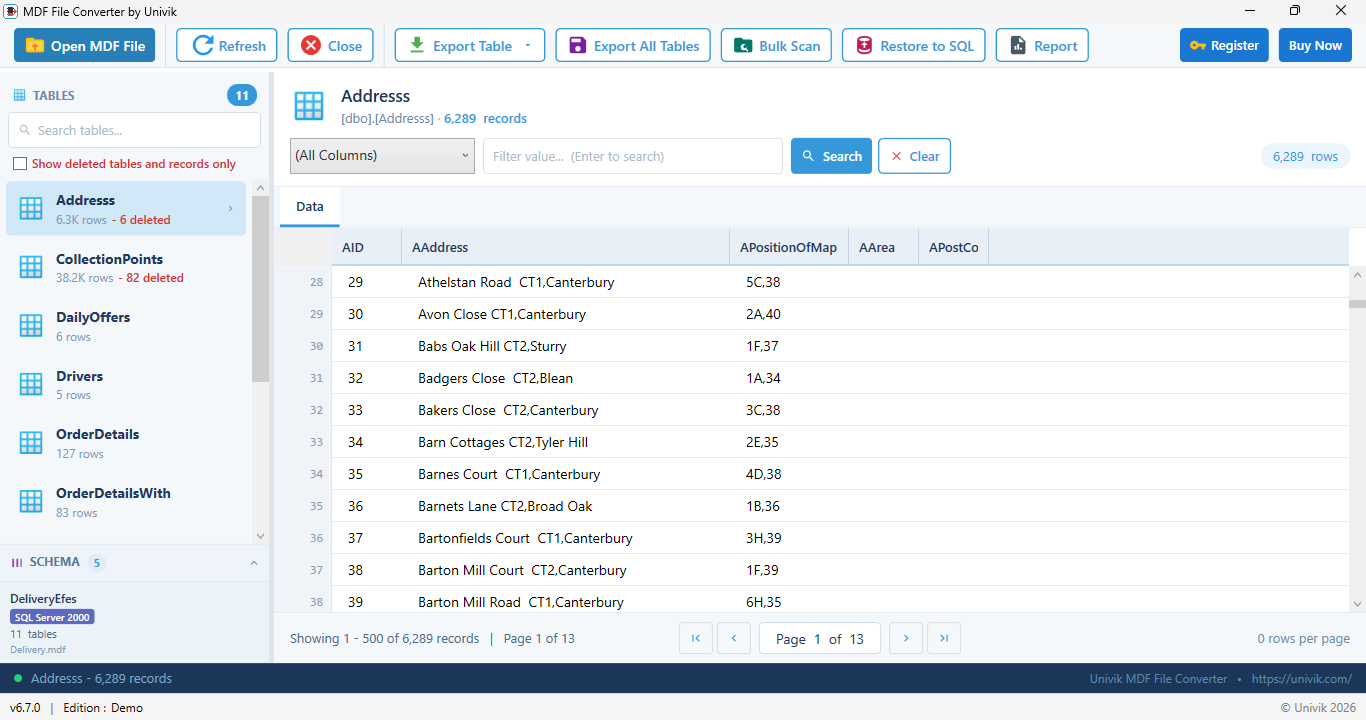
A dropped table rebuilt with its schema and surviving rows
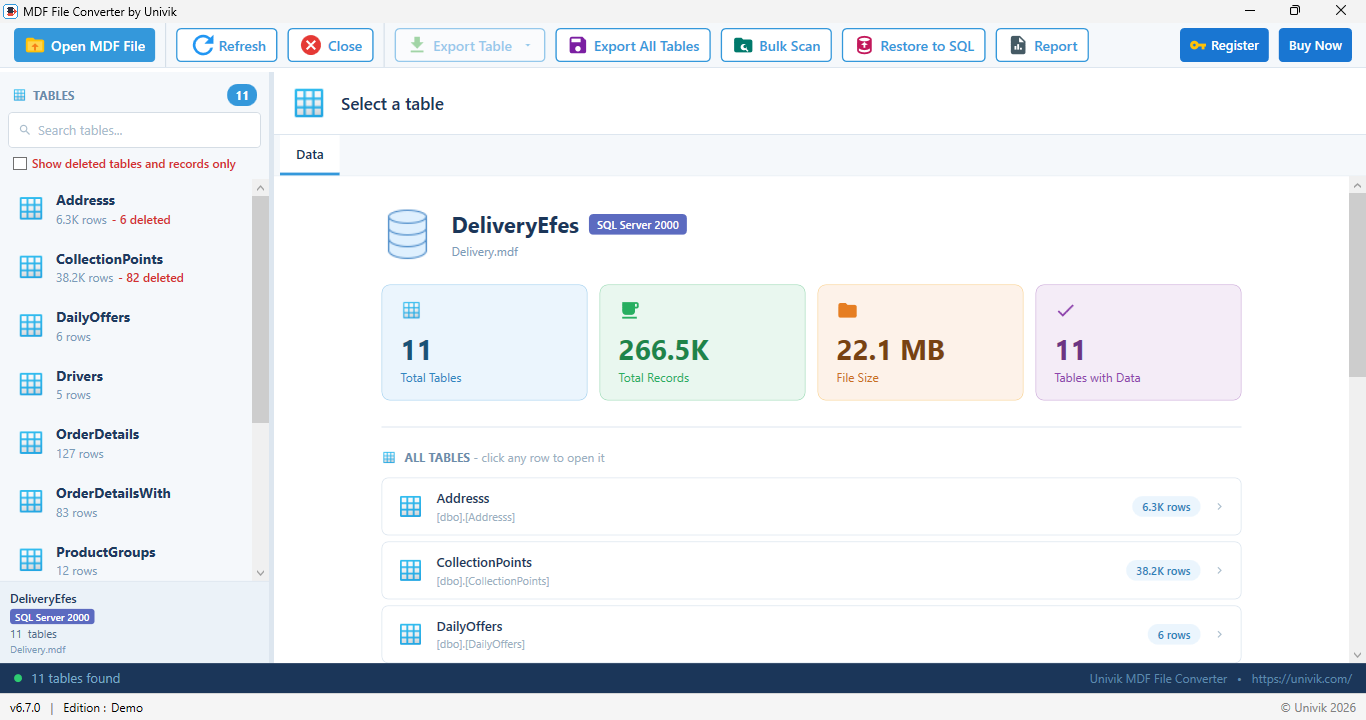
A suspect file opened directly, with every table loaded
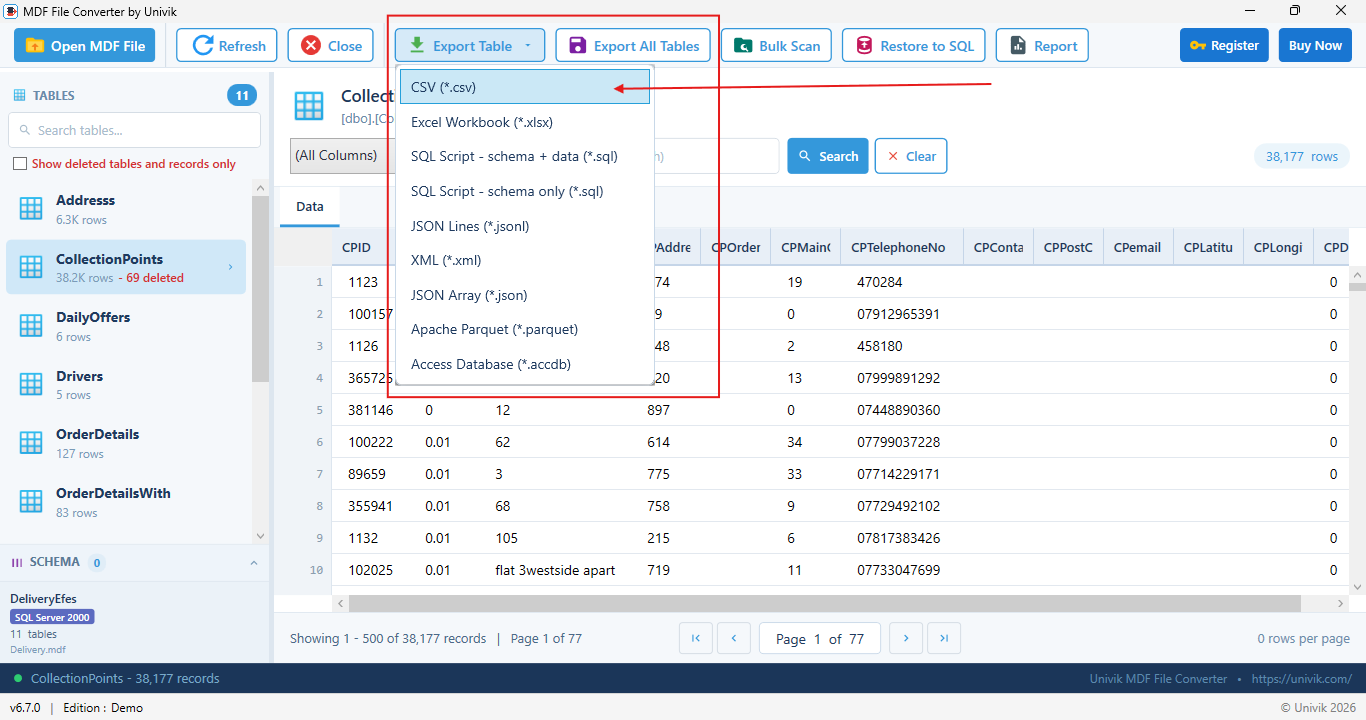
Recovered data ready to export or restore to SQL Server
 SQL Recovery
One recovery tool for every MDF problem, from a database marked suspect to a table someone dropped by mistake.
Repair Corrupt MDF Files
Reverse torn page protection bits and read past damaged pages so a corrupt MDF file opens and gives up its rows.
Open a Suspect Database
When SQL Server marks the database suspect and will not attach, read the MDF directly and pull the data out.
Recover Deleted Records
Bring back rows deleted from any table, including rows found after ghost cleanup, shown in red with a count.
Recover Dropped Tables
Rebuild a dropped table with its name, full schema and surviving rows from catalog remnants left in the file.
Read an Orphaned MDF
Open an MDF that was detached, copied or left behind after a server failure, with no matching LDF needed.
Bulk Scan Many Files
Check many MDF files in one pass and see which ones are readable, with clear warnings about what is damaged.
Deleted Records
Rows deleted from a table are not gone right away. The recovery engine finds them and marks them clearly.
Deleted rows, brought back in red
Dropped Tables
A dropped table leaves traces in the file. The engine reads those traces and rebuilds the table.
Dropped tables, rebuilt from remnants
Repair
When a database is marked suspect and will not attach, the engine still reads past the damage and pulls out every readable row. Focused on a single corrupt file? See MDF Repair.
Torn Page Recovery
Reverses SQL Server torn page protection bits before any parsing so a damaged file reads correctly.
Damaged Slot Arrays
Recovers rows from pages with broken slot arrays by scanning the page body directly.
Row Header Healing
Heals corrupted row headers with evidence based checks, so healthy data is never altered.
Forwarded Records
Handles rows moved by updates so they are never lost or counted twice.
Large Value Reads
Reads large text, ntext and image values through record pointers with a fallback scan for older formats.
Validated Recovery
Recovery is checked against SQL Server internal row counters so the counts you see are accurate.
 Beyond Tables
A database is more than its tables. The recovery brings back the programmable objects too, even from a damaged file, scripting each one as T-SQL.
Views
Recovered with their full SELECT definition, ready to recreate.
Stored Procedures
Complete procedure bodies pulled from the damaged file.
Functions
Scalar and table valued functions with parameters intact.
Triggers
Table and database triggers tied to the objects they fire on.
Synonyms
Alias definitions with the objects they point to.
Sequences
Number generators with their current value, step and range.
Assemblies
CLR assembly definitions registered inside the database.
Data Types
User defined types your tables and procedures depend on.
Rules
Legacy validation rules still bound to columns and types.
Defaults
Standalone default definitions from older schema designs.
When corruption has taken pages away, every object that survives is recovered and scripted, so the rebuilt database keeps as much of its schema as the file still holds.
 Error States
When SQL Server throws one of these, the database will not come online, but the MDF file still holds your data. Open it here and export the tables.
| SQL Server state or error | What it means | How recovery helps |
|---|---|---|
| Database marked suspect | The database failed to recover on startup and is offline. | Read the MDF directly and export the tables. |
| Stuck in recovery pending | SQL Server cannot start recovery, often a missing file or resource. | Pull the data from the MDF without bringing the database online. |
| Cannot attach without LDF | The log file is missing or corrupt so attach fails. | No LDF is needed. The MDF is read on its own. |
| Error 5171 | The file is reported as not a primary database file. | Open it at the binary level and recover readable rows. |
| Error 823 and 824 | An I/O or logical consistency error, often a torn page. | Reverse the torn page bits and read past the bad page. |
| Error 9004 | An error while processing the transaction log. | The log is not used, so recovery still reads the MDF. |
Recovery is read only. The original file is never changed, so you can still try other options afterward.
 How It Works
Four steps from a broken file to your data back in hand.
Step 1: Load the Damaged MDF File
Select the corrupt, suspect or detached MDF file. No SQL Server and no LDF log file is needed.
Step 2: Scan and Recover
The engine reverses torn pages, walks the record layout and scans catalog remnants for lost data.
Step 3: Review Recovered Data
Browse the tables. Deleted rows show in red and dropped tables appear with a deleted label.
Step 4: Export or Restore
Export the recovered tables or restore them straight back into a live SQL Server database.
Quick Start Guide
 Comparison
See how safe recovery compares to the built in repair commands.
Univik SQL Database Recovery
DBCC CHECKDB and Manual Repair
 Use Cases
Real situations where getting the data out of a broken MDF saves the day.
DBA in an Outage
The database is suspect and will not attach. Pull the tables out and get the business running while you rebuild.
Records Deleted by Mistake
Rows were deleted and there is no fresh backup. Recover them from the file before the space is reused.
A Table Was Dropped
Someone dropped a table and the backup is old. Rebuild its schema and rows from what is left in the file.
Forensic and Evidence Work
Examiners must read a damaged database without altering it. Read only recovery keeps the original intact.
MSP or Support Desk
You handle many client servers. Bulk scan a batch of MDF files and see which ones can still be read.
Developer With a Suspect DB
A dev or staging database went suspect. Recover the tables and restore a clean copy without a full rebuild.
 Technical Data Sheet
Product details, system requirements and compatibility.
| Product Name: | Univik SQL Database Recovery |
| Version: | 6.7 (Latest) |
| File Size: | 18.4 MB |
| License Delivery: | Instant via Email |
| License Price: | Starting from $99 Buy Now |
| Free Trial: | Free Download 100% Safe & Secure |
Recovery Engine
What It Recovers
| Input File: | MDF (corrupt, suspect, detached, orphaned or offline SQL Server primary data file), collation detected automatically |
| Recovered Output: | Recovered tables written to new files or restored to SQL Server. No LDF log file required. |

| Platforms: |
|
| Prerequisites: |
|
 Pricing
Try recovery free, then unlock the full recovery and export when you are ready.
Free Trial
$0
Most Popular
Personal License
$99
Business License
$199
 Customer Reviews
Feedback from DBAs, forensic examiners and support teams.

Martin H.
Database Administrator, Manchester, UK
"A production database went suspect on a Monday morning and would not attach. This read the MDF straight away and let me export every table. We were back up before lunch."
Neha R.
Digital Forensics Analyst, Pune, India
"I recover data from damaged databases for case work. The read only mode keeps the original file untouched. The recovered deleted records are exactly what I need to report."
Tomasz K.
MSP Engineer, Warsaw, Poland
"We support dozens of small business servers. The bulk scan tells me which MDF files are readable in minutes, so I know where recovery is possible before I promise anything."
Data recovered? Export or restore it.
Once your tables are back, save them as CSV, Excel, SQL script, JSON, XML, Parquet or Access, then restore them to a live server with Univik MDF Converter, which shares the same engine. Just need to look inside a healthy file? Use the free MDF Viewer.
 Help & Support
Common questions about SQL Database Recovery.
Yes. SQL Database Recovery reads the MDF file directly at the binary level, reverses torn page protection bits and scans past damaged pages. It opens files that SQL Server marks suspect or will not attach and extracts every readable row to new files.
Yes. It finds ghost records that SQL Server marked for cleanup and also finds deleted rows after ghost cleanup by walking the physical record layout on each page. Deleted records show in red with a per table count and export apart from live data.
Yes. It scans catalog remnants to recover dropped table names, rebuilds the full column schema from surviving catalog entries and re-links surviving data pages when the space was not reused. Dropped tables appear in red with a deleted label.
Yes. When a database is stuck in recovery pending or suspect mode it will not come online, but the MDF file on disk still holds the data. SQL Database Recovery reads that file directly and exports the tables, so you get your data without bringing the database online.
Yes. No LDF log file is needed. The tool reads the MDF file on its own, which is useful when the log file is missing, deleted or corrupt and SQL Server cannot attach the database.
REPAIR_ALLOW_DATA_LOSS can delete pages to make a database consistent, which loses data. SQL Database Recovery is read only. It never changes the original file and writes recovered data to new files, so nothing is deleted and the original stays intact for another attempt or for evidence.
Recovery works with MDF files from SQL Server 2000, 2005, 2008, 2008 R2, 2012, 2014, 2016, 2017, 2019, 2022 and 2025. Damaged files from any of these versions are read at the binary level and the collation is detected from the boot page so text decodes correctly.
No. The MDF file opens in read only mode and is never modified. All recovered data goes to new files you choose. This makes the tool safe for forensic and evidence work.
Recovered tables can be exported to CSV, Excel, SQL script, JSON, XML, Parquet or Access. They can also be restored straight into a live SQL Server database. The export and format work is handled by Univik MDF Converter, which shares the same engine.
No. There is no SQL Server, no ATTACH and no RESTORE needed. You only need read access to the MDF file and .NET Framework 4.8 or higher on Windows. New to the format? See our MDF file guide.
Yes. Along with tables, the recovery brings back views, synonyms, stored procedures, functions, triggers, assemblies, user defined data types, rules, defaults and sequences. Each recovered object is scripted as T-SQL, so the rebuilt database keeps its full schema even when the source file is damaged.
Still have questions? Contact support or Live Chat
 Related Products
Explore More Univik Tools

MDF File Converter
Export healthy MDF data to CSV, Excel, SQL, JSON, XML, Parquet and Access, then restore it to SQL Server.
Learn MoreMDF File Viewer
Free read only viewer to open and browse SQL Server MDF files without SQL Server and without conversion.
Learn MoreMDF File Guide
Learn what an MDF file is, how it is structured and how SQL Server stores it in our complete MDF format guide.
Learn MoreSQL Log Analyzer
Read a SQL Server transaction log and build a court-ready forensic report with evidence hashes and recovered records.
Learn More