Convert MDF Files without SQL Server
Convert the MDF file directly from disk at page and record level. No SQL Server service, no attach, no restore and no LDF log file. Works on copies of live files, detached files and files pulled from backups.
 Univik MDF File Converter
Convert & Export SQL Server MDF Data
Univik MDF File Converter is a Windows desktop tool that reads SQL Server database files directly at the binary level. Preview every table, then export the data to 9 formats including SQL scripts, Excel and Parquet. No SQL Server instance, no attach and no restore. Just pick the MDF file and start working.
*Free trial lets you load files and preview every table and its records. A license unlocks unlimited export, starting from $99.


VirusTotal Verified Safe
Certified clean by 70+ antivirus engines. No malware, spyware or adware.
Supported SQL Server Versions

SQL Server 2025
SQL Server 2022
SQL Server 2019
SQL Server 2017
SQL Server 2016
SQL Server 2014
SQL Server 2012
SQL Server 2008 R2
SQL Server 2008
SQL Server 2005
SQL Server 2000
 Product Screenshots
See MDF File Converter In Action
A quick look at the app as it loads every table and exports to any format without SQL Server.
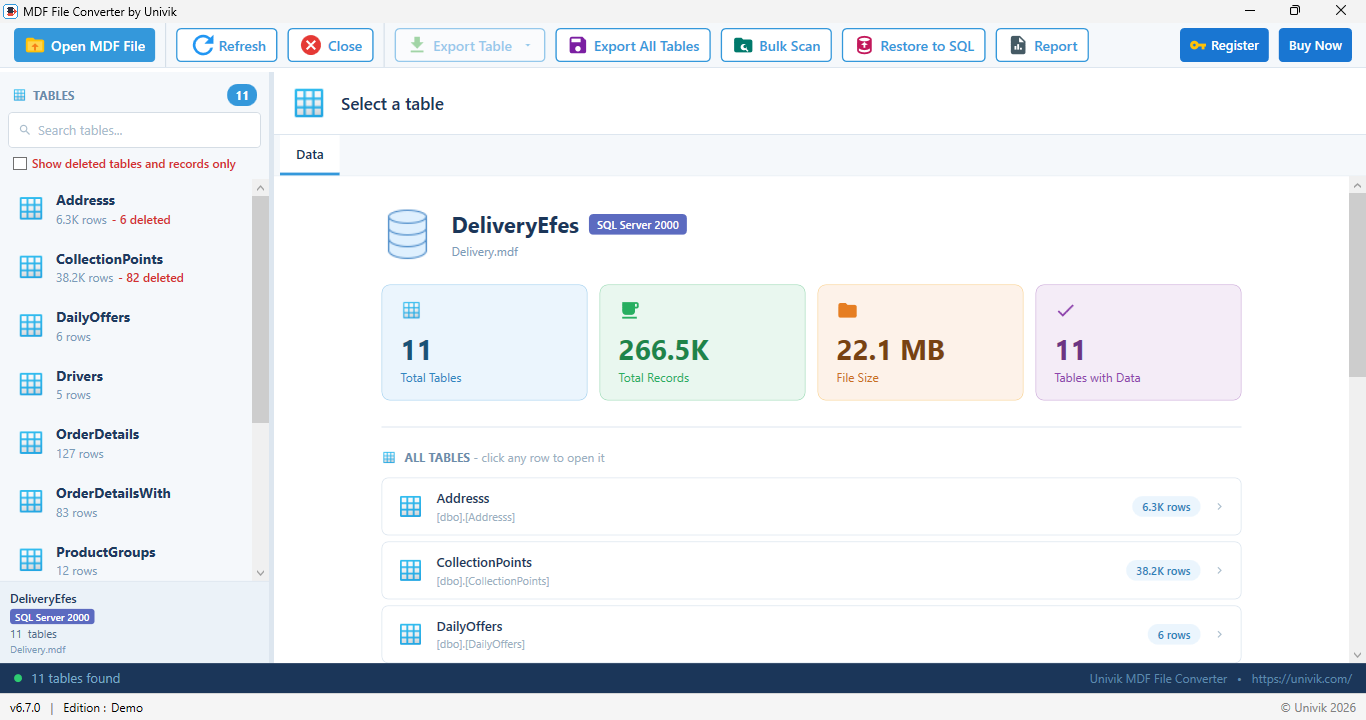
All tables loaded with live record counts, no SQL Server running
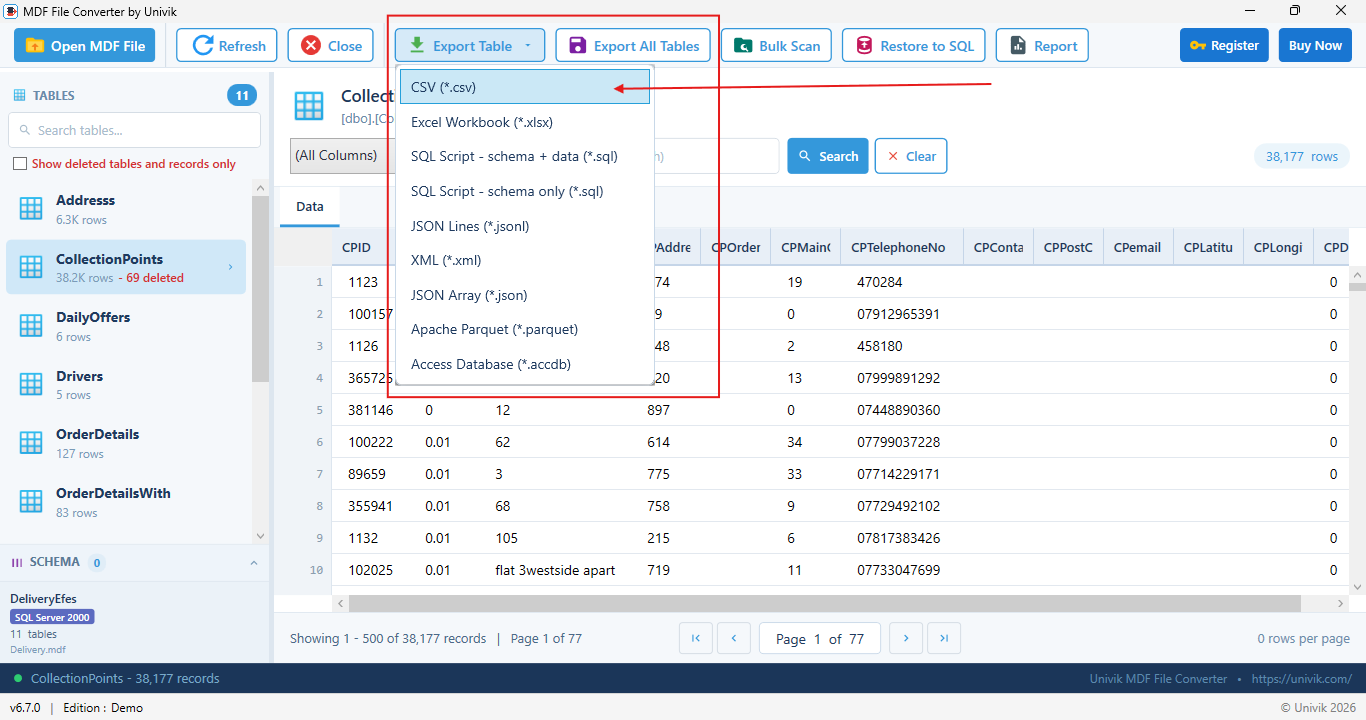
Export any table to 9 formats
 Key Features
Built for DBAs, developers and analysts who need clean data out of any MDF file and into the format they use next.
Convert MDF Files without SQL Server
Convert the MDF file directly from disk at page and record level. No SQL Server service, no attach, no restore and no LDF log file. Works on copies of live files, detached files and files pulled from backups.
Preview and Select Tables to Export
Line up your export by checking every table with live record counts, then use table search and value search to target the exact rows you need before saving. Only need read only browsing without exporting? The free MDF Viewer is built for that.
Portable SQL Script Export
Export a full CREATE TABLE plus batched INSERT statements, ready to rebuild the table on any SQL Server. A schema only script is available when you only need the structure without the rows.
Schema Accurate Conversion
Every column keeps its true data type, length, nullability and key information, so the data lands correctly in Excel, Access, Parquet or a new SQL Server database.
Corrupt or Deleted Data?
Repairing a corrupt or suspect file is a job for our dedicated SQL Database Recovery tool. It also carves out records this converter can no longer see and rebuilds dropped tables. This converter focuses on exporting readable data, visible deleted rows included.
Batch Export in Parallel
Select any set of tables with checkboxes, choose one format for the whole batch and decide whether deleted records are included. Each table saves as its own file with the correct extension and many tables run in parallel with a live progress report.
Restore to SQL Server
A built in SQL restore tool scripts recovered tables back into a live SQL Server database. It works together with the SQL script export when you want manual control over the rebuild.
Read Only and Fully Offline
The MDF file opens in read only mode and is never modified. All output goes to new files you choose. Everything runs on your Windows machine with no cloud upload, which keeps sensitive financial, medical and legal data private.
 Export Options
Save any table in the format your next tool expects, from spreadsheets to data pipelines. Recovered deleted records are marked in every format so they never mix silently with live data.
CSV .csv
Spreadsheets, imports and universal exchange. Choose delimiter, encoding, header and quoting options.
Excel Workbook .xlsx
Reports and analysis in Microsoft Excel. Recovered deleted records are marked so you can filter them apart.
SQL Script, schema and data .sql
CREATE TABLE plus batched INSERT statements, ready to run and rebuild the table on any SQL Server.
SQL Script, schema only .sql
Recreate the table structure without data when you only need the shape of the database.
JSON Lines .jsonl
One record per line for data pipelines and streaming tools that read row by row.
JSON Array .json
A standard array of objects for web applications and APIs.
XML .xml
Legacy systems and document workflows. Deleted rows carry a clear deleted attribute.
Apache Parquet .parquet
Columnar format for big data tools, Spark, Python and analytics workloads.
Access Database .accdb
Move a table straight into Microsoft Access with recovered records marked apart.
Deleted records included in every format Three ways to export: toolbar, right click or batch
Corrupt file, suspect database or deleted data?
This converter exports readable data, including deleted records still visible in the file. To repair a corrupt or suspect MDF file, carve out records the converter can no longer see or rebuild a dropped table, use our dedicated SQL Database Recovery tool. It runs the same engine with the recovery features turned on.
 Beyond Tables
Tables are only part of a database. The converter reads and extracts the programmable objects too, scripting each one as T-SQL right next to your data.
Views
The full SELECT definition exported, ready to recreate the view.
Stored Procedures
Complete procedure bodies scripted exactly as they were written.
Functions
Scalar and table valued functions, exported with their parameters.
Triggers
Table and database triggers scripted with the objects they belong to.
Synonyms
Alias definitions carried across with their targets.
Sequences
Number generators exported with current value, step and range.
Assemblies
CLR assembly registrations included in the schema script.
Data Types
User defined types written out before the tables that use them.
Rules
Legacy validation rules included with their column bindings.
Defaults
Standalone defaults from older schemas, carried across.
A rebuilt database carries its full schema, not only tables. Objects export in dependency order, so the generated script runs cleanly on a new server.
 How It Works
Open the file, review recovered data and export it, all without SQL Server.
Behind the four steps, Univik reads the MDF at the page level straight from the file, so it needs no SQL Server.
Step 1: Load the MDF File
Launch the tool and select your MDF file. Tables load with live record counts and no SQL Server is running.
Step 2: Preview and Select Tables
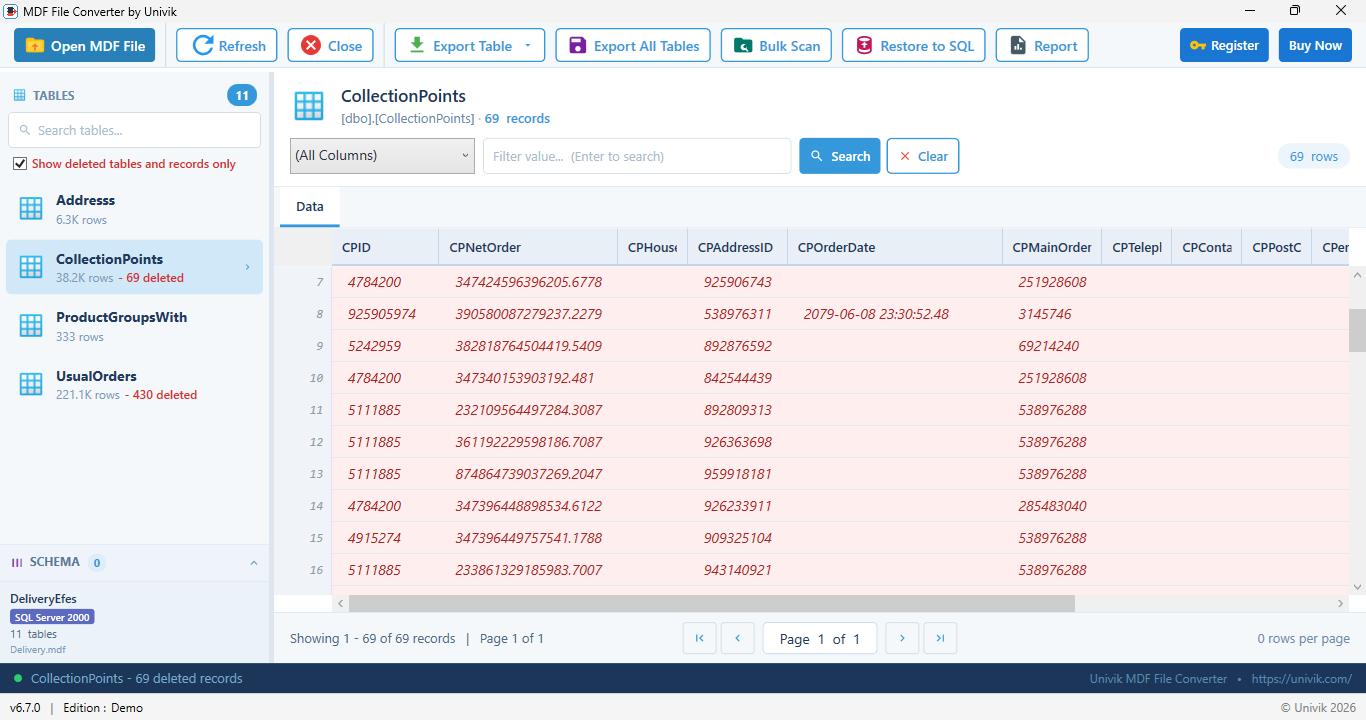
Browse the records in any table, then check the tables you want to export.
Step 3: Choose Tables and Format
Pick one table or check many and select one of the 9 export formats.
Step 4: Export or Restore
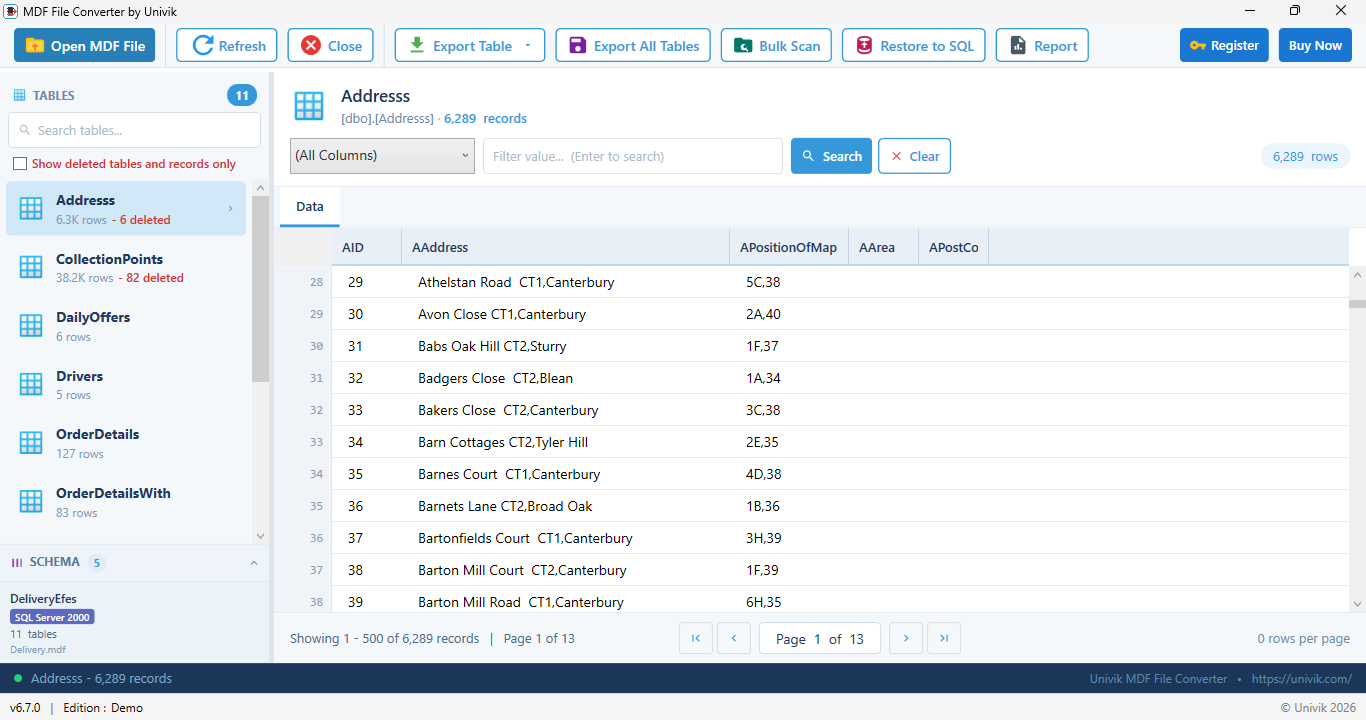
Run the export to save your files or restore the tables straight back into SQL Server.
Quick Start Guide
 Comparison
See how Univik MDF File Converter compares to manual SQL Server scripting and online tools.
Univik MDF File Converter
Manual Scripts and Online Tools
 Technical Data Sheet
Product details, system requirements and compatibility.
VirusTotal Score: Clean
Verified by 70+ antivirus engines. 100% safe to download and use.
Supported Input File
MDF SQL Server Primary Data File:
• SQL Server 2000, 2005, 2008, 2008 R2
• SQL Server 2012, 2014, 2016, 2017
• SQL Server 2019, 2022, 2025
• Detached, offline and corrupted files
Collation detected automatically.
| Product Name: | Univik MDF File Converter |
| Version: | 6.7 (Latest) |
| File Size: | 18.4 MB |
| License Delivery: | Instant via Email |
| License Price: | Starting from $99 Buy Now |
| Free Trial: | Free Download 100% Safe & Secure |
Latest Release
Version 6.7 Highlights
| Output Formats: | CSV, Excel XLSX, SQL script (schema and data), SQL script (schema only), JSON Lines, JSON array, XML, Apache Parquet and Access ACCDB |

| Hard Disk: | 50 MB free (500 MB recommended for large exports) |
| RAM: | 2 GB minimum (4 GB recommended for large databases) |
| Processor: | Intel Core i3 or equivalent |

| Platforms: |
|

| Prerequisites: |
|
 Pricing
Try it free, then unlock unlimited export starting from $99.
Free Trial
$0
Most Popular
Personal License
$99
Business License
$199
 Customer Reviews
What Our Customers Say
Feedback from DBAs, developers and forensic examiners.

Daniel W.
Senior DBA, Frankfurt, Germany
"Our server died and all we had was the MDF file. Univik opened it with no attach and let us pull every table to CSV and Excel in one batch. It saved us from rebuilding a SQL Server just to read the data."
Priya S.
Digital Forensics Analyst, Bengaluru, India
"I read database evidence from seized machines. The read only mode keeps the file untouched for chain of custody. Exporting any table to CSV for my report is fast and clean, even on large databases."
Carlos M.
Backend Developer, Madrid, Spain
"We moved a legacy app off SQL Server. The SQL script export rebuilt the tables cleanly and the Parquet export dropped straight into our analytics stack. It saved us weeks of manual work."
 Use Cases
Who Benefits from MDF File Converter
Real situations where reading an MDF file without a server saves the day.
Server Retired, Data Lives On
A server was decommissioned and only the MDF file remains. Pull the data out and export it without rebuilding SQL Server first.
Move Off SQL Server
Moving to a new platform. Export every table as SQL scripts, CSV or Parquet and load it wherever you need next.
Move Data to Excel or Access
Analysts and accountants need the data in a spreadsheet or Access. Export any table straight to XLSX or ACCDB.
Feed Analytics and Pipelines
Export to Apache Parquet or JSON Lines and drop the data straight into Spark, Python or your data warehouse.
Forensic Read Only Export
Examiners must export database evidence without altering it. The file opens read only, which keeps the original intact for chain of custody. To read the transaction log behind the data, pair it with the SQL Log Analyzer.
Legacy Data to New Formats
Old application databases need the data in modern formats. Export directly to JSON, XML or Parquet with no live server in the loop.
New to MDF files? Start with our MDF file guide.
Learn what an MDF file is, how it is built from 8 KB pages, how it differs from NDF and LDF files, where SQL Server keeps it and how to attach it. Then come back here to recover and export the data.
Not ready to export yet? Start with the free MDF Viewer.
If you only need to browse tables, inspect schema or check record counts, use the completely free Univik MDF Viewer with no trial limits and no payment.
 Help & Support
Common questions about Univik MDF File Converter.
An MDF file is the primary data file for a SQL Server database. For a full breakdown of the format, see our MDF file guide. Univik MDF File Converter converts the file directly from disk, so you can convert and export it without installing SQL Server.
No. There is no SQL Server, no ATTACH, no RESTORE and no LDF log file needed. You only need read access to the MDF file. The software does need .NET Framework 4.8 or higher on Windows.
MDF files from SQL Server 2000, 2005, 2008, 2008 R2, 2012, 2014, 2016, 2017, 2019, 2022 and 2025 are supported. The tool detects the database collation and decodes text in the correct code page.
Yes. Export a SQL script with schema and data, which is a CREATE TABLE plus INSERT statements ready to run on any SQL Server. A built in restore tool can also push tables straight into a live server.
Use Excel XLSX for spreadsheets and reports. Use Apache Parquet or JSON Lines for analytics tools like Spark and Python. Every format keeps the correct data types.
Use our dedicated SQL Database Recovery tool. It repairs corrupt and suspect files, carves out records this converter can no longer see and rebuilds dropped tables. This converter exports readable data, including deleted records still visible in the file.
Every table can be saved as CSV, Excel workbook, SQL script with schema and data, SQL script schema only, JSON Lines, JSON array, XML, Apache Parquet or Access database. You choose the tables and the format for each export.
The MDF file opens in read only mode and is never modified. All output goes to new files you choose. This makes the tool safe for forensic and evidence work.
Yes. A built in SQL restore tool scripts tables back into a live SQL Server database and works together with the SQL script export when you want manual control.
Yes. The converter reads and extracts views, synonyms, stored procedures, functions, triggers, assemblies, user defined data types, rules, defaults and sequences from the MDF file. Each object is scripted as T-SQL next to your table data, so a rebuilt database carries its full schema, not only tables.
No. Two unrelated formats share the .mdf extension. This converter reads SQL Server database files, the kind that hold tables and records. Disc image MDF files from Alcohol 120% are CD and DVD copies and belong in a disc tool that converts them to ISO. If your file came from a burner or an old game backup, it is the disc image kind.
The free trial opens any MDF file, lists every table with live record counts and previews the data, so you can confirm your database reads correctly before paying. Export in the trial is limited and the full license removes the limit. Nothing is uploaded and no SQL Server is needed at any stage.
Uploading a database is rarely a good idea. MDF files are often gigabytes in size and hold live business records, so an online converter means a long upload and a copy of your data on someone else's server. This converter runs entirely on your machine: the file never leaves your disk, which also makes it suitable for regulated and forensic work.
Still have questions? Contact support or Live Chat
Related Products
Explore More Univik Tools
Free read only viewer for SQL Server MDF files. Browse tables, inspect schema and preview records with no SQL Server and no conversion.
Learn MoreLearn what an MDF file is, how it is structured and how it relates to NDF and LDF files in our complete MDF format guide.
Learn More
Browse every Univik file converter covering email, database, document and archive formats for any project.
Learn More