MDF Viewer Univik MDF File Viewer

Excellent 4.8 TrustRating (412 Verified Reviews)

Free MDF Viewer Tool to Open & Read SQL Server MDF Files

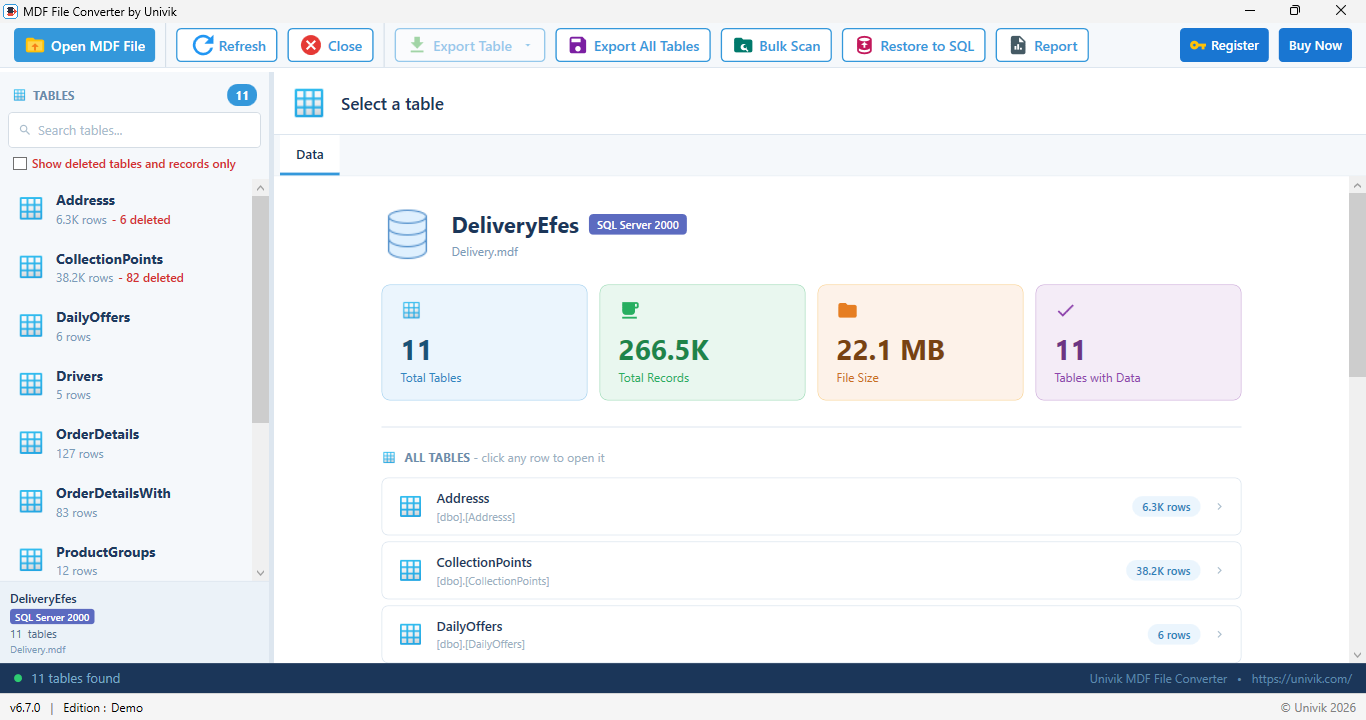
Univik MDF File Viewer is a free tool to open and read SQL Server MDF database files without SQL Server installed. Browse tables, preview records and inspect the schema, all from a clean Windows desktop tool with no database configuration needed.

*Completely free for personal and commercial use. No trial limitations.

  • No SQL Server Required: Open and read MDF files on any Windows PC - no database engine, SSMS or server setup needed.
  • Full Schema Access: Browse tables, views, stored procedures, columns, data types, primary keys and indexes.
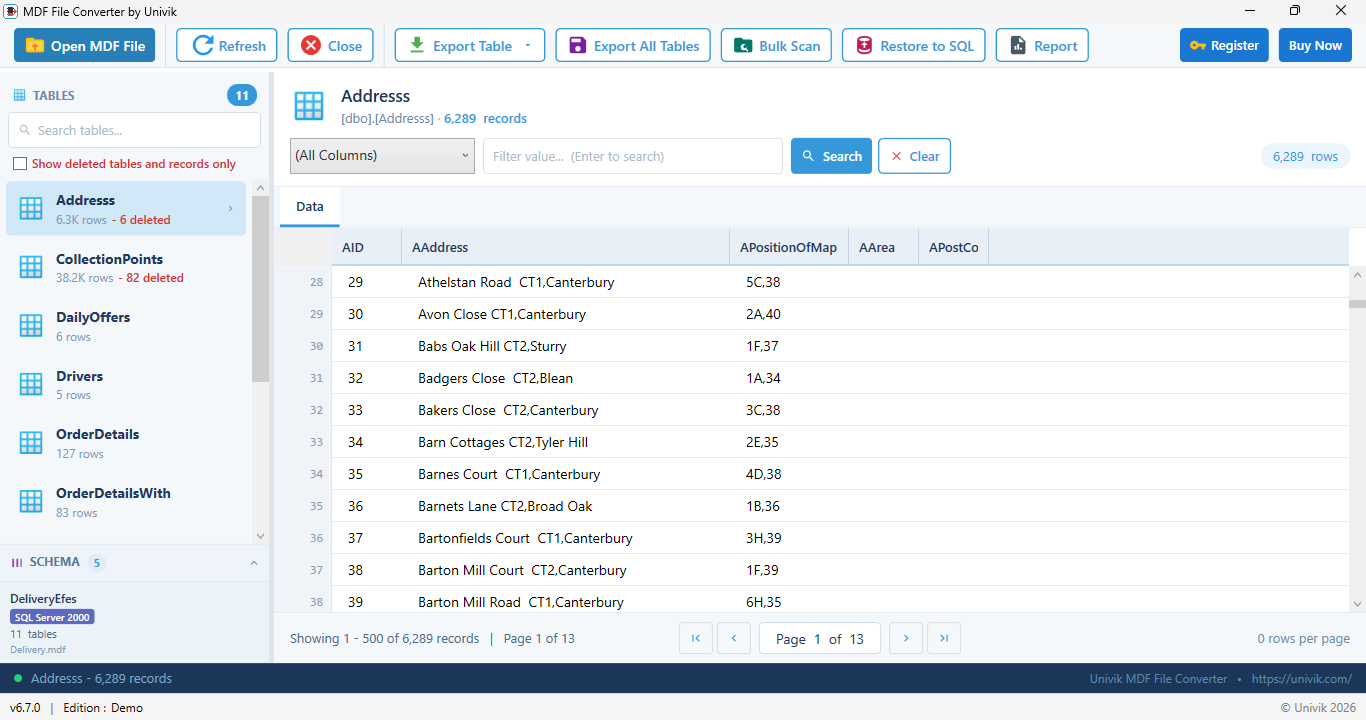
  • Live Data Preview: View actual records from any table with sortable grid display and row count information.
  • 100% Free & Offline: Completely free desktop software. No internet, no registration, no trial limits.


Univik MDF Viewer Box

Free Software

100% Free Software

No trial limits, no registration required. Free for personal and business use.

 Viewable Database Properties

 Product Screenshots

See the MDF Viewer In Action

Open a SQL Server MDF file, browse every table and preview records, all without SQL Server installed.

 Key Features

Free MDF Viewer Features

Access your SQL Server MDF database instantly without installing SQL Server or SSMS. Browse schema, preview records and export data with ease.

Open MDF

Open MDF without SQL Server

Open and read SQL Server MDF database files without installing SQL Server, SSMS or any database engine. The viewer reads the MDF format directly and works independently. Access detached or orphaned databases on any Windows computer, even those that never had SQL Server installed.

Browse Schema

Browse Complete Database Schema

Navigate through the full database schema in the left panel. All tables, views, stored procedures and functions are listed in a familiar tree structure. Expand any table to see its columns, data types, nullability and constraints. Click any object to inspect it instantly.

Preview Data

Preview Live Table Data

View actual records from any table in a sortable data grid. Column values display with correct formatting for text, numbers, dates, GUIDs and binary data. International Unicode text reads correctly using the database collation. Row count per table shows in the schema tree. Large tables page smoothly with no file size limit.

Export Data

Quick Inspection Export

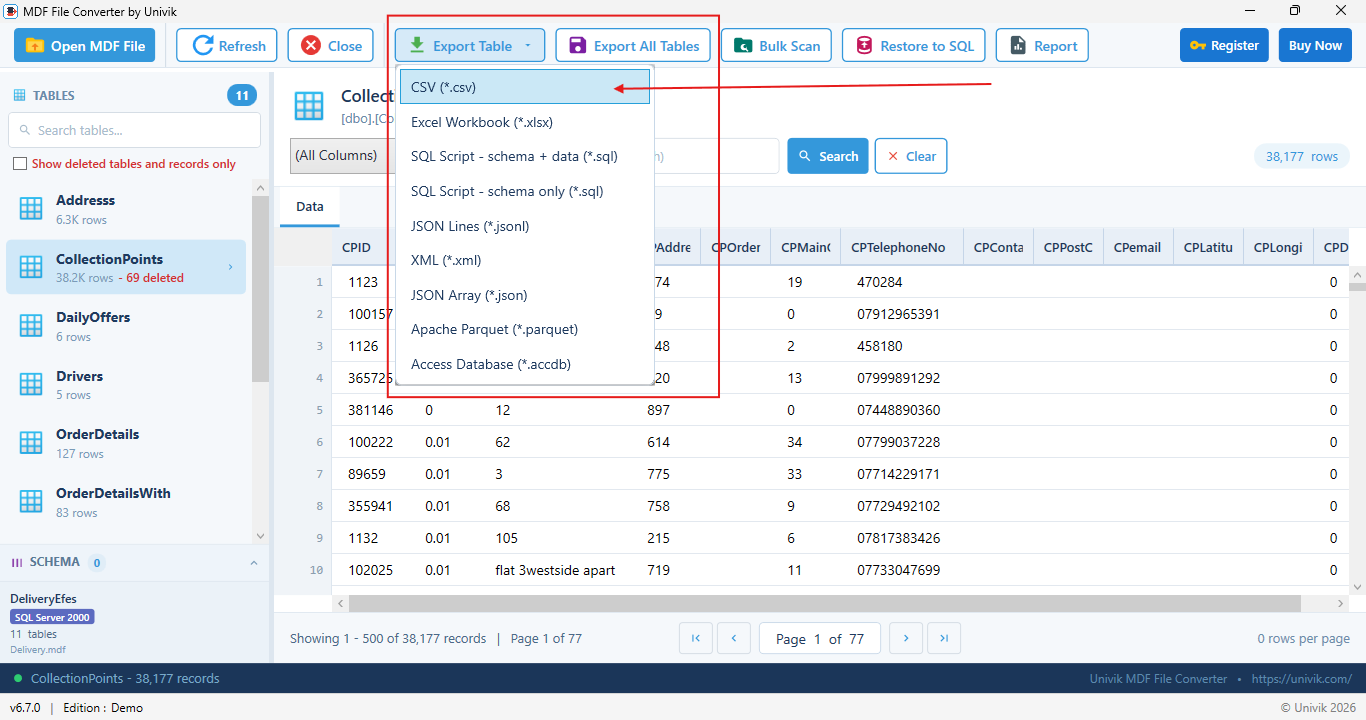
Save the current table view as CSV or Excel for quick reference, spot checks or sharing a data snapshot with your team. Ideal for documenting what you found during inspection. For full multi-table database conversion and schema migration, use Univik MDF Converter.

Search Data

Search Table Data

Find specific records quickly with built-in search functionality. Search by value across all columns in a table or target specific fields. Filter results to narrow down records in large datasets. Locate rows in tables containing millions of records without writing SQL queries.

Keys Indexes

View Keys, Indexes and Constraints

Inspect the complete table structure including primary keys, foreign keys, unique constraints and indexes. View index type, included columns and fill factor. Foreign key relationships show referenced tables and columns for a full picture of database integrity rules.

Detached MDF

Open Detached, Orphaned and Corrupt MDF Files

Open MDF files that were detached, orphaned, copied from another server or pulled from a backup, including a database that SQL Server marks suspect and will not attach. The viewer detects the SQL Server version and collation automatically and reads what it can so you can inspect the contents. Works with SQL Server 2000 through 2025 with no attach or restore. To repair a damaged file or recover deleted rows, use SQL Database Recovery.

Stored Procedures

View Stored Procedures and Views

Read the source definition of stored procedures, functions and views stored in the MDF file. Useful for auditing database logic, recovering lost code or documenting a database schema. All programmable objects are listed alongside tables in the schema tree.

 Simple Steps to View MDF

How to Open & Read MDF Files

Open your SQL Server MDF file, browse the schema and start viewing records in seconds.

Quick Start Guide


  1. Download & Install: Download free Univik MDF Viewer and install on Windows. Takes less than a minute.
  2. Locate MDF File: Find your SQL Server MDF file - typically in the SQL Server DATA folder or your backup location.
  3. Open File: Click "Open File" button and select your MDF file. The schema tree loads instantly in the left panel.
  4. Browse Schema: Expand tables, views and procedures in the left panel to inspect database objects and their structure.
  5. View Records: Click any table name to load its data in the grid. Rows display with all column values correctly formatted.
  6. Search or Export: Use the search bar to filter records or click Export to save table data as CSV or Excel.

 Viewer Interface

Inside the MDF Viewer Interface

A three-panel layout: the schema tree on the left, column details in the center and record data in the grid.

Univik MDF File Viewer Open File Export Schema Tree Tables Customers Orders Views Stored Procedures Functions Keys and Indexes Column Details CustomerID int PK Name nvarchar(100) Email nvarchar(150) Created datetime2 Country nvarchar(60) Data Grid ID Name Email Country 1 Acme Ltd a@acme.io US 2 Bolt Inc b@bolt.io UK 3 Cove LLC c@cove.io DE 4 Dyne Co d@dyne.io IN Search, sort and page through records

The three-panel layout: schema tree, column details and record data.

Schema Panel

Schema Panel

Left Panel

Tree view of all tables, views, stored procedures and functions. Expand to see columns, keys and indexes. Click any object to load it.

Column Details Panel

Column Details Panel

Center Panel

Shows column names, data types, length, nullability, defaults and key/index membership for the selected table.

Data Grid Panel

Data Grid Panel

Bottom/Right Panel

Sortable grid showing all records from the selected table. Paginated display with row count, column sorting and value search.

Toolbar Features

  • Open File: Load MDF files from any location
  • Search: Filter records by value or column
  • Export CSV: Save table data as comma-separated file
  • Export Excel: Save table data as XLSX spreadsheet
  • Refresh: Reload schema and data from file
  • Zoom: Adjust data grid font size

Keyboard Shortcuts

  • Ctrl+O: Open MDF file
  • Ctrl+F: Search records
  • Ctrl+E: Export current table
  • Up/Down: Navigate schema tree
  • Enter: Load selected table data
  • Ctrl+S: Save exported file

 Beyond Tables

See Every Schema Object

Open a database and browse more than its tables. The viewer lists the programmable objects and shows each definition on screen as readable T-SQL.

Views

Read the SELECT behind every view on screen.

Stored Procedures

Browse procedure code exactly as it was written.

Functions

Inspect scalar and table valued code with its parameters.

Triggers

See which tables each trigger fires on and what it does.

Synonyms

Check where every alias points before you rely on it.

Sequences

View each counter with its current value and step.

Assemblies

List the CLR entries registered in the database.

Data Types

Inspect the custom types the schema is built on.

Rules

See the legacy rules still attached to columns.

Defaults

Spot the freestanding defaults old schemas left behind.

Everything is on screen before anything is exported, so you know exactly what the database contains, from a quick look at one view to a full audit of the schema.

 Use Cases

When to Use MDF Viewer

Common scenarios where the free MDF Viewer is the perfect solution for accessing SQL Server database files.

Database Audit

Database Audit

Inspect a SQL Server MDF file to audit table structure, stored procedures and data without attaching the database to a live server. Useful for compliance reviews and code audits.

Pre-Recovery Inspection

Pre-Recovery Inspection

Before running a costly database repair, open the MDF in the viewer to see which tables are still readable and how many rows are accessible. Assess the damage first. To repair the file and recover the rows, use SQL Database Recovery.

Schema Documentation

Schema Documentation

Document database structure by browsing tables, columns, keys and indexes without a live SQL Server connection. Export column lists and schema details for documentation or handoff.

Developer Inspection

Developer Inspection

Developers needing to inspect a client database backup or a staging MDF file can open it directly without configuring a local SQL Server instance. Saves hours of database server setup time.

Forensic Evidence Review

Forensic Evidence Review

Forensic analysts can open MDF files from seized devices and browse tables and records without modifying the source file. The viewer operates read-only, preserving chain of custody during the initial evidence review.

Pre-Migration Assessment

Pre-Migration Assessment

Browse table sizes, row counts and column structure to plan your migration accurately before committing to it. Once you know what needs moving, hand off to Univik MDF Converter to perform the actual export.

 Which Tool Do I Need?

MDF Viewer vs Converter vs Recovery

Look inside with the free Viewer. Export healthy data with the Converter. Fix corrupt files or bring back lost data with Recovery.

Task Free Viewer MDF Converter SQL Recovery
Open a healthy MDF without SQL ServerYesYesYes
Browse tables, schema and recordsYesYesYes
Quick CSV or Excel exportYesYesYes
Export to SQL, JSON, XML, Parquet and AccessNoYesVia export
Batch-export every tableNoYesVia export
Open a corrupt or suspect fileRead onlyNoYes
Recover deleted recordsNoNoYes
Recover dropped tablesNoNoYes
Repair torn pages and damaged rowsNoNoYes
PriceFreeFrom $99From $99

MDF Converter SQL Database Recovery

 Technical Details

MDF Viewer Specifications

System Requirements

Operating SystemWindows 11, 10, 8.1, 8, 7 and Windows Server 2016 or later
Processor1 GHz or faster
RAM512 MB minimum
Disk Space35 MB for installation
.NET Framework4.8 or higher

Software Information

Version6.7 (Latest)
File Size14.2 MB
LicenseFreeware (100% Free)
SupportEmail & Live Chat

Supported Features

SQL Server Versions

  • SQL Server 2025, 2022, 2019, 2017
  • SQL Server 2016, 2014, 2012
  • SQL Server 2008 R2, 2005, 2000

View Capabilities

  • Tables, views, procedures, functions
  • Column definitions and data types
  • Primary keys, foreign keys, indexes
  • Live record data with pagination

Export Options

  • CSV (comma-separated values)
  • Excel XLSX spreadsheet
  • Quick single-table export
  • Offline - no internet required

 Customer Reviews

What Users Say About Us
MR

Michael R.

Database Administrator

"Our SQL Server went down and I needed to pull records from an MDF backup immediately. This viewer opened the file in seconds and I was able to export the data I needed without any database reinstall. Absolute lifesaver."

SP

Sarah P.

Software Developer

"I needed to inspect a client's legacy database but didn't want to spin up a full SQL Server instance for a one-time review. This tool let me browse the schema and preview the data in minutes. Exactly what I needed."

AK

Andrew K.

IT Manager

"Used this to verify data in an MDF file recovered after a server failure. The export to Excel worked perfectly and saved us from hours of manual recovery work. Free software but genuinely professional quality."

 Frequently Asked Questions

Common Questions

Yes, Univik MDF File Viewer is completely free for both personal and commercial use. There are no trial limitations, no registration required and no hidden costs. Download, install and use without any restrictions.

No, SQL Server is not required. MDF Viewer reads the MDF file format directly and works completely independently. You can view MDF files on any Windows computer, even if SQL Server was never installed on that machine.

Look in your SQL Server data folder or your backup location, then click Open File to load it. For the default paths by SQL Server version and a full explanation of the MDF format, see our MDF file guide.

Yes. MDF Viewer opens MDF files directly from disk without requiring them to be attached to a running SQL Server instance. This is the primary use case. Open any detached, copied or backed-up MDF file and browse its contents immediately without any database configuration.

MDF Viewer is for reading and inspecting. Browse schema, preview table records, audit stored procedures and export a quick CSV or Excel snapshot of any table. MDF Converter is for export and migration and batch-exports every table to CSV, Excel, SQL, JSON, XML, Parquet and Access. SQL Database Recovery is for repair and recovery and brings back deleted records and dropped tables from a corrupt or suspect file. Start with the free Viewer to look inside, then pick the tool that matches your next step.

Yes. The schema tree in the left panel lists tables, views, stored procedures and scalar or table-valued functions. Click any object to see its definition or data. This makes the viewer useful for auditing database logic and reading source code from MDF files where the original development database is no longer accessible.

Yes. Select any table, enter a value in the search bar and the data grid filters to matching rows instantly. You can also click column headers to sort. No SQL knowledge is needed. The viewer is designed for non-technical users to browse database contents without writing queries.

MDF Viewer is designed for read only browsing and quick single-table inspection exports to CSV or Excel. To batch-export every table or migrate the database, use Univik MDF Converter. To recover deleted records and dropped tables or repair a corrupt file, use Univik SQL Database Recovery. Start with the free Viewer to inspect, then pick the right tool.

Yes. MDF Viewer opens the file directly from disk and reads the tables and records it can access, which helps you inspect a database that SQL Server marks suspect or will not attach. The viewer is read only and never changes the file. To repair a damaged file or recover deleted records and dropped tables, use Univik SQL Database Recovery.

Yes. The viewer lists views, synonyms, stored procedures, functions, triggers, assemblies, user defined data types, rules, defaults and sequences, then shows each definition on screen as readable T-SQL. No SQL Server is needed to browse any of it.

Yes. An NDF is a secondary data file that belongs to the same database as the MDF, holding tables the database spread across extra files. Keep the NDF files next to the MDF and load them together, so every table appears in the same tree. Our NDF file guide explains how the files fit together.

Yes. Our guide on how to open an MDF file without SQL Server walks through the viewer route step by step, compares the free SQL Server Express attach route and covers where SQL Server hides its data files on disk.

Ready to View Your SQL Server Database?

Download the free MDF Viewer and start browsing your SQL Server database files today.

Need more than a look inside?

MDF Viewer is free for browsing and inspection. To export or migrate every table, use Univik MDF Converter. To repair a corrupt or suspect file and bring back deleted records and dropped tables, use Univik SQL Database Recovery. To read the transaction log for an investigation, use the SQL Log Analyzer.

 Related Products

Explore More Univik Tools

MDF Converter

MDF Converter

Export healthy MDF data to CSV, Excel, SQL, JSON, XML, Parquet and Access, then restore it to SQL Server.

Learn More
MDF File Guide

MDF File Guide

Learn what an MDF file is, how it is structured and how SQL Server stores it in our complete MDF format guide.

Learn More
SQL Database Recovery

SQL Database Recovery

Repair corrupt and suspect MDF files and bring back deleted records and dropped tables from a damaged database.

Learn More