 Open & Read Guide
 By
By An MDF file is a stack of 8 KB pages. Page 0 is the file header and page 9 is the boot page, which holds the database name, version and collation. The system tables after them list every table, column, key and index. You can read all of it without SQL Server. A hex editor shows the version and name, a free MDF viewer shows the full schema and an online viewer does the same in a browser.
Someone hands you an .mdf and wants to know what is in it. Which SQL Server wrote it, what the database is called, how many tables it has and how many rows sit in each. Installing SQL Server to answer four questions feels like too much, and attaching the file can change it.
This guide shows where that information lives inside the file and four ways to read it with no server. It starts with the structure, so the numbers make sense, then walks through each method.
- How Is an MDF File Built?
- What Metadata Is Stored in an MDF File?
- Which Way Should You Read an MDF File?
- How Do You Open an MDF File on Windows?
- Step 1: Open the .mdf in the viewer
- Step 2: Read the database facts
- Step 3: Browse tables, columns, keys and indexes
- Step 4: Check row counts and preview rows
- Step 5: Export what you found
- How Do You View an MDF File in a Browser?
- How Do You Read the MDF Version in a Hex Editor?
- How Do Developers Read an MDF File With OrcaMDF?
- What Can You Not See in an MDF File Without a Server?
- MDF Structure and Metadata Questions
How Is an MDF File Built?
The structure is simpler than the file size suggests. SQL Server writes every data file as a run of 8 KB pages, 8,192 bytes each, numbered from 0. Every page opens with a 96 byte header that records the page number, the page type and which object the page belongs to. The rest of the page holds rows, index entries or allocation bitmaps, depending on the type.
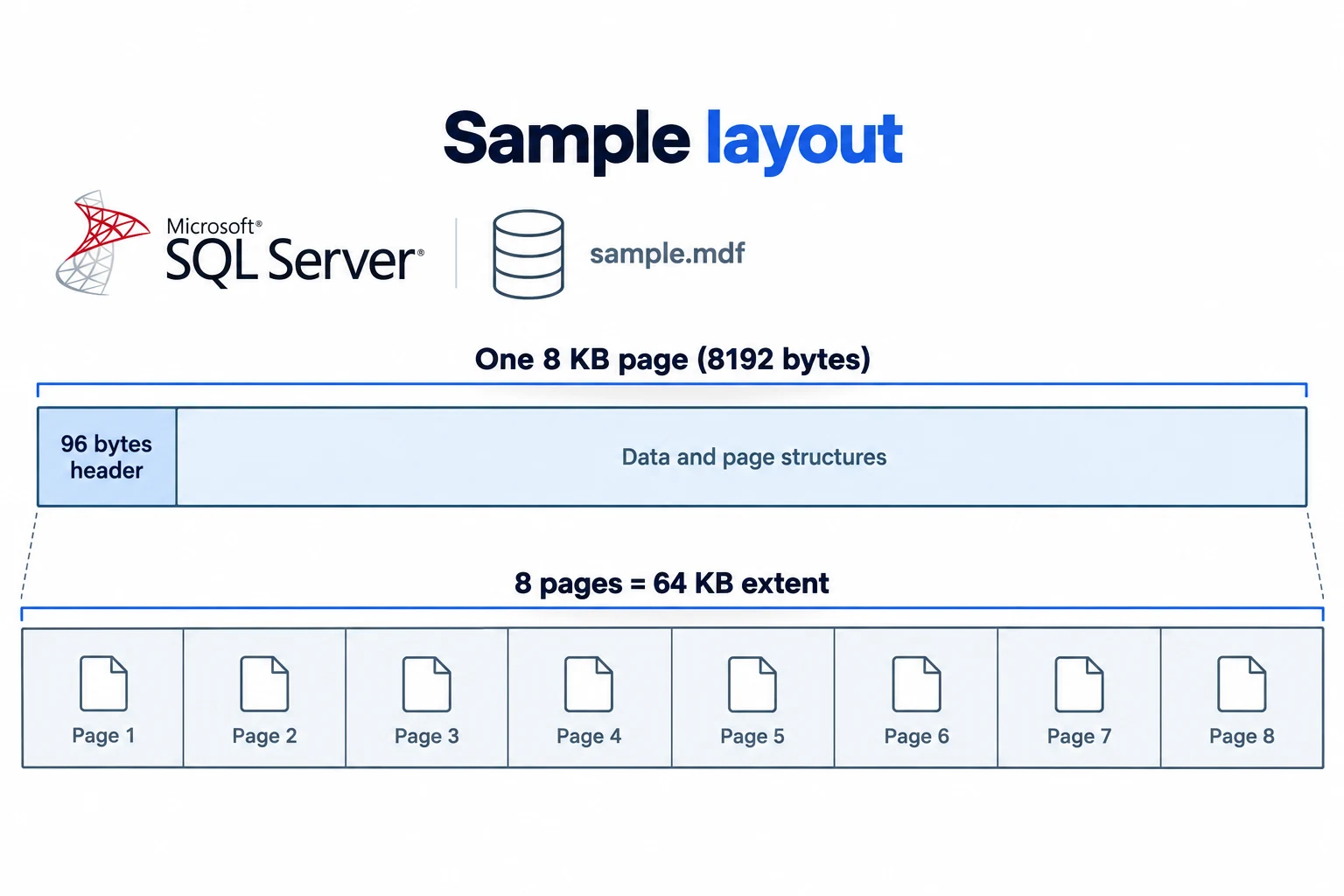
Eight pages make one extent, 64 KB. That grouping is how SQL Server hands out space, and it is why a tiny table still takes at least one page and often a whole extent.
The first pages of the file have fixed jobs, which is what makes the metadata easy to find:
| Page | Name | Page type | What it holds |
|---|---|---|---|
| 0 | File header page | 15 | The file's own facts: file ID, logical name, size, growth setting and the GUID that ties the file to its database |
| 1 | PFS, page free space | 11 | How full each of the next 8,088 pages is, and whether it is allocated |
| 2 | GAM, global allocation map | 8 | Which extents in the next 4 GB are allocated |
| 3 | SGAM, shared allocation map | 9 | Which mixed extents still have a free page |
| 6 | DCM, differential changed map | 16 | Extents changed since the last full backup |
| 7 | BCM, bulk changed map | 17 | Extents changed by bulk logged operations |
| 9 | Boot page | 13 | The database facts: name, ID, version, creation date, collation, backup and CHECKDB history. Only in file 1 |
After those come the system base tables. They are ordinary tables that SQL Server keeps for itself. sys.sysschobjs lists every object with its name and type. sys.syscolpars lists every column with its data type. sys.sysidxstats lists the indexes. sys.sysallocunits and sys.sysrowsets tie each table to the pages that hold its rows, and sys.sysobjvalues stores the T-SQL text of views, procedures and functions. A reader that can decode these six tables can rebuild the whole schema from the file alone.
Everything after that is your data: data pages (type 1) for table rows, index pages (type 2) for B-tree indexes, text pages for large values and IAM pages (type 10) that map which extents each table owns.
What Metadata Is Stored in an MDF File?
People say "metadata" and mean four different layers. All four are in the file, and each method below reaches some or all of them.
| Layer | Stored where | What you get |
|---|---|---|
| File | Page 0, file header | File ID, logical name, size and growth settings, database binding GUID |
| Database | Page 9, boot page | Database name and ID, internal version (dbi_version), create version, creation date, compatibility level, collation, last clean DBCC CHECKDB time, last log backup time, checkpoint and backup LSNs |
| Schema | System base tables | Tables, columns with data types and nullability, primary and foreign keys, unique constraints, indexes with their columns, views, stored procedures, functions, triggers, sequences and user defined types |
| Data | Data and IAM pages | Row count per table, pages used per table and the rows themselves. A reader that looks at free slots also shows rows that were deleted but not yet overwritten |
The version number in the boot page is the one people ask about most, because it decides which SQL Server can attach the file. The lookup is short: 539 is SQL Server 2000, 611 or 612 is 2005, 655 is 2008, 661 is 2008 R2, 706 is 2012, 782 is 2014, 852 is 2016, 869 is 2017, 904 is 2019 and 957 is 2022. The full table, with product and compatibility levels, is in our guide to which SQL Server version wrote an MDF file.
Which Way Should You Read an MDF File?
Four methods work without SQL Server. They differ in how deep they go and who they suit.
| Method | Shows | Needs | Best for |
|---|---|---|---|
| Free MDF reader (Univik MDF Viewer) | Everything: database facts, full schema, row counts, the rows, procedure code | A Windows PC, free download | Most people. A complete picture in a minute |
| Online MDF viewer | Tables, rows, views and procedures in the browser | Any device with a browser, nothing installed | Mac, Linux, a phone or a PC where you cannot install software |
| Hex editor or PowerShell | Version number and database name from the boot page | HxD or a PowerShell window | One quick check before an attach or a migration |
| OrcaMDF | Any page by number, header fields, system tables, rows with a schema you supply | C# and Visual Studio | Developers and forensic work on damaged files |
| SQL Server Express or LocalDB | Everything, through DBCC DBINFO, DBCC PAGE and the catalog views | An install and an attach. The file may be upgraded | When you need to run queries, not only look |
The last row is there for honesty. Express and LocalDB are free, but they are SQL Server. Attaching a file to a newer version upgrades it in place, so a file from 2012 attached to 2022 can no longer go back. Every other method opens the file read only.
How Do You Open an MDF File on Windows?
Univik MDF Viewer reads the pages itself, decodes the system tables and shows the result as a schema tree. Nothing is attached, no service runs and the file is not written to. It reads files from SQL Server 2000 through 2025, including detached and orphaned files. It can also open a file that SQL Server has marked suspect and read what is still intact.
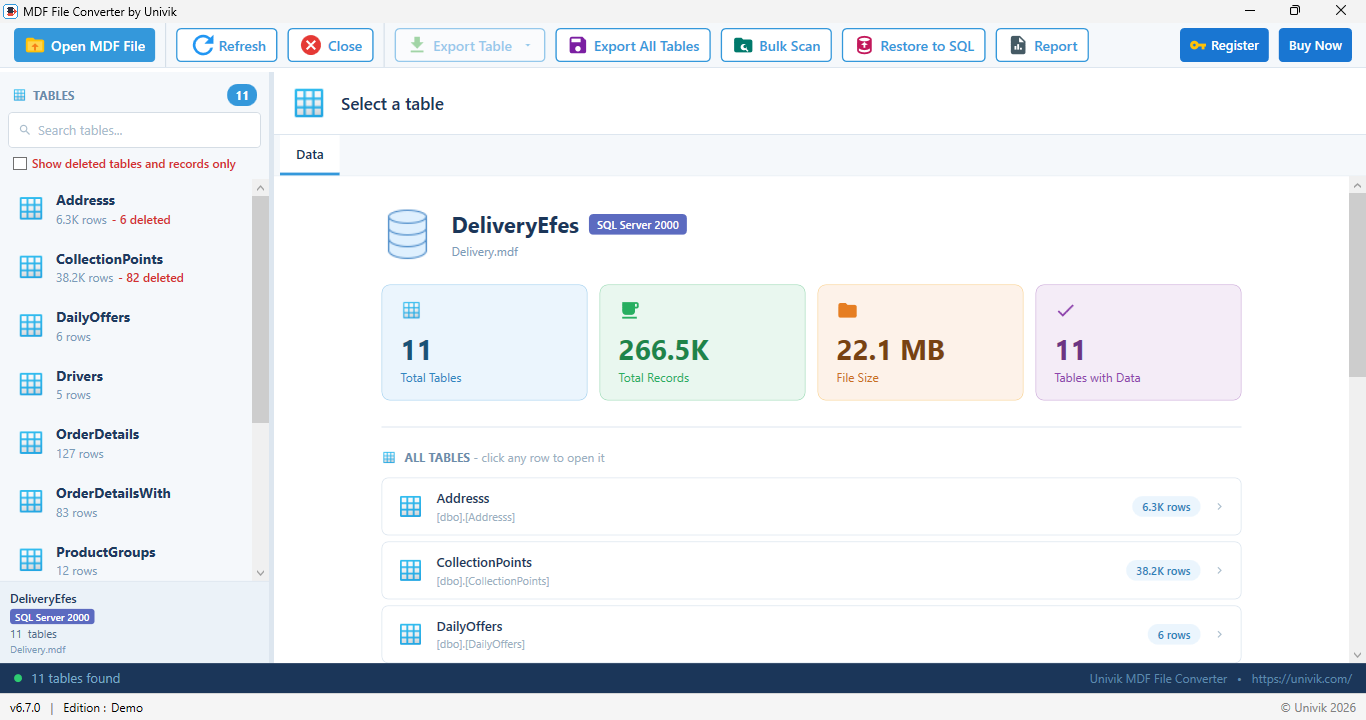
The facts you came for, on one screen Delivery.mdf opened with no server: the database name, the SQL Server 2000 version stamp read from the boot page, 11 tables, 266.5K records and the 22.1 MB file size. Each table shows its row count, and six rows in Addresss are flagged as deleted.
Open the .mdf in the viewer
Install the free Univik MDF Viewer, click Open File and pick the .mdf. If the database has .ndf files, add them in the same pick so tables stored in those files can be read. The schema tree fills in a few seconds for a small file. Large files are read page by page, so there is no size limit.
You should see The database name in the status bar with the SQL Server version and a table count.
Read the database facts
The summary shows the database name, the version of SQL Server that wrote the file, the collation used for text, the file size and the total number of tables and records. This is the boot page and file header, decoded. Note the version before you plan an attach, because a 904 file will not open on a SQL Server 2017 instance.
Browse tables, columns, keys and indexes
Expand any table in the tree. The column panel lists each column with its data type, length, nullability and default. It marks which columns sit in the primary key or an index. Foreign keys show the table and column they point to. Views, stored procedures, functions and triggers sit under their own branches. Clicking one shows its definition as readable T-SQL.
Check row counts and preview rows
The row count sits next to each table name in the tree, so you can size a migration without loading anything. Click a table to load its rows into the grid, sort a column or search for a value across the table. Dates, GUIDs, Unicode text and binary columns display in their proper form.
You should see The first page of rows with a total, for example 6,289 records over 13 pages.
Export what you found
Save the table you are looking at as CSV or Excel when you need a record of what the file holds, for a report or a hand over. To write every table out at once, with the schema as a SQL script, the Univik MDF Converter does that job.
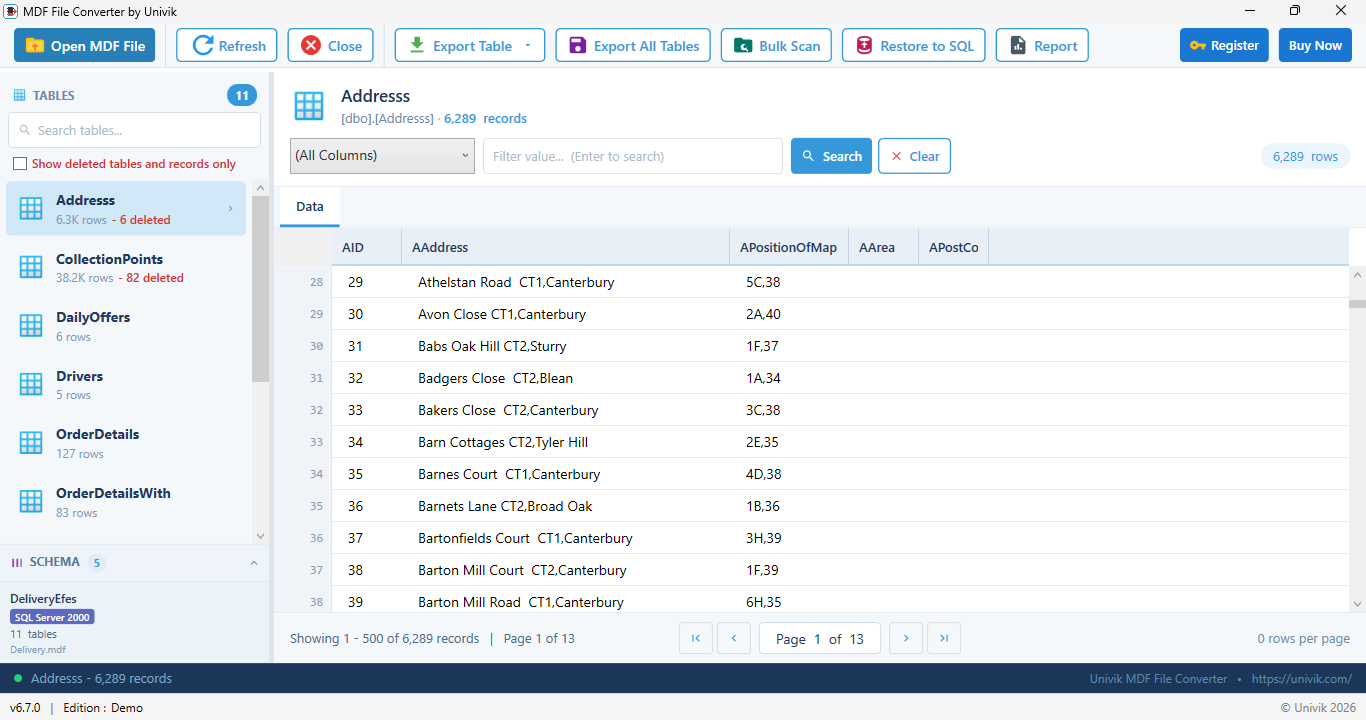
Inside one table The Addresss table read straight from the pages: 6,289 records, the column names from sys.syscolpars and the rows paged 500 at a time. The search box filters on any column without a query.
Most people who ask for an MDF's structure want three numbers: which SQL Server wrote it, how many tables it has and how many rows are in each. All three are inside the file, and none of them needs a server to read.
Univik MDF Viewer opens the .mdf with no SQL Server installed and shows the version, collation, every table with its columns, keys, indexes and row count, plus the rows themselves. Free, offline, read only.
Windows 11 / 10 / 8 / 7 · SQL Server 2000 to 2025 files · free for personal and business use
How Do You View an MDF File in a Browser?
On a Mac, a Linux machine, a locked down work PC or a phone, the Univik Online MDF Viewer does the same reading inside the browser tab. Pick the .mdf, and the page reads its 8 KB pages from your disk, decodes the system catalog and lists the tables, views and stored procedures with their rows. Nothing is uploaded, which is the difference from other online MDF tools that send the file to a server and attach it there.
It handles SQL Server 2000 to 2025 files, row and page compression and multi file databases when you add the .ndf files. Open the page, then go offline. It still works, so it is safe for customer data and case evidence.
How Do You Read the MDF Version in a Hex Editor?
When the only question is "which SQL Server wrote this", you do not need a reader at all. The internal version sits 100 bytes into the boot page. Page 9 starts at 9 times 8,192 bytes, so the version is at file offset 0x12064. Open the file in HxD or any hex editor, jump to that offset and read two bytes.
| 00012050 | 5F 3A 00 00 01 00 00 00 06 00 00 00 00 00 00 00 | _:.............. |
| 00012060 | 0A 00 00 00 1B 02 00 00 1B 02 00 00 4E 00 00 00 | ............N... |
| 00012070 | C6 50 04 00 00 00 00 00 39 05 00 00 00 00 00 00 | .P......9....... |
| … | 44 00 65 00 6C 00 69 00 76 00 65 00 72 00 79 00 | D.e.l.i.v.e.r.y. |
The bytes are little endian, so 1B 02 becomes 0x021B, which is 539. PowerShell does the same read in one line and prints the number:
# Windows PowerShell 5.1
$b = Get-Content -Encoding Byte 'C:\Data\Delivery.mdf' -ReadCount 0 |
     Select-Object -Skip 0x12064 -First 2
$b[1] * 256 + $b[0]

# PowerShell 7
$b = Get-Content -AsByteStream 'C:\Data\Delivery.mdf' -ReadCount 0 |
     Select-Object -Skip 0x12064 -First 2
$b[1] * 256 + $b[0]
The database name is on the same page, stored as Unicode, so it appears in the text column with a 00 byte after each letter. That is as far as a hex editor comfortably goes. The table list lives in binary rows spread over many pages, and decoding those by hand is a project, not a check.
How Do Developers Read an MDF File With OrcaMDF?
OrcaMDF is an open source C# parser for MDF files written by Mark S. Rasmussen, released under GPL v3. Its RawDatabase class opens a file and hands you any page by file ID and page number, with the header fields decoded: page type, object ID, free byte count and slot count. Because it does not trust the metadata to be intact, it is the tool people reach for on a damaged file, where you filter data pages by object ID and parse the rows with a column layout you supply.
var db = new RawDatabase(@"C:\Data\Delivery.mdf");
var boot = db.GetPage(1, 9);        // the boot page
var objects = db.Pages
    .Where(p => p.Header.Type == PageType.Data && p.Header.ObjectID == 34); // sys.sysschobjs
It fully supports SQL Server 2005 through 2012 and mostly works on later files, though those are not tested by the author. It is read only. If you want the schema without writing code, the two viewers above already do the decoding.
What Can You Not See in an MDF File Without a Server?
Three things stay out of reach. A database protected with Transparent Data Encryption stores every page encrypted, so no file reader can show its tables without the certificate. The transaction log in the .ldf is a different format and holds no tables, though a log reader can show what changed. And if the boot page itself is damaged, nothing that relies on it will open the file, which is when a repair tool that rebuilds the structure from the page chains, such as Univik SQL Database Recovery, is the way in.
One more thing to check first: the .mdf extension is shared by Alcohol 120% disc images and ASAM measurement files. If the file did not come from a database server and has no .ldf beside it, our guide to opening an MDF file without SQL Server shows how to tell them apart.
The short version
- An MDF is 8 KB pages. Page 0 is the file header, page 9 is the boot page, then the system tables, then your data.
- The boot page holds the name, version, creation date and collation. The version bytes are at file offset 0x12064.
- The system base tables hold every table, column, key, index and procedure definition.
- A free MDF reader shows all of it with row counts. A hex editor shows the version and name. OrcaMDF gives developers page level access.
- None of these attach the file. Attaching to a newer SQL Server upgrades it and cannot be undone.
Get the free Univik MDF Viewer
MDF Structure and Metadata Questions
Can I see the tables in an MDF file without SQL Server?
Yes. The table list is stored inside the file in the system base tables, so a reader that understands the MDF format can list every table, its columns and its row count without attaching the file. Univik MDF Viewer does this on Windows for free, and the Univik Online MDF Viewer does it in a browser on any device.
What metadata is stored in the MDF boot page?
The boot page, page 9 of the first data file, holds the database name, database ID, internal version, create version, creation date, compatibility level, collation, the time of the last clean DBCC CHECKDB, the last log backup time and several log sequence numbers used by backups and checkpoints.
Where is the SQL Server version stored in an MDF file?
In the boot page, 100 bytes into page 9. Because pages are 8,192 bytes long, that is file offset 0x12064. Read the two bytes there as a little endian number. 539 means SQL Server 2000, 706 means 2012, 904 means 2019 and 957 means 2022.
Can Notepad or a text editor show the structure of an MDF file?
No. Notepad shows the bytes as unreadable characters. A hex editor shows the same bytes as numbers, which is enough to read the version and the database name, but the table list is stored as binary rows across many pages and needs a real MDF reader to decode.
Does viewing an MDF file this way change the file?
No. A hex editor, PowerShell, OrcaMDF and the Univik viewers open the file read only and never attach it. Attaching the file to a newer SQL Server is what upgrades the internal version and rewrites pages, so viewing is the safer first step.
Can I read stored procedure and view definitions without SQL Server?
Yes. The T-SQL text of views, stored procedures, functions and triggers is stored inside the MDF in the sys.sysobjvalues base table. Univik MDF Viewer lists these objects in the schema tree and shows each definition as readable T-SQL.
What about the LDF and NDF files?
The .ldf is the transaction log and holds no tables, so it is not needed to read the structure. The .ndf files are secondary data files of the same database. If the database has them, open them with the .mdf so tables stored in those files can be read too.
What if the file is encrypted or the boot page is damaged?
A database protected with Transparent Data Encryption stores every page encrypted, so no reader can show its tables without the key. If the boot page itself is damaged, SQL Server cannot open the database at all and a repair tool that rebuilds the structure from the page chains is the only way to see inside.
 About This Guide
Written and maintained by Leena Taylor Paul and the Univik team, developers of Windows data conversion and recovery software since 2013. The page layout, boot page fields and version offset were checked against Microsoft's documentation and the sources below. The screens on this page come from a real 22.1 MB SQL Server 2000 database, Delivery.mdf, with 11 tables and 266,500 rows, read by the Univik file reader with no attach. Last verified September 20, 2026. Need a hand? Contact our support team.
Sources checked: Microsoft Learn: Pages and Extents Architecture Guide · Univik MDF Viewer