MDF Repair Tool Univik MDF Repair Tool

Fix a Corrupt MDF File Without SQL Server

Repair a damaged SQL Server MDF file by reading it at the binary level. Univik scans around the damage, rebuilds the schema from the file itself and recovers your tables, deleted records and dropped tables. No SQL Server, no attach and no backup needed.

Excellent 4.8 TrustRating (142 Verified Reviews)
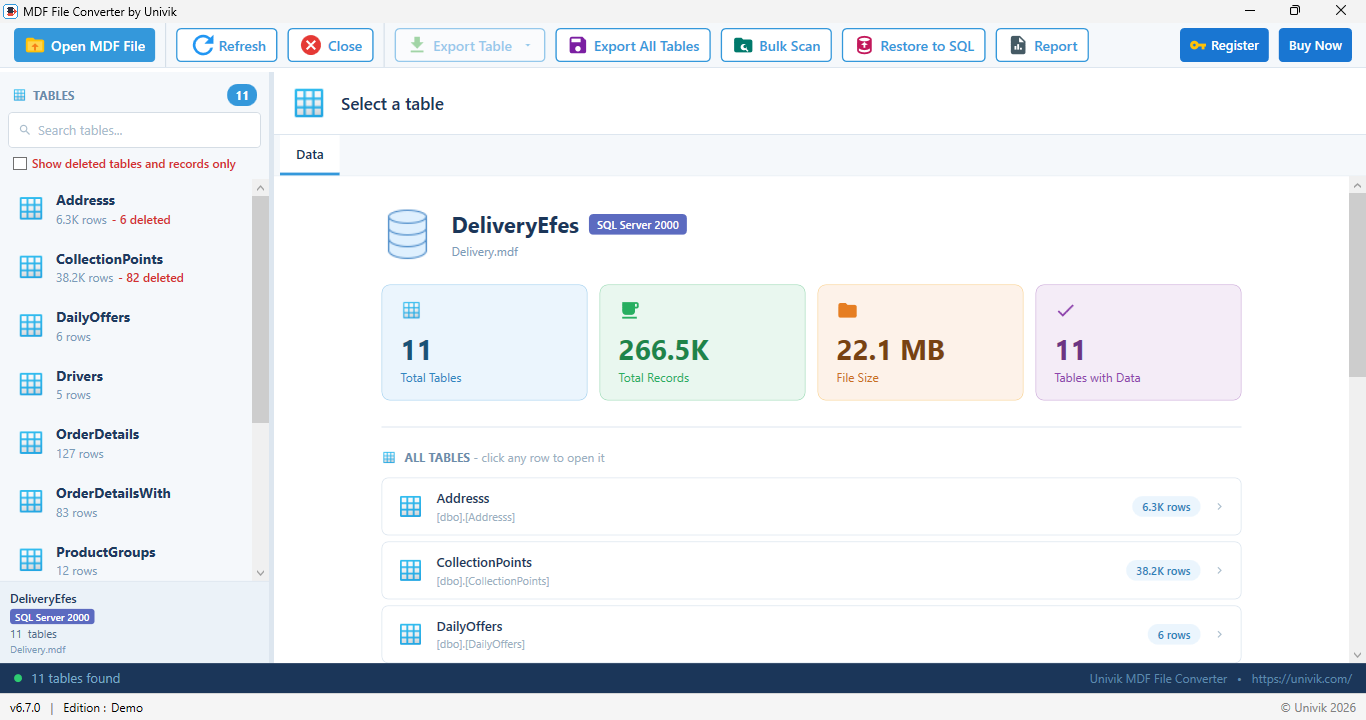
Univik MDF repair tool with recovered tables loaded from a corrupt MDF file

 What the Repair Recovers

Tables and Records Deleted Records Dropped Tables Views Stored Procedures Functions and Triggers Indexes and Keys NDF Data

 Why It Happens

What Makes an MDF File Corrupt

An MDF holds your data in 8 KB pages. When something interrupts a write or damages the disk beneath it, pages break and SQL Server refuses the whole file. Our guide to what causes SQL Server corruption covers each cause in depth.

Common causes of SQL Server MDF file corruption Six common causes of MDF corruption Power loss during a write a page is left half written Disk or hardware fault bad sectors under the file Drive ran out of space writes fail mid operation Virus or malware the file is damaged on disk SQL Server crash the engine dies mid write Copied while in use the copy is torn mid change

 Your Options

Two Ways to Repair an MDF File

You can ask SQL Server to force the database back to consistency or you can read the file directly and take the data out.

The manual way: DBCC CHECKDB

SQL Server can attempt a repair with DBCC CHECKDB and its REPAIR_ALLOW_DATA_LOSS option. It needs a running instance that can still attach the database. The name is honest: to force consistency it can discard the damaged data. See our guide to DBCC CHECKDB with REPAIR_ALLOW_DATA_LOSS before you run it.

The Univik way: read the file

Univik does not ask SQL Server to fix anything. It reads the MDF at the binary level, page by page, skips the pages that are broken and recovers everything that is physically present. The original file opens read only and is never touched, so nothing is discarded to force consistency.

 Key Features

MDF Repair Features

Everything needed to take a corrupt MDF from unreadable to recovered, previewed and exported.

Repair without SQL Server

Repair Without SQL Server

Open the damaged .mdf straight from disk on any Windows computer. No instance, no attach and no RESTORE. The reader parses the file format itself, so it works when the server is gone and only the file survives.

Damage tolerant scan

Damage-Tolerant Scan

A corrupt file fails a normal parse, so the recovery scan reads page by page instead. It skips broken pages, keeps every readable one and rebuilds the table schema from the file's own system catalog.

Deleted records in red

Deleted Records in Red

Deleted records and dropped tables are recovered alongside the live data and highlighted in red, so you can tell at a glance what was recovered and what was still live.

Removal method detection

Know How a Table Was Emptied

The tool tells you whether each empty table was cleared by DELETE, TRUNCATE or DROP. That matters for recovery and it matters even more when the deletion itself is the question.

NDF support

NDF and Multi-File Databases

Databases split across a primary MDF and secondary NDF files are read together. Data that spans filegroups is reassembled, so the recovery covers the whole database rather than one file.

Recovery report

Recovery Report

An HTML report records the file health, the SQL Server version, the corruption findings and per-table statistics with data previews. Print it to PDF for a record of what was recovered.

Bulk triage

Bulk Folder Triage

Point it at a folder of MDF files and every one is checked and flagged as healthy or corrupt, with the SQL Server version detected per file. A pile of unknown files becomes a prioritized worklist.

Export and restore

Export or Restore the Data

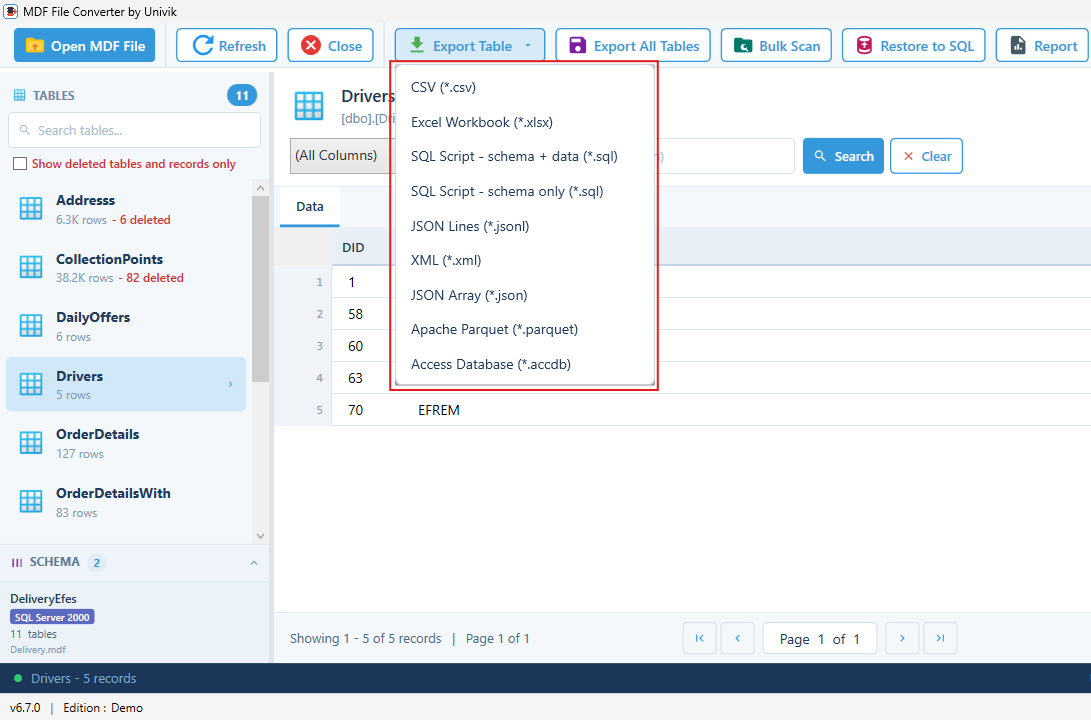
Send recovered tables to CSV, Excel, SQL script, JSON, XML, Parquet or Access. Or restore them straight into a running SQL Server and turn a dead file back into a working database.

How the Repair Reads Around Damage

SQL Server rejects the whole file when pages are broken. Univik reads it page by page and keeps everything that is still intact.

The damage-tolerant scan skips broken pages and recovers the rest One corrupt MDF, page by page Page 1 damaged Page 3 Page 4 damaged Page 6 4 of 6 pages recovered into tables

 Simple Steps

How to Repair a Corrupt MDF File

Four steps take you from a file SQL Server rejects to recovered data you can use.

Open

1. Open the MDF

Open the damaged .mdf read only. No SQL Server and no attach is needed.

Scan

2. Run the Scan

The damage-tolerant scan reads every page it can and rebuilds the schema.

Preview

3. Preview the Data

Browse recovered tables. Recovered deleted rows are highlighted in red.

Export

4. Export or Restore

Export to CSV, Excel or SQL script or restore into a live SQL Server.

Export options for repaired MDF data including CSV, Excel, SQL script and live SQL Server

Export the recovered tables or restore them straight into a live SQL Server

 When You Need It

Files SQL Server Refuses to Open

These are the situations where reading the file directly gets your data back.

Database marked suspect

The database shows as suspect and will not come online. The file is read directly, so the suspect flag does not matter. Our guide to fixing a suspect database covers the details.

Attach fails with an error

Errors like 823, 824 or 5171 mean SQL Server hit damaged pages or a damaged header. The scan reads around those pages and recovers everything that is intact.

Detached or orphaned file

The server is gone and only the .mdf survives, sometimes without its LDF. The file is opened on its own, with no attach and no log required.

Stuck in recovery

The database hangs in recovery or recovery pending and never comes online. Read the file directly instead of waiting. See stuck in recovery for the full walkthrough.

No backup exists

The damaged file is all you have. The repair works from the file itself, so a missing backup does not end the recovery. See recover without a backup.

Data was deleted or dropped

Rows were deleted or a table was dropped and the space has not been reused. The scan recovers them and highlights them in red. See recover deleted records and recover a dropped table.

 Which Approach?

MDF Repair vs Viewer vs DBCC CHECKDB

Pick the path that fits how damaged the file is and what you need back.

TaskMDF RepairFree MDF ViewerDBCC CHECKDB
Works without SQL ServerYesYesNo
Opens a corrupt or suspect MDFYesPreview onlyMust attach first
Recovers deleted records and dropped tablesYesNoNo
Repairs NDF multi-file databasesYesNoYes
Never modifies the original fileYesYesNo
Risk of discarding dataNoNoYes, by design
Export to CSV, Excel, SQL and moreYesNoNo
PriceFrom $99FreeBuilt in

Free MDF Viewer DBCC CHECKDB Guide

 Technical Details

MDF Repair Specifications

System Requirements

Operating SystemWindows 11, 10, Server 2016 and later
Processor1 GHz or faster
RAM4 GB recommended
Disk Space100 MB for installation
.NET Framework4.8 or higher

Software Information

Version6.7 (Latest)
File Size15.6 MB
LicenseFrom $99
SupportEmail & Live Chat
Tested OnSQL Server 2000 to 2025

Supported Capabilities

SQL Server Versions

  • SQL Server 2025, 2022, 2019
  • SQL Server 2017, 2016, 2014, 2012
  • SQL Server 2008 R2, 2005, 2000

Recovery

  • Damage-tolerant page scan
  • Deleted records and dropped tables
  • DELETE vs TRUNCATE vs DROP detection
  • NDF and filegroup reassembly

Output

  • CSV, Excel, SQL script, JSON, XML
  • Parquet and Access exports
  • Restore into a live SQL Server
  • HTML recovery report

 Customer Reviews

What Users Say About Us
MK

Marcus K.

Database Administrator

"Our database went suspect after a power failure and DBCC wanted to throw data away. Univik read the file directly and we exported every table intact."

SA

Sofia A.

IT Consultant

"A client handed me an orphaned MDF from a retired server with no backup. The scan rebuilt the schema from the file and the deleted rows showed up in red."

JP

James P.

Systems Engineer

"I had a folder of recovered MDF files from a failed drive. The bulk triage flagged which ones were corrupt and which version wrote each file. Huge time saver."

 Help & Support

Common Questions

Yes. Univik reads the .mdf at the binary level on any Windows computer. No SQL Server, no attach and no instance is needed to scan the file and recover the data.

Yes. The tool works from the damaged file itself. It reads every page it can, rebuilds the schema from the file and recovers the data, so no backup is required.

No. The file opens read only and is never modified. Recovered data goes to a new export or a new database, so the original stays intact as evidence or for another attempt.

Yes. Deleted records and dropped tables are recovered and highlighted in red, so you can tell recovered data from live data. It also reports how each table was emptied: DELETE, TRUNCATE or DROP.

Yes. Databases split across a primary MDF and secondary NDF files are supported. Data that spans files is reassembled during the scan.

No. The reader uses memory-mapped access, so large database files are scanned without loading the whole file into memory.

MDF files from SQL Server 2000 through 2025 are supported. The version that wrote the file is detected automatically from its internal marker.

The free demo scans your corrupt MDF and previews everything it recovers, so you can confirm your data is there before paying. Exports are limited to 10 records per table. The full version removes that limit.

DBCC CHECKDB needs a running SQL Server that can still attach the database and its repair option can discard data to force consistency. Univik reads the file directly instead, recovers what is physically present and never writes to the original.

Files with page-level damage, header damage, suspect databases and detached or orphaned files that SQL Server refuses to attach. The damage-tolerant scan reads around bad pages and recovers the rest.

Get Your Data Back From a Corrupt MDF

Scan the damaged file free, preview every recovered table, then export when you are ready.

Download Now Talk to the Team

Recovering more than one file?

For full database recovery across MDF, NDF and BAK files, see SQL Database Recovery. Just need to look inside a healthy file first? The free MDF Viewer opens it with no purchase needed.

 Related Products

Explore More Univik Tools

SQL Database Recovery

SQL Database Recovery

Recover a whole damaged database across MDF, NDF and BAK files, with deleted records and dropped tables restored.

Learn More
MDF File Viewer

MDF File Viewer

Open a SQL Server MDF file to browse tables and preview records for free, with no SQL Server installed.

Learn More
MDF File Guide

MDF File Guide

Learn what an MDF file is, how its pages are structured and how it relates to NDF and LDF files.

Learn More