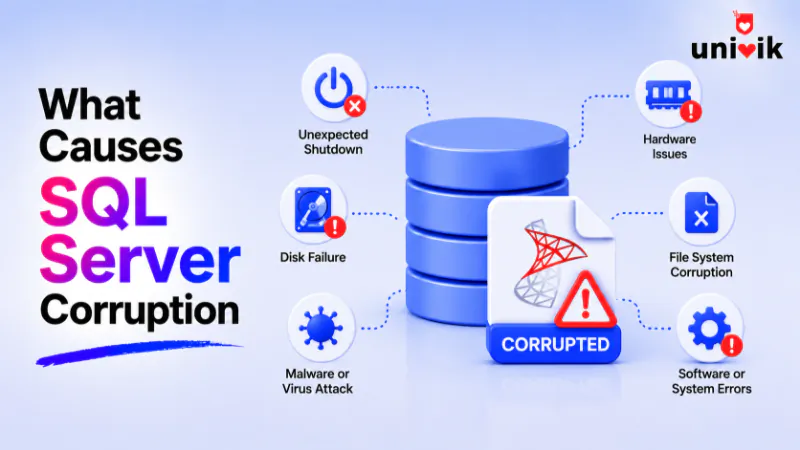
Nearly all SQL Server database corruption starts in the I/O path, failing disks, storage controllers, firmware, drivers, faulty memory and power loss mid write, not in SQL Server itself. DBCC CHECKDB and the 823, 824 and 825 errors are how it shows itself. This page covers the causes, the checks and the prevention, then routes each repair scenario to the right fix, including Univik SQL Database Recovery for a database that stays unreadable.
Corruption is the word for a database whose bytes on disk no longer match what SQL Server wrote, and knowing where it comes from changes how you run a server. It decides what you monitor, what you switch on and how fast you catch damage before it spreads into backups. We see the aftermath across every cause on this page while recovering corrupt MDF files for users of our tools, and the pattern behind them is remarkably consistent. Here is what actually corrupts SQL Server databases, how to check for it and what keeps it from happening.
Where SQL Server Corruption Really Comes From
The short answer is the input and output path. SQL Server hands its writes to Windows, and Windows hands them on to drivers, controllers and disks. A fault anywhere along that chain can change what lands on disk. When a page comes back different from what was written, that is corruption. And in the overwhelming majority of cases, well over 99 percent by most published accounts, the fault sits in that hardware and driver chain rather than in SQL Server’s own code.
That has a practical meaning people miss. Corruption is rarely a software problem you patch away, it is a symptom of the storage underneath, which is why the same database corrupting twice points at a failing component, not bad luck. It is also why the fix for the data and the fix for the cause are two different jobs, recovering the database gets your data back, and finding the failing disk, controller or memory module keeps it from happening again.

“We corrupt databases on purpose to test recovery, MDF and NDF, LDF and BAK, from 100 MB right up to 5 GB, on every SQL Server version and edition. Breaking them deliberately is the only way to know what recovery gets back.”
Nick Rogers
|Founder, Univik, building file conversion tools since 2013
The Causes of Database Corruption, Ranked
Roughly in order of how frequently they turn up, these are the causes behind corrupt SQL Server databases.
Two of these need a closer look. Power loss corrupts through torn pages, a write is 8KB but disks commit in smaller sectors, so power dying mid write leaves a page that is part new and part old. And the filter layer matters because anything that touches the write between SQL Server and the disk, a compression driver, an encryption layer, a badly matched sector size, is one more place a page can be changed in flight. Virtualized storage widens that layer further, SAN and NAS instability and misconfigured virtualization both show up as torn writes on otherwise healthy disks. One line worth drawing here, a database wholly encrypted by ransomware is a different problem from corruption, the pages are intact but locked, and it calls for a security response rather than a repair.
How to Check a SQL Server Database for Corruption
The check is DBCC CHECKDB, SQL Server’s own integrity test. It reads every page in the database, verifies the checksums and torn page markers and validates the logical structures on top, indexes, allocation maps and the links between them. A clean run means the database is sound end to end. A run that reports errors names the damaged objects and pages, which is the map for whatever comes next.
Two quieter checks back it up. The msdb database keeps a suspect_pages table where SQL Server records every page that has failed a read, worth a look whenever something feels off. And the SQL Server error log alongside the Windows event log carry the I/O errors that precede most corruption, so a scan for the error numbers below turns up trouble before a full check does. CHECKDB is heavy on disk and CPU, which is why it runs on a schedule rather than constantly, off hours on busy servers.
DBCC CHECKDB has one limit worth naming. It checks a single database the server has online, so a folder of detached MDF files or a stack of backups needs a different approach, covered in how to check multiple database files for corruption without attaching them.
The Error Numbers That Signal Corruption
Three error numbers carry most of the corruption news, and they form a ladder from warning to failure.
An 825 in the log with no other symptom is the cheapest warning you will ever get, the read eventually worked, but a disk that needs retries is a disk on its way out. 823 and 824 mean damage has arrived, and at that point the job splits into the two tracks from earlier, recover the data and replace whatever is failing underneath.
Page, Index and Table Corruption
Corruption lands at different depths, and the depth sets how loud it is. A corrupt page is the base case, one 8KB unit of the file no longer reads correctly, and everything else is a matter of what that page belonged to. When it belonged to an index, queries using that index fail while the underlying table data can be fine, which is the gentlest case since a damaged index can be rebuilt from the intact table. When the page belonged to the table’s own data, the rows on it are what is damaged, and when it belonged to the allocation structures that map where everything lives, whole ranges of the database can go unreadable at once.
The loudness varies with the depth too. Some corruption announces itself the moment any query touches the damaged page. Some sits silent in a corner of the database no query has visited for months, which is exactly the case scheduled checks exist to catch before it ages into every backup you keep.
When the Master or Another System Database Corrupts
SQL Server runs on a set of system databases, and corruption there behaves differently from corruption in your own. The master database holds the instance’s configuration and the catalog of every other database, so a corrupt master can stop the whole SQL Server service from starting, not just one database from opening. The model database is the template new databases copy from, and tempdb is rebuilt fresh at every service start. That rebuild makes tempdb corruption at rest the least serious of the family, a restart gives it a new one, though repeated tempdb corruption still points at the same failing storage as everything else on this page.
A corrupt master is an instance level emergency with its own repair procedures in Microsoft’s documentation, rebuilding or restoring the system databases, and it is a different job from recovering a user database. What the two share is the cause, system databases sit on the same disks through the same controllers, so a corrupt system database is the same hardware message delivered to a more painful address.
What to do the Moment Corruption Appears
This page stays out of the repairs themselves, each scenario has its own guide, and the fastest help is knowing which one you are in. A database marked suspect, where SQL Server refuses to bring it online, is walked through in our guide to fixing a suspect database. A database stuck showing in recovery for hours has its own causes and exits, covered in SQL Server database stuck in recovery. When CHECKDB has found errors and the question is what its repair options really do and what the data loss option truly costs, that decision is laid out in our guide to DBCC CHECKDB and REPAIR_ALLOW_DATA_LOSS.
The clean exit from any of them is a healthy backup restored, and when no such backup exists the routes are gathered in recovering a SQL database without a backup. And when the database refuses to attach or the instance cannot read the file at all, Univik SQL Database Recovery opens the MDF straight from disk on Windows and rebuilds what the damaged file still holds. The free MDF Viewer gives a look at what is still readable before anything is committed, part of the wider approach in opening an MDF without SQL Server.
When the file is the last copy standing
Univik SQL Database Recovery reads a corrupt MDF directly on Windows, works around the damaged pages and rebuilds the tables the file still holds, so hardware that ruined the database does not get to keep the data too.
Prevent SQL Server Corruption Before it Starts
Prevention is mostly about catching the I/O path lying, and SQL Server ships the tools for it. Keep the PAGE_VERIFY option set to CHECKSUM on every database, it stamps each page as written so any change in flight is caught on the next read, and it is the single setting that turns silent corruption into a loud error. Run DBCC CHECKDB on a schedule that matches how much data you can afford to lose, weekly at minimum for databases that matter. Take backups with checksums on and restore one now and then, since a backup that has never been restored is a hope rather than a plan, and corruption that ages into the whole backup chain undoes the plan entirely.
On the hardware side, put database servers on protected power so a blackout cannot tear a write in half, and keep controller firmware and SQL Server’s cumulative updates current. Be deliberate about anything that sits in the write path, every added filter driver or compression layer is one more component to trust. And never keep database files in compressed folders or volumes, which Microsoft does not support for data files and which raises the corruption risk directly. None of this rules corruption out entirely, disks still die, but it turns months of silent damage into a same week discovery with a clean backup ready behind it.
Frequently Asked Questions
What is the Most Common Cause of SQL Server Corruption?
The I/O subsystem, the chain of drivers, controllers and disks that carries writes from SQL Server to storage. Failing drives, controller cache faults, firmware bugs and bad memory account for the overwhelming majority of cases, which is why recurring corruption on one server points at hardware rather than at SQL Server.
Can a Power Outage Corrupt a SQL Server Database?
Yes. A database page is 8KB but disks commit in smaller pieces, so power dying mid write can leave a torn page, part new data and part old. Checksums catch it on the next read and protected power prevents it, which is why a UPS on a database server is corruption prevention, not just uptime.
How do I Check if a SQL Server Database is Corrupted?
Run DBCC CHECKDB against the database, it reads every page, verifies checksums and validates the structures on top, and a clean result means the database is sound. The suspect_pages table in msdb and the 823, 824 and 825 errors in the SQL Server log are the other two places corruption shows up.
Does DBCC CHECKDB Fix Corruption?
It finds corruption, and it carries repair options that come with real trade offs, the strongest of which can delete data to make the database consistent. What those options do and when each is worth it is a decision in itself, covered in our guide to DBCC CHECKDB and REPAIR_ALLOW_DATA_LOSS.
What is SQL Server Error 824?
The read from disk technically succeeded but the page failed its consistency checks, a wrong checksum, a torn page or a bad page ID. It means the bytes on disk are not the bytes SQL Server wrote, which points at the storage path, and the page it names is corrupt and needs recovery.
Why Setup Says the SQL Server Installation is Either Corrupt?
That message is a different problem from database corruption, it comes from the installer when the SQL Server program files or setup media are damaged, and it is fixed by repairing the installation, not the databases. Your data files can be perfectly healthy while setup shows it, and the reverse holds too.