 ACT! Database Fields Extracted

No ACT! Installation Required
This ADF file converter reads the ADF binary directly. You do not need ACT! installed, a valid licence or an internet connection. That is what matters most when the licence has expired or the old version will not run.
Univik ACT ADF Converter
Univik ACT ADF Converter unlocks ACT! ADF database files without the program installed. Every contact, company, note, history record and opportunity is read from the binary ADF file and exported to clean, portable formats you can actually use. No licence required. No data leaves your machine.
*Free trial exports the first 10 contacts per database. No registration required. A $39 licence unlocks unlimited export.

v6.9.0 Windows 7 to 11
Built for CRM administrators and IT teams
IT teams and database administrators use Univik ACT ADF Converter to rescue decades of contact data from locked ADF files, whatever the version.
ACT! Database Fields Extracted
Contact
Full Name
Company
Organisation
Phone
All Numbers
Email
All Addresses
Address
Home + Work
Group
Membership
Opportunity
Sales Pipeline
Notes
All Notes
History
Activity Log
Activity
Tasks + Calls
Custom
User Fields
Web Site
URL Field
Output Formats
Each format is designed for a specific destination. Import into a new CRM, archive for compliance or move contacts to Outlook.
Key Features
Built for IT administrators, CRM managers and businesses that need reliable, complete extraction from ACT! databases.
No ACT! Installation Required
This ADF file converter reads the ADF binary directly. You do not need ACT! installed, a valid licence or an internet connection. That is what matters most when the licence has expired or the old version will not run.

ACT! 2005 Through Act! v27
ACT! 2005, the Sage ACT! releases through 2013 and every Swiftpage Act! version up to v27. The converter tool reads the version from the ADF header and picks the right parser on its own. Versions 3 to 6 kept data in .dbf files, a different format.

Notes and History Fully Preserved
Notes and history are the data most often lost in an ACT! move. The converter software exports every note with its date, linked contact and full text. Every history record comes with date, type, Regarding line and description.

Custom Fields Auto-Detected
ACT! users add their own fields to contacts, companies and opportunities. The converter software reads the field list stored in the database, finds every user-defined field and adds it as a column in the Excel and CSV output. No field mapping needed.

100% Offline and Confidential
An ACT! database holds years of customer relationships and pipeline. The converter tool runs on your own Windows PC. Nothing is uploaded and no internet connection is needed.

Opportunities and Groups Exported
Opportunities export with value, probability, close date, stage and linked contact. Groups export with name, description and every member. Both save you rebuilding the pipeline in the new CRM.
How It Works
From locked binary file to a clean export in minutes.
Load Your ADF File
Open the .adf file with the matching .alf in the same folder. A summary shows the contact, company and history counts before you export anything.
Choose What to Export
Pick the tables you want, then the format: Excel for a multi-sheet workbook, CSV for CRM import, VCF for phones and Outlook, PST for Outlook or PDF for archiving.
Export and Import
Pick a save folder and click convert. Import the CSV into Salesforce, HubSpot or Zoho, review the Excel file before migration or load the VCF into Outlook or your phone.
Step-by-step help with screens from v6.9.0
Inside the Tool
These are real screens from Univik ACT ADF Converter reading a live database. It lists every contact, exports to the format you pick and logs each record it writes.
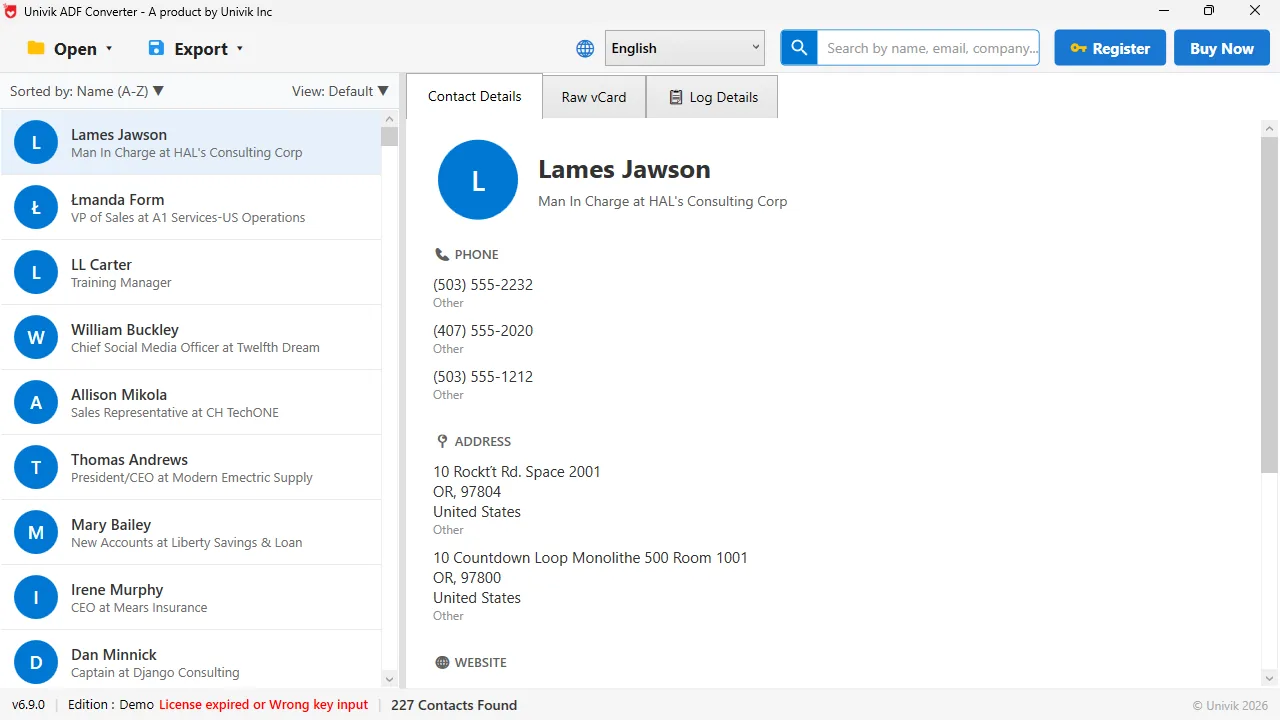
The tool opens the ADF file and lists every contact. Here it read 227 contacts, with names, job titles, phone numbers and addresses ready to export.
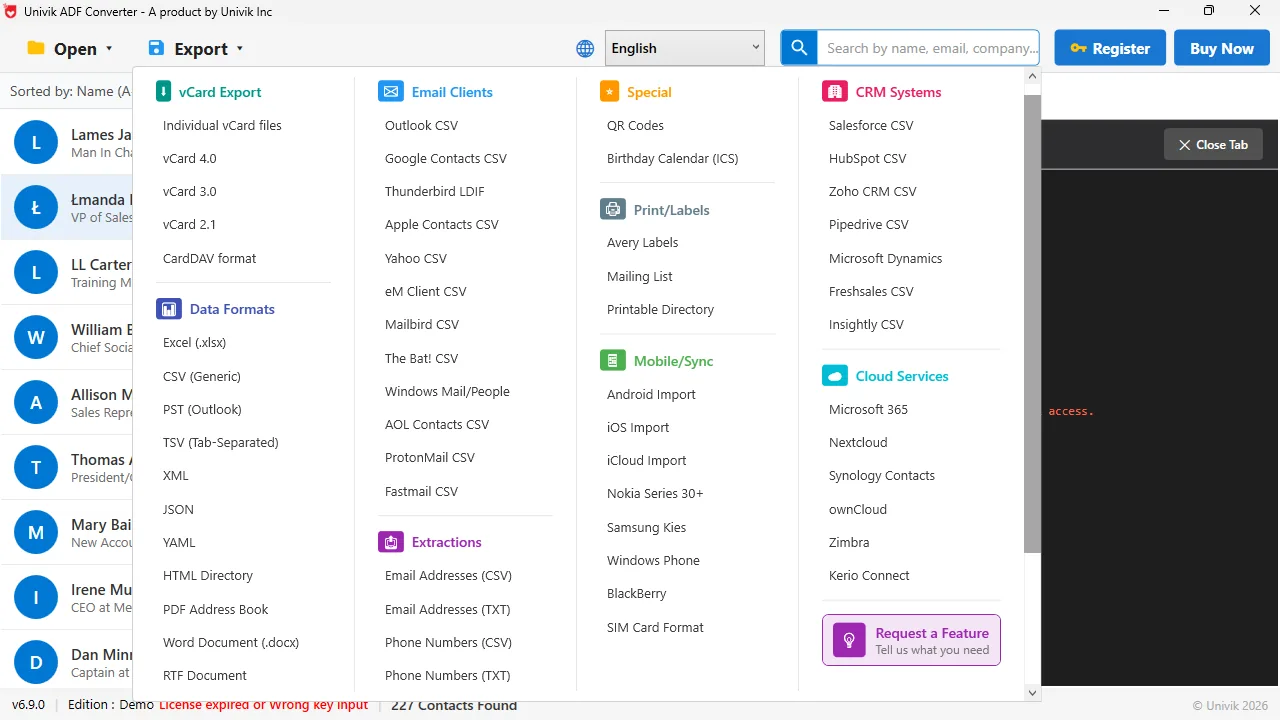
One menu, every destination. Export ACT! contacts to Excel, CSV, vCard and PST. There is also a CRM CSV for Salesforce, HubSpot, Zoho and more.
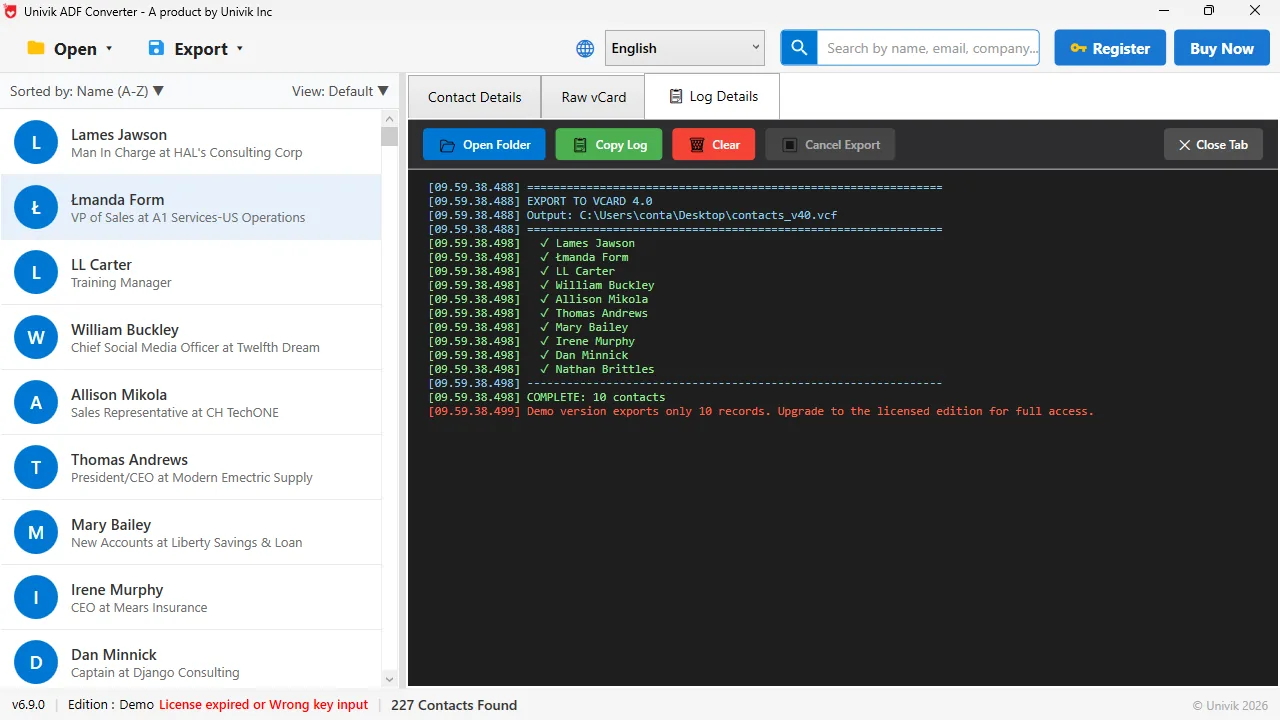
Every export writes a log. Here a vCard 4.0 export finishes with a tick beside every name. In the demo, the log stops at 10 records. A licence removes that cap.
Migration Destinations
The CSV and Excel output imports into Outlook, Excel and the major CRMs. New to this? Read how to export ACT! contacts to Excel, Outlook and CSV.

Salesforce
Import the contacts and accounts CSV with the Salesforce Data Import Wizard.
HubSpot CRM
Import the contacts CSV with the HubSpot import tool and match the columns.

Zoho CRM
Import contacts and accounts by CSV through the Zoho CRM import wizard.

Pipedrive
Import people and organisations by CSV. Opportunities import as deals.
Microsoft Outlook
Open the PST in Outlook or import the VCF. Phone, email and address fields mapped.
Google Contacts
Import the contacts CSV into Google Contacts for Gmail and Google Workspace.

Monday.com CRM
Import the contacts CSV into a Monday Sales CRM contacts board.

Microsoft Excel
One sheet per table in XLSX. Pivot tables, VLOOKUP and Power Query work at once.
Use Cases
The businesses and professionals who rely on the converter every week.
IT Departments Decommissioning ACT!
Before the old CRM is wiped, IT needs a full extract. This ADF file converter writes every table to CSV, ready for the new platform.
Legacy Database Rescue
ACT! 2007, 2009 or 2012 will not install on Windows 10 or 11. The converter tool reads the old .adf directly and brings the contacts back.
Sales Team CRM Migration
Moving to Salesforce or HubSpot? Contacts, opportunities and notes export in one run. For very large databases, our migration service handles the project.
Why Univik
Most ADF tools need ACT! installed, read one or two versions or drop the notes and history. Univik ACT ADF Converter software does none of that.
Five ways to get data out of an ACT! database, including the ones that do not need Univik.
| Way | Needs ACT! running | Notes and history | Cost | Best when |
|---|---|---|---|---|
| ACT! File menu export | Yes | No, contacts only | Free | ACT! still opens and you only need the contact list |
| Act! 14-day trial install | Yes, for 14 days | No, contacts only | Free for 14 days | A one-time contact list and the database updates cleanly |
| Attach the .adf to SQL Server | No, but you need a database expert | Yes, as raw tables | Free, your time | You have someone who knows SQL |
| JL Technical conversion service | No, they run it for you | Exports the database to CSV files | Paid service | You want someone else to do the work |
| Univik ACT ADF Converter Our tool | No | Yes, dated and linked to each contact | $39 one time | ACT! will not open, or you want six formats in minutes |
If ACT! still runs and you only need the contacts, its own export is free and fine. Univik ACT ADF Converter is the better choice when the program will not open, when notes and history matter or when you want all six formats without learning ACT!'s screens.
ADF File Reference
What the ADF file holds, why Excel and Access cannot open it and why SQL Server needs an expert to attach it.
ADF stands for ACT! Data File, the database ACT! has used since the 2005 release, when it moved to Microsoft SQL Server. Underneath it is a SQL Server data file, like an .mdf, so Excel and Access cannot read it and SQL Server needs a database expert to attach it.
Every .adf travels with a companion .alf file that ACT! needs to manage the database. Keep the pair together and take an ADF backup of both before you export ADF files.
Full explainer: ACT! ADF, ALF and PAD files explained. All 20 ACT! guides are listed in the guides section below.
| Extension | .adf (with .alf companion) | |
| Format | SQL Server data file, like an .mdf (ACT! 2005 onward) | |
| Creator | Act! (Sage era from 2005, Swiftpage since 2013) | |
| Data | Contacts, Companies, Groups, Opportunities | |
| Child data | Notes, History, Activities, Custom Fields | |
| ALF file | Required. Companion file ACT! needs to manage the database. | |
| Reference | fileformat.com/database/adf | |
ACT! Guides
Each guide covers one job, from reading an .adf file without ACT! to moving notes and history into a new CRM. Written by the Univik team.
Why People Need an ADF Converter
ACT! has had five owners since 1987. Each change left users with licence breaks and ADF files they could no longer open. These are the situations that bring people here.
Version Coverage
ACT! moved to Microsoft SQL Server in 2005, and every release since, from Sage ACT! to Act! v27 by Swiftpage, writes the same .adf and .alf pair. Twenty years of ADF databases, one converter that reads them all.
| Version | 6.9.0 (Latest) |
|---|---|
| Licence | $39 one-time, Personal edition for 2 PCs. Business and Enterprise editions for more PCs. |
| Platform | Windows 11, 10, 8.1, 8 and 7 |
| Framework | .NET Framework 4.8 or higher |
| Reads | .adf with its matching .alf, from ACT! 2005 through the current Act! release |
| Writes | CSV, Excel (.xlsx), vCard (.vcf), PDF, Outlook PST and TXT |
Batch convert Lotus Notes NSF mail and contacts to PST, EML, MBOX, MSG, PDF and VCF.
Batch convert Outlook Express DBX files to PST, EML, MBOX, MSG and PDF.
Turn AOL Desktop Gold PFC mail into EML, MBOX, PDF and CSV in one run.
FAQs
What IT admins and business owners ask most about ACT! ADF conversion.
"We built this ACT ADF converter to read the raw .adf binary, so it opens databases from ACT! 2005 through the latest Swiftpage release even when ACT! will not install on Windows 11. In our own testing the contacts, notes and history all come across intact." Univik Research Team
Univik has made Windows data tools since 2013. The converter reads the .adf read-only and nothing is uploaded. Every licence carries a 30-day money-back guarantee.
Free trial. No registration. No ACT! licence needed. Your data stays on your machine.
Windows 7, 8, 10, 11 | 100% offline | 30-day money-back guarantee
Written by Univik Research Team
Last updated September 2026
Works on closed CRM formats such as ACT! ADF and its ALF companion. This page was fact checked in September 2026 on a 227-contact ACT! database in converter version 6.9.0 on Windows 11. It was also tested against real ADF files from several versions. Read more on the Univik blog.
 How It Works
 Migration Destinations
 Use Cases
 Why Univik
 ADF File Reference
 FAQs
FAQs