A Bank of Baroda statement is sealed with the eight numbers of your birth date, in the order DDMMYYYY. That turns 22 November 1978 into 22111978.
Bank of Baroda applies the same date rule to files from Baroda Connect and to files saved in the bob World app. Once the file is open, you can take the password out so it never prompts you on future opens.
A Bank of Baroda statement reaches you as a sealed PDF and refuses to open until you feed it the right code. Bank of Baroda ties that code to a single detail it already keeps on file, the day you were born, typed as eight bare numbers. Learn the pattern one time and every BoB statement gives way. From there the Univik PDF Unlocker can lift the code off the file for good, so no Bank of Baroda statement halts you again.
What Is the Bank of Baroda Statement PDF Password?
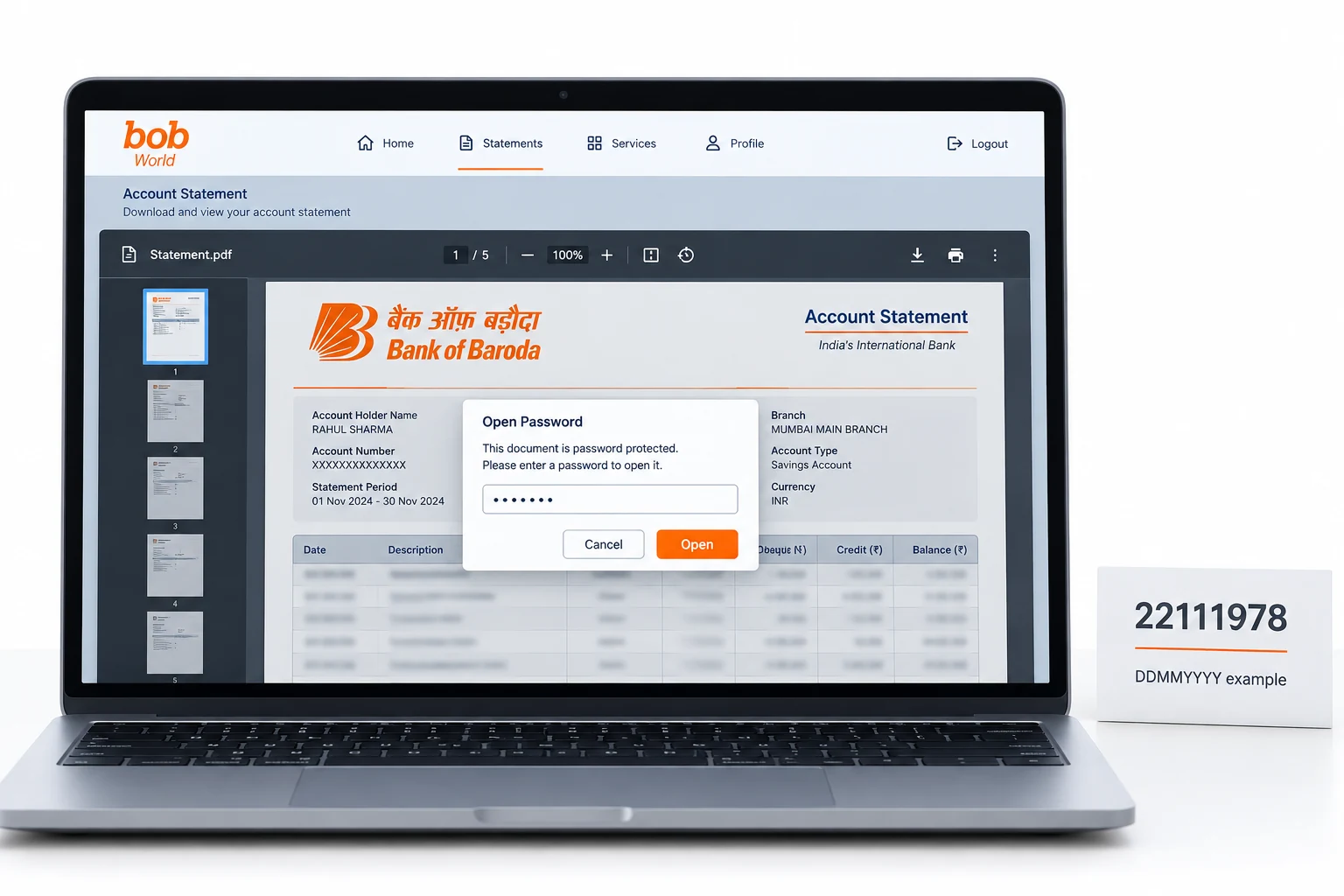
The Bank of Baroda statement password is your birth date rendered as eight numbers that run day, then month, then the full year. A holder born on 22 November 1978 keys 22111978. Bank of Baroda gives any single-digit day or month a zero at the front, so the value always stretches to eight digits. This rule holds for a statement pulled through Baroda Connect and for one exported from the bob World app. Your name plays no role and neither does your account number. BoB relies on the birth date on its own.
| Your date of birth | Bank of Baroda password |
|---|---|
| 22 November 1978 | 22111978 |
| 6 April 1983 | 06041983 |
| 30 September 1975 | 30091975 |
Match a row to yourself. The eight numbers that spell your own birth date are the exact code your Bank of Baroda file wants.
Why Does Bank of Baroda Lock Its Statement PDF?
Bank of Baroda wraps the statement in that lock so the account number, together with the balance printed inside, stays out of view if the file ever drifts to a stranger's inbox. A BoB e-statement arrives by email and sits in your mailbox, where an unprotected PDF would reveal every line to the person who taps it open. The birth-date code is what the bank labels an open password, and the reader puts up an empty box that yields none of the pages until the eight numbers land. Think of it as a wrapper guarding a statement about your money, not a hint that something ails your Bank of Baroda account.
How Do You Open a Bank of Baroda Statement PDF?
To open a Bank of Baroda statement, type your birth date as eight numbers into the password box and the pages appear at once. Fetch the file from your BoB email or export a fresh copy through the bob World app, then open it inside any reader you have to hand. Enter the day, then the month, then all four numerals of the year with nothing between them. Where a day or a month runs to one figure, set a zero ahead of it. The Bank of Baroda statement opens the second those numbers line up with the birth date the bank holds on record for you.
How Do You Remove the Bank of Baroda Statement Password?
Keying the birth date into each Bank of Baroda statement grows tiresome, and while the code sits in place, other programs are shut out of the file, say a lender's upload page or the accounting app your accountant relies on. The right move is to open the BoB file a single time using the date, then set aside your own clean version that has no password on it. The Univik PDF Unlocker runs right on your Windows machine and can take an entire folder of Bank of Baroda statements in one clean pass.
With a Bank of Baroda statement open, the Univik PDF Unlocker puts aside a copy that holds no password. Send it a folder of BoB statements and each file drops its lock.
Free Download See all featuresBank of Baroda Statement Not Opening With Your Date?
If your date will not open the Bank of Baroda statement, study how the code is built before anything else. Check that the run goes day first, then month, then year. Make sure a lone figure still keeps its leading zero and that the full year carries all four of its digits. At times the birth date Bank of Baroda has on record differs from the one you noted down, and that gap is worth checking. When the eight numbers keep bouncing back, the covering note that carried the BoB statement lays out the rule in full. A quick word with Bank of Baroda customer care will settle which date sits on your account or trigger a fresh send of the file. A remover cannot help with a code you were never given, since it works only on a BoB file that already opens.
- The Bank of Baroda statement password is your eight-number birth date in DDMMYYYY order.
- Born on 22 November 1978, you open the BoB file with 22111978.
- The same birth-date rule covers Baroda Connect and the bob World app.
- The code leaves out your name and your account number entirely.
- Open the BoB statement with the date, then strip the code out so it quits asking on later opens.
- If the date is refused, Bank of Baroda can spell out the rule again or issue a fresh statement.

Bank of Baroda Statement Password Questions

This guide stays current under Leena Taylor Paul and the Univik crew, a shop that has shipped Windows tools since 2013. Many people only want a Bank of Baroda statement to open for a bank form or an accountant, without the date box on every view, so the piece sets down the format next to a tidy way to take the lock off. Last checked September 2026. Date not working? Contact our support team.