For a Punjab National Bank statement, the PDF opens to your date of birth keyed as DDMMYYYY. A birth date of 7 March 1985 makes the password 07031985.
PNB applies that same date rule to files pulled through net banking and to files saved from the PNB ONE app. With the statement open, you are free to strip the password so later opens go straight through.
Tap a Punjab National Bank statement and the PDF stops you at a password box, blank until the right value goes in. PNB draws that value from one detail it already holds on you, your day of birth, put in as eight bare figures. Once the pattern is clear, every PNB file opens without a fight. After that the Univik PDF Unlocker can strip the value off the file for keeps, so no PNB statement prompts you again.
What Is the PNB Bank Statement PDF Password?
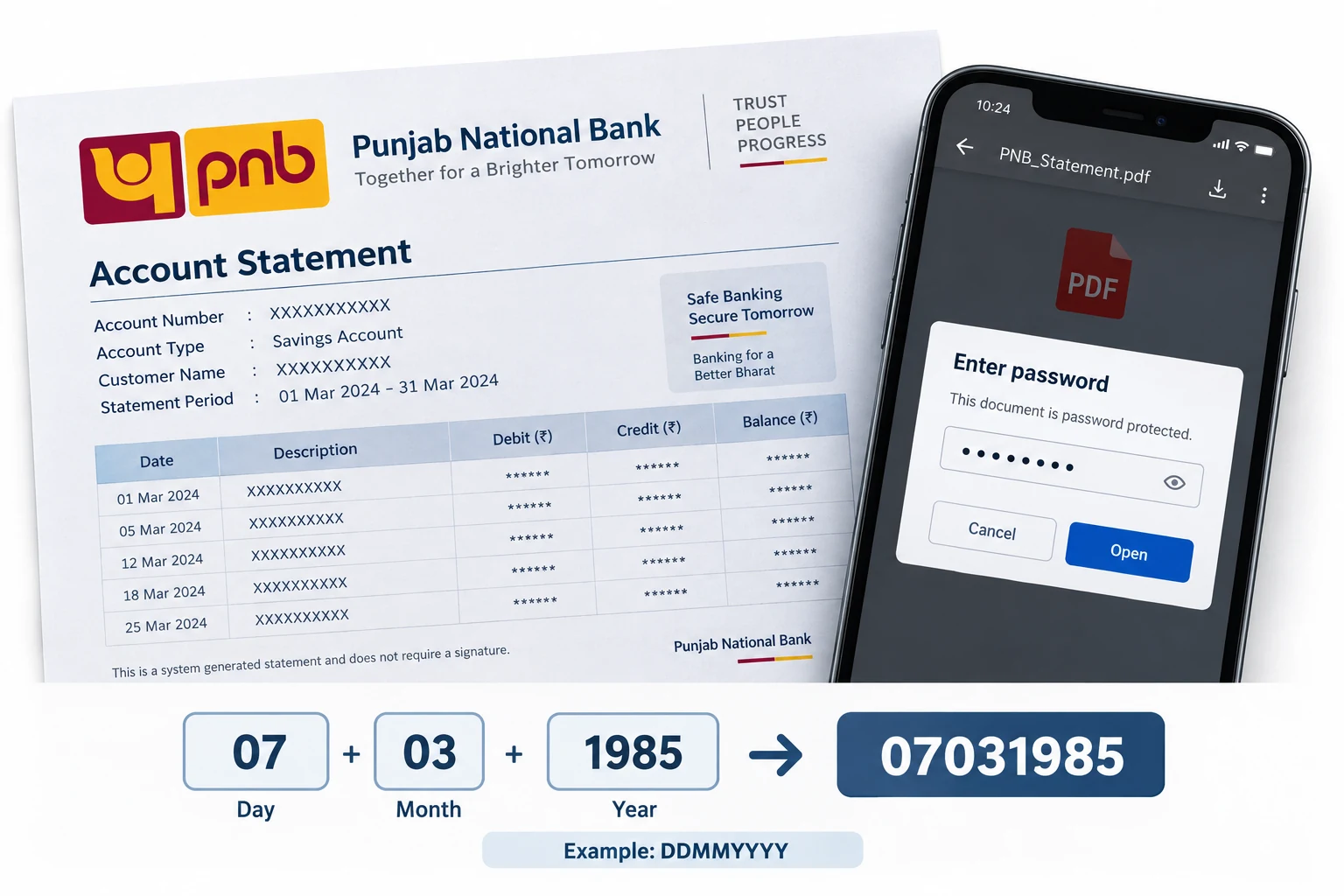
On a PNB bank statement the password equals your date of birth in DDMMYYYY shape, eight figures that carry the day first, the month next, then the four-figure year. A customer born on 7 March 1985 keys 07031985. PNB puts a zero in front of any single-figure day or month, so the value always fills eight places. The same rule covers a statement emailed through PNB net banking as well as one exported out of the PNB ONE app. Neither your name nor your account number goes into it. Punjab National Bank builds the value from your birth date and nothing else.
| Your date of birth | PNB statement password |
|---|---|
| 7 March 1985 | 07031985 |
| 21 June 1992 | 21061992 |
| 3 October 1978 | 03101978 |
Match any row against yourself. Drop the eight figures of your own birth date in and you hold the PNB password for that file.
Why Does PNB Password Protect Its Statement?
PNB shields the statement so the account number and the balance on the page stay private if the file ever slips to a stranger's mailbox. A PNB e-statement rides in over email and rests in your inbox, where an unlocked PDF would spread every line before whoever tapped the attachment. That birth-date value is what PNB calls an open password: the reader offers a bare prompt and lets none of the pages through before the eight figures arrive. Treat it as a wrapper guarding a record of your money, not a hint that your PNB account is in any trouble.
How Do You Open a PNB Bank Statement PDF?
To open a PNB bank statement, enter your birth date as eight figures in the password box and the pages surface at once. Pull the statement out of your PNB email or export a new copy from the PNB ONE app. Open it in whatever PDF reader you already use. Start with the day, follow with the month, then finish with the full four-figure year and leave no gaps anywhere. If a day or a month sits at a single figure, tuck a zero ahead of it. The PNB statement gives way the moment those figures match the birth date PNB keeps for you.
How Do You Remove the PNB Statement Password?
Keying your birth date into every PNB statement wears thin fast, and while the lock stays on, other software cannot read the file, say a lender portal that wants your statement or an accounting package that has to open it. The answer is to open the PNB file one time with the date, then keep a clean version with no password on it at all. The Univik PDF Unlocker does exactly that on the Windows PC in front of you and can work through a full folder of PNB statements in a single go.
With your PNB statement open, the Univik PDF Unlocker sets aside a copy that carries no password. Aim it at a folder of PNB statements and every file inside loses the lock together.
Free Download See all featuresPNB Statement Not Opening With Your Birth Date?
Should your birth date turn the PNB statement down, look closely at how the value is built. Make certain the sequence reads day first, month second, year last. See that any lone figure still shows its leading zero and that the year gives all four numerals. Sometimes PNB has a birth date on record that differs from the one in your own note, so a mismatch there is worth ruling out. If the eight figures keep bouncing, the note that delivered the PNB statement lays the rule out word for word. A quick call to PNB customer care will settle the birth date tied to your account or get the file sent once more. A password stripper is powerless over a value you never had, since it works from a PNB file that already opens, not one still sealed.
- Your PNB statement password is the eight-figure birth date in DDMMYYYY form.
- A birth date of 7 March 1985 opens the PNB file with 07031985.
- PNB net banking and the PNB ONE app work off the very same birth-date rule.
- No letters from your name and no account number sit in the PNB value.
- Open the PNB statement with the date, then take off the lock so it quits prompting.
- If the birth date fails, PNB can restate the rule or send the statement once more.

PNB Bank Statement Password Questions

Leena Taylor Paul reviewed this PNB guide with the Univik team, who have shipped Windows software since 2013. Many readers only want their PNB statement to open for a lender or their accountant without the date prompt each time, so the piece sets out the format and a tidy route to clear the lock for good. Checked over in September 2026. Unsure which date to use? Ask the Univik support team.