Your Bank of India statement password depends on where your file came from. The e-statement emailed by the bank opens with your 15-digit account number. A PDF saved from BOI Mobile opens with four lower case letters from your name and the DDMM day and month of your birth.
Ravi Kumar born on 15 August types ravi1508 for an app download and his full account number for the emailed copy. Loan and overdraft statements can follow their own rule.
Bank of India customers hit a problem that most other banks spare them: the code that opens one statement fails on the next, because BOI uses one rule for the statement it emails and another for the PDF saved out of BOI Mobile. Knowing which file you hold settles it in a second and that's the whole trick.
Both Bank of India statement passwords are on this page, with the way to tell the files apart and the role of Univik PDF Unlocker once a mixed folder of both kinds needs to open without a password box in the way.
What Is the Bank of India Statement Password?
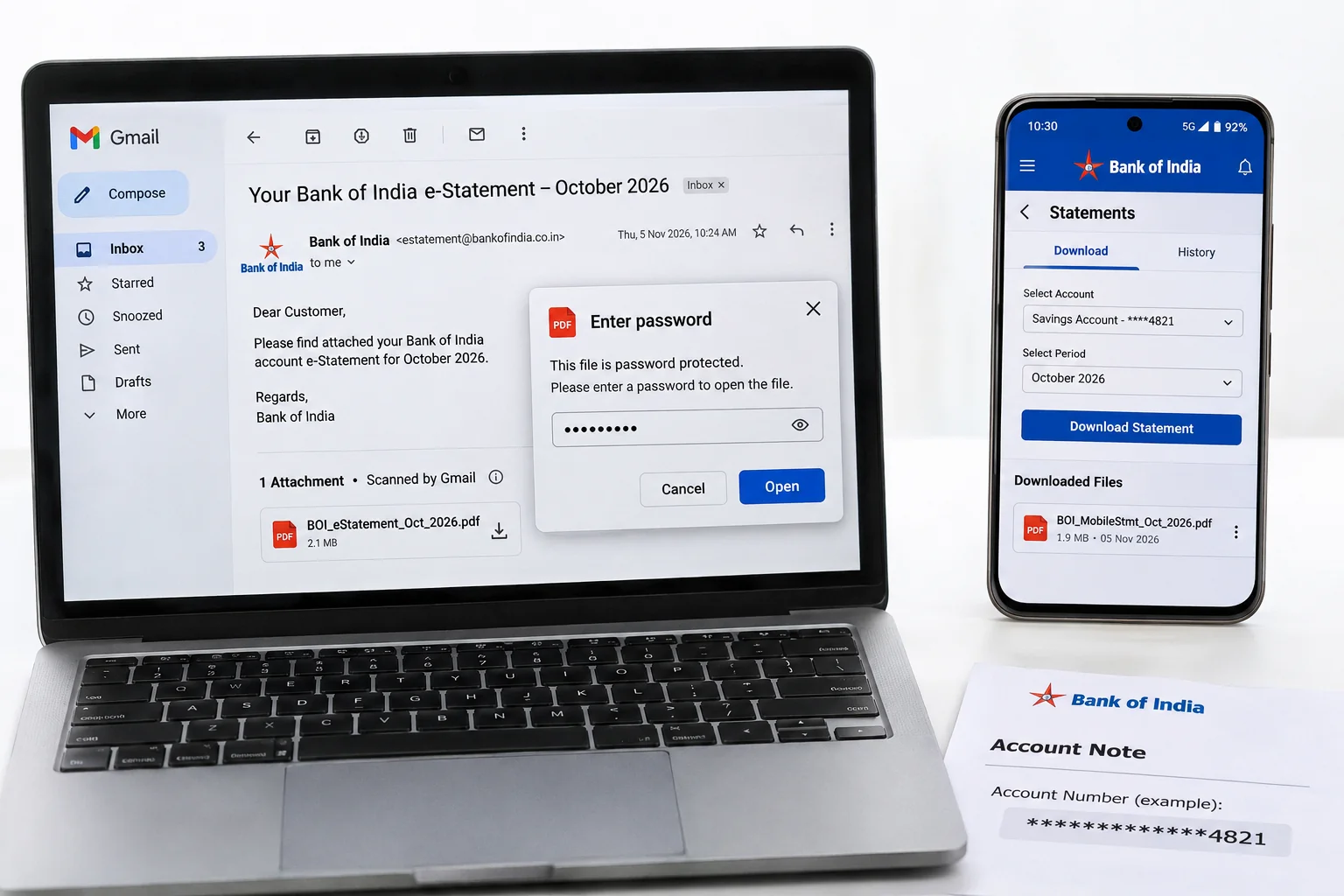
Bank of India runs two statement passwords. The e-statement that the bank emails to your registered address opens with your account number, all fifteen digits, typed with no space or dash. The PDF you download inside BOI Mobile wants four lower case letters from your name and then DDMM for the day and month of your birth. Ravi Kumar, born 15 August, types ravi1508 for the app file and his fifteen-digit account number for the emailed one.
The lower case matters on the app code, because the same four letters in capitals are a different password to a PDF reader.
I cross-checked two published guides on the Bank of India rule on 9 November 2026. Both place the app download on the four letters plus DDMM pattern and one of them records the account number rule for your emailed statement. Bank of India doesn't publish either rule on its website, so the email that delivered your statement remains the final authority for your account. Loan and overdraft accounts can carry a separate pattern.
| Where the BOI statement came from | Password rule | Example |
|---|---|---|
| E-statement emailed by Bank of India | Your 15-digit account number | 123456789987654 |
| PDF saved from BOI Mobile | First four letters of your name in lower case + DDMM | ravi1508 |
| Anjali Nair, 8 July, app download | Same app rule, zero kept on the day | anja0807 |
Look at the file name and the place you saved it from before you type. An attachment from the bank wants your account number. A file from the app wants the letters and the date.
Why Does Bank of India Use Two Statement Passwords?
The two codes come from two separate systems. The emailed e-statement is produced by the bank mailing system, which keys its lock to the account the statement belongs to. The BOI Mobile app produces its PDF on the spot and keys its lock to the customer profile, which is why it reaches for your name and birth date instead. Both are open passwords, so the whole PDF stays blank until the matching value is entered.
Both exist for the same reason: a statement shows your account number, each transaction and the balance. That file travels by email or sits in a phone download folder where a stranger could reach it. Neither code signals trouble on the account itself, so there's nothing to worry about on that front.
How Do You Open a Bank of India Statement PDF?
Work out which file you have. An attachment from Bank of India takes your fifteen-digit account number, copied from the passbook or cheque book with no spaces. A download from BOI Mobile takes four lower case letters from your name plus DDMM, so ravi1508 for Ravi Kumar born 15 August. Then press Enter and your statement opens. On a phone, a browser preview sometimes reports an encrypted PDF as damaged. Open your file in Adobe Acrobat Reader or another full PDF app instead and the password box appears.
How Do You Remove the Bank of India Statement Password?
A folder holding emailed BOI statements for some months and app downloads for others means two codes to remember and twelve prompts a year. None of those files can be read by a loan portal or your accountant software while the lock stays on. Open each statement once and keep a version that asks for nothing. Univik PDF Unlocker accepts a different value on every row, so emailed and app files share one list on your own PC.
Type your account number in the Password box of an emailed statement and the letters plus date in the box of an app statement, press Check on each, then press Unlock. Clean copies of every Bank of India statement land in your output folder.
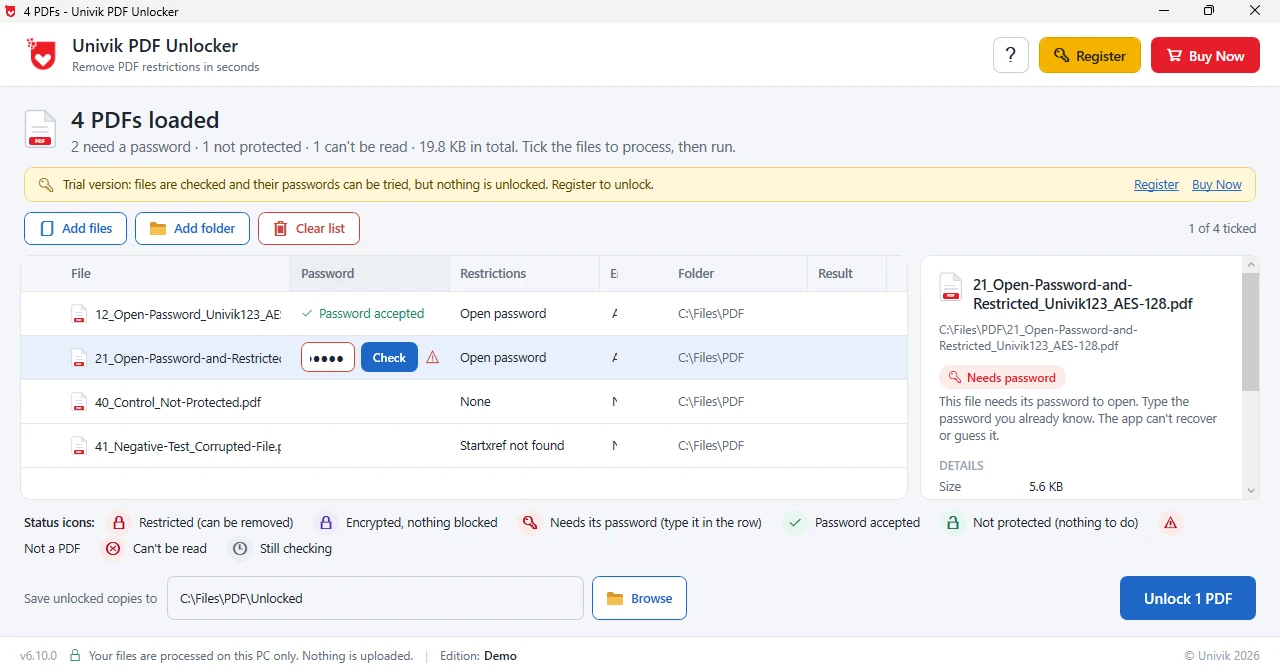
Univik PDF Unlocker takes the account number on the emailed rows and the name code on the app rows. Every Bank of India statement comes back open in the same pass.
Free Download See all featuresBank of India Password Not Working?
The first thing to check is whether you used the right rule for the right file. An emailed Bank of India statement rejects ravi1508 and an app download rejects your account number, so swap them before anything else. On your account number, count the digits, because a fifteen-digit BOI number typed from memory often drops one. Also, on the app code, keep the letters in lower case, use the name as the bank holds it and put the day before the month with its zero in place.
Loan, overdraft and some older savings accounts can carry a different pattern and the quickest check is an older statement from the same account that you managed to open. The statement email prints the rule for your account. Bank of India customer care can confirm the registered name and date or resend your file. Software removes a lock only from a statement that has already opened, so a code you were never given stays out of reach.
- Bank of India runs two statement passwords: the account number on the emailed e-statement, four lower case name letters and DDMM on the BOI Mobile download.
- Ravi Kumar born 15 August types ravi1508 for an app file and his 15-digit account number for the emailed file.
- The BOI Mobile app code is lower case, which sets it apart from most other banks.
- Loan and overdraft statements can follow a rule of their own, so check an older file first.
- A phone browser that calls the PDF damaged is reading the encryption, so open it in a full PDF app.
- Clear each statement with its own code once and both prompts stop for good.

Bank of India Statement Password Questions
What is the Bank of India statement password?
The Bank of India statement password depends on the file. The e-statement emailed by Bank of India opens with your 15-digit account number. A PDF saved from BOI Mobile opens with four lower case name letters and the DDMM day and month of birth, so ravi1508 for Ravi Kumar born 15 August.
Why does my BOI statement password work on one file and fail on another?
Because the two files came from two channels. The emailed statement is keyed to your account number and the app download is keyed to your name and birth date. Use the rule that matches where your file came from.
Is the Bank of India app password in capitals or lower case?
Lower case. Type ravi1508, not RAVI1508. A PDF treats the two as different passwords.
What about a Bank of India loan or overdraft statement?
Bank of India loan and overdraft accounts can carry their own pattern. Open an older statement from the same account to confirm the rule or read the note in your statement email.
How do I remove the Bank of India statement password?
Load the statement in Univik PDF Unlocker with whichever code fits its channel, press Check and then Unlock. That copy without a password goes to the output folder and the original stays as received.
Can I unlock emailed and app statements from BOI in one run?
Yes. Each row takes its own password, so type your account number for the emailed files and the name code for the app files, press Check on each and then Unlock. All of them get clean copies together.
Can a Bank of India statement be unlocked safely?
Yes, offline on your own PC. A Bank of India statement shows your account number against your balance, which isn't a pairing to hand to a website. Clearing the code from a statement that is yours is lawful and routine.

Leena Taylor Paul compiled this Bank of India guide at Univik, a Windows utility studio operating since 2013. Both rules were compared across two published guides, since Bank of India does not print them on its website and the statement email stays the final reference for each account. Readers come here with a BOI file that refuses a code that worked last month, so the two rules are sorted first and the lasting fix comes after. Verified November 2026. Still shut out of a BOI file? Contact our support team.