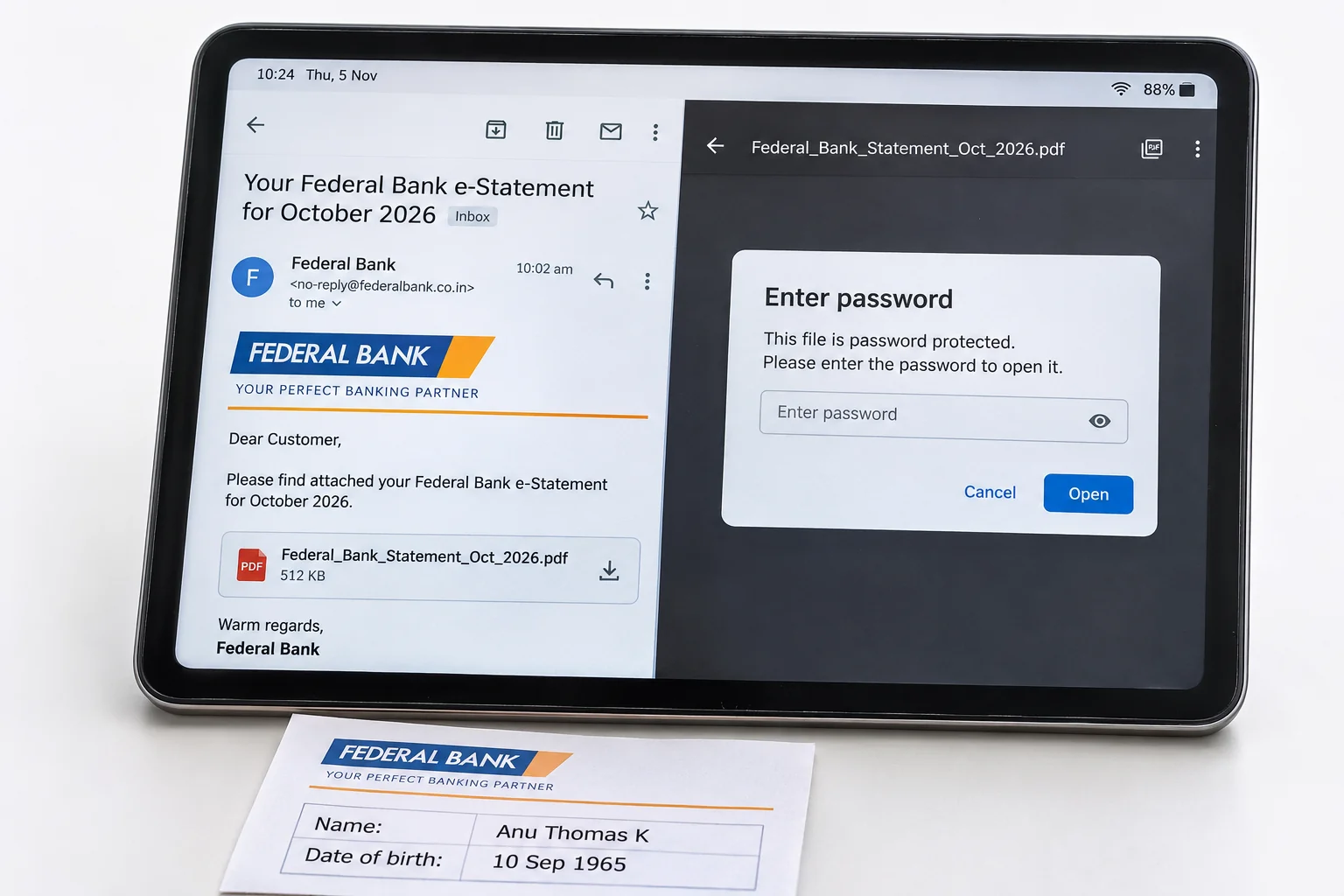
Your Federal Bank statement password is four capitals from your name with your DDMM birth date behind them. Anu Thomas K, born 10 September 1965, types ANUT1009.
Federal Bank publishes this rule on its own download page and uses the ANUT1009 example itself. A firm types the first four letters of the firm name and its date of incorporation. Spaces and special characters stay out. Once a statement has opened, you can store it with the lock gone.
Federal Bank is one of the few banks that prints its statement password rule on its own website and the rule is short: four letters from your name and four digits from your birthday. The statement that FedMobile emails you, the one you download from FedNet and the one that comes out of the certificate download portal all open with it.
Federal Bank's own example anchors the rule here, together with the places where people trip and the way Univik PDF Unlocker saves a copy of each Federal Bank statement that opens without a prompt.
What Is the Federal Bank Statement Password?
Your Federal Bank statement password takes four capital letters from your name and adds your birth day and month in DDMM form, with no space or symbol between the two halves. Federal Bank words it as the first four letters of your name or the name of your firm, all in capitals, followed by your date of birth or the firm date of incorporation in DDMM format.
The example on the bank page is a customer registered as Anu Thomas K with a birth date of 10-09-1965, whose password is ANUT1009. Note where the letters come from: ANU is the first name and the T is borrowed from Thomas, because the bank reads the name as one string and takes the first four letters it finds.
I read the Federal Bank download page on 9 November 2026 and the password note there is exactly that line, with ANUT1009 as the example. The year of birth plays no part. A one-digit day or month keeps its zero in front, so a birthday on 5 April gives 0504.
| Registered name and birthday | Federal Bank statement password |
|---|---|
| Anu Thomas K, 10 September | ANUT1009 |
| Vishal Sharma, 5 April | VISH0504 |
| Kerala Traders, incorporated 12 November | KERA1211 |
Count the letters of your registered name the way the bank does, from the first character onward and the table gives you your own code.
Why Does Federal Bank Protect the Statement PDF?
Federal Bank states on its download page that the online statements are password protected and the reason is the content. A statement lists your account number, every credit and debit for the period and the closing balance. It travels by email to a registered address that may be read on several devices. An open password on the PDF means a forwarded or intercepted copy shows nothing until those eight characters go in. The bank picked a value you can type from memory while a stranger cannot.
The lock is a cover over your money record, not a flag on your Federal Bank account and the statement inside matches what FedNet shows on screen.
How Do You Open a Federal Bank Statement PDF?
Federal Bank gives three routes to your statement and all three produce a PDF with the same lock. In FedMobile you can download the monthly statement or email it to yourself. In FedNet the statement is under More Actions in several formats. The certificate download portal saves a password protected PDF to your computer and offers an Email Statement button for your registered address.
Open your file in Adobe Acrobat Reader, Microsoft Edge or your phone viewer, then type the four capital letters and the four digits with nothing between them and press Enter. The Federal Bank statement opens at the first page of transactions.
How Do You Remove the Federal Bank Statement Password?
A locked Federal Bank statement can't be read by a loan processor upload form, by accounting software or by anyone you forward it to without your code. Open it once and keep a copy with no password. Univik PDF Unlocker works offline on your own Windows machine. Queue the statements, enter ANUT1009 or your own code in the Password column against each one and press Check. When a row reads accepted, Unlock writes a clean copy of that Federal Bank statement to your chosen folder.
Six months of statements for a home loan file clear together, every row with the same eight characters.
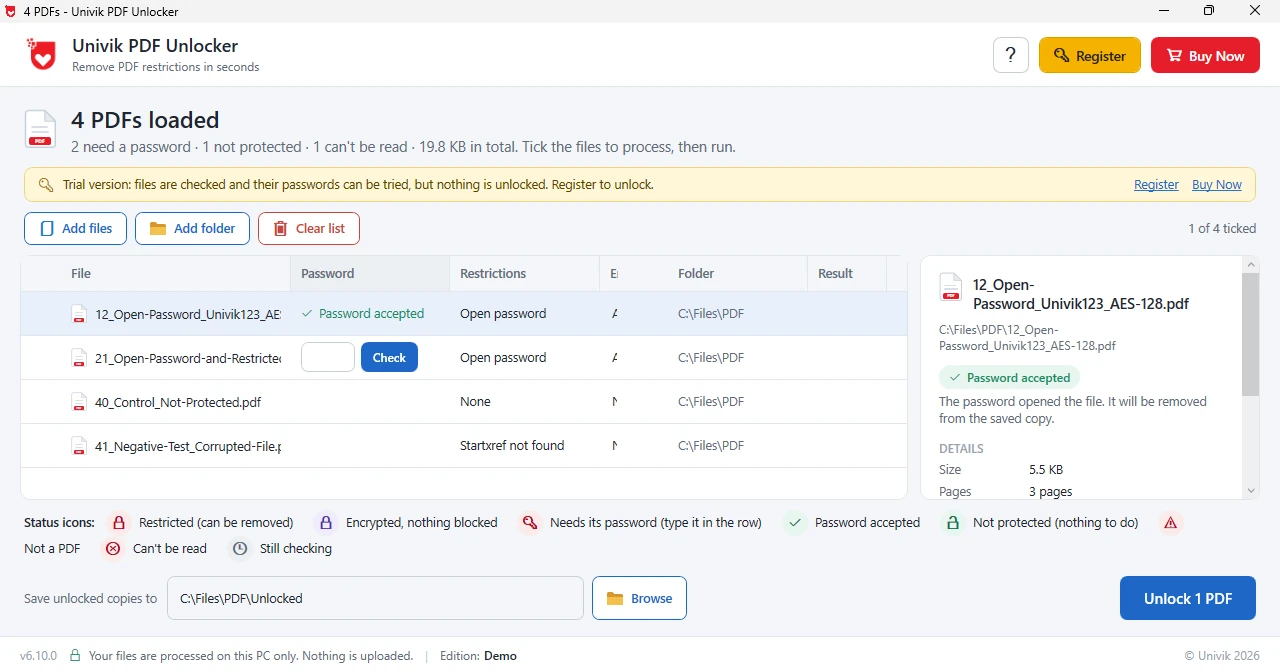
Univik PDF Unlocker needs your Federal Bank code once per statement and hands back copies that open on a click. A folder of FedMobile statements clears together.
Free Download See all featuresFederal Bank Password Rejected?
If ANUT1009 style codes keep failing, start with the name. Federal Bank takes the first four letters of the name as registered, so a short first name pulls letters from the next word and a name registered with an initial first may begin with that initial. Also check the case, since lower case letters are a different password to a PDF. Check that the digits are the day and month only, with the day first and a zero in front of a single digit.
For a firm, the letters come from the firm name and the digits from the date of incorporation. The statement email from Federal Bank carries the rule for your account and FedNet shows the registered name and date of birth, so a mismatch there is the next thing to rule out. Customer care can correct the record. The code must open your file before any unlocker can remove it, so a value you don't have can't be worked around.
- Four capital letters from your registered name followed by DDMM: that is the Federal Bank statement password.
- Federal Bank's own example is Anu Thomas K, born 10 September 1965, with password ANUT1009.
- A firm's Federal Bank password uses four letters of the firm name and its date of incorporation.
- FedMobile, FedNet and the certificate download portal produce the same lock.
- Your birth year stays out of your Federal Bank code.
- Clear the code once per statement and keep the unlocked copies for loan and tax files.

Federal Bank Statement Password Questions
What is the Federal Bank statement password?
Four capital letters from your registered name, then DDMM for the day and month you were born. Federal Bank gives the example Anu Thomas K, born 10 September 1965, whose password is ANUT1009.
Does the FedMobile statement use the same password as FedNet?
Yes. Statements from FedMobile, FedNet and the certificate download portal carry the same eight-character lock.
What is the Federal Bank statement password for a firm or a company?
The first four letters of the firm name in capitals followed by the date of incorporation as DDMM. Kerala Traders incorporated on 12 November types KERA1211.
Why is my Federal Bank statement password not working?
Check three things: the letters are capitals and come from the name as registered, the digits are day then month only and there is no space anywhere. FedNet shows the registered name and date of birth if you need to compare.
How do I take the password off a Federal Bank statement?
Add the statement to Univik PDF Unlocker, type ANUT1009 or your own code, run Check and press Unlock. That copy without the password is saved in your chosen folder and the download is untouched.
Can I unlock six months of Federal Bank statements together?
Yes. Queue the six files, type your code on every row, Check them in turn and Unlock the lot. Six clean copies come out together and nothing is uploaded.
Is it safe to remove the Federal Bank statement password?
Yes, if it happens on your own PC. A Federal Bank statement carries your account number and balance, so an offline unlocker is the right place for it. Removing the lock from a statement that is yours breaks no rule.

Leena Taylor Paul checked this Federal Bank page at Univik, a Windows utility studio trading since 2013. She verified the rule and the ANUT1009 example against the Federal Bank download page. People reach this page when a statement refuses to open for a loan or a return, so the code leads and the lasting fix comes next. Verified November 2026. ANUT1009 style code still failing? Contact our support team.