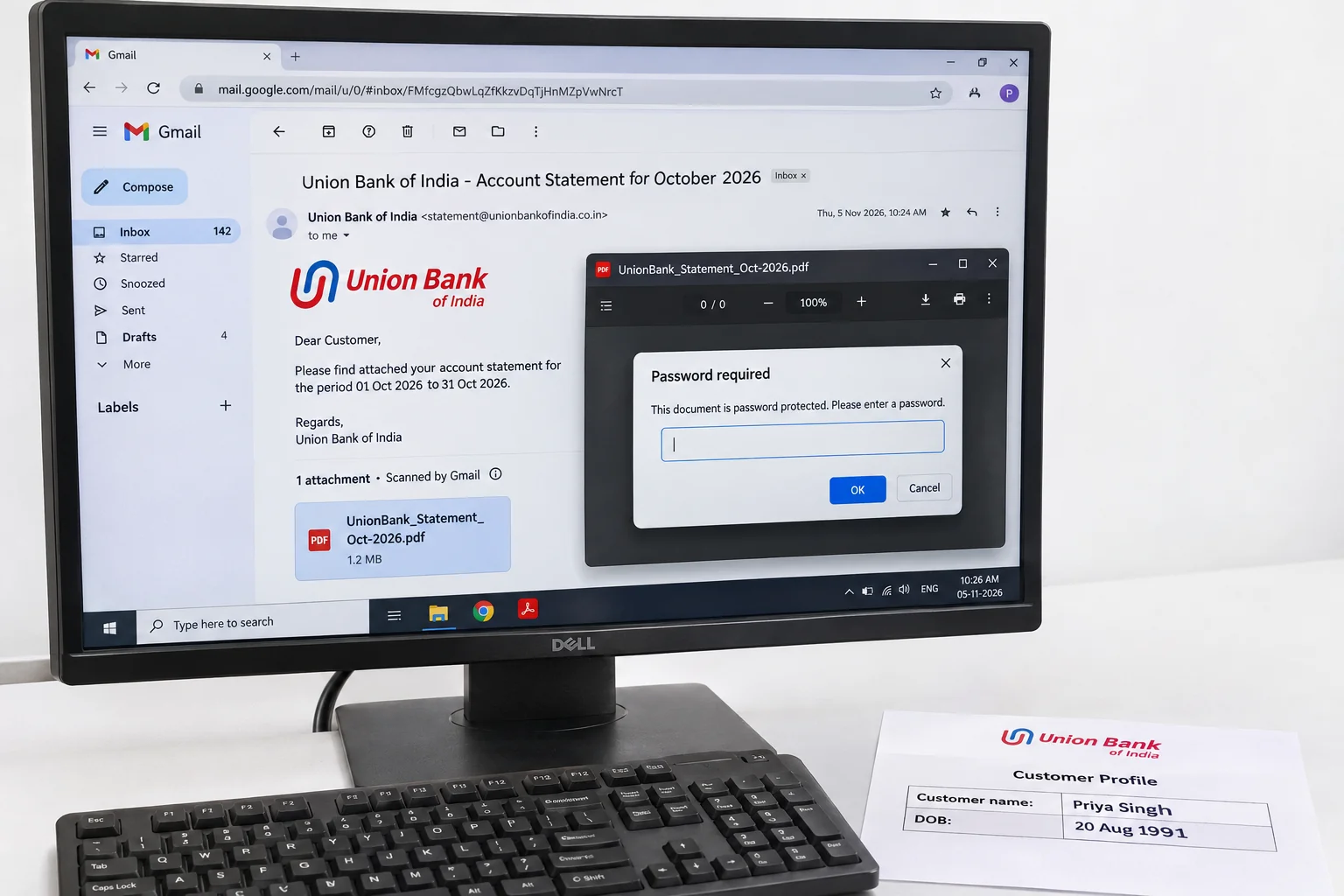
Your Union Bank statement password joins four capital letters from your name to your birth day and month as DDMM. Priya Singh, born 20 August, types PRIY2008.
Union Bank of India applies this rule to the e-statement it emails and to the PDF you download from Union Vyom or net banking. Your birth year plays no part. A statement that has opened once can be saved without the code so next month needs no typing.
A Union Bank of India e-statement arrives as a PDF that won't show a single transaction until an eight-character code goes in. Union Bank builds that code from the start of your name and the day and month you were born, which is why it looks like a word glued to a number. Get the four letters and the four digits right and your statement opens.
The Univik PDF Unlocker then saves a copy with no code on it, so a year of Union Bank statements can sit in a folder that opens on a click.
What Is the Union Bank Statement Password?
Your Union Bank statement password is eight characters long: four capitals taken from the start of your name as the bank holds it, then two digits for your birth day and two for the month. Priya Singh with a birthday on 20 August types PRIY2008. Rahul Sen born on 1 June types RAHU0106, with the zero in front of the one-digit day. The year of birth stays out, so nobody types 1998 or 98 anywhere in your code.
The letters come from the name on the account, not from a nickname or a spouse name on a joint account and they are capitals every time.
A first name shorter than four letters borrows from the surname. Raj Kumar born on 15 May becomes RAJK1505. I compared two published guides on the Union Bank rule on 9 November 2026 and both give the same four letters plus DDMM pattern. Union Bank doesn't print the rule on its public website, so treat the line under your attachment in your statement email as the final word for your account.
| Name on the account and birthday | Union Bank statement password |
|---|---|
| Priya Singh, 20 August | PRIY2008 |
| Rahul Sen, 1 June | RAHU0106 |
| Raj Kumar, 15 May | RAJK1505 |
Place your own four letters and four digits in the same slots and the code for your Union Bank file is ready.
Why Does Union Bank Lock the Statement PDF?
Union Bank of India sends the e-statement by email once a month and an email can be forwarded, left open on a shared computer or read on a lost phone. So the PDF carries an open password and nothing on any page shows until the right eight characters are typed. The bank chose a value built from your own details so that you can type it without looking anything up, while a stranger holding your attachment cannot. The lock covers your account number and the balance printed on each page.
The lock says nothing about the health of your Union Bank account and the statement inside is the same one you would see in Union Vyom.
How Do You Open a Union Bank Statement PDF?
Open the attachment from your Union Bank statement email in whichever PDF viewer you use, on the PC or on the phone. Type four capitals from the start of your name, then two digits for the day and two for the month of your birth, with no space anywhere. Then press Enter and your statement opens. A PDF saved from the Union Vyom app or from Union Bank net banking takes the same eight characters.
Turn off autocorrect on a phone keyboard before typing, because it tends to lower the case of the letters or push a space after the fourth one and either change makes your code fail.
How Do You Remove the Union Bank Statement Password?
Typing PRIY2008 into one statement is quick. Typing it into twelve statements for a loan file, a visa file or a tax return is a chore and the locked files can't be read by the accounting software or the upload form at the other end. Open each Union Bank statement once and keep a version with no code on it. Univik PDF Unlocker does this on the Windows PC where the statements already sit.
Drop them into your list, type those eight characters in the Password column of the first row, press Check and repeat for the rest. Unlock then writes a clean copy of every accepted statement to your chosen folder and leaves the emailed originals untouched.
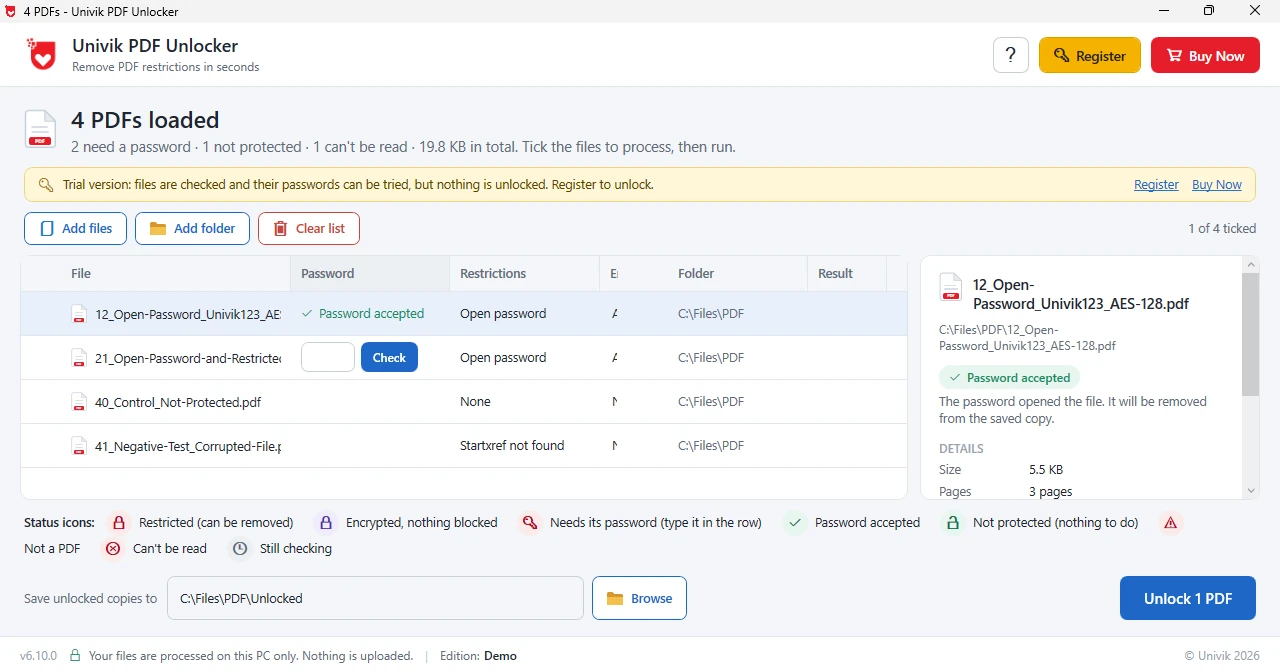
Univik PDF Unlocker takes your Union Bank code once per statement and gives back files that open on a click, twelve months in a single sitting.
Free Download See all featuresUnion Bank Password Not Accepted?
When those eight characters bounce, check the letters first. They must be capitals and they must come from the name as Union Bank recorded it, which for a joint account is the first holder and for a firm is the firm name. A first name with fewer than four letters needs letters from the surname to fill the four slots. Also check the digits. Day comes before month, each takes two digits and the year is never included.
If your code still fails, your statement email prints the rule for your account, so read the line under your attachment. A visit to Union Bank net banking shows the name and the date of birth the bank holds and a mismatch there explains most stubborn cases. Customer care can correct the record or resend your statement. No unlocker opens a Union Bank file whose code you don't have, because the lock has to come off from the inside.
- Four capital letters from your name plus your DDMM birth day and month make the Union Bank statement password.
- Priya Singh born on 20 August opens her Union Bank statement with PRIY2008.
- A short first name borrows letters from the surname, so Raj Kumar becomes RAJK.
- Your birth year never appears in your Union Bank code.
- Email statements, Union Vyom downloads and net banking PDFs take the same code.
- Unlock every statement once and the monthly prompt is gone for good.

Union Bank Statement Password Questions
What is the Union Bank statement password?
Four capital letters from the start of your name, then your birth day and month as DDMM. Priya Singh, born 20 August, types PRIY2008. The year stays out.
Does the Union Vyom app statement use the same password?
Yes. A PDF saved from Union Vyom or from Union Bank net banking opens with the same eight characters as your emailed e-statement.
What if my first name has fewer than four letters?
Fill the four slots with letters from your surname. Raj Kumar born on 15 May types RAJK1505.
Why does Union Bank refuse my password?
Lower case letters, a space after the name or the year of birth typed in are the usual causes. Use capitals with no space and only the day and month. Check the name and date Union Bank holds in net banking if it still fails.
How do I remove the Union Bank statement password permanently?
Queue the statement in Univik PDF Unlocker, enter the eight-character code, press Check and then Unlock. That clean copy goes to your chosen folder and the emailed original is left alone.
Can I unlock a year of Union Bank statements in one go?
Yes. Queue all twelve, enter your code against each, press Check down the list and finish with Unlock. Twelve clean copies come out together and nothing leaves your PC.
Is it safe to take the code off a Union Bank statement?
Yes, provided it happens on your own PC. A statement shows your account number next to your balance, which is reason enough to keep it away from upload sites. Taking the code off your own Union Bank statement is legal and ordinary.

Leena Taylor Paul covers Union Bank here for Univik, a Windows utility studio founded in 2013. The pattern was compared across two published guides and the statement email, because Union Bank does not publish the rule itself. Most readers come because a loan desk or a tax return needs a statement that will not open, so the code is given first and the lasting fix afterwards. Verified November 2026. Still refused after a retype? Contact our support team.