The password on a Canara Bank statement PDF is your birth date written DDMMYYYY. For a birthday of 9 June 1992 you type 09061992.
Canara Bank keeps the same date rule for a file pulled from net banking and one saved in the Canara ai1 app. Once the file opens, you can peel the password away so it no longer prompts on future opens.
Open a Canara Bank statement and the PDF halts at a code box that stays empty until you supply the right figures. Canara builds those figures from one thing already on your record: the date you were born. Once the format clicks, each Canara file lets you straight in. After that, the Univik PDF Unlocker can take the code off the document for keeps, so no Canara statement asks you for it twice.
What Is the Canara Bank Statement PDF Password?
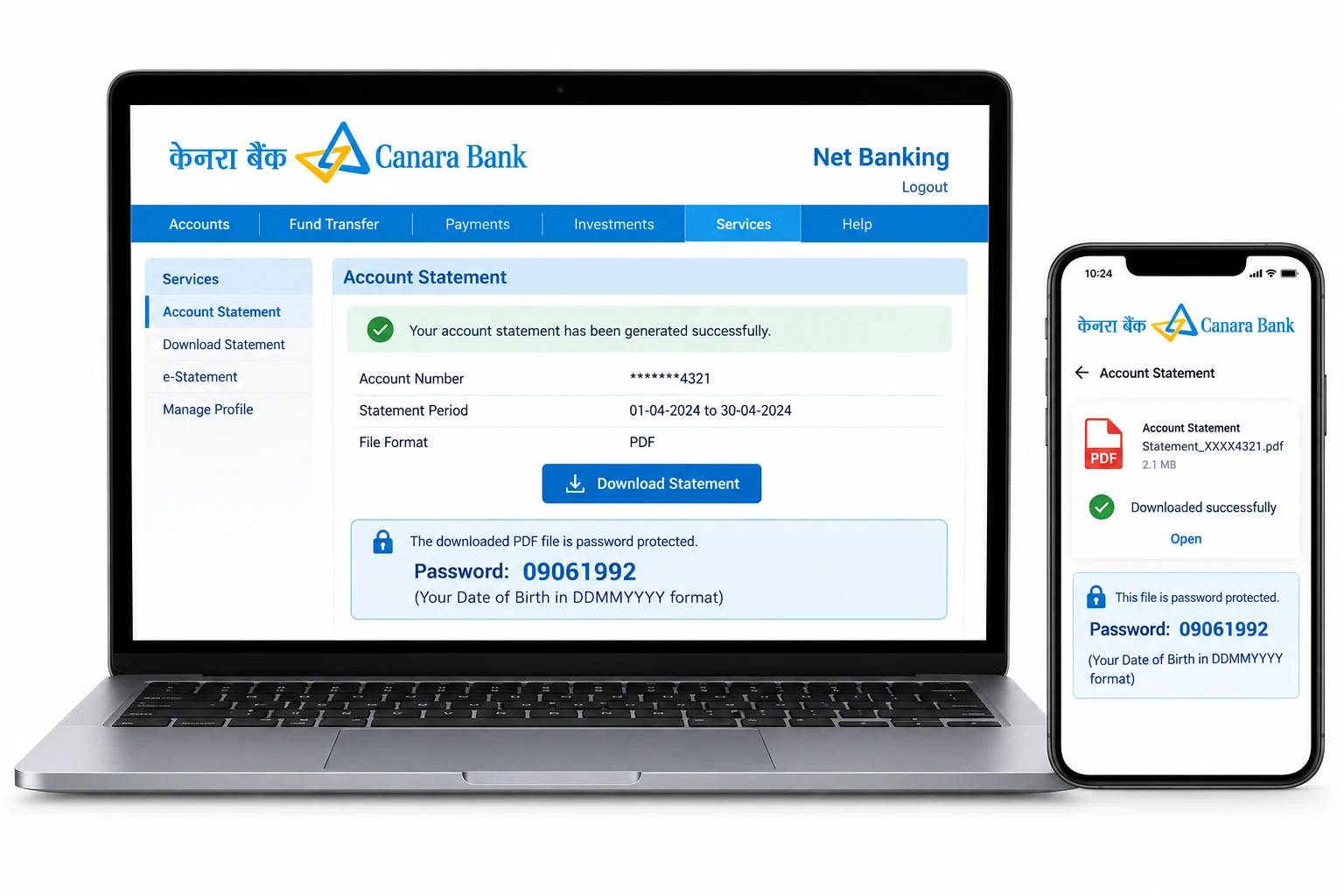
On a Canara Bank statement the code is nothing more than your birth date, set down as eight figures with the day at the front, the month in the middle, then the four numbers of the year. Someone born on 9 June 1992 keys 09061992. Canara pads a one-figure day or month with a zero up front, so the code fills all eight slots every time. This rule sits on a statement mailed out of Canara net banking and on one you save from the Canara ai1 app alike. Your name adds nothing and your account number adds nothing. Canara needs the birth date and nothing more.
| Your date of birth | Canara statement password |
|---|---|
| 9 June 1992 | 09061992 |
| 24 February 1987 | 24021987 |
| 3 October 1980 | 03101980 |
Treat any line as a stencil. Slide your own eight birth-date figures into the same slots and you have the precise code your Canara file is asking for.
Why Does Canara Bank Lock Its Statement PDF?
Canara Bank puts a lock on the statement to keep the account number and the running balance out of sight should the file ever wander into the wrong inbox. A Canara e-statement travels by email and waits in your mail, where a PDF with no code would lay each line bare to anyone who tapped the attachment. What Canara sets here is an open password, meaning the reader shows an empty box and releases not one page until the eight figures go in. Read it as a cover placed over a record of your money, not a signal that anything is wrong with your Canara account.
How Do You Open a Canara Bank Statement PDF?
To open a Canara Bank statement, put your birth date in as eight figures at the code box and the pages come up right away. Grab the statement out of your Canara email. You can also pull a fresh copy from the Canara ai1 app. Open it in whatever PDF viewer sits on your computer. Type the day, then the month, then the whole four-figure year, with nothing sitting between them. Where the day or the month is a single figure, place a zero ahead of it. The Canara statement opens the moment those eight figures match the birth date the bank has on record.
How Do You Remove the Canara Statement Password?
Feeding your birth date into every Canara statement gets old quickly, and while the code stays put, no other program can get into the file, from a bank's own upload form to the software your accountant runs. The fix is to open the Canara file once with the date, then hold on to a clean version that carries no code at all. The Univik PDF Unlocker runs there on the very Windows machine you use and can wipe the code from a full folder of Canara statements in a single pass.
With a Canara statement open, the Univik PDF Unlocker keeps aside a copy that holds no password. Direct it at a folder of Canara statements and every file comes back unlocked.
Free Download See all featuresCanara Statement Not Opening With Your Date?
When the birth date bounces back off your Canara statement, look first at the way the eight figures are ordered. The day has to lead, the month follows, then a year written in full closes it out. A single-figure day or month needs its zero out front, and the year must show every one of its four numerals. It also happens that the birth date on your Canara record does not match what you jotted down, so rule that gap out too. Should the figures keep getting turned away, the email that delivered your Canara statement prints the exact rule. One short call to Canara customer care can settle which date is on record for your account or set another copy on its way. Keep in mind that no remover reaches a code you were never handed, because it goes to work only after a Canara file has already opened.
- The Canara Bank statement password is your birth date typed as eight figures in DDMMYYYY order.
- A birth date of 9 June 1992 unlocks the Canara file as 09061992.
- Canara net banking and the Canara ai1 app run on the very same date rule.
- The Canara code skips your name and skips your account number.
- Open the Canara statement with the date, then clear the code so the prompt stops for good.
- Should the date be turned away, Canara can lay the rule out again or send another copy.

Canara Bank Statement Password Questions

This Canara guide is looked after by Leena Taylor Paul together with the Univik crew, a Windows utility studio going since 2013. Most people reaching this page want a Canara statement to spring open for a form or their lender, skipping the date box every time, so it sets out the format next to a clean method for lifting the lock off. Verified September 2026. Still stuck on which date to key? Contact our support team.