the HDFC bank statement PDF password is the opening four letters of your name in lowercase, then your date of birth as DDMM. For Priya, born 9 January, it is priy0901.
the covering email from HDFC states the exact rule. Once it opens, drop the password so the file stops asking on every view.
Your HDFC bank statement password is not something you picked. HDFC sets it for you, and the e-statement that reaches your inbox stays sealed until you type it. The rule is short. Take the opening four letters of your name in lowercase, then add your date of birth as DDMM. Once you know that, the file opens and you can lift the lock so HDFC never quizzes you again. The Univik PDF Unlocker handles that last part on your own Windows PC and can clear a full folder of monthly HDFC statements in one go.
What Is the HDFC Bank Statement Password?
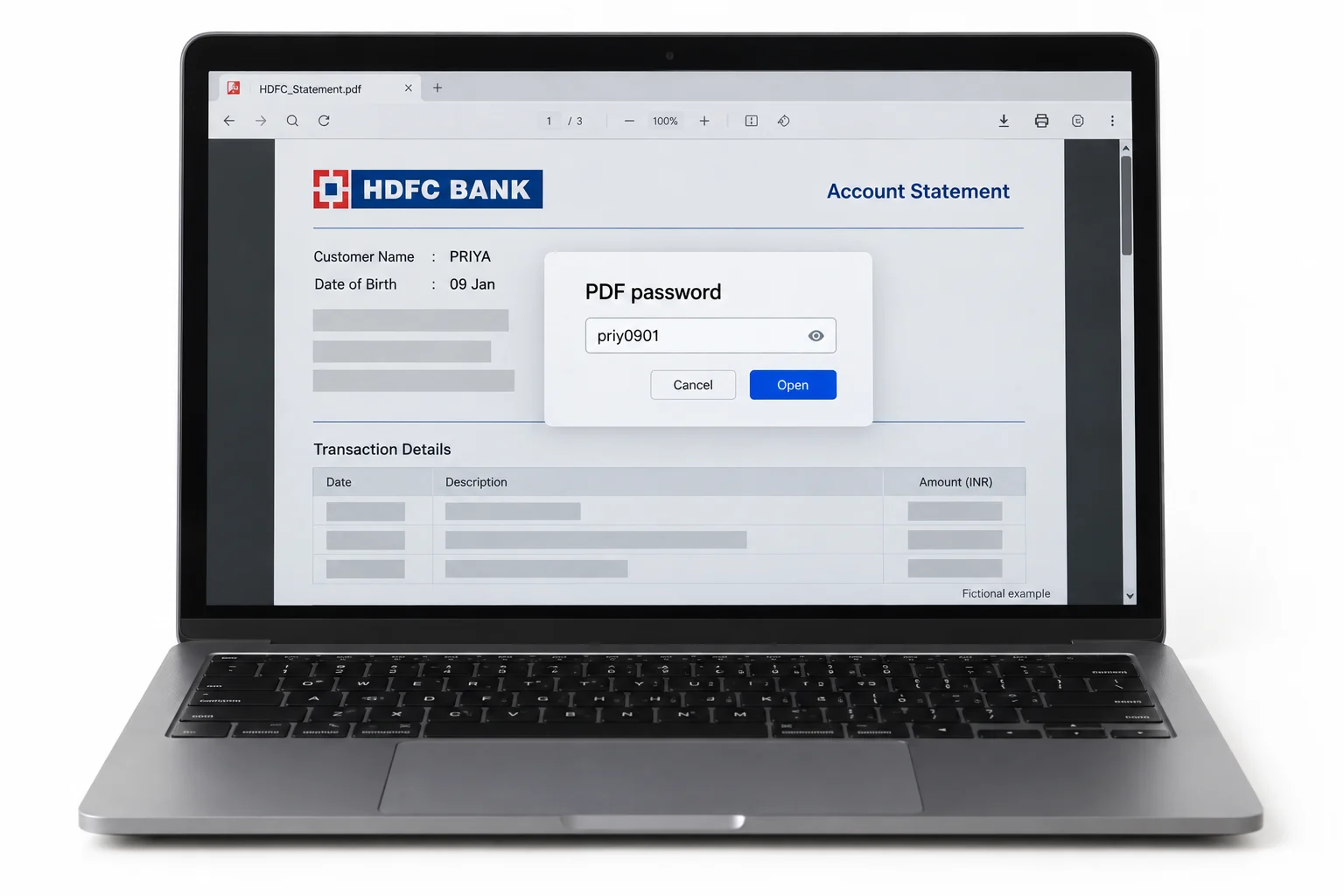
The HDFC bank statement password is a short code made from two things you already carry, your name and your birth date. HDFC takes the opening four letters of your name, drops them to lowercase, then puts the day and month you were born behind them in DDMM order. So a customer called Priya who was born on the ninth of January opens her statement with priy0901. Type the name the way it prints at the top of the statement and leave out any space. The same value works whether the file came from HDFC NetBanking or landed as an email attachment.
| Part of the HDFC code | What to use | Priya, born 9 Jan |
|---|---|---|
| Name letters | Opening four letters of your name, in lowercase | priy |
| Birth date | Day and then month, four digits (DDMM) | 0901 |
| Full password | Name letters, then the four digits, with no gap | priy0901 |
Why Is Your HDFC Statement Password Protected?
HDFC locks the statement because the pages spell out your account number, your balance and every debit and credit for the month. A file like that can drop into a crowded inbox or sit on a shared laptop, so HDFC seals it before it ever leaves the bank. The lock is an open password, which means no page shows until the right value goes in. It is not there so the bank can shut you out of your own money. It only turns back a stray reader who has no clue about your name and birth date. Because HDFC ties the code to details you already own, you are never chasing a random string.
How Do You Open an HDFC Bank Statement PDF?
You open an HDFC statement by typing the built code into any PDF reader. Put the value together first, then enter it at the prompt.
- Take the opening four letters of your name and write them in lowercase.
- Add your birth day and month as four digits, day ahead of month.
- Open the PDF, wait for the box and key in that value. The HDFC statement shows on the spot.
Two small things trip people up. The name has to match the spelling on the statement, and the digits run day first and then month with no gap. If the covering email named a different rule for your account, follow the email ahead of the general format.
How Do You Remove the HDFC Statement Password?
You remove the HDFC statement password by opening the file one time and then keeping a version that carries no lock. Keying that code in on every open gets old fast, and it shuts out other software that has to read the statement, like an accountant's app or a lender's upload form. The trick is to drop the lock on a statement that already sits open in front of you, so there is no cracking or guessing at any point. Open the file with your HDFC value, then hand it to the tool below.
Once your HDFC statement is open, the Univik PDF Unlocker saves a version with the password gone and sets it next to the first file. Drop a full year of them in and the whole lot comes out cleared in one sweep.
Free Download See all featuresWhy Won't the HDFC Password Open the Statement?
If the standard format is refused, go back to the email or NetBanking page that carried your statement, because HDFC prints the exact rule right beside the file. A few accounts sit on a different mix, and a joint or company account can follow a pattern of its own. Check the case of your name and confirm the birth date reads day and then month. If the file still will not open, HDFC can reissue the statement or confirm the exact rule for your account by phone or at a branch. One honest limit is worth naming. A remover works only on a statement you can already open, so it cannot bring back a code you have truly lost. There the answer is to ask HDFC for a fresh copy.
- The HDFC bank statement password is the opening four letters of your name in lowercase plus your birth date as DDMM.
- For Priya, born on 9 January, the value is priy0901.
- HDFC seals the statement because it lays out your account number and balance.
- Open the file once with the code, then take the password off so it opens on its own next time.
- One run of the tool can clear a whole folder of monthly HDFC statements.
- A forgotten code cannot be recovered, so ask HDFC to send it again.

HDFC Bank Statement Password Questions

Written up by the Univik team with Leena Taylor Paul, who have shipped Windows file utilities since 2013. Plenty of readers only want an HDFC statement they can forward to a lender without the monthly code, so this guide lays out the format first and then the way to lift the lock. Last checked September 2026. Password still not working? Contact our support team.