Quick Answer
The ICICI credit card statement password is the first four letters of the name on your card, in lowercase, followed by your date and month of birth as DDMM. Sujit Sawant, born on 5 January, types suji0501. Leave out the year, spaces and symbols.
Read the four letters from the name printed on your card, because that is the spelling ICICI uses.
If your ICICI credit card statement asks for a password, the PDF wants two things from you. Type the first four letters of the name on your card in lowercase. Then add your date and month of birth as DDMM. Sujit Sawant, born on 5 January, types suji0501, which is the example on ICICI's own help page.
If a first try has already failed, compare what you typed with the table below. This guide shows how the password is built, why the birth year is left out and how to keep an unlocked copy of your own statement. I read ICICI's help pages on 15 November 2026.
- If you open one bill, type the two parts into your PDF reader.
- If you keep a year of bills, save an unlocked copy of each.
- If the password is refused, check the lowercase letters and the DDMM date first.
What Is the ICICI Credit Card Statement Password?
The ICICI credit card statement password has two parts. ICICI's help page on opening a credit card e-statement says the first four letters come from your name as displayed on your card. Your date and month of birth follow in DDMM format. ICICI adds that the password is case sensitive and takes no special characters or spaces.
ICICI's credit card FAQ page asks for those four letters in lowercase. A name of Sujit Sawant and a birth date of 5 January therefore give suji0501. The year of birth is not part of the password.
| Name on card | Date of birth | Password |
|---|---|---|
| Sujit Sawant (ICICI's example) | 5 January | suji0501 |
| Anita Rao (sample) | 12 November | anit1211 |
| Rohan Mehta (sample) | 3 June | roha0306 |
| Meera Iyer (sample) | 28 February | meer2802 |
I built the three sample rows with the same rule, so only the first row comes from ICICI. The help page does not say what applies to a name shorter than four letters. If your name is short, ask ICICI Customer Care to confirm your password.
Which Cardholders Open an ICICI Statement Every Month?
- A salaried cardholder You read each bill before its due date and want it open in seconds.
- A freelancer You collect statements to match card spends with your own records.
- A family accountant Bills for several cards reach you and each one asks for a different name.
- A new cardholder Your first e-statement arrived and wants a password you never set.
How Do You Open an ICICI Credit Card Statement PDF?
ICICI's page on viewing statements online says statements normally arrive by email each month. The same page lists iMobile (Bill Payments, then Credit Card, then the Statements tab) and Internet Banking (My Accounts, then Credit Cards) for a download. That page gives several menu paths and notes that labels vary, so compare each one with your screen.
- Get the statement. Open the monthly e-statement email from ICICI or download the PDF from iMobile or Internet Banking.
- Take four letters of your name. Use the first four letters of the name on your card, in lowercase.
- Add your birth date and month. Put your date and month of birth after them as DDMM.
- Type all eight characters. Enter them together in the password prompt with no space.
- Check the first page. Confirm that the statement opens before you close the prompt.
Note: if the statement still does not open, ICICI says to call Customer Care from your registered mobile number.
Which Two Ways Open an ICICI Credit Card Statement?
The table shows what each of two ways needs to open the file and where it ends.
| Method | Requirement | Limit |
|---|---|---|
| Type it in a PDF reader | Adobe Acrobat Reader or Microsoft Edge | You type the eight characters at every opening |
| Save an unlocked copy on Windows | Your statement, its password and a 64-bit PC with Windows | PDF files only. A trial tests the password but saves no copy |
If you read one bill a month, the first row is enough, but a year of bills for your records is easier to keep as unlocked copies. Cardholders with a second card can read about the HDFC credit card statement password.

What Do You Check Before You Type the Password?
Do this: ICICI says the password is case sensitive and its FAQ page asks for lowercase. A capital S in suji0501 would make a different password.
Do this: ICICI bases the four letters on your name as displayed on your credit card, so read them from the card.
Do this: The birth year is not part of the password. Type DDMM and not DDMMYYYY.
Do this: ICICI says not to include special characters or spaces in the password.
Save a Copy of Your ICICI Card Statement With No Password
Univik PDF Unlocker reads an ICICI e-statement on a Windows PC, tests the eight characters you type and then saves a second copy with no password. It never guesses or recovers a password, so it works only when you know yours. The status bar of its window states that processing happens on your PC and nothing is uploaded.
- Load the statement. Select Add files to load one statement. Select Add folder to load twelve monthly statements.
- Type the password. Enter the name letters and the DDMM date in that row's Password field, then select Check.
- Read the status. Password accepted means your characters matched. A red field means they did not.
- Save the copy. Select Unlock and find the copy in your output folder.
- Open the copy. Scroll through a page or two to confirm that it reads like the original.
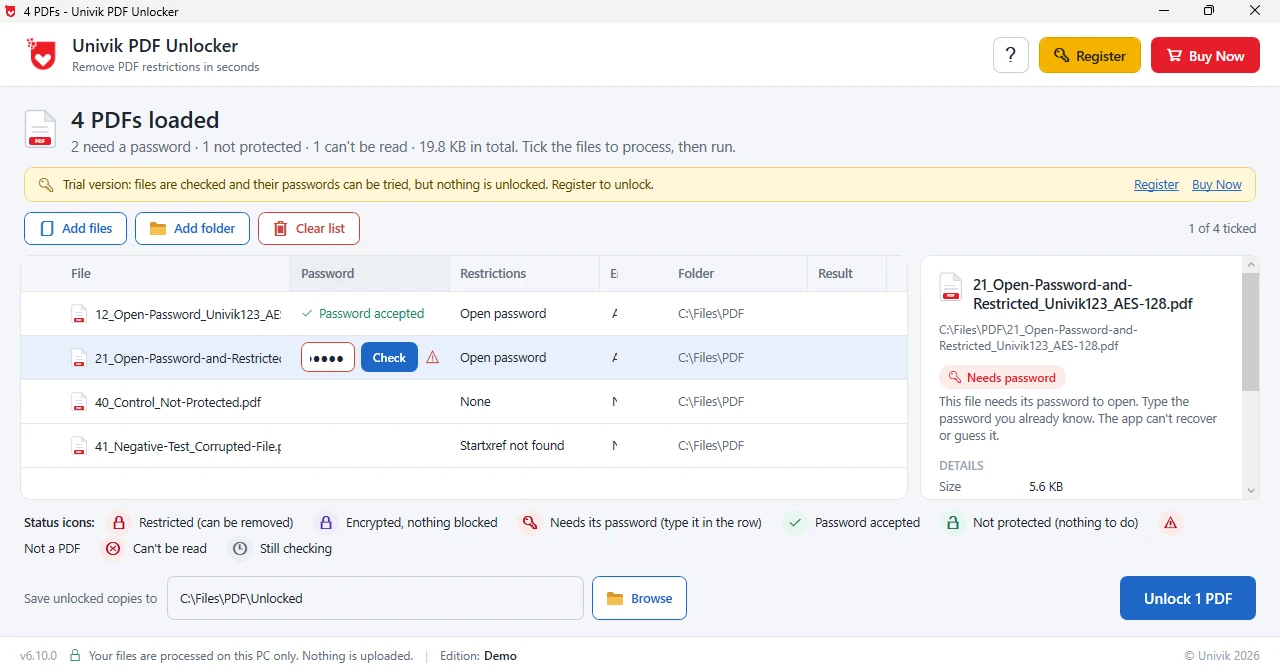
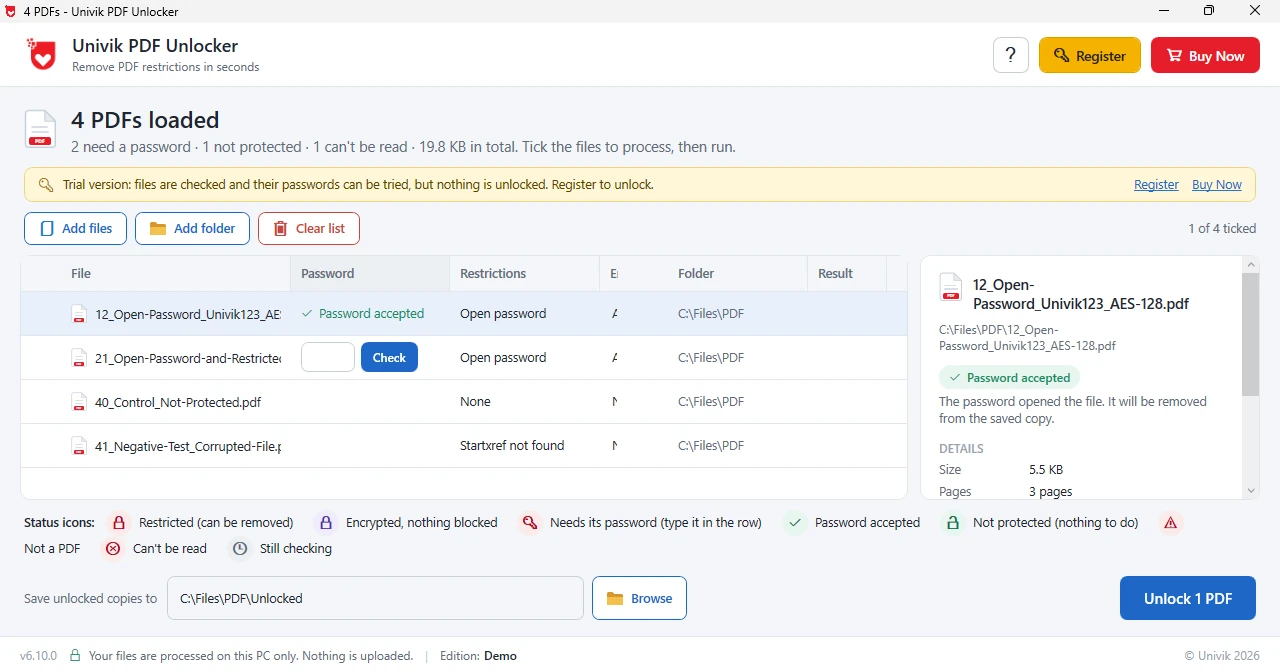
Limitations: a trial tests your password but saves no unlocked copy, because saving needs a licence at $29. Mac is not supported. A wrong password keeps its row at Needs password.
Windows tests the password you type and keeps an unlocked copy of your own statement in your output folder.
Download Free Trial Select a Licence - From $29Your own statement gets a Password accepted status in the trial before you buy.
What If the ICICI Credit Card Statement Password Is Not Working?
Do this: ICICI's password is case sensitive and takes no spaces or special characters. Retype it with lowercase letters only.
Do this: ICICI asks for date and month only, so remove the year and keep the four digits of DDMM.
Do this: One ICICI blog page says the PDF password is the four digits at the end of your card number. That page shows no date and ICICI's FAQ pages give the name rule, so try the name rule first.
If none of these open the file, ICICI says to call Customer Care from your registered mobile number.
Where Did I Check the ICICI Password Rule?
I read ICICI's help page on opening a credit card e-statement and its credit card FAQ page on 15 November 2026. Both give the same rule. ICICI's blog on viewing statements online gives a different one and shows no date, so I list it only as a second try.
For the unlocker I used Univik's PDF Unlocker page and the status names inside the program. ICICI may rename menu items, so match each label to what you see.
- The ICICI credit card statement password is four lowercase letters from the name on your card, then your birth date and month as DDMM.
- The birth year is not part of it, so Sujit Sawant, born on 5 January, types suji0501.
- ICICI says not to add spaces or special characters. The password is also case sensitive.
- One ICICI blog page names the last four card digits instead, so try that only after the name rule.
- Keep an unlocked copy of your statement and you will not retype those eight characters for it.
FAQ: ICICI Credit Card Statement Password
What is the ICICI credit card statement password?
The first four letters of the name on your card in lowercase, followed by your date and month of birth as DDMM. ICICI's example gives suji0501.
Is the ICICI credit card statement password my full date of birth?
No, because ICICI asks for the date and month only after four name letters and leaves the year of birth out.
Why is my ICICI credit card statement PDF password rejected?
Usually a capital letter or a space slipped in or the year was added, so retype four lowercase name letters and the DDMM date with nothing between them.
Does the ICICI credit card password use my card number?
ICICI's FAQ pages say no and give the name and DDMM rule. One ICICI blog page names the last four card digits, so try that only if the name rule fails.
What if my name is shorter than four letters?
ICICI's help page does not say, so ask ICICI Customer Care to confirm your password.
How do I remove the ICICI credit card password with Univik PDF Unlocker?
Load the statement, enter the password in its row and press Check. Once the row reads Password accepted, select Unlock and the copy is saved.
Can I test the unlocker on my statement first?
Yes. A trial tests your password on your own file. A licence at $29 is needed to save unlocked copies.
Does the unlocker upload my statement?
No. According to its status bar, files stay on your PC during processing.

The password rule comes from ICICI's help page on opening a credit card e-statement and its credit card FAQ page, both read on November 15, 2026. Product details come from Univik's page for the unlocker.