Quick Answer
The Form 26AS password is your date of birth typed as DDMMYYYY. A birth date of 1 February 1980 becomes 01021980. TRACES gives this one rule for the Form 26AS PDF, so type all eight digits with the leading zeros and no spaces.
Read your birth date from your PAN card first, because TRACES builds the password from the date as per PAN.
If your Form 26AS PDF stops at a password prompt, the answer is short. TRACES names your date of birth as your password, typed as day, month and four-digit year with no spaces. A birth date of 5 March 1984 becomes 05031984 and the statement opens.
If you open this statement every filing season, retyping eight digits gets old. This guide gives the format, the TRACES steps for that PDF, what to try when the password fails and how to save a copy of your own statement that opens without a prompt. I checked the TRACES pages on 15 November 2026.
- If you read the statement once, type your date of birth in your PDF reader and you are done.
- If you keep statements for several years, save an unlocked copy of each one.
- If the password is refused, check the date order and the date on your PAN card first.
What Is the Form 26AS Password Format?
The Form 26AS password format is your date of birth as DDMMYYYY. The TRACES taxpayer FAQ on Form 26AS says so in one line. The TRACES e-tutorial on password formats gives the example: a birth date of 01-Feb-1980 becomes 01021980.
The tutorial calls it your date of birth as per PAN, so try the date printed on your PAN card first. Zeros stay in, which means a day of 5 is typed as 05 and a month of 3 is typed as 03.
| Date of birth | Form 26AS password |
|---|---|
| 1 February 1980 (the TRACES example) | 01021980 |
| 5 March 1984 | 05031984 |
| 17 July 1993 | 17071993 |
| 9 November 2002 | 09112002 |
TRACES names a date of birth and nothing else, so the pages I read give no separate rule for a company or a firm. If your PAN is issued to one, ask TRACES support which date applies.
Who Opens a Form 26AS PDF Most Often?
- A salaried taxpayer You compare the tax deducted from your pay with your return before you file.
- A tax consultant Statements for many clients arrive over a few weeks and each one needs opening.
- A finance clerk You match TDS credits with your books and need the same file open again and again.
- A first-time filer TRACES is new to you and the PDF asks for a password you were never given.
What Does a Form 26AS PDF Show From Assessment Year 2023-24?
From Assessment Year 2023-24 the TRACES FAQ lists TDS, TDS on Form 15G or 15H, TCS, refunds paid and TDS or TCS defaults among its parts. That FAQ says advance tax and self-assessment tax no longer show there. Those entries moved to the AIS on the e-filing portal. The Statement of Financial Transactions moved there too.
If you need those entries, open your Annual Information Statement. Its password follows a different rule, which my guide to the AIS password format explains.
How Do You Download and Open Form 26AS From TRACES?
These steps follow the TRACES e-tutorial for PDF download. TRACES also lists internet banking of your bank and the e-filing website as places that offer the same statement.
- Sign in to TRACES. Enter your User ID, your password and the verification code.
- Open the statement option. Select Proceed on the landing page and open the Form 26AS option in your menu.
- Choose year and format. Select the Assessment Year and set the format to PDF.
- Download the file. Select View/Download. The PDF goes to your Downloads folder.
- Type the password. Open the PDF and type your date of birth as DDMMYYYY.
Note: if a statement has more than 1,500 transaction entries, TRACES allows only a text download. A text file is not a PDF, so the unlocker in this guide does not read it.
Which Two Ways Open a Form 26AS PDF Password?
The table lists what each of two ways needs to get you into a Form 26AS PDF and where each one stops.
| Method | Requirement | Limit |
|---|---|---|
| Type the password in a PDF reader | Adobe Acrobat Reader, Microsoft Edge or another PDF viewer | You type your date of birth whenever you open the file |
| Save an unlocked copy on Windows | Your own PDF and the password on a 64-bit Windows PC | Reads PDF files only. A trial checks your password but does not save the copy |
If you need one statement this year, the first row is enough. If you also keep the TDS certificates that match your statement, read about the Form 16A password.

What Do You Check Before You Type the Password?
Do this: The unlocker in this guide reads PDF files only. Choose PDF in the format list if TRACES offers it for your year.
Do this: TRACES says the password follows your date of birth as per PAN. Take that date from the card and not from memory.
Do this: TRACES gives the format as DDMMYYYY. Leave out slashes, dashes and spaces.
Do this: Leave the file from TRACES in its folder and unlock a copy for your own records.
Save a Copy of Form 26AS With No Password on Windows
Univik PDF Unlocker opens your Form 26AS PDF on a Windows PC, checks the password you type and saves a copy that opens without a prompt. It cannot recover or guess a password, so you type your own date of birth. The window states that your files are processed on your PC and that nothing is uploaded.
- Add the PDF. Select Add files for one statement or Add folder for a season of them.
- Type your date. Enter the eight digits in the Password field of that row and select Check.
- Wait for the status. A row that shows Password accepted is ready to save.
- Select Unlock. The copy is saved in the output folder you chose.
- Open the copy. Check that it opens in your PDF reader with no prompt and that its entries match the original.
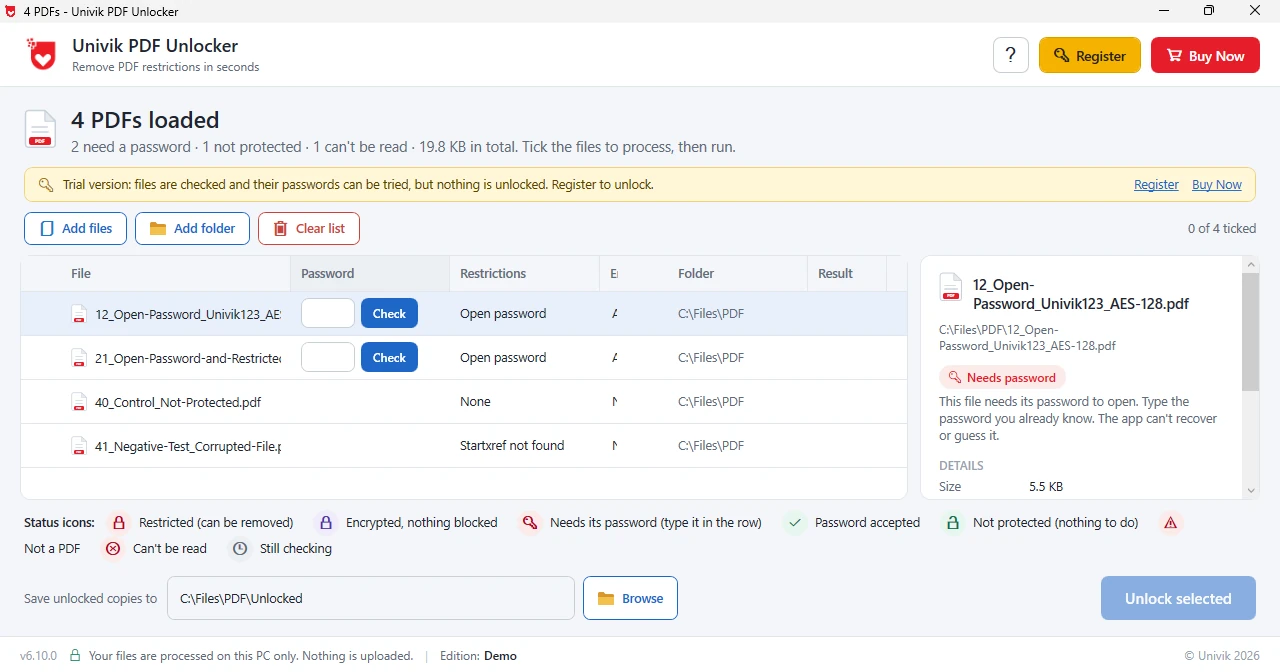
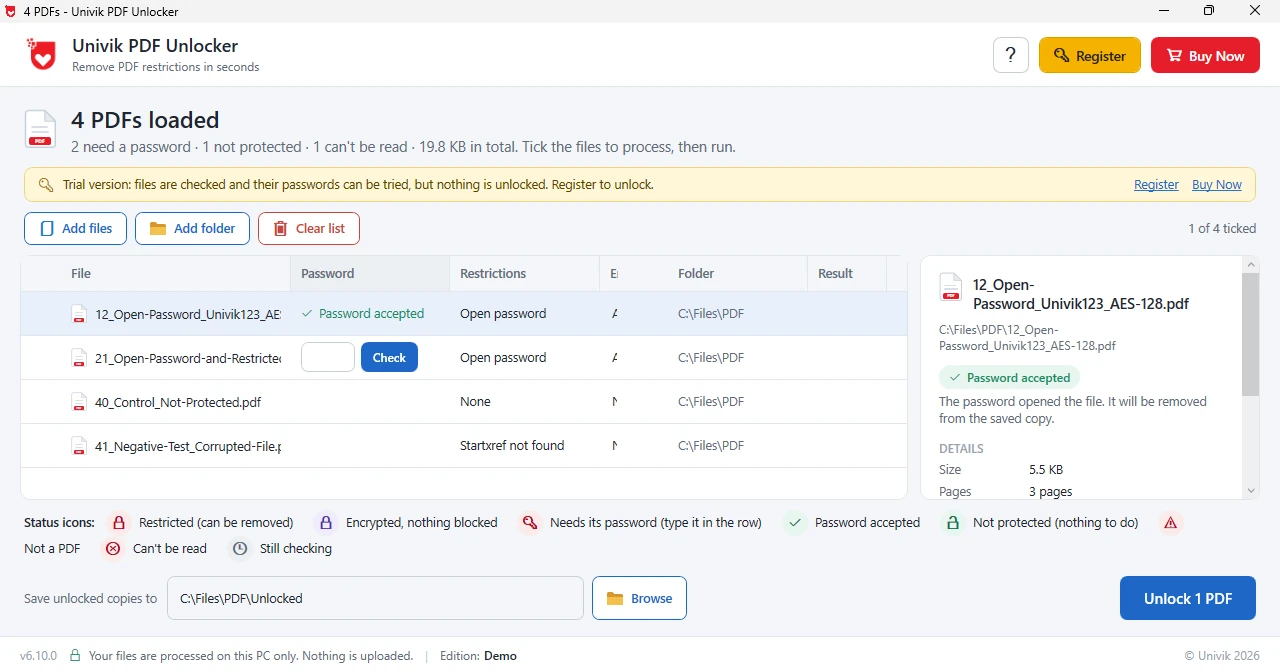
Limitations: the trial checks files and tests your password but saves no unlocked copy. A licence costs $29. The unlocker needs Windows and reads PDF files but not text downloads. A wrong date keeps the row at Needs password and nothing is saved for it.
Windows checks the date you type and saves an unlocked copy of your own statement into the folder of your choice.
Download Free Trial Select a Licence - From $29A trial shows Password accepted on your own file before you decide to buy.
What If the Form 26AS Password Is Not Working?
Do this: TRACES gives day, month and then year, so a birth date of 5 March 1984 is 05031984 while 19840305 puts the year first.
Do this: The tutorial says date of birth as per PAN. If your PAN card shows another date than you use elsewhere, try the card date.
Do this: An AIS password adds your PAN in lower case before the date, so check the file name before you retry.
If your return acknowledgement PDF asks for a password too, read about the ITR intimation password.
Which Sources Back the Rules in This Guide?
I read TRACES's taxpayer FAQ on Form 26AS and its e-tutorial on password formats, both read on 15 November 2026. The tutorial shows a 2016 copyright year, so I took the rule from the current FAQ and the example from the tutorial.
Univik's PDF Unlocker page and the status labels in the software are my source for the unlocker. TRACES can change its menus, so compare each label with your screen.
- A Form 26AS statement needs your date of birth typed as DDMMYYYY, so 1 February 1980 is 01021980.
- TRACES gives the date of birth as per PAN, so read it from your PAN card.
- TRACES offers only a text download for a statement with more than 1,500 entries, which is not a PDF.
- An AIS follows a different password rule and adds your PAN in lower case.
- Save an unlocked copy of your own statement once, so you never type the date for that file again.
FAQ: Form 26AS Password
What is the Form 26AS password?
Your date of birth as DDMMYYYY. TRACES gives 01-Feb-1980 as 01021980 in its e-tutorial.
Is the Form 26AS password the same as the AIS password?
No, because Form 26AS asks for your date of birth only while an AIS password puts your PAN in lower case before the date.
Why does my Form 26AS PDF password say incorrect?
Usually the date went in year first or has a slash or dash in it. Type eight digits as day, month and year. Use the date shown on your PAN card.
Where can I download Form 26AS?
TRACES names three places. They are its website, internet banking on your bank's website and the e-filing website.
What is the Form 26AS password for a company or firm?
The TRACES pages I read name only a date of birth. They give no separate rule for a company or firm, so ask TRACES support.
How do I remove the Form 26AS password with Univik PDF Unlocker?
Add the PDF, type your date of birth in its row and select Check. When the row shows Password accepted, select Unlock to save a copy.
Can I try the unlocker before I buy?
Yes, because the trial checks files and tests your password. Saving unlocked copies needs a licence, which costs $29.
Does the unlocker upload my Form 26AS?
No, because the window states that your files are processed on your PC and that nothing is uploaded.

Password facts follow the TRACES taxpayer FAQ on Form 26AS and its e-tutorial on password formats, as read on November 15, 2026. Univik's PDF Unlocker page supplies the product details.