the password for an IDFC FIRST Bank statement PDF is your own date of birth, keyed in DDMMYYYY order. Someone born on 19 September 1994 types 19091994.
IDFC FIRST Bank applies one date rule to a file from net banking and to one from its mobile app. With the statement open, the password can be lifted so no prompt returns on later views.
An IDFC FIRST Bank statement shows up as a protected PDF, and a small box blocks the view before a single figure on the page loads. IDFC FIRST Bank builds that box from a detail already sitting on your profile: your birth date, entered as one run of eight digits. Learn the shape one time over and the IDFC FIRST file opens up. The Univik PDF Unlocker will later peel that lock away for good, so an IDFC FIRST statement never stops you at the box again.
What Is the IDFC FIRST Bank Statement PDF Password?
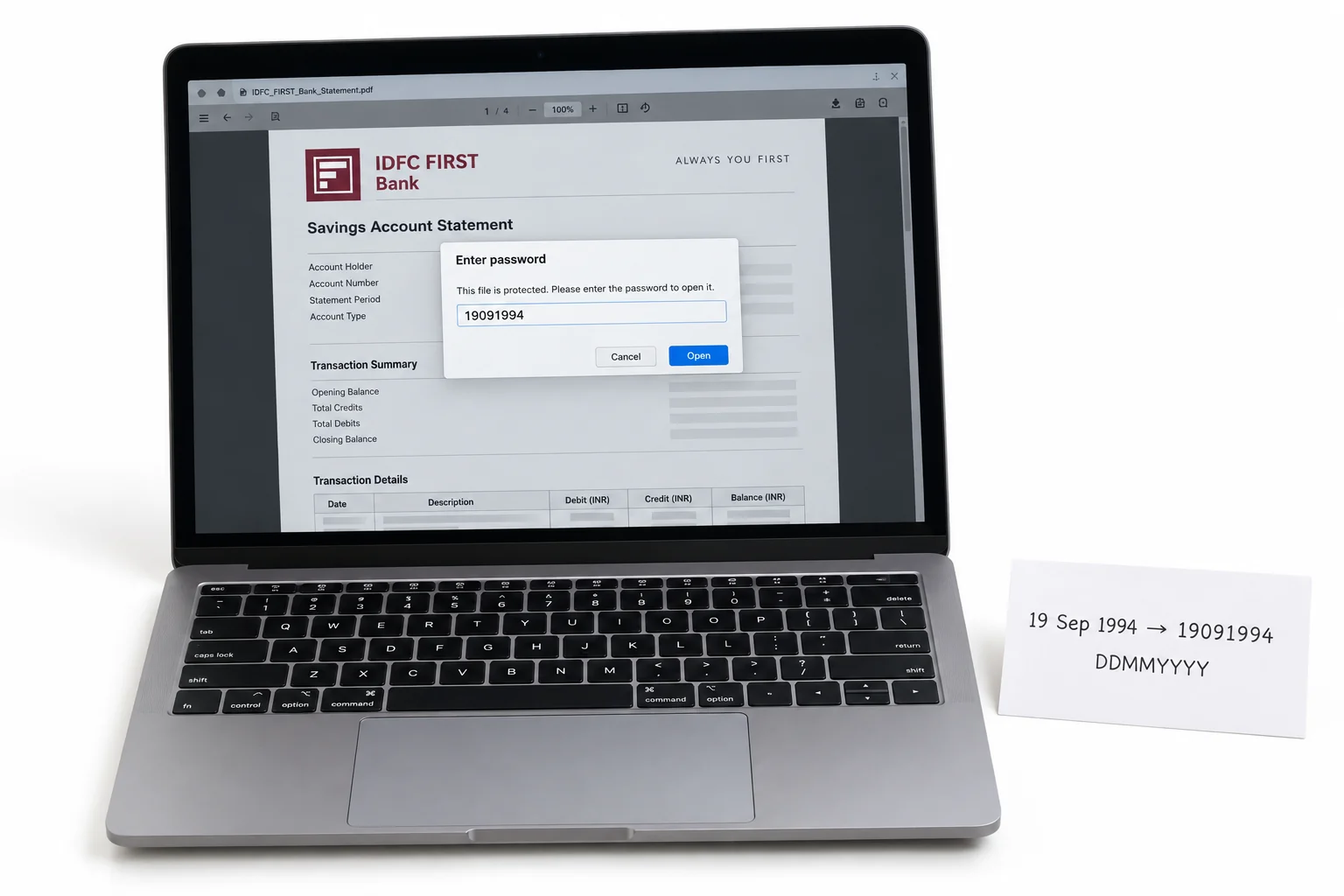
The password on an IDFC FIRST Bank statement is drawn wholly from your birth date, laid down as eight digits that run day first, then month, then the year in all four numerals. A customer born on 19 September 1994 opens the file with 19091994. Where a day or a month is only one figure, IDFC FIRST Bank pads it with a front zero, so the code always fills its eight places. The rule stands the same on a statement mailed from IDFC FIRST net banking and on one pulled through the IDFC FIRST Bank mobile app. Your name plays no part and your account number plays no part either. IDFC FIRST Bank rests the code on your birth date and on nothing else.
| Birth date | IDFC FIRST password |
|---|---|
| 19 September 1994 | 19091994 |
| 5 January 1989 | 05011989 |
| 28 July 1996 | 28071996 |
Line your own case up against a row. Fit your eight birth-date digits into the same slots and you hold the exact IDFC FIRST code for that file.
Why Does IDFC FIRST Bank Lock Its Statement PDF?
IDFC FIRST Bank seals the file so the numbers on it, your account balance sitting beside the account itself, stay out of view if the statement ever drifts to the wrong mailbox. An IDFC FIRST e-statement arrives by email and settles in your inbox, where a copy with no seal would spread every entry before anyone who opens the attachment. The bank leans on what security people term an open password: the viewer offers a blank field and holds back every page until those eight digits are keyed. Treat the lock as a shield around a private money record, not a warning that your IDFC FIRST account is in any bother.
How Do You Open an IDFC FIRST Bank Statement PDF?
To open an IDFC FIRST Bank statement, drop your birth date into the password box as eight digits and the pages load on the spot. Grab the file from the IDFC FIRST net banking email, or export a new copy inside the IDFC FIRST Bank mobile app, then open it in any PDF reader you keep on hand. Put the day at the start, the month next and the year in its full four figures, with no space or slash between them. When the day or the month is a lone figure, place a zero before it. The IDFC FIRST statement lets you through the second those eight digits agree with the birth date the bank has recorded for you.
How Do You Remove the IDFC FIRST Statement Password?
Keying your birth date into an IDFC FIRST statement at each opening soon wears on you, and for as long as the lock holds, no other program can get inside the file. A lender's upload page or the software your accountant runs stays locked out. The wiser move is to open the IDFC FIRST file one time only with your date, then keep a private duplicate of your own that carries no password. The Univik PDF Unlocker handles this right on the Windows machine you already sit at and can work a whole folder of IDFC FIRST statements in one straight pass.
With an IDFC FIRST statement showing on your screen, the Univik PDF Unlocker writes out a fresh duplicate that no password guards. Give it a whole folder of IDFC FIRST statements and every one lands open.
Free Download See all featuresIDFC FIRST Statement Not Opening With Your Date?
Should the IDFC FIRST statement keep turning your birth date away, take a close look at how the code is built before trying anything more. The day sits first, the month comes next and the four-figure year closes it, with a leading zero on any single number. It happens now and then that IDFC FIRST Bank stores a birth date that does not line up with the one in your own note, so that gap is worth ruling out. When the eight digits keep bouncing, the email that delivered your IDFC FIRST statement sets the rule down plainly. One brief call to IDFC FIRST Bank customer care settles the birth date held against your account or triggers a fresh send. Keep in mind that a remover has nothing to work on until the IDFC FIRST file already opens, so it cannot force a code you were never handed.
- Your IDFC FIRST Bank statement password is the eight digits of your birth date in DDMMYYYY order.
- Born on 19 September 1994, you open the IDFC FIRST file with 19091994.
- IDFC FIRST net banking and the IDFC FIRST Bank mobile app run on one birth-date rule.
- The IDFC FIRST code passes over your name and your account number.
- Open the IDFC FIRST statement with the date, then lift the lock so no prompt returns.
- If the date is turned down, IDFC FIRST Bank can restate the rule or send the file again.

IDFC FIRST Bank Statement Password Questions

Drafted and kept current by Leena Taylor Paul alongside the wider Univik crew, who have shipped Windows utilities since 2013. Many people reach this page only wanting an IDFC FIRST statement to unlock for a loan form or for their accountant, with no date box on every view, so it lays out the format beside a tidy method for lifting the lock. Reviewed in September 2026. Cannot get the date to work? Reach the Univik support team.