 Open & Read Guide
 By
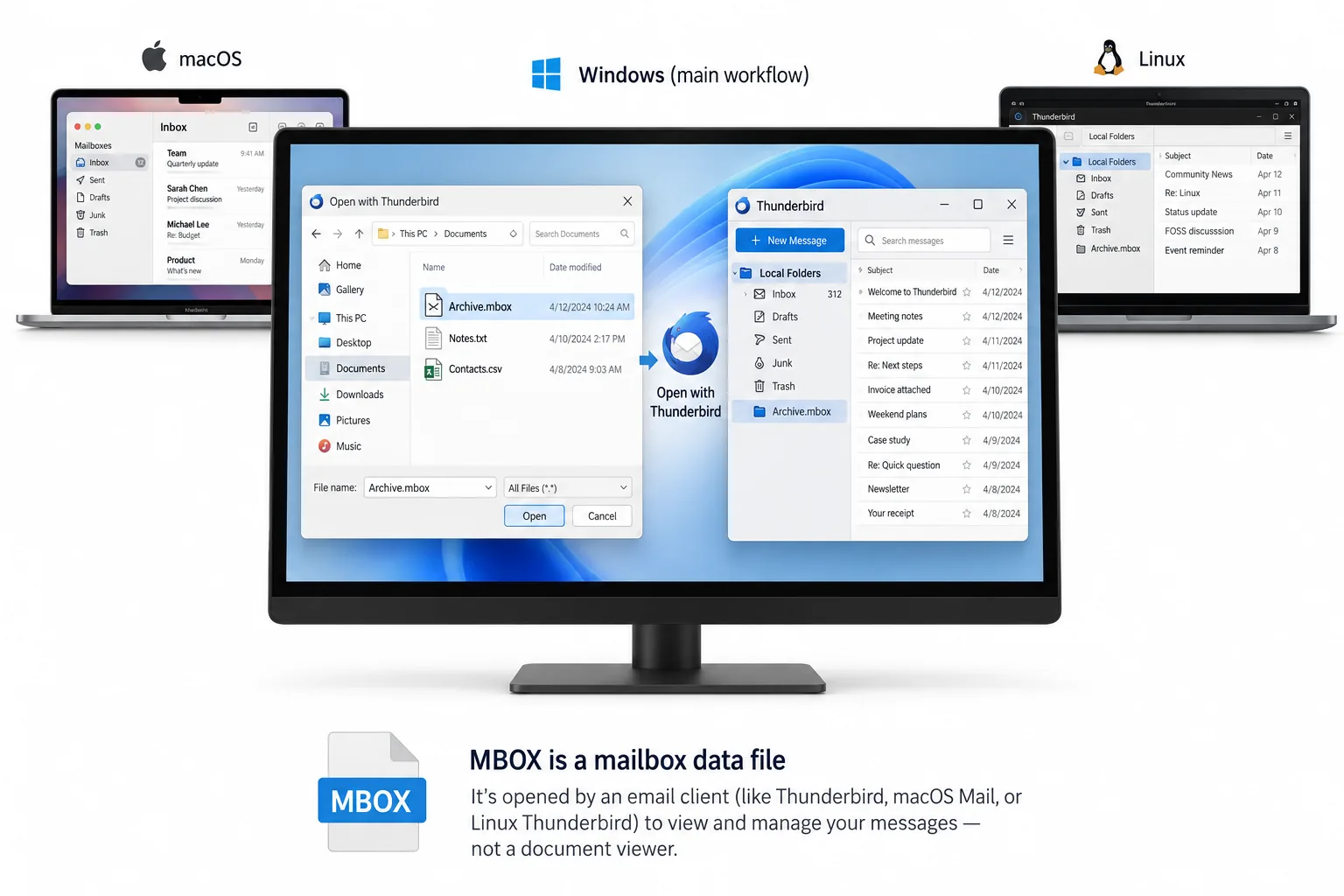
By An MBOX file is one text file that holds many emails, each starting with a line that begins "From ". Windows has no built in app for it, so a double click does nothing. Open it with a free MBOX viewer on Windows or with an online viewer in a browser on any device. You can also import it into Thunderbird or Apple Mail. A Google Takeout download is one large MBOX called "All mail Including Spam and Trash.mbox".
You have a file that ends in .mbox, or a file with no extension at all that a backup tool saved as one. Double click it and Windows shrugs, or it opens in Notepad as a wall of unreadable text. The emails are all in there. You only need the right way to read them.
This guide explains what an MBOX file is, so the rest makes sense, then gives five ways to open one and says which fits your device and your file.
- What Is an MBOX File?
- Which App Made Your MBOX File?
- Which Way Should You Open an MBOX File?
- How Do You Open an MBOX File on Windows?
- Step 1: Open the MBOX file in the viewer
- Step 2: Browse the folder and message list
- Step 3: Read a message with its attachments
- Step 4: Search across the mailbox
- Step 5: Save or export what you need
- How Do You Open an MBOX File in the Browser?
- How Do You Import an MBOX File Into Thunderbird?
- How Do You Open an MBOX File on a Mac?
- What Does the Raw File Look Like in a Text Editor?
- How Do You Open a Gmail Takeout File?
- Can You Open an MBOX File in Outlook?
- MBOX Opening Questions
What Is an MBOX File?
MBOX is short for mailbox, and it is one of the oldest email storage formats still in daily use. It is a single plain text file that holds a run of email messages, one after another. Each message begins with a line that starts with the word From and a space, the so called From line, which is how a reader knows where one message ends and the next begins. Microsoft's rival format, PST, packs the same mail into a database, but an mbox is plain text.
That design is why a double click fails. The file is text, so Windows offers Notepad, which prints every byte: the headers, the From lines and the attachments encoded as long strings. Nothing is broken. The messages are all there, but a text editor cannot lay them out as email. The format is defined in RFC 4155, which registers it as the application/mbox media type.
One quirk to know about. There are four flavours of mbox, mboxo, mboxrd, mboxcl and mboxcl2, which differ in how they escape a From line that appears inside a message body. Thunderbird writes an mboxrd variation and Eudora an mboxo one. You do not need to pick a flavour to open a file. A viewer built for the format reads all of them, which matters when the file came from an app you no longer have.
Which App Made Your MBOX File?
The file opens the same way whatever wrote it, but knowing the source helps you find the file and set your expectations. These are the common ones:
| Source | What you have |
|---|---|
| Mozilla Thunderbird | Files with no extension inside the profile Mail folder, one per folder, named Inbox, Sent and so on |
| Apple Mail | An exported .mbox package, which is really a folder holding an mbox file called mbox inside |
| Gmail via Google Takeout | One large .mbox file called "All mail Including Spam and Trash.mbox" |
| Postbox, SeaMonkey, Eudora, Evolution and 20+ others | An .mbox file, or a file with no extension, exported or copied from the app's storage |
If your file has no extension and you are not sure it is an mbox, open it in a text editor and look at the very first line. If it starts with From followed by a space and an email address, it is an mbox.
Which Way Should You Open an MBOX File?
Five methods work, and none needs the app that made the file. They differ by device and by how much you want to do with the mail.
| Method | Shows | Needs | Best for |
|---|---|---|---|
| Free viewer (Univik MBOX Viewer) | Every message with formatting, attachments and search | A Windows PC, free download | Most people on Windows. The fastest read |
| Online MBOX viewer | The same, inside a browser tab | Any device with a browser, nothing installed | Mac, Linux, Chromebook, a phone or a locked down PC |
| Import into Thunderbird | The mail as folders in a real email client | Thunderbird plus the ImportExportTools NG add-on | When you want to reply and keep using the mail |
| Import into Apple Mail | The mail in the Mac Mail app | A Mac | Reading an archive on a Mac you already use |
| A text editor | Raw headers and text, no layout | Notepad or any editor | A quick check that the file is really an mbox |
How Do You Open an MBOX File on Windows?
On Windows the fastest route is a viewer that reads the format on its own. Univik MBOX Viewer is free. It opens files written by Thunderbird, Apple Mail, Postbox, Gmail Takeout and more than 20 other clients. It runs on Windows 7, 8, 10 and 11. It opens a file even when it has no extension, and it reads the file page by page, so a multi gigabyte Takeout export opens without stalling.
Open the MBOX file in the viewer
Install the free Univik MBOX Viewer, click Open File and pick your .mbox file. If the file has no extension, choose it anyway, the viewer detects the format from the contents.
You should see The message list fill in, with a count of how many messages the file holds.
Browse the folder and message list
Messages load in a list you can sort by sender, subject or date. A file exported per folder shows that one folder. A single Gmail Takeout file shows every message together, since Takeout puts everything in one file.
Read a message with its attachments
Click any message to read it in the reading pane. Formatting, inline images and the list of attachments all show, the way they would in a mail app. Nothing is uploaded and the file is opened read only.
Search across the mailbox
Type in the search box to find a message by sender, subject or a word in the body. The viewer searches without loading the whole file into memory, so search stays quick on a large archive.
Save or export what you need
Save a single message as an EML file or as plain text for your records. To move the whole mailbox into Outlook, that is a conversion job, covered in the last section.
Most people do not need to import an mbox anywhere. They need to read a handful of old emails, find one message or check that a backup is intact. A viewer answers that in a minute, without touching a mail client.
Univik MBOX Viewer opens files from Thunderbird, Apple Mail, Gmail Takeout and 20+ other clients on Windows, with no email client installed. Read every message, attachments and all, free and offline.
Windows 11 / 10 / 8 / 7 · opens files with or without an extension · free forever
How Do You Open an MBOX File in the Browser?
On a Mac, a Linux box, a Chromebook, a phone or a work PC with no install rights, the Univik Online MBOX Viewer reads the file inside a browser tab. Pick the .mbox file and the page reads it on your own device and lays out the messages. Nothing is uploaded, which is the difference from tools that send the file to a server, and it means the viewer is safe for private mail and case evidence.
It reads Thunderbird, Apple Mail and Gmail Takeout exports and keeps labels and attachments. The page opens once, so you can go offline and it still works.
How Do You Import an MBOX File Into Thunderbird?
When you want the mail as live folders you can reply from, Thunderbird is the free route. It does not import an mbox on its own, so you add a small free add-on called ImportExportTools NG first.
- In Thunderbird, open the menu, choose Add-ons and Themes, search for ImportExportTools NG and click Add to Thunderbird.
- Right-click Local Folders in the left pane and make a New Folder to hold the mail, for example Imported Mail.
- Right-click that folder, hover ImportExportTools NG and choose Import mbox file, then Import directly one or more mbox files.
- Pick your .mbox file and click Open. A large file can take a few minutes to load.
The messages appear inside the folder you made, as ordinary Thunderbird mail. This is the heavier route, because Thunderbird copies every message into its own store, so for a quick read a viewer is faster.
How Do You Open an MBOX File on a Mac?
On a Mac, the Mail app reads mbox files through its own import. Choose File then Import Mailboxes, pick Files in mbox format and point it at your .mbox file or the .mbox package Apple Mail itself exports. The mail lands in a new mailbox called Import in the sidebar, and you drag it wherever you want. This is the built in way on macOS, so it needs no add-on.
What Does the Raw File Look Like in a Text Editor?
You do not need any of the above only to confirm a file is an mbox or to read one line of text. Open it in Notepad or any editor. You will see the From line, then the headers, then the message, then long blocks of encoded text where the attachments are. It is not pretty, but it proves the mail is there.
The highlighted line is the From line that starts every message. The X-Gmail-Labels header is a giveaway that the file came from Google Takeout. The base64 block near the end is an image attachment stored as text, which is why a plain editor is fine for a peek but wrong for real reading.
How Do You Open a Gmail Takeout File?
Most people who search for how to open one of these got theirs from Google. When you export mail at takeout.google.com, Google hands you a single mbox file, not one per label, named exactly All mail Including Spam and Trash.mbox. It can be several gigabytes, because it holds your whole mailbox in one file.
Two things follow from that. First, your labels are not folders in the file. Each message keeps its labels in an X-Gmail-Labels header, and the thread ID sits in X-GM-THRID, so a message that had three labels appears once with all three listed. Second, the file is big, so a viewer that reads page by page opens it far more comfortably than importing the whole thing into a mail client. Open it with the free viewer or the online viewer, and if you later want it inside Outlook or a new Gmail, convert it or import it from there.
Can You Open an MBOX File in Outlook?
Reading an mbox and moving it into Microsoft Outlook are two different jobs. Outlook does not read the mbox format at all, so there is nothing to open. To land the mail in Outlook you convert the mbox to a PST file first, then import that PST. Our guide to converting MBOX to PST covers the free Thunderbird route and the direct converter. If you only need to read the messages or copy a few out, stay with a viewer, it is quicker and changes nothing.
The short version
- An mbox is one text file holding many emails, each starting with a From line. Windows has no built in app for it.
- On Windows, the free Univik MBOX Viewer opens it fastest. On a Mac, phone or Linux, the online viewer opens it in a browser.
- To reply and keep the mail, import it into Thunderbird with ImportExportTools NG or into Apple Mail on a Mac.
- A Google Takeout export is one large file called All mail Including Spam and Trash.mbox, with labels kept in a header.
- To put the mail in Outlook, convert the mbox to PST first. Outlook cannot read mbox directly.
Get the free Univik MBOX Viewer
MBOX Opening Questions
What app opens an MBOX file?
On Windows the quickest option is a free viewer such as Univik MBOX Viewer, which opens the file on its own with no email client installed. You can also import the file into Mozilla Thunderbird or, on a Mac, into Apple Mail. There is no such app built into Windows, which is why a double click does nothing.
Can I open an MBOX file without Thunderbird?
Yes. A dedicated viewer opens the file directly, and the Univik Online MBOX Viewer reads it in a browser tab with nothing installed. Thunderbird is only one route, and it needs the ImportExportTools NG add-on to bring the file in.
How do I open a Google Takeout MBOX file?
A Gmail Takeout download is a single mbox file called "All mail Including Spam and Trash.mbox", often several gigabytes. Open it the same way as any other one: a free viewer or the online viewer reads it page by page, or you import it into Thunderbird. The Gmail labels are kept inside as an X-Gmail-Labels header on each message.
Why does my MBOX file open as unreadable text?
Because an mbox is a plain text file, so Windows offers Notepad, which shows the raw bytes: headers, From lines and encoded attachments run together. The messages are intact, but a text editor cannot lay them out. A reader that understands the format shows each message as a normal email.
Can I open an MBOX file on Mac, iPhone or iPad?
On a Mac, import the file into Apple Mail with File then Import Mailboxes then Files in mbox format, or read it in the Univik Online MBOX Viewer in Safari. On an iPhone or iPad, the online viewer opens the file in the browser, since there is no way to import a raw mbox into the iOS Mail app.
Can I open an MBOX file in Outlook?
Not directly. Outlook does not read the mbox format. To get the mail into Outlook you convert the mbox to a PST file first, then import that PST. The Univik MBOX to PST Converter does that step. To only read the messages, a viewer is faster.
Is it safe to open an MBOX file?
Yes. A viewer opens the file read only and does not run anything inside it, so viewing a message is safe even for forensic evidence. Treat attachments inside the mail with the same care as any email attachment, and scan one before you open it outside the viewer.
Does the size of the MBOX file matter?
For a viewer, not much. A good reader loads the file page by page rather than all at once, so a multi gigabyte Takeout file opens without running out of memory. Importing the same file into Thunderbird or Apple Mail takes longer, because the client copies every message into its own store.
 About This Guide
Written and maintained by Leena Taylor Paul and the Univik team, developers of Windows data conversion and recovery software since 2013. The format details were checked against RFC 4155 and the vendor documentation for Thunderbird, Apple Mail and Google Takeout listed below. The steps were run on real mbox files from Thunderbird and a Gmail Takeout export. Last verified September 20, 2026. Need a hand? Contact our support team.
Sources checked: RFC 4155: The application/mbox Media Type · Wikipedia: mbox format and its variants · University of Michigan: Import MBOX files into Thunderbird · Apple Support: Import or export mailboxes in Mail on Mac · Metaspike: Google Takeout in email forensics · Univik MBOX Viewer