An SBI bank statement uses two rules. From OnlineSBI net banking the password is your account number. A YONO app statement uses your date of birth as DDMMYYYY, such as 15081990.
Which rule applies depends on where you downloaded the SBI statement. Once the SBI file opens, you can drop the password so it stops asking.
You pull an SBI statement into your reader and it halts at a password box before a single line appears. SBI seals the file because it lists your account number and every entry on the page. The password is not one you picked. SBI sets it from a detail it already holds about you, and the rule it reaches for depends on where the statement was downloaded. Sort out which of the two SBI formats fits your file, get it open, then run it one time through the Univik PDF Unlocker so the prompt never returns.
What Is the SBI Bank Statement PDF Password?
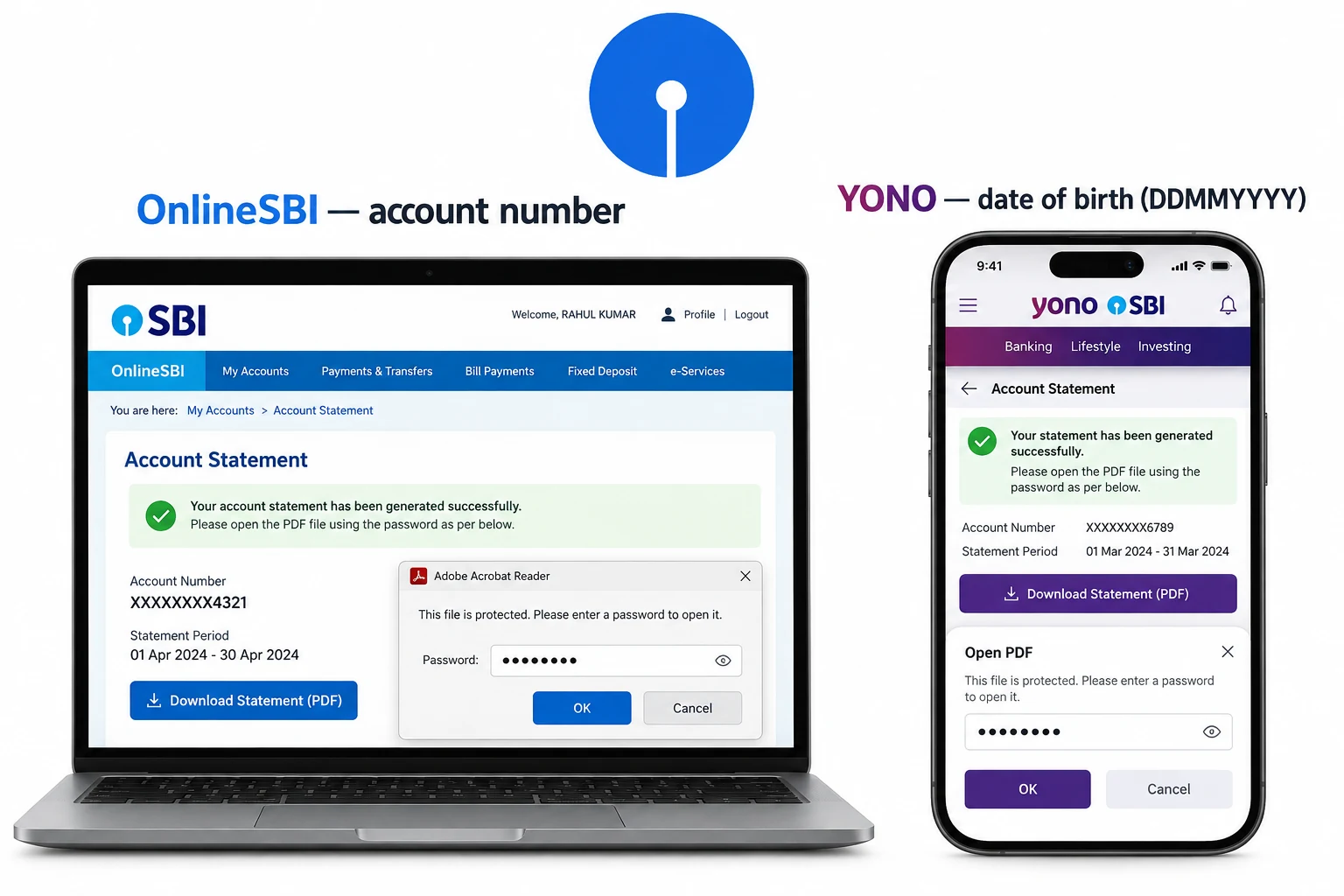
The SBI statement password is a short value the bank builds from your own record, and it arrives in two shapes. A file saved from OnlineSBI net banking opens with your bank account number typed in full. A file exported from the YONO app opens with your date of birth in DDMMYYYY order, so 15 August 1990 turns into 15081990. Both are open passwords, which means the SBI document reveals nothing until the right value lands in the box. You never chose either one. SBI applied it the moment the statement was created.
| Where you got the SBI statement | Password rule | Example |
|---|---|---|
| OnlineSBI net banking | Your full bank account number | account number, no spaces |
| YONO mobile app | Date of birth written as DDMMYYYY | 15081990 |
| Statement email or SMS | The exact rule is printed in the covering note | see the note |
If you are unsure which route produced your file, the safe move is to try the account number first for a desktop download and the birth date first for anything that came off your phone.
Why Does SBI Lock Its Statement PDF?
SBI seals the file so your account details and the balances printed inside stay private while the file waits in your inbox or on a shared machine. An SBI statement that reaches the wrong person without a lock would give away real banking details, so the bank seals every copy before it leaves. This kind of lock goes by the name open password. The reader holds back the whole document until the value is entered. SBI reuses one rule for each customer, which is why the password feels tied to you even though you never typed it in.
There is a bright side to a fixed rule. Because the value is your own account number or your own birth date, you can work it out in a few seconds once you know which SBI format is in play.
How Do You Open an SBI Bank Statement PDF?
Opening an SBI statement rests on one question before anything else: where did the file come from? That single answer points you to the correct SBI rule. After that it is a matter of keying the value at the prompt.
- Work out the source. A file saved from OnlineSBI net banking uses your account number. A file from the YONO app uses your date of birth.
- Build the value from your own record. Type the account number in full with no spaces. For a YONO statement enter the birth date as an eight-digit DDMMYYYY value.
- Open the SBI PDF in any reader and enter the value when the box appears. The statement shows on the spot.
Keying that value on every open grows tiring in a hurry, so the next step lifts the password for good.
How Do You Remove the SBI Statement Password?
Retyping the SBI password on every open turns into a monthly grind, and it stops other programs from reading the file, like tax software or a lender's upload form. Taking the password off leaves an SBI statement that opens the second you double-click it. Get the file open with the value that fits your source, then clear the lock with the steps below.
Give an open SBI statement to the Univik PDF Unlocker and it returns a copy with no password. Aim it at a folder and every SBI statement lands unlocked.
Free Download See all featuresNeither SBI Password Working? What to Do Next
When neither the account number nor the birth date opens the file, stop testing values and look at the message SBI sent with the statement. That note names the exact rule for your file, and it settles which format to use. If the note is gone or the value keeps failing, SBI can resend the statement or confirm the pattern on your account. A password remover cannot help at this stage, because it works only on an SBI file that already opens for you. Not one product on the market can bring back a value that is truly lost, so a short word with SBI is the real fix. A part-downloaded file can also reject a correct value, so fetch the statement once more before you give up.
- An SBI bank statement PDF is sealed with an open password that the bank sets for you.
- A net banking download from OnlineSBI opens with your account number.
- A statement from the YONO app opens with your date of birth as DDMMYYYY, so 15081990.
- Once the SBI file is open, take the password off and it will not prompt again.
- The tool works offline on your Windows machine and can unlock a folder of SBI statements together.
- If neither rule fits, the covering note names the exact one. SBI can also resend the file.

SBI Bank Statement Password Questions

This SBI guide is maintained by Leena Taylor Paul with the Univik crew, a Windows tool team going since 2013. Plenty of readers only need an SBI statement to open for an accountant or a loan form without the password each time, so this guide gives both formats and the way to clear the lock. Last checked September 2026. Neither format working? Contact our support team.