Synology MailPlus Server is a software package that turns a Synology NAS into a fully functional on-premises email server handling SMTP delivery, IMAP and POP3 access, spam filtering and all the backend functions of a mail server. Email stays on the NAS hardware you control rather than on a cloud provider’s servers. It is a strong choice for organisations that already have a Synology NAS, want control over where their email data lives and have someone with enough technical knowledge to manage it. It is not the right choice for organisations without IT capability, without reliable hardware and power infrastructure or with strict uptime requirements that a NAS cannot guarantee.
What MailPlus Server Is
Synology MailPlus Server is an email server that runs on a Synology NAS. Install it from the Synology Package Center the same way you install any other application on a Synology NAS and the NAS becomes capable of receiving, storing and sending email for your domain.
Your email address at yourcompany.com delivers to a mailbox stored on your own NAS hardware. Users access email via the MailPlus webmail interface in a browser, via Outlook, Thunderbird or Apple Mail over IMAP or via the MailPlus mobile apps. The email never passes through Microsoft’s, Google’s or any other cloud provider’s servers it lives on your hardware, in your location.
This is what distinguishes MailPlus Server from Microsoft 365 and Google Workspace: data sovereignty. Your email is under your physical and administrative control.

“MailPlus is a product we run ourselves, in the lab, so that the migration paths can be tested on real data. The largest move we have done from it was 11 TB across roughly 3,246 accounts.”
Nick Rogers
|Founder, Univik, building file conversion tools since 2013
What It Does
MailPlus Server handles every function a mail server needs to handle:
Inbound email delivery. Receives email sent to your domain addresses via SMTP. Applies spam and malware filtering before email reaches user inboxes.
Outbound email sending. Delivers email from user accounts to external recipients. Supports SMTP relay (smarthost) for environments where direct SMTP delivery is blocked by the ISP.
IMAP and POP3 access. Users connect standard email clients Outlook, Thunderbird, Apple Mail, iOS Mail, Android Gmail to the NAS using IMAP or POP3. Any email client that supports these protocols works with MailPlus Server.
Spam and malware filtering. Rspamd-based spam filtering with auto-learning. ClamAV-based malware scanning. Both are configurable through the MailPlus Server admin interface.
Domain and alias management. Multiple domain support, per-user aliases, catchall addresses and auto-responders. A 20-person company with two domain names (company.com and company.co.uk) can host both on the same MailPlus Server instance.
Webmail access. The MailPlus client package provides a browser-based webmail interface think of it as a private Gmail web UI that lives on your NAS. Users access it at your-nas-ip:port or through a custom domain. Mobile apps for iOS and Android are also available.
High availability. MailPlus Server supports pairing two Synology NAS units for high availability if one fails, the other takes over email service automatically. This requires two compatible NAS units and appropriate licences on both.
Mailbox export and archiving. Administrators can export any user’s mailbox for migration, backup or archiving. On DSM 7, the export produces PST files. On DSM 6, it produces MBOX files. Univik Synology MailPlus Converter converts either format to PDF, EML, MSG and more.
Who Uses It
MailPlus Server is not for everyone. The organisations that get the most from it tend to share a few characteristics.
Organisations already running a Synology NAS for file storage. If you already have a Synology NAS for shared file access, adding MailPlus Server means adding email hosting to hardware you already manage. The incremental cost is the licence pack hardware is already in place.
Organisations with data sovereignty requirements. Legal, medical and financial organisations in jurisdictions with strict data residency requirements sometimes need email to remain on their own infrastructure rather than in a cloud provider’s data centres. MailPlus Server keeps email on hardware the organisation physically owns and controls.
Organisations avoiding per-user SaaS subscription costs. For a stable 20-person company, MailPlus Server licences cost approximately $450 once. Microsoft 365 Basic for 20 users costs over $1,400 per year. Over five years the savings are significant assuming reliable hardware, power and IT support to manage it.
Organisations with an IT administrator or technically capable owner. MailPlus Server requires configuration, maintenance, monitoring and occasional troubleshooting. It is not a set-and-forget system. An organisation with no technical capability to manage it will face problems spam issues, certificate expiry, DNS misconfiguration that cloud email handles automatically.
Who Should Not Use It
MailPlus Server is the wrong choice for some organisations and being honest about this matters more than promoting the product.
Organisations with no IT capability. Managing a mail server even a well-designed one like MailPlus Server requires someone who can handle DNS records, SSL certificates, spam filter tuning, DMARC and SPF configuration and the occasional delivery failure investigation. A small business with no IT support and no technical owner should use cloud email. A misconfigured mail server creates more problems than it solves.
Organisations requiring guaranteed uptime. MailPlus Server runs on NAS hardware in an office or server room. If the power goes out, the internet goes down or the NAS fails, email stops. Microsoft 365 and Google Workspace offer 99.9% uptime SLAs backed by global redundant infrastructure. A single NAS cannot match that. High availability mode (two NAS units) improves resilience but still depends on a single physical location.
Organisations sending high volumes of cold or marketing email. Self-hosted email servers are significantly more likely to land in spam folders than email sent from established cloud providers. Microsoft 365 and Google Workspace have strong sending reputations built from billions of legitimate messages. A new MailPlus Server on a residential or small business IP address will struggle with deliverability for mass email. MailPlus Server is designed for transactional business email between known correspondents, not bulk outbound campaigns.
Growing organisations above around 200 users. MailPlus Server scales reasonably well for SMB use cases, but very large mailbox counts, high email volumes and enterprise email features (advanced compliance, eDiscovery, litigation hold) are better handled by enterprise cloud email platforms. MailPlus Server is built for the SMB segment the upper practical limit for most deployments is 100 to 200 active users before performance and management overhead becomes a constraint.
MailPlus Server vs Microsoft 365 vs Google Workspace
| Consideration | MailPlus Server | Microsoft 365 | Google Workspace |
|---|---|---|---|
| Email data location | Your hardware, your location | Microsoft data centres | Google data centres |
| Cost model | One-time licence + hardware | Per-user monthly subscription | Per-user monthly subscription |
| 5-year cost (20 users) | ~$450 licences + NAS hardware | ~$7,200+ | ~$7,200+ |
| Uptime guarantee | Dependent on hardware and power no SLA | 99.9% SLA | 99.9% SLA |
| IT administration required | Yes ongoing | Minimal | Minimal |
| Spam deliverability | Moderate new IP reputation | Excellent | Excellent |
| Webmail interface | MailPlus web client | Outlook Web App | Gmail |
| Mobile apps | MailPlus iOS and Android | Outlook iOS and Android | Gmail iOS and Android |
| Data sovereignty | ✅ Full control | Limited Microsoft terms apply | Limited Google terms apply |
| Works with Outlook and IMAP clients | ✅ Yes | ✅ Yes | ✅ Yes |
Honest Limitations
No review of MailPlus Server is complete without naming what it cannot do as well as cloud providers.
Deliverability takes time to establish. A new MailPlus Server deployment will initially have a low sending reputation. Recipients at large providers (Gmail, Outlook.com, Yahoo) may send messages to spam until the IP reputation builds up. Setting up SPF, DKIM and DMARC correctly is not optional it is the baseline for any chance of reliable delivery. Even with correct configuration, building reputation takes weeks.
Spam filtering needs ongoing attention. Rspamd is capable but it learns from your specific mail patterns over time. Out of the box it is not as finely tuned as Google’s or Microsoft’s filtering systems, which are trained on hundreds of billions of messages. Expect some spam management overhead in the first months, particularly for users receiving high volumes.
No built-in calendar sharing with external parties. MailPlus Server handles email. It does not provide a calendar that integrates with Google Calendar or Outlook Calendar for external scheduling. Synology Calendar is a separate package with its own functionality useful within the Synology ecosystem but not a replacement for Google or Microsoft calendar integration for organisations that schedule externally.
Backup and disaster recovery require active management. Cloud email providers handle backup, disaster recovery and redundancy automatically. With MailPlus Server, the responsibility falls on you. See our MailPlus Server email backup guide for the correct approach which requires more than just Hyper Backup.
Getting Started
If MailPlus Server sounds like the right fit, the setup sequence is:
Install MailPlus Server and MailPlus from Package Center. Both packages are needed MailPlus Server for the backend and MailPlus for the webmail client. For the distinction between them, see our MailPlus vs MailPlus Server guide.
Configure your domain DNS records. Add MX records pointing to your NAS public IP. Add SPF, DKIM and DMARC records. MailPlus Server admin guides you through the DNS configuration this is the most important step for deliverability.
Set up an SSL certificate. Enable HTTPS for the MailPlus web interface and SSL for IMAP and SMTP connections. Synology’s Let’s Encrypt integration handles this automatically with a valid domain name pointing to the NAS.
Create user accounts and add licences. The first 5 users are covered by the free tier. See our MailPlus Server licensing guide for the full licence model and what counts as a user for licence purposes.
Exporting Email From MailPlus Server
At some point whether for migration, backup or decommissioning the NAS you will need to export email from MailPlus Server. On DSM 7, the admin export produces a PST file per account via Account then User then Import/Export. On DSM 6, a bulk MBOX export is available via Storage then Back Up. See our MailPlus Server export guide for the exact steps for both versions.
The exported file (PST on DSM 7, MBOX on DSM 6) goes into Univik Synology MailPlus Converter, which converts to PST for Microsoft 365 or Outlook, PDF for long-term archiving, EML for cross-platform use and more. The converter runs entirely offline on Windows no NAS connection needed after the export.
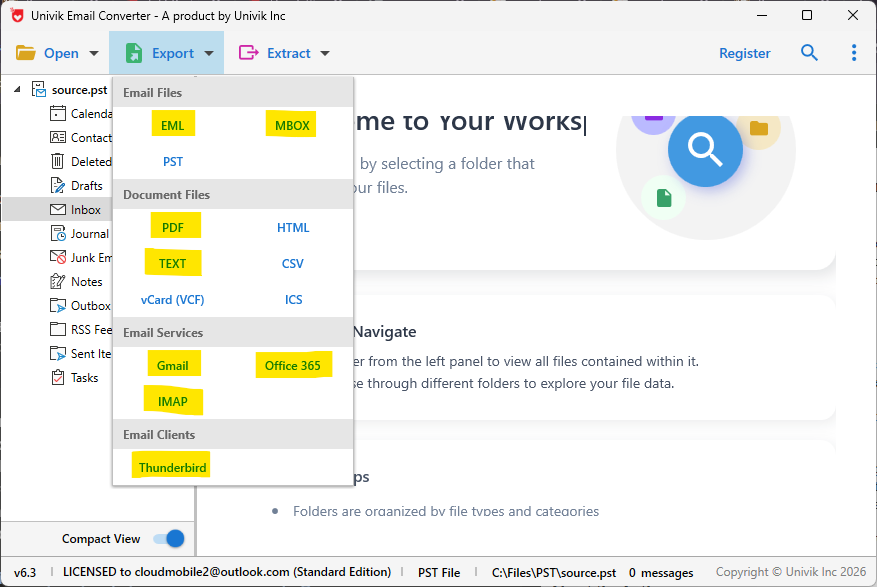
Univik Synology MailPlus Converter accepts PST (DSM 7) and MBOX (DSM 6) and exports to 20+ formats including PDF, EML, Gmail and Microsoft 365
Frequently Asked Questions
Is MailPlus Server suitable for a 2 or 3 person company?
Yes, if there is someone comfortable managing it. The free 5-user tier covers a 2 or 3 person team at no licence cost. The configuration and ongoing maintenance is manageable for a technically capable owner or part-time IT person. If nobody in the team is comfortable with DNS records, SSL certificates and occasional delivery troubleshooting, cloud email is safer.
Can I run MailPlus Server from home?
Technically yes, but there are practical barriers. Most residential ISPs block port 25 (SMTP), which prevents direct email delivery. A smarthost relay (an SMTP relay service that accepts email from your NAS and delivers it on your behalf) is the workaround but this adds a dependency on a third-party service. Residential IP addresses also have poor sending reputation by default. Running a mail server from a business internet connection or colocation facility is substantially more reliable.
How does MailPlus Server compare to self-hosted alternatives like iRedMail or Zimbra?
MailPlus Server is considerably easier to set up and maintain than server-based self-hosted email platforms. iRedMail and Zimbra run on Linux servers and require command-line administration, system knowledge and manual maintenance. MailPlus Server provides a GUI admin interface, automatic updates through Package Center and integration with the Synology ecosystem. For organisations already on Synology NAS hardware, MailPlus Server is the lower-friction self-hosted option.
What happens to my email if I stop using MailPlus Server?
Email data remains on the NAS until exported or deleted. You can export all mailboxes as MBOX files and convert them to PST or PDF for long-term storage before shutting down the service. Once you update your domain MX records to point to a new provider (Microsoft 365, Google Workspace etc.), new email routes to the new system. Historical email on the NAS can be imported into the new system or archived separately. Nothing is automatically deleted by switching providers.
The Short Version
MailPlus Server is a capable, well-designed on-premises email server for organisations that want control over where their email lives and are willing to take on the management responsibility that comes with running their own infrastructure.
It is not a simpler version of Microsoft 365. It is a different product with a different trade-off: lower ongoing cost and data sovereignty in exchange for IT management responsibility and the absence of an uptime SLA. For organisations with the right profile existing Synology NAS hardware, an IT-capable person, a stable user count and a reason to keep email on-premises MailPlus Server is an excellent choice.
For organisations without those conditions, cloud email is the more reliable option, regardless of the cost difference.
Does your organisation already have a Synology NAS and someone who manages it? If both answers are yes, MailPlus Server is worth evaluating seriously. If either is no, the management overhead may exceed the cost savings.