 Pegasus Mail Guide
 By
By Pegasus Mail stores filed email in a home mailbox folder on disk, most often under C:\PMAIL\MAIL on a single-user install. Folders of messages are saved as .PMM files, each with a .PMI index, while new and unread mail sits as single .CNM files. The exact location is shown in Help, About Pegasus Mail, Info, which lists the home mailbox directory. IMAP accounts keep the master copy on the server with a local offline cache.
People come to this question for two reasons. Either the mail needs backing up or moving to a new PC, or the program will no longer start and the folder has to be found by hand. Both need the same thing: the real path to the mailbox and an idea of what the files inside it are. Here is how to get both, from the reliable route to the default guess.
How Do I Find Where Pegasus Mail Stores Mail?
Take the first step if the program still opens, since it gives the exact path. Fall back to the default folder only when Pegasus will not run.
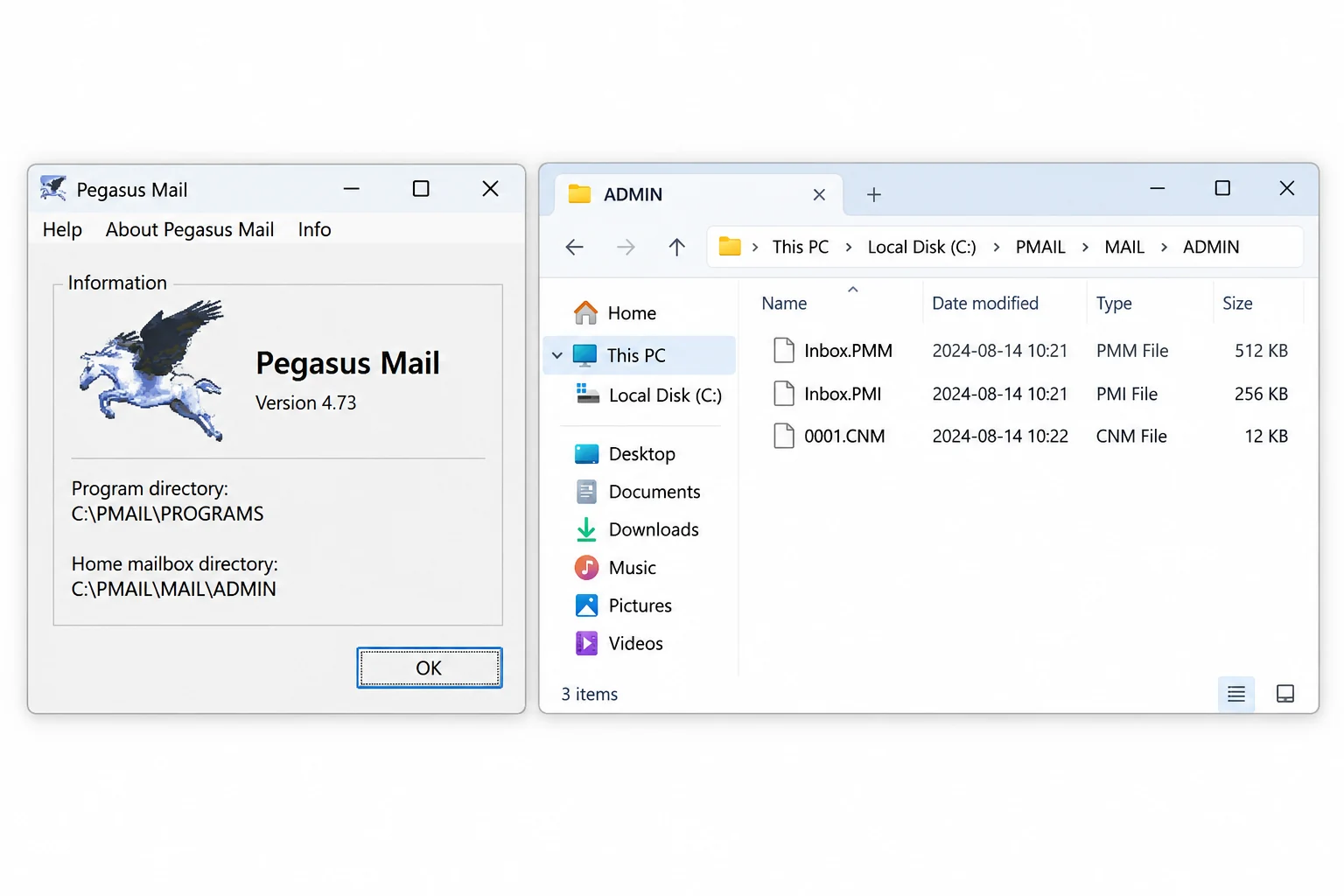
Ask Pegasus Mail for the exact path
The surest answer comes from the program itself. Open Pegasus Mail, open the Help menu, pick About Pegasus Mail, then click Info. It prints the program directory and, more importantly, the home mailbox directory where your filed mail lives. Note both. This beats guessing, because a network install or a multi-user setup can put the mailbox far from the program.
Look in the default folder if it was a standard install
A normal single-user install sits at C:\PMAIL. Inside it, C:\PMAIL\PROGRAMS holds the program and C:\PMAIL\MAIL holds the mail, often under a per-user subfolder. On a multi-user machine the mailbox may sit under a username folder or on a mapped network drive instead. If C:\PMAIL is not there, the Info screen from the first step is the way to find where it went.
Learn what the files in that folder are
The mail folder is not one file. A saved folder of messages is a .PMM file, and each .PMM has a matching .PMI index that Pegasus rebuilds if it is lost. Fresh incoming and unread messages are separate .CNM files in the new-mail area until they are filed into a folder. If the account used IMAP, an offline copy lives in a local cache while the server keeps the master mailbox.
Open or move the mail once you have found it
Found the folder but no longer run Pegasus Mail? A .PMM or .CNM means nothing to Outlook or Thunderbird on its own. To read a file quickly, drop it into the free online Pegasus Mail viewer in a browser. To keep the mail for good, Univik Pegasus Mail Converter turns the .PMM folders and .CNM messages into PST, EML, MBOX or PDF, folder tree and attachments intact, with no Pegasus install needed.
What Do the Pegasus Mail Files Mean?
Pegasus Mail, written by David Harris and around since 1990, uses its own layout rather than one file per message like some mail apps. A folder you see in the program is a .PMM file on disk, a container that packs many messages end to end. The .PMI next to it is a lookup table so the program can jump to a message without reading the whole container, and the program can build a new index if the old one goes missing.
New mail is different. Each arriving message lands as its own .CNM file in the new-mail area, and stays a separate file until you move it into a folder, at which point it joins that folder's .PMM. This split is worth knowing, because a backup that copies only the folder containers can miss mail that is still sitting as loose .CNM files. Copy the whole mailbox directory, not a chosen file or two.
The mistake we see most is someone copying a single .PMM and thinking they have their mail, then finding the newest messages gone. Those were loose .CNM files in the new-mail area. Grab the whole mailbox folder, then read or convert it. Nothing is left behind.
Pegasus Mail File Types at a Glance
The files you will meet in the mailbox folder, what each one holds and how to read it.
| File | What it holds | Where it lives | How to read it |
|---|---|---|---|
.PMM | A mail folder holding many messages | Home mailbox folder | Viewer or converter |
.PMI | The index for a .PMM folder | Beside its .PMM file | Rebuilt by Pegasus |
.CNM | A single new or unread message | New-mail area of the mailbox | Viewer or converter |
IMAP cache | Offline copy of server mail | Local cache folder | Server holds the master |
Univik Pegasus Mail Converter reads the .PMM folders and .CNM messages straight from the mailbox directory and writes PST, EML, MBOX, PDF and more, folder tree and attachments kept. No working Pegasus install required. For a quick look first, the online viewer opens the files in a browser.
Reads .PMM, .PMI and .CNM · no Pegasus install needed · runs on your PC
The short version
- Filed mail lives in a home mailbox folder, usually under C:\PMAIL\MAIL on a single-user install.
- Help, About Pegasus Mail, Info prints the exact home mailbox directory, which beats guessing.
- .PMM is a folder of messages, .PMI is its index and .CNM is a single new or unread message.
- Copy the whole mailbox folder, since loose .CNM new mail sits outside the .PMM containers.
- Univik Pegasus Mail Converter turns those files into PST, EML, MBOX or PDF without a Pegasus install.
Convert your Pegasus Mail folder
Pegasus Mail Storage Questions
 About This Guide
Researched and written by Leena Taylor Paul. Univik has built Windows utilities since 2013 and studied the Pegasus Mail on-disk format closely for its converter. The paths and file roles here were checked against a Pegasus Mail install while writing. Updated 24 September 2026. Cannot find your mailbox folder? Support can help from the link below.
Reference: Pegasus Mail filenames and extensions guide · Univik Pegasus Mail Converter