
Outlook PST
The most common choice, open directly in any Outlook version. Maintains complete folder structure and all properties.
Most Popular Univik OST Converter

Univik OST Converter extracts emails, contacts, calendars and attachments from inaccessible Exchange & Microsoft 365 offline data files, even when you've lost server access or left your organization.
*Free trial exports first 25 items per folder. Full version for complete conversion.


VirusTotal Verified Safe
Certified Clean by 70+ Antivirus Engines. No malware, spyware or adware.
 What We Recover From Your OST File
Email Messages

Attachments

Contacts

Calendar

Tasks
Notes

Folder Structure

Deleted Items
 Export Options
Export your recovered data in the format that best suits your needs, from Outlook-compatible PST to universal formats like EML and MBOX.
📁
.OST
Source File
⚙️
Univik
Converter
📄
PST, EML, MBOX...
Output
 Supported Output Formats
Outlook PST
The most common choice, open directly in any Outlook version. Maintains complete folder structure and all properties.
Most PopularEML Files
One file per email, compatible with Thunderbird, Windows Mail and most email clients. Great for individual email access.
Universal
MBOX Format
Standard Unix mailbox format, import into Thunderbird, Apple Mail or migrate to Gmail via Google Takeout reverse.
Cross-PlatformMSG, PDF, HTML
Individual MSG files, printable PDF documents or HTML for web viewing. Perfect for legal discovery and archival.
Specialized Key Features
Purpose-built for orphaned OST recovery with features designed to extract maximum data from inaccessible files.
No Outlook/Exchange Required
Works completely independently of Microsoft Outlook and Exchange Server. The software directly parses OST file structure using proprietary algorithms, extracting data without requiring any server connection, active profile or valid subscription. Essential for orphaned file recovery.
Recover Deleted Items
Scans the OST file's recoverable items container to find soft-deleted emails, contacts and calendar entries. These items may have been deleted but still exist in the file's internal structure. Our deep scan technology locates and recovers data others miss.
Preserve Folder Hierarchy
Maintains your complete folder organization during conversion. Inbox, Sent Items, Drafts, custom folders, Calendar, Contacts, Tasks, everything is preserved exactly as it appeared in Outlook. Subfolders and nested structures maintained perfectly.

Full Content Preview
Preview complete email content including HTML formatting, embedded images and attachments before conversion. View contact details, calendar appointments and task information. Verify data integrity before committing to export.

Encrypted OST Support
Handles OST files with Outlook's standard encryption (Compressible and High encryption levels). For password-protected files, enter the password during conversion. Supports both ANSI and Unicode OST file formats from all Outlook versions.
Handle Large OST Files
Optimized for processing large OST files up to 50GB or more. Uses intelligent memory management to convert massive mailboxes without crashing. Progress indicators show real-time status during lengthy conversion operations.
Preserve Email Properties
Maintains all metadata: sender, recipient, date/time, CC/BCC, read/unread status, importance flags, categories, follow-up flags and custom properties. Attachments extracted with original filenames and timestamps intact.
Selective Export & Filters
Don't need everything? Select specific folders for conversion using checkboxes. Filter by date range to export only emails from a specific period. Export selected items only when you need only a subset of your data.
Data Integrity
We convert and we verify. Every element of your data is checked and preserved during conversion.
📧 Email Data Integrity
📅 Calendar & Contacts Integrity
 Comparison
Not all OST converters are created equal. See how we compare to alternatives and free tools.
Univik OST Converter
Other Tools & Methods
 How It Works
Recover your orphaned OST data in minutes with this easy process.
Step 1: Add OST File
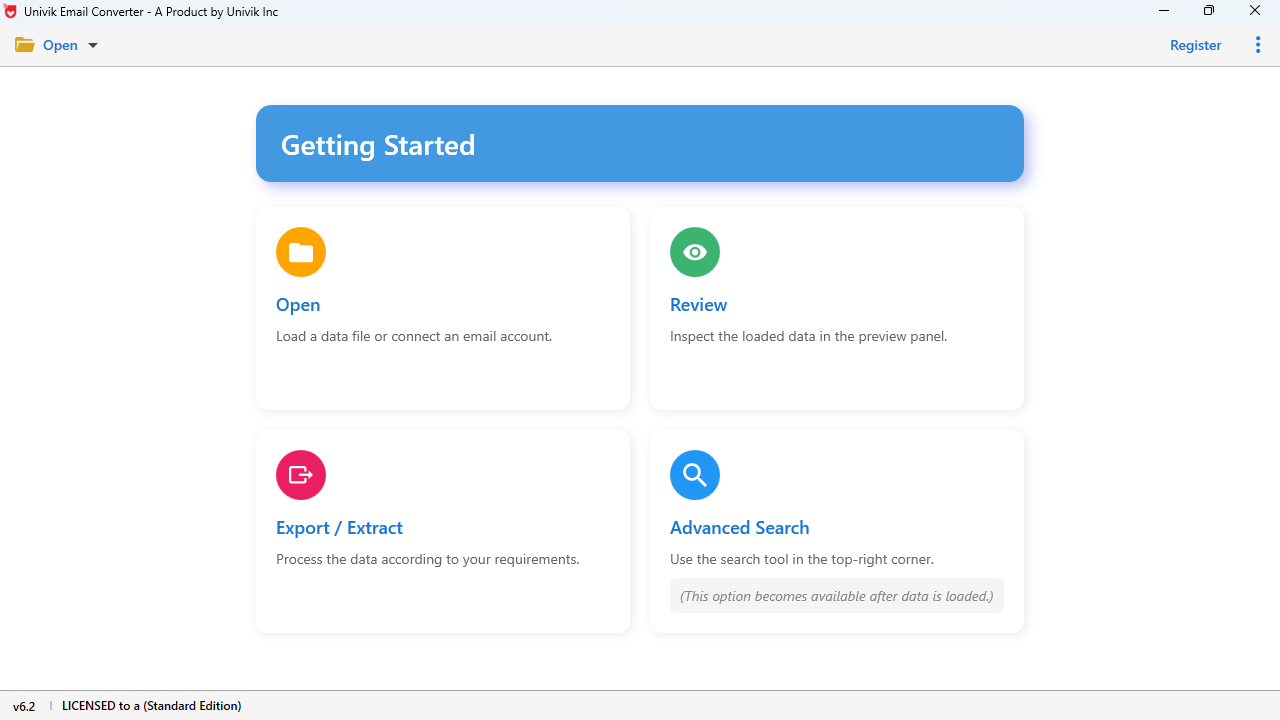
Launch OST Converter and click "Add File" to browse and select your OST file.
Step 2: Scan & Preview
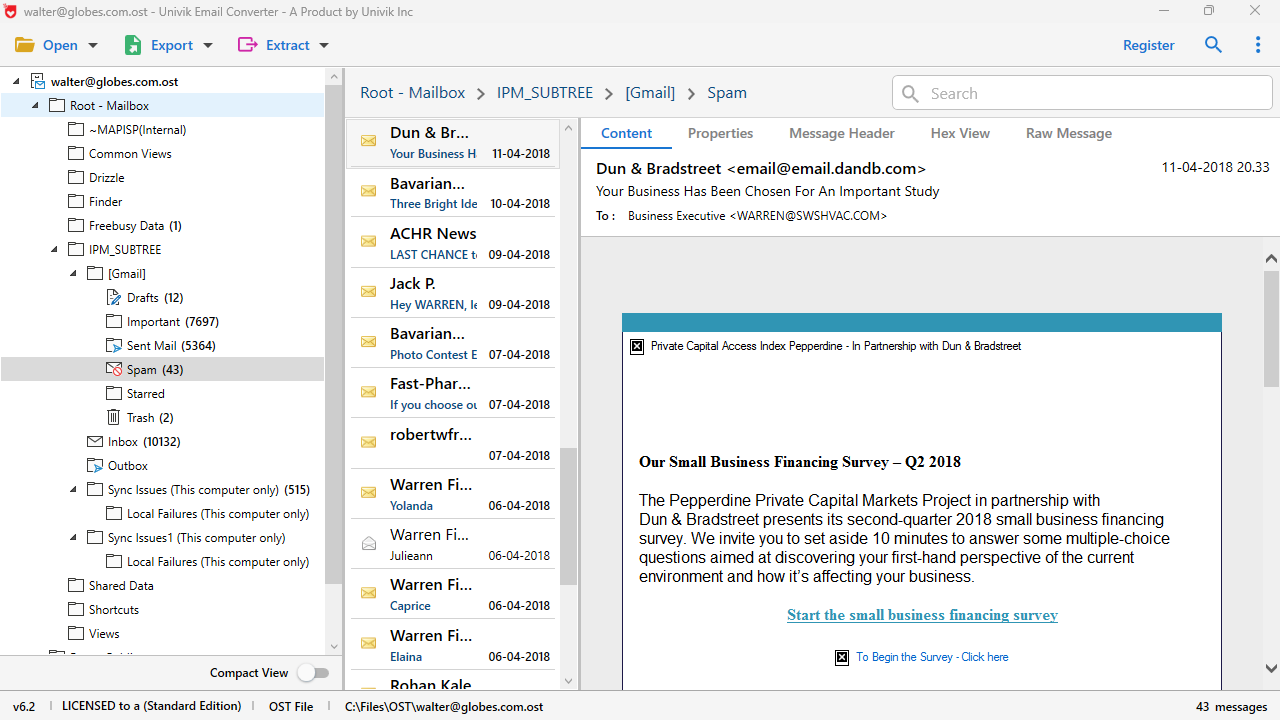
Software scans the file and displays all recoverable folders and items for preview.
Step 3: Select Format
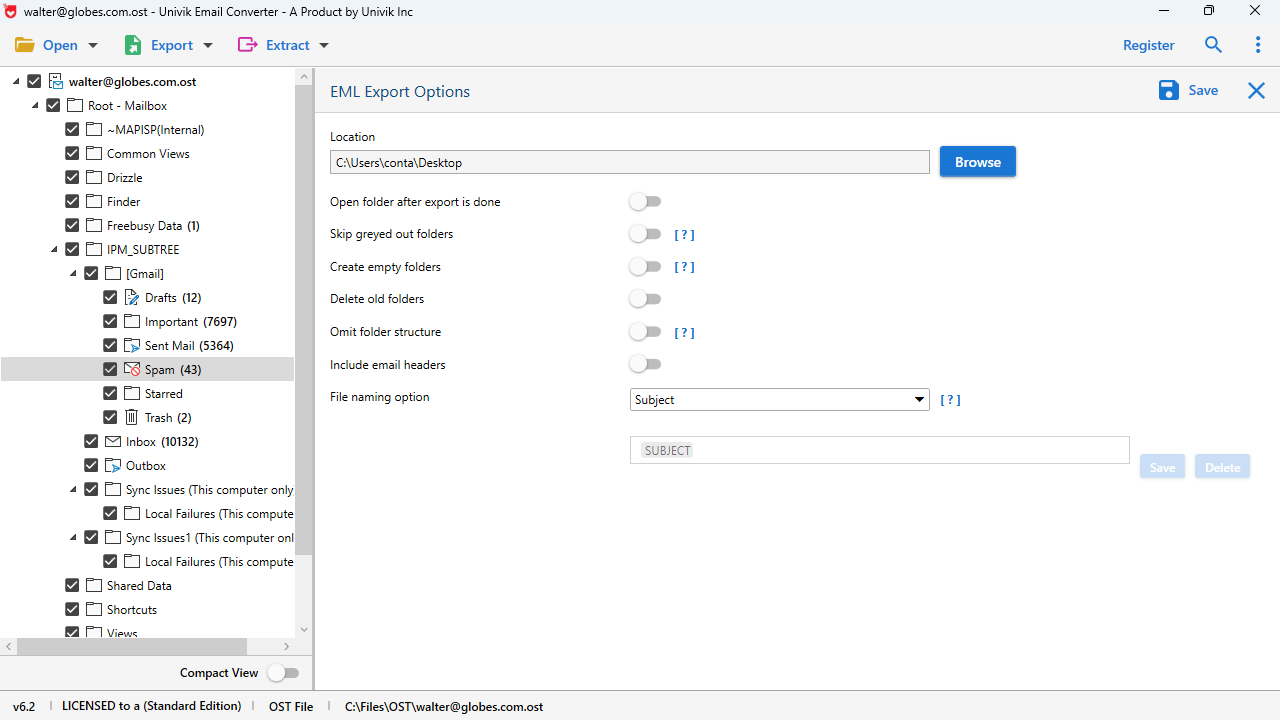
Choose output format: PST, EML, MBOX, MSG, PDF or HTML.
Step 4: Convert & Save
Click Convert. Progress bar shows status. Files ready when complete!
Quick Recovery Guide
%localappdata%\Microsoft\Outlook\, or use our auto-detect feature. Understanding the Problem
OST files are designed to synchronize with Exchange/Microsoft 365 servers. When that connection breaks, your locally cached data becomes trapped, completely inaccessible through normal means.
Common Reasons Your OST File Becomes Orphaned:
The Problem: Locked Out of Your Data
Your OST file contains years of important emails, contacts and calendar appointments, but Outlook won't open it. The file sits on your computer, gigabytes of critical data, completely inaccessible because:
The Solution: Univik OST Converter
Our software bypasses the server dependency entirely by directly parsing the OST file structure. This means you can recover all your data regardless of whether you have access to Exchange or Microsoft 365:
 Real Recovery Scenarios
These situations happen more often than you'd think. Here's how Univik OST Converter saves the day in each scenario.
🏢 Scenario 1: Left Your Job
The Situation
You left your company. IT deleted your Exchange account. Your OST file with 5 years of work emails is now orphaned on your personal backup drive.
The Recovery
Load the OST into our converter. Export all emails to PST or EML. Now you have a portable archive you can open in any email client.
Recovery Rate:
98% - Near Complete Recovery
💻 Scenario 2: Computer Crashed
The Situation
Your work laptop died. You recovered the hard drive and found the OST file, but your Outlook profile no longer exists on the new machine.
The Recovery
Use our tool to extract data from the recovered OST. Convert to PST and import into your new Outlook installation without needing the old profile.
Recovery Rate:
95% - Excellent Recovery
☁️ Scenario 3: M365 Subscription Ended
The Situation
Your Microsoft 365 subscription expired or was cancelled. Outlook enters read-only mode and eventually locks your OST file completely.
The Recovery
Convert the OST before it becomes completely inaccessible. Export to PST for long-term archival that doesn't require any subscription.
Recovery Rate:
100% - Full Recovery
 Technical Insight
Understanding what's stored in your OST file helps appreciate what we recover.
📧
Message Store
Email messages with full headers, body content (HTML/plain text) and embedded objects stored in MAPI properties.
📎
Attachment Table
Binary attachment data with original filenames, MIME types and modification timestamps preserved.
📁
Folder Hierarchy
Complete folder tree: Inbox, Sent Items, Drafts, Calendar, Contacts, Tasks and all custom folders you created.
🔄
Sync State Data
Internal markers for Exchange synchronization (we skip these, they're not needed for recovery).
🗑️
Recoverable Items
Soft-deleted emails that haven't been purged yet, our deep scan finds these hidden items.
🔐
Encryption Layer
Profile-based encryption protecting the data, our algorithms handle standard Outlook encryption.
 Customer Reviews
Real testimonials from users who recovered their orphaned OST data using Univik OST Converter.

Jennifer R.
Project Manager, New York, USA
"After leaving my company, I thought I'd lost 4 years of important project emails. The OST file was sitting on my backup drive but completely inaccessible. This tool recovered EVERYTHING, even emails I had deleted months ago. The folder structure was perfectly preserved. Absolute lifesaver!"
Marcus T.
IT Consultant, Berlin, Germany
"I use this tool regularly for clients who've had Exchange server migrations go wrong. It's handled every OST file I've thrown at it, including a 38GB monster that other tools couldn't even open. The preview feature is excellent for verifying data before conversion. Highly recommended for IT pros."
Amanda L.
Attorney, Toronto, Canada
"Needed to recover emails for a legal case from a departed employee's orphaned OST file. The PDF export option was perfect for document production. Timestamps, headers, attachments, all preserved with forensic accuracy. This tool paid for itself many times over on the first case alone."
Technical Data Sheet
Complete product specifications, system requirements and compatibility information.
VirusTotal Score: Clean
Verified by 70+ antivirus engines. 100% safe to download and use.
100% Offline & Private
Your OST data never leaves your computer. No uploads, no cloud processing. Complete privacy guaranteed.
📋 System Requirements
| OS: | Windows 11, 10, 8.1, 7 |
| CPU: | 1 GHz or faster |
| RAM: | 512 MB minimum (4GB recommended for large files) |
| Disk: | 100 MB + space for output |
| Outlook: | Not required |
📁 Supported OST Versions
| Outlook 2003 | ✓ |
| Outlook 2007 | ✓ |
| Outlook 2010 | ✓ |
| Outlook 2013/2016/2019 | ✓ |
| Outlook 365 | ✓ |
📦 Product Information
| Version: | 25.1 |
| Size: | 22.8 MB |
| License: | Perpetual (no subscription) |
| Support: | 24/7 Email & Chat |
Frequently Asked Questions
An orphaned OST file is an Outlook offline data file that has lost its connection to the original Exchange Server or Microsoft 365 account. This happens when you leave a company (account deleted), switch computers without migrating properly, have a corrupted Outlook profile or when your M365 subscription ends. The file contains all your cached emails, contacts and calendars but Outlook cannot open it because it cannot verify against the server.
Yes, absolutely! Univik OST Converter works completely independently of Microsoft Outlook. It reads the OST file structure directly using proprietary parsing algorithms. No Outlook installation, no Exchange connection, no active account needed. This is exactly what makes it suitable for orphaned file recovery.
Yes, 100%. The complete folder hierarchy is maintained during conversion. All folders, Inbox, Sent Items, Drafts, Deleted Items, Calendar, Contacts, Tasks, Notes and any custom folders you created, are preserved exactly as they appeared in the original OST file, including nested subfolders.
In many cases, yes! Our deep scan feature searches the OST file's "Recoverable Items" container where soft-deleted emails are stored. If the items haven't been permanently purged (which typically happens after 14-30 days depending on Exchange settings), they can be recovered. The tool will show recovered items in a separate folder.
OST (Offline Storage Table) is a local cache that synchronizes with Exchange/M365 servers, it's automatically created and tied to a specific profile. PST (Personal Storage Table) is an independent data file you create manually for backup or archival, it's portable and can be opened on any computer with Outlook. Converting OST transforms server-dependent data into a portable, independent format.
Univik OST Converter can handle OST files of any size, including large files up to 50GB or more. The software uses optimized memory management and streaming techniques to process massive mailboxes without crashing or requiring excessive RAM. For very large files, conversion may take longer but will complete successfully.
Your data is completely private and secure. Univik OST Converter is a desktop application that works 100% offline. All processing happens locally on your computer. No data is ever uploaded to any server, no internet connection is required for conversion and we have no access to your files. Your sensitive emails remain on your machine only.
Still have questions? Contact support or Live Chat
Related Products
Other Email Tools
PST File Viewer
Open and view PST files without Outlook. Preview emails, contacts, calendars.
Learn More →
MBOX Converter
Convert MBOX files to PST, EML, PDF. Works with Thunderbird and Gmail exports.
Learn More →
EML Converter
Batch convert EML files to PST, MBOX, PDF. Combine individual emails into archives.
Learn More →