Yes, free MBOX splitters exist. Python's mailbox module and a few open source scripts on GitHub cut a mailbox file by size, by date or by Gmail label. They cost nothing and run wherever Python, Perl or PHP is installed. They do not compare the parts with the source, they write no index and each one offers a single split rule.
Pick a script when you are comfortable with a command line and need one kind of split. Pick a desktop tool when you are not, or when someone needs proof that every message arrived.
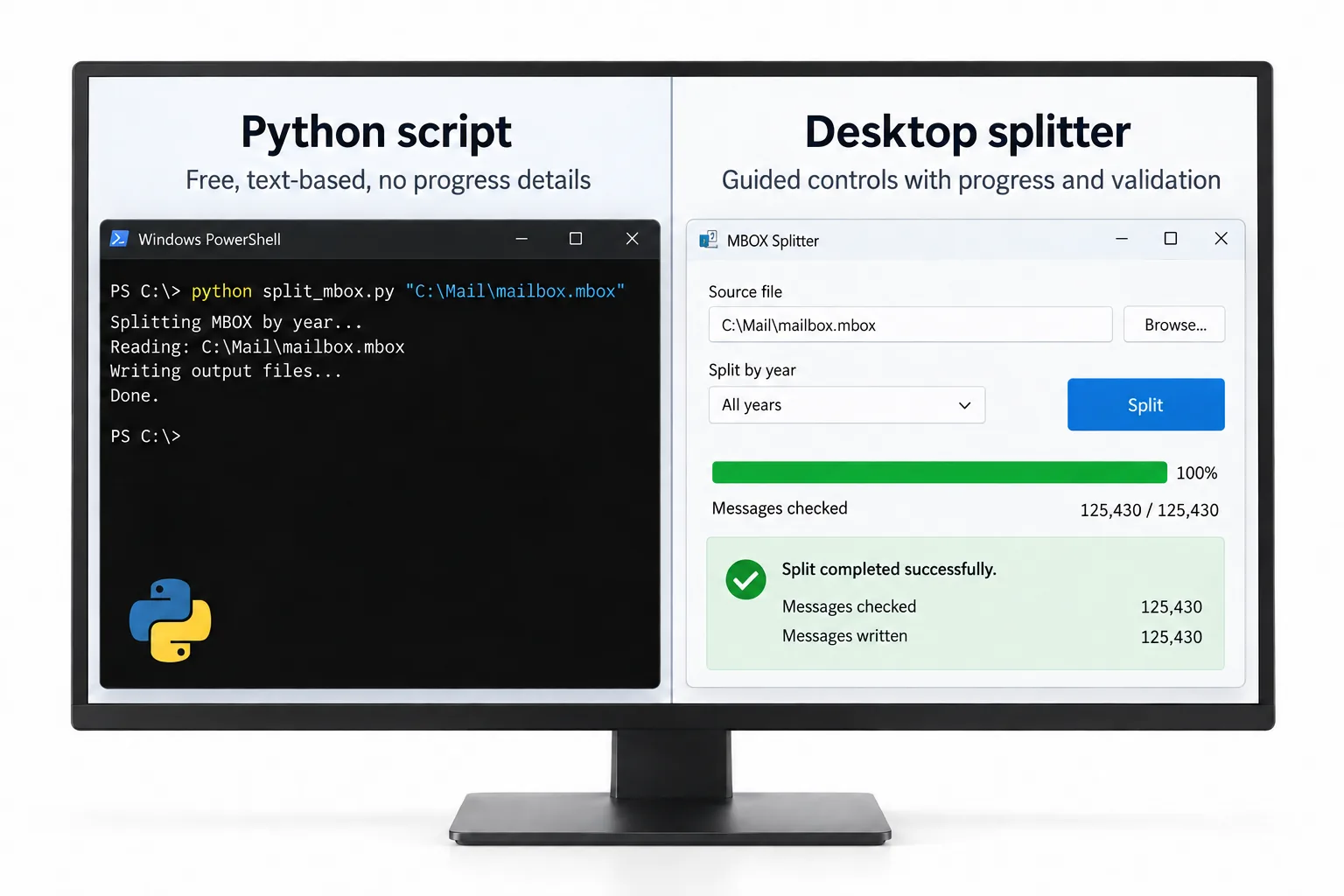
Search for a free MBOX splitter and you will find scripts, not programs with a window. Most of them live on GitHub and a short piece of Python can do the same work. This page compares those scripts with a paid Windows program called Univik MBOX Splitter and says plainly where each side is the better choice. It names the scripts, lists what they are good at and shows the points where they stop. It also explains how to test the desktop route before you spend anything.
What Free MBOX Splitter Scripts Exist?
Four free options come up again and again: the Python mailbox module and three open source projects on GitHub. The mbox format is plain text and every message opens with a separator: the word From, a space and the sender. A splitter finds those separators and copies whole messages into new files.
Python mailbox module. Ships inside Python itself. It opens an .mbox file and returns the messages one after another with their headers. You write the rule, such as a new file every 500 messages. About twenty lines of code are enough.
f00b4r0/gmail-mboxsplitter. A Python project for Google Takeout exports. It looks at X-Gmail-Labels (the header Gmail uses to list a message's labels) and sorts the message into a file for its label. Its README says each message is stored a single time.
ryosama/mbox_spliter. A Perl script. It groups messages by their date and writes a file per day, per week, per month or per year.
devgiants/mbox-splitter. A PHP script that cuts a mailbox into pieces of a chosen size. Its author wrote it because Roundcube webmail refused one large upload.
Where Do Free Scripts Beat a Paid MBOX Splitter?
Free scripts win on price, on operating system and on control.
- They cost nothing. A one-time $39 licence is small, but zero is smaller.
- They run on a Mac or on Linux. The desktop tool compared here is Windows-only.
- You can read the code. You see every line before you run it.
- You can schedule them. Export at night, split at 2 a.m., upload by morning. A program with buttons cannot be chained that way.
- One rule may be enough. If you only want yearly files, the Perl script does yearly files.
If you can open a terminal and you need one split, run the script.
Where Do Free MBOX Splitter Scripts Stop?
They stop at checking. A script writes the parts and exits. Nothing then opens each part, counts the messages and compares the total with the original file. If a message was dropped, you find out weeks later.
- No index. After a split you have twelve files and no list of which message went where.
- They need a runtime. Windows does not ship with Python, Perl or PHP. Installing one is quick for a developer and confusing for everyone else.
- One rule per script. The Perl script splits by date only. The PHP script splits by size only.
- Separator mistakes damage messages quietly. A body line that begins with From and a space must carry a leading greater-than sign, or a reader thinks a new message started there. A script that misses this rule can glue two messages together or cut one in half.
- Memory depends on the author. Some scripts load the whole file into memory first. A 10 GB Takeout export can stall a laptop.
- Conversations are your problem. Keeping a message together with its replies in one part is a rule you would code yourself from the In-Reply-To and References headers.
| Route | Split rules | Runs on | Checks the parts | Index file | Price |
|---|---|---|---|---|---|
| Python mailbox module | Any rule you write | Anywhere Python runs | Only if you code it | Only if you code it | Free |
| f00b4r0/gmail-mboxsplitter | Gmail label, one copy per message | Anywhere Python runs | No | No | Free |
| ryosama/mbox_spliter | Day, week, month or year | Anywhere Perl runs | No | No | Free |
| devgiants/mbox-splitter | Size | Anywhere PHP runs | No | No | Free |
| Univik MBOX Splitter | Size, count, label, year, month, sender, sender domain | Windows 10 and 11 only | Yes, each part is opened again and counted | split-index.csv, one row per message | $39 one-time, free trial |
When Does a Paid Desktop MBOX Splitter Earn Its Price?
A paid tool earns its price when you need several rules at the same time, or when you need proof.
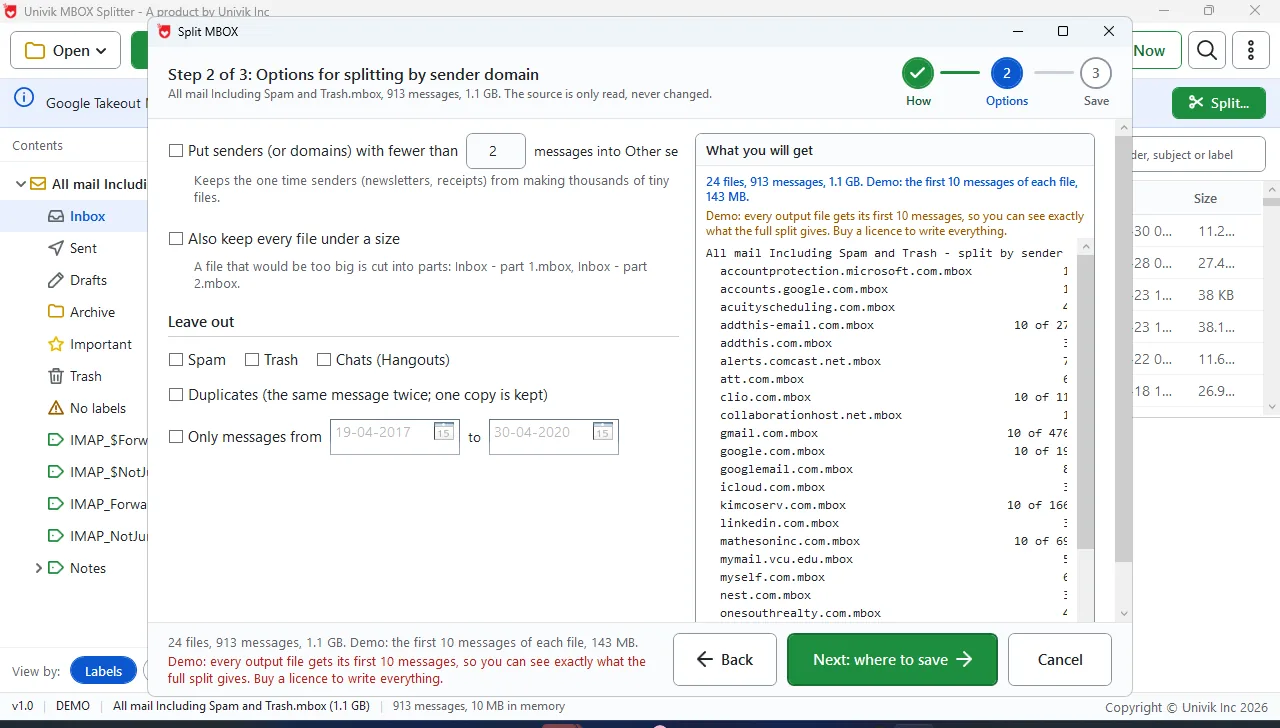
Labels, threads and size together. A Takeout export can be split by Gmail label while each conversation stays in one part and no part passes 2 GB. The label rules are a topic of their own, covered in the guide on splitting a Takeout export by Gmail label.
Read-back. After the write, the program opens every part again and matches count and content against the original.
An index in Excel. split-index.csv holds one line per message: position in the original, output part, date, sender and subject.
No coding and no unzipping. It is a signed Windows installer. It opens the Takeout download in zipped form, so nothing needs extracting. On a test export of 1.1 GB with 913 messages, the file opened in about one second using around 10 MB of memory.
The limits are real too. It runs on Windows 10 and 11 and nowhere else. It does not convert to PST or PDF and does not repair a damaged file. If none of this matters to you, the scripts are the better deal.
The Univik MBOX Splitter trial runs the whole split and writes the first ten messages of every part, so you can check the result before you pay.
Free Download See all featuresScript or Desktop MBOX Splitter: Which Should You Pick?
Pick by answering four questions.
- Can you run a command line without help? No means the desktop tool.
- Do you need one split rule or several? One rule means a script. Several means the desktop tool or a weekend of coding.
- Does anyone need proof the split was complete? A lawyer, an auditor or your future self counts. Only the paid route has read-back and an index.
- Which computer do you have? A Mac or a Linux box means a script. Windows leaves both routes open.
Whichever you pick, count the messages in the original and in the parts before you trust the result.
- Free MBOX splitters are scripts: the Python mailbox module plus three GitHub projects.
- Scripts win on price, on Mac and Linux support and on scheduling.
- Scripts stop at checking: no read-back, no index and one split rule each.
- A separator-line mistake in a script can join two messages or cut one apart with no error shown.
- A paid desktop tool bundles labels, threads, size caps, read-back and an index, on Windows only.
- The trial writes ten messages per part in the real folder layout before you pay.

Free MBOX Splitter Questions

Leena Taylor Paul built this comparison alongside the Univik team, who have compared free and paid file tools since 2013. The scripts named here are real GitHub projects and this page says where they beat our own tool. Last checked September 2026. Not sure which route fits? Contact our support team.