 Univik MBOX Splitter for Windows
 At a Glance
 Key Features
Splits a Takeout MBOX by Gmail Label
Univik MBOX Splitter writes one file per label, nested labels as subfolders such as Clients\Acme.mbox. A message with several labels goes into every label file as in Gmail, or once with no duplicate messages.
Univik MBOX Splitter for Windows
Univik MBOX Splitter is a Windows tool, free to try, that cuts one large MBOX file such as a Google Takeout export into smaller files by Gmail label, year, month, sender, domain, size or count. No Thunderbird, Outlook or Python is needed, the source is only read and nothing is uploaded.
Source Never Changed7 Split ModesOffline OnlyFree to Try
*The free trial writes the first 10 messages of every output file, same names and folders as the full split. A licence writes every message, with a 30-day money-back guarantee.

At a Glance
Seven ways to split, zero uploads, every file checked.
7
Split Modes
Size, count, label, year, month, sender, domain.
0
Files Uploaded
Every split runs on your PC.
10 MB
Memory Used
On a 1.1 GB export of 913 messages.
v1.0
Windows 11 and 10
64-bit, .NET Framework 4.8, every part read back.
$39
One-Time Licence
Free to try, one payment, 30-day money back.
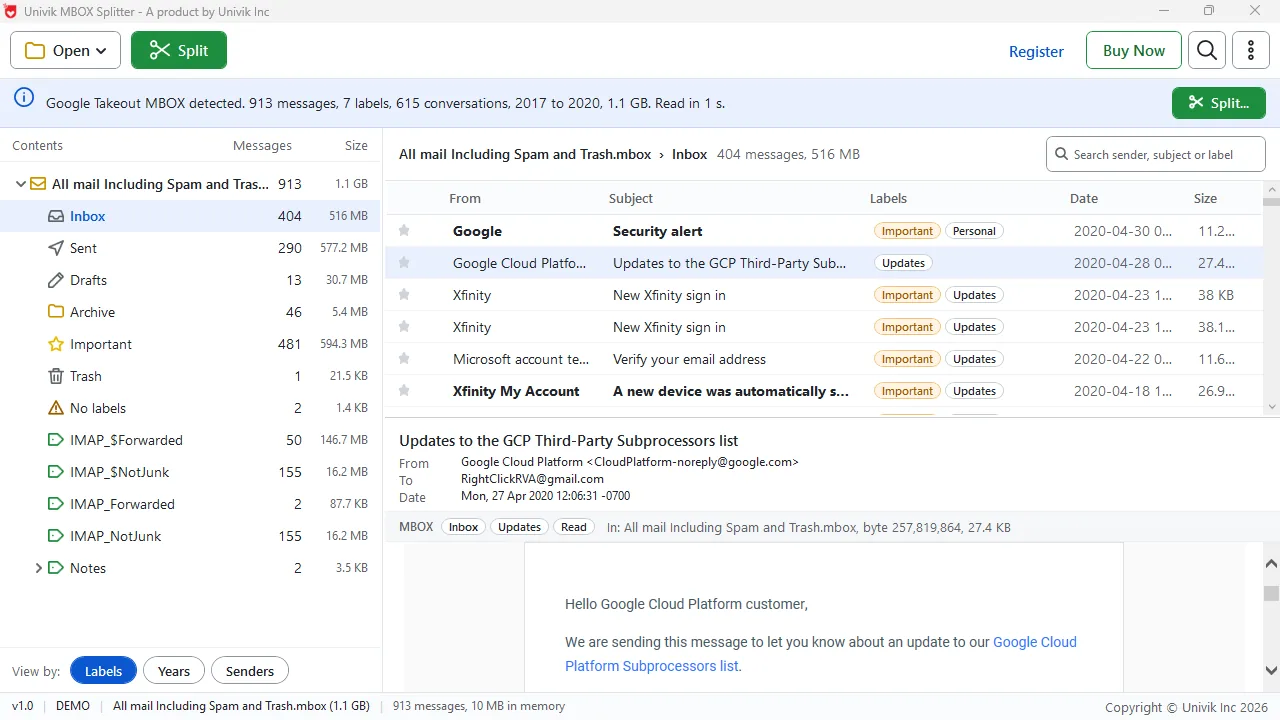
A 1.1 GB Takeout export, listed by label
Key Features
Splits a Takeout MBOX by Gmail Label
Univik MBOX Splitter writes one file per label, nested labels as subfolders such as Clients\Acme.mbox. A message with several labels goes into every label file as in Gmail, or once with no duplicate messages.
Keeps Conversations Together
A message and its replies always land in the same file. Threads come from Gmail's thread id (the X-GM-THRID header) or from the References and In-Reply-To headers.
Reads Every File Back and Checks It
After writing, Univik MBOX Splitter opens each part again and compares it with the source: same message count, same content. The report accounts for every message and split-index.csv lists where each one went.
Never Changes the Source File
The original is only read. Parts go into an Output folder, one subfolder per split, so a second run never overwrites the first.
Opens the Takeout Zip, No Unzipping
Univik MBOX Splitter reads the mbox inside the takeout-...-001.zip and -002.zip parts as it is, with nothing to unpack first.
Browse, Search and Leave Out
The tool lists the file by label, year and sender and previews any message. Skip Spam, Trash, chats and duplicates or keep a date range.
The Short Version
Google Takeout gives you all of Gmail as one file, often too large to import. Big files are also slow to open and search.
Problem 1: Thunderbird Skips It
The ImportExportTools NG add-on reports Mbox larger than 4GB, skipping and the folder stays empty. The known workaround, copying the file into the profile folder by hand, still leaves one huge folder. See the add-on's bug reports.
Problem 2: Apple Mail Cuts Off the End
Apple Mail stops a mailbox export and import near 2.15 GB and every message after that point is lost. Documented in Apple Support Community threads.
Univik MBOX Splitter cuts the file into smaller parts under 2 GB or 4 GB, or into one file per label or year. Every part then imports. A cut is only made between two messages, never in the middle of one.
What It Reads
Google Takeout
All mail Including Spam and Trash.mbox
Zip parts open directly from the download. Labels come from X-Gmail-Labels, conversations from Gmail's thread id. Any standard mbox opens too, see the MBOX file format page.
Thunderbird
Profile folder files, no extension
Choose the profile folder and every mail folder inside opens.
Apple Mail
Exported .mbox mailboxes
Open the export folder and the mbox inside is read. Split it into parts under 2 GB before importing it back.
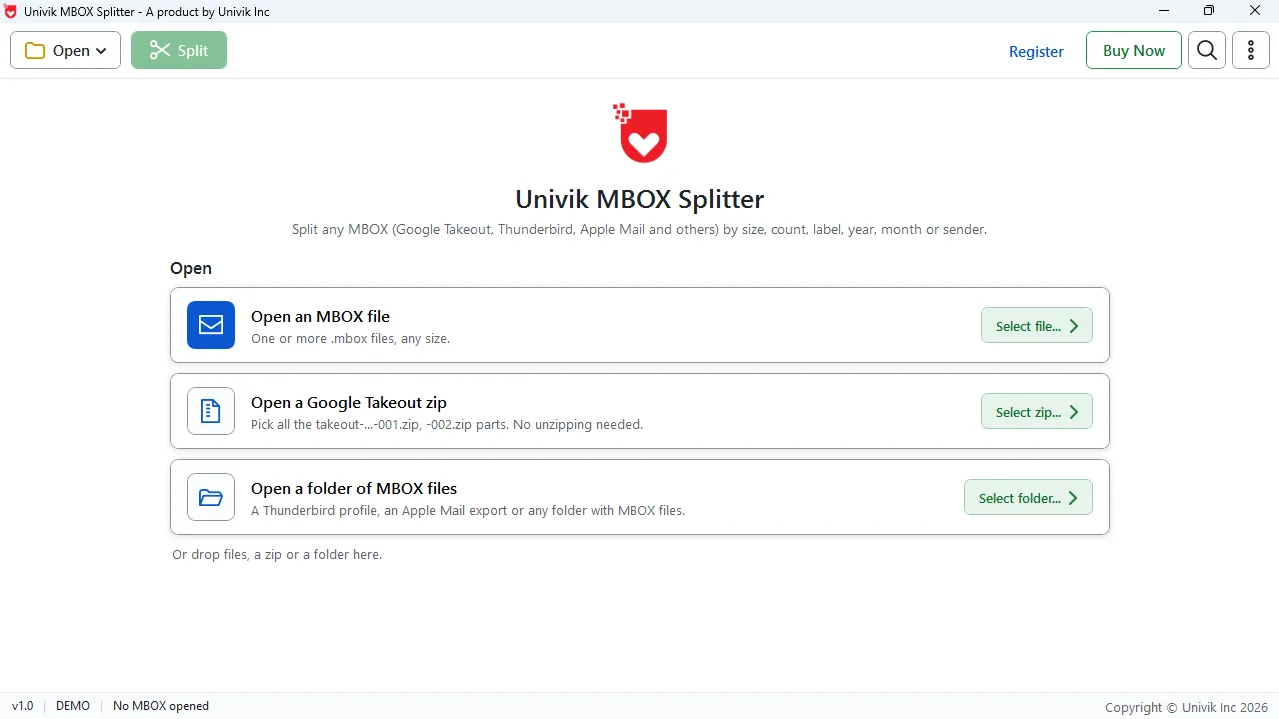
Open a file, the Takeout zip or a folder
Three Steps
Three clicks on the PC, no sign-in and no mail program needed.
Open the MBOX, Zip or Folder
Click Open and pick an .mbox file, the Takeout zip parts or a folder of MBOX files. The software lists it by label, year and sender in seconds.
Choose How to Split
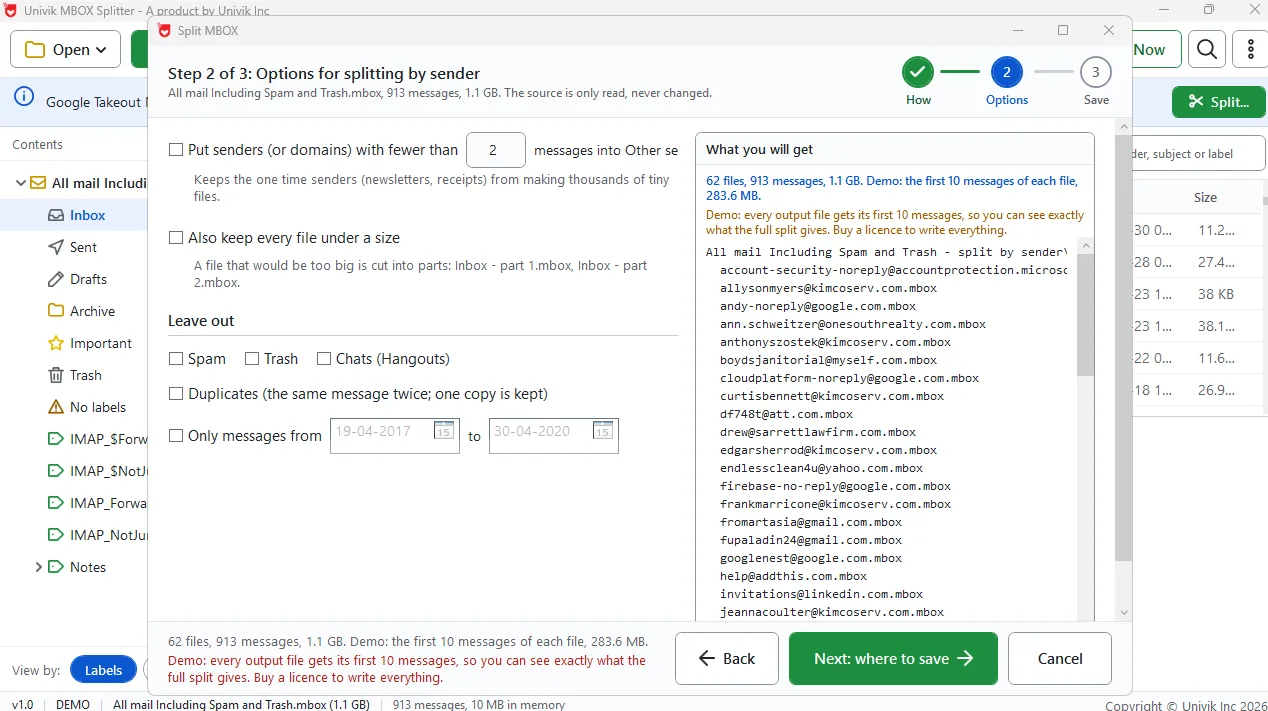
Pick size, count, Gmail label, year, month, sender or domain. Keep conversations together and leave out spam, trash or duplicates. The preview lists every file it will make.
Pick a Folder and Split
Choose a destination. The software writes an Output folder, reads every file back and saves split-index.csv.
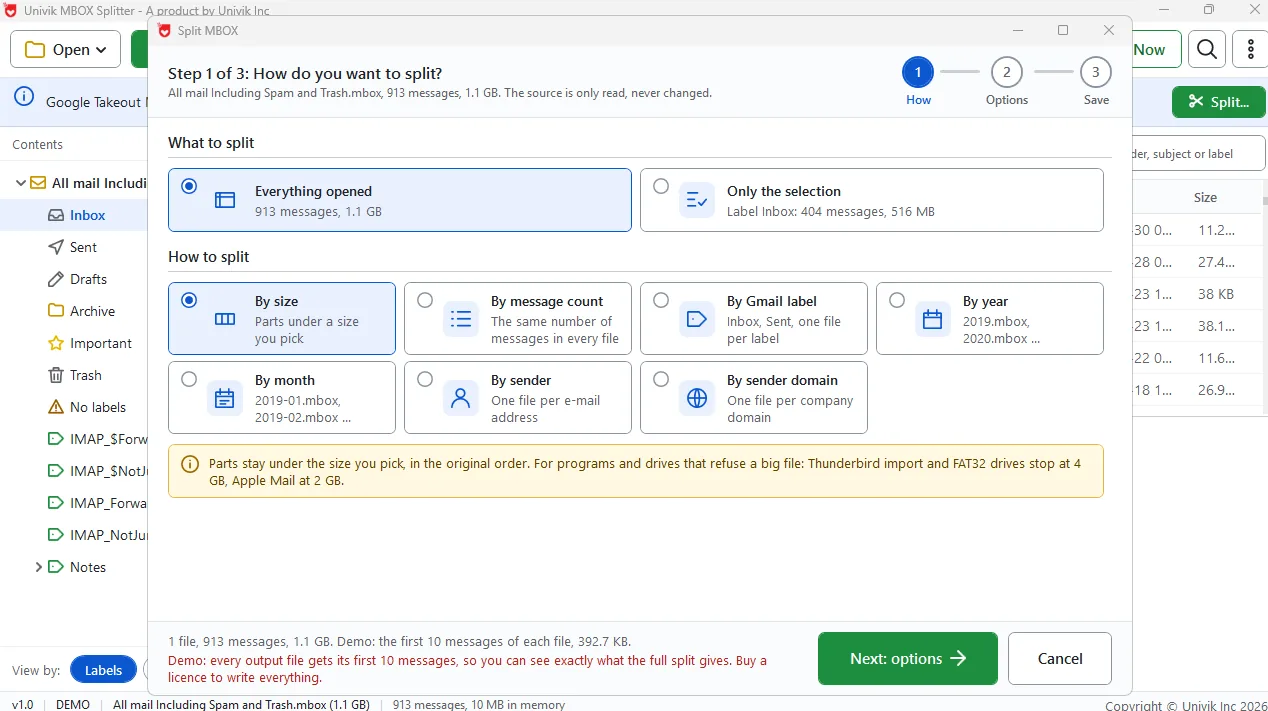
Step 1: pick a split mode
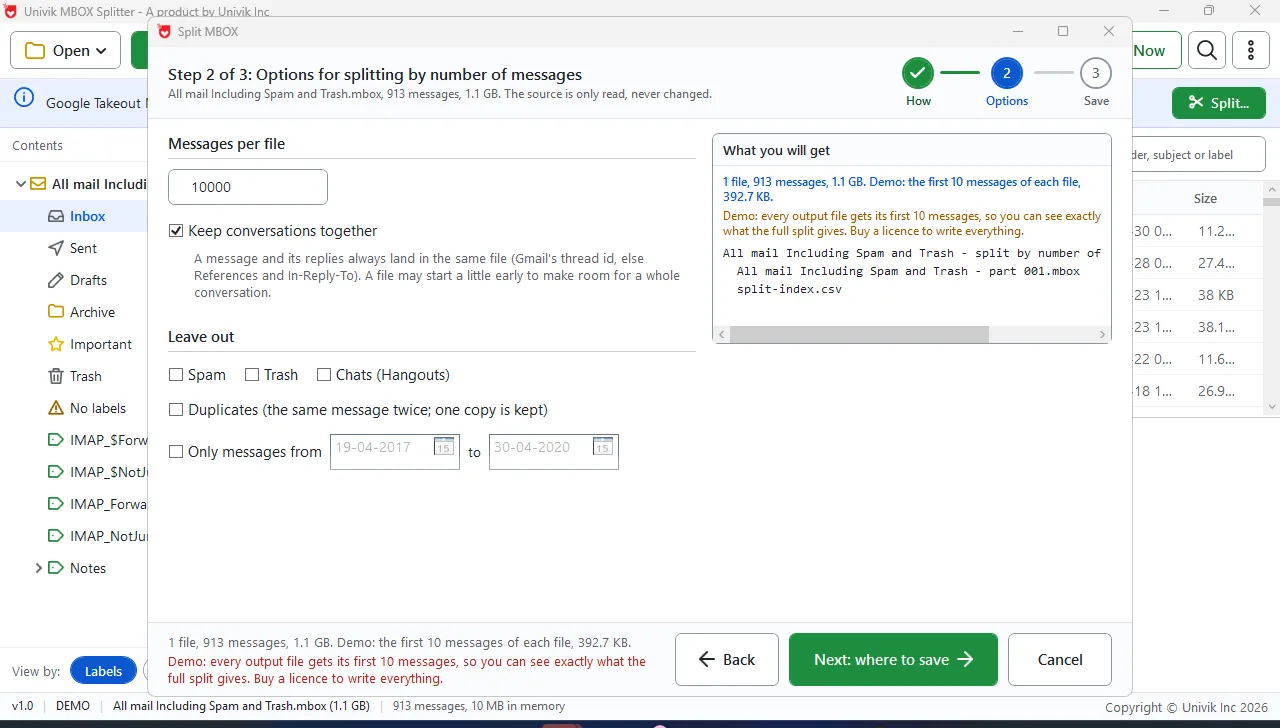
Step 2: label options and preview
Step 3: destination, read-back check, index
Real Situations
Moving Gmail to Thunderbird
Split a ten-year Gmail export by label so Inbox and Sent arrive as folders under the 4 GB import limit.
Sending Mail to a Lawyer or Accountant
Split by sender domain and every message from one client sits in its own file. Send that file only.
Archiving Year by Year
One file per year keeps an archive small enough for a FAT32 USB stick, and the index says which year holds what.
Read This First
Google Takeout puts every Gmail message, Spam and Trash included, into one file named All mail Including Spam and Trash.mbox, often many gigabytes. Takeout then cuts the download into zip parts, 2 GB each by default, named takeout-...-001.zip and -002.zip.
This MBOX file splitter reads the zipped or unzipped file a little at a time. It writes the parts you choose into Output\All mail Including Spam and Trash - split by Gmail label\ with split-index.csv beside them.
Compare Your Options
| What you need | Python mailbox Module Script | Thunderbird + ImportExportTools NG | Univik MBOX SplitterTRIAL |
|---|---|---|---|
| Split by Gmail label | Only if you code it | Manual, folder by folder | Yes, like Gmail |
| Opens the Takeout zip parts | No, unzip first | No, unzip and import first | Yes |
| File over 4 GB | Yes | Skipped by the add-on | Yes, read at 10 MB of memory |
| Keep conversations together | No | No | Yes |
| Every file read back and checked | No | No | Yes |
| Index of where each message went | No | No | split-index.csv |
| Install needed | Python 3 | Thunderbird and the add-on | One installer, no mail program |
| Mac or Linux | Yes | Yes | No, Windows only |
| Cost | Free | Free | Free trial, $39 licence |
Tested
A real 1.1 GB Google Takeout export opened in Univik MBOX Splitter: 913 messages, 7 labels, 615 conversations, 2017 to 2020. It was read in one second with 10 MB in memory.
| Split mode on this export | Files it makes | Note |
|---|---|---|
| By Gmail label | 13 | 1,162 copies of 913 messages with a copy in every label file, 1.3 GB in all |
| By year | 4 | 2017 to 2020, 302 messages in the largest year |
| By sender domain | 24 | gmail.com alone held 476 messages |
| By sender | 62 | Small senders grouped into Other senders |
Test setup: Univik MBOX Splitter 1.0, 64-bit Windows 11, September 2026, our own Takeout export. Counts come from the split preview and will differ for your file.
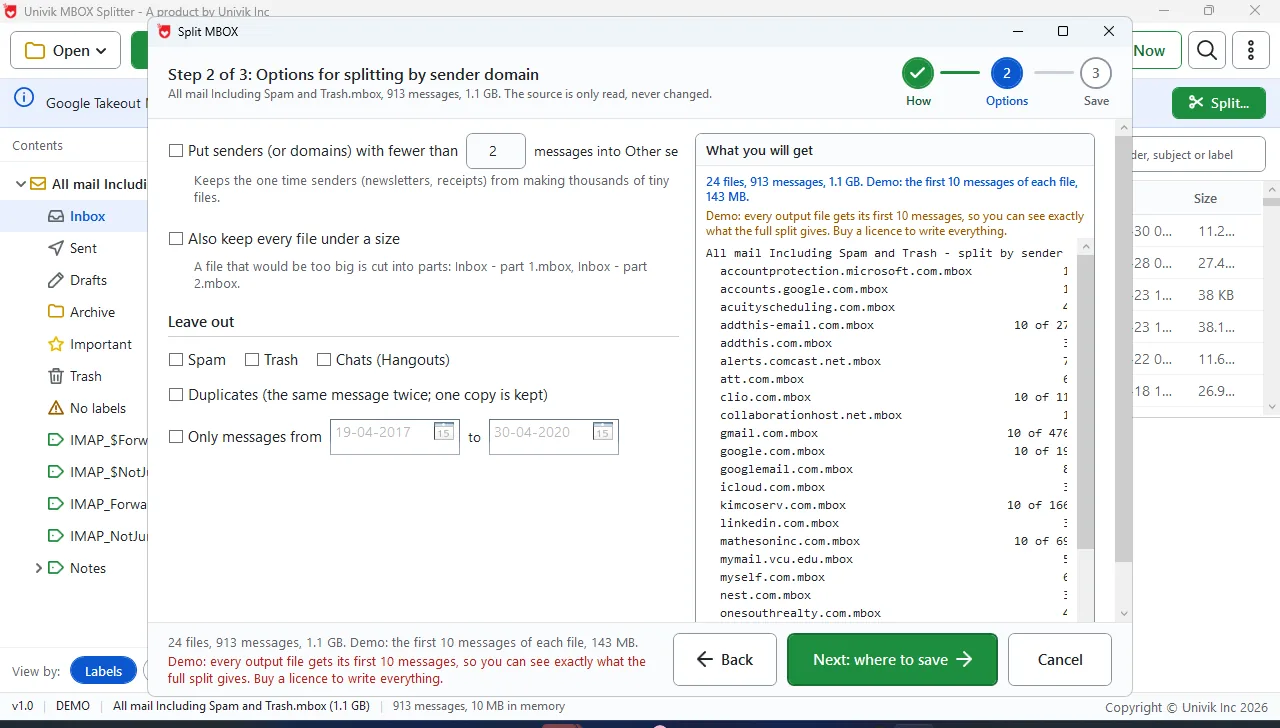
The split report: every message accounted for
What You Need
Windows Version
Runs on 64-bit Windows 11 or 10 and needs .NET Framework 4.8 or higher.
No Mail Client Needed
This MBOX splitter tool reads the file on its own. No Thunderbird, Outlook or Apple Mail needed.
Memory and Disk
The file is read a little at a time, so 4 GB of RAM is enough. The Save step shows the disk space needed first.
Runs Offline
The internet is needed only to download the installer.
| Software Information | Univik MBOX Splitter |
| Version | 1.0 (Latest) |
| Licence | $39 one-time, free trial first |
| Platform | 64-bit Windows 11 or 10 |
| Framework | .NET Framework 4.8 or higher |
| Reads | MBOX files, Takeout zip parts and whole folders of mbox files |
| Writes | Standard .mbox parts plus split-index.csv and a split report |
| Split Modes | Size, message count, Gmail label, year, month, sender, sender domain |
Questions
Guides
More Tools
Univik MBOX Splitter in Short
About This Page and Its Sources
Fact Checked
Written and checked by the Univik team, makers of file tools since 2013. Import limits come from the ImportExportTools NG issue tracker and Apple Support Community threads. The test figures are from our own export.
“We built the MBOX Splitter around one rule: never trust a split you cannot check. Every file is read back and compared with the source, and the index tells you where each message went. If a tool cannot prove that, it should not be cutting your mail.”
Our installer carries a code signature and installs nothing extra. A 30-day money-back guarantee covers every licence.
Since 2013Read-Back VerifiedUnivik Team
Updated September 2026


 The Short Version
 Three Steps
 Compare Your Options
 Tested
 Questions
 Guides
 More Tools
