 Email Migration Guide
 By
By Start the Mimecast archive export before you leave. In the Administration Console run an archive search per user or date range, export it as EML, PST or Exchange Journal (EJF) and download the ZIP batches within 14 days. Each console export is limited to 50,000 items and five run at a time, so a whole company needs Mimecast's bulk export through your account manager, priced per gigabyte and delivered as ZIP files by date range or on a drive by user. Either way the output is hundreds of ZIP files, and Univik Mimecast Archive Converter turns them into per-user PST files for Microsoft 365 or Outlook.
The renewal quote arrived and the answer is no. Now there is a date, and everything in the Mimecast archive has to be somewhere else before it. Offboarding starts with a Mimecast archive export. That is years of mail for every employee, the journal that compliance depends on and the exports legal has been running from the console. Mimecast does give you the data, but on its terms. You get search-sized exports with item caps and a 14 day download window, or a paid bulk export that takes weeks to arrange. This guide lays out the timeline and both export routes. It covers the formats to choose for each destination and the conversion that makes the ZIP files usable.
- Before you leave Mimecast
- Console export vs bulk export
- Export from the console in 5 steps
- Step 1: Build the search per user or date range
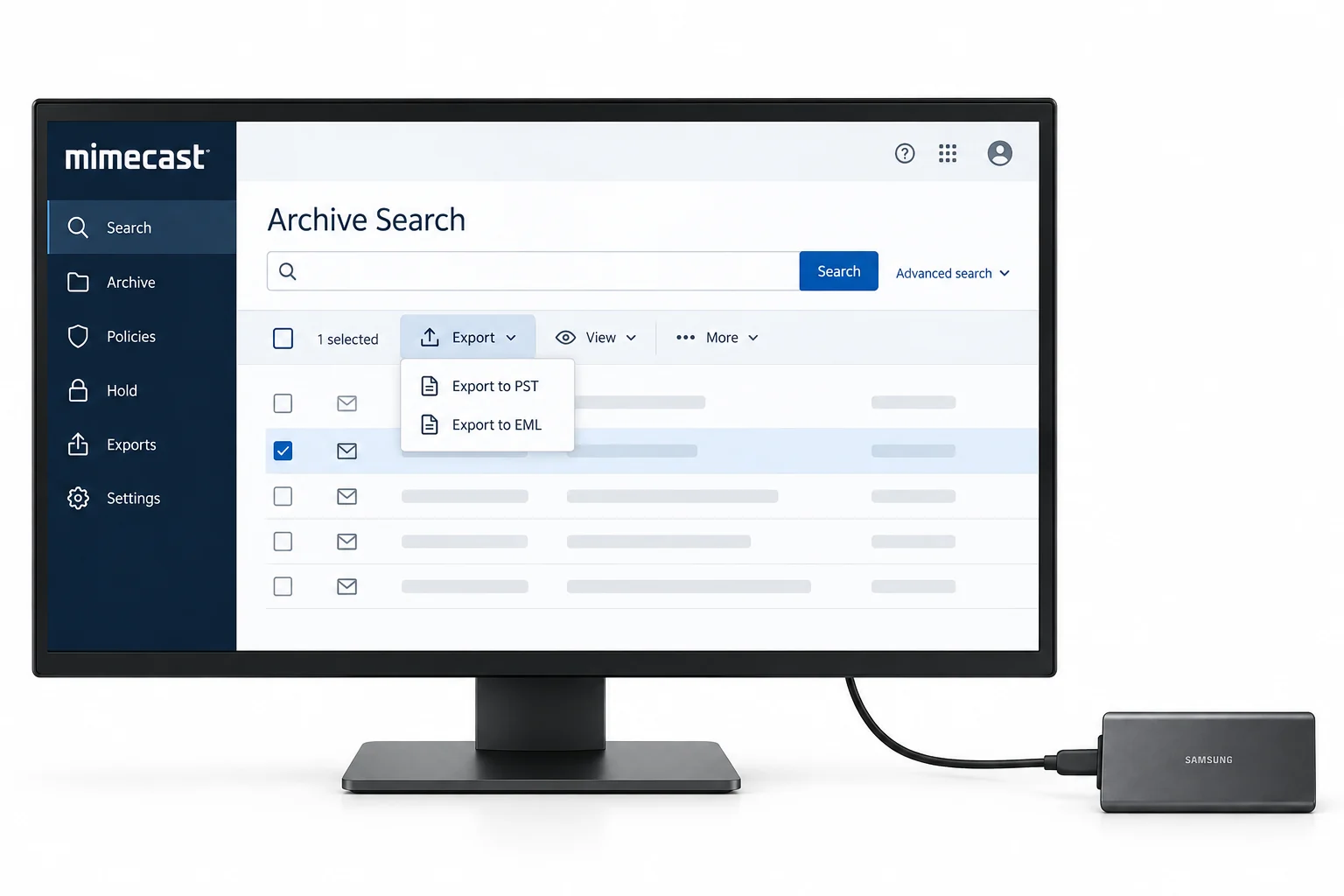
- Step 2: Start the export and pick the format
- Step 3: Split searches under 50,000 items
- Step 4: Download every batch within 14 days
- Step 5: Reconcile counts against the search
- The bulk export route
- Convert the ZIP batches
- Where the archive goes next
- After the export
- Fix common problems
- Mimecast export questions
Before You Leave Mimecast
How much has to come out, and how soon? Those two numbers pick the route.
- The contract end date and the data access dateThey may differ. Confirm in writing when console access ends and whether the archive stays readable after the service stops. Do not assume a grace period.
- A Super Administrator or Discovery Officer roleConsole exports need one of these roles in the classic console, or Content Administrator in the newer console. A Personal Portal user cannot bulk export.
- An inventory of mailboxes, years and the journalItem counts per user per year from the console decide how many exports you need under the 50,000 item cap. The journal is counted separately.
- Storage for the ZIP files and the converted outputBudget the archive size twice over: once for the downloaded ZIP batches, once for the PST or EML output you will import elsewhere.
- Archive search
- The console query that returns messages for a mailbox, a date range and a route (inbound, outbound, internal). Exports are built from a search.
- SJF and EJF
- Standard Journal Format is a plain copy of each message as EML. Envelope Journal Format wraps it in an Exchange journal report that records BCC recipients and expanded lists.
- Export part
- Mimecast writes an export in batches of up to 10 GB, downloaded as parts of a size you choose. Every part is a ZIP file.
- Bulk export
- Mimecast's Professional Services extraction of an entire archive, priced by volume and delivered outside the console.
- Retention and legal hold
- Mimecast keeps data for the purchased retention period from the sent date; expired data is removed 90 days later unless a legal hold applies. Leaving does not change what exists, only your access to it.
Console Export vs Bulk Export: Which Mimecast Route Fits
| Administration Console export | Bulk export (Professional Services) | |
|---|---|---|
| Cost | Included | Per GB, minimum volume |
| Scope per export | One search, up to 50,000 items | The whole archive, or a defined set of users and years |
| Concurrency | 5 exports running at once | Handled by Mimecast |
| Formats | EML (SJF), PST, Exchange Journal (EJF) | EML ZIP or PST, agreed in the order |
| Delivery | ZIP parts, 14 day download window | ZIP files by date range for download or a drive organised by user |
| Time | Hours per export, weeks of clicking for a company | Weeks from order to delivery; start early |
| Best for | Under a few hundred mailbox-years, legal pulls, the journal by quarter | Everything, with a fixed end date |
Most exits use both. The bulk export moves the estate. The console export handles the last few weeks of mail after the bulk cut-off. It also covers the journal quarters legal wants first and any user whose data is needed before the drive arrives.
Mimecast Archive Export from the Console in 5 Steps
The console route is a loop: search, export, download, repeat. The limits decide how many times you go round.
Build the archive search per user or date range
In the Administration Console open Archive, then Search. Search by mailbox address and a date range, with the route set to inbound and outbound so both directions are included. Save the search, because you will need the same scope again if an export fails. Note the item count and size in the results header.
| Date | From | To | Subject |
|---|---|---|---|
| 12/03/2019 09:48 | sarah.chen@vendor.com | priya.adams@contoso.com | Re: Supplier contract renewal |
| 11/03/2019 16:17 | priya.adams@contoso.com | mike.turner@acme-partner.com | Q2 partnership update |
| 10/03/2019 11:03 | legal@vendor.com | priya.adams@contoso.com | Updated agreement for review |
Step 1One mailbox, one year, both routes. 38,412 items fits under the 50,000 cap.
Start the export and pick the format for your destination
Click Export. Three formats are offered. PST when the data is going to Outlook or the Microsoft 365 Import service; a Mimecast export to PST keeps the mailbox folders. EML in Standard Journal Format when the destination reads EML, or when you want single files for a review platform. Exchange Journal in Envelope Journal Format for the journal itself, so the BCC recipients travel with it. Set the part size; parts of 2 GB are easier to download over an office connection than 10 GB ones. The export runs on Mimecast's side and you are told when it is ready.
Step 2PST for Microsoft 365 and Outlook, EML for review platforms, Exchange Journal for the journal.
Split any Mimecast search over 50,000 items
An export over 50,000 items is not supported and fails. Busy mailboxes and the journal go over that in a few months, so split by date until each search is under the cap: a year, then a half year, then a quarter. Only five exports run at once, so queue them in batches and keep a sheet of what has been requested, what is ready and what has been downloaded. For a journal, quarters are usually the unit.
You should seeevery search in your sheet under 50,000 items before you click Export. A failed export costs a slot and a day.
Download every export part within 14 days
Open Archive, Exports. Ready exports list their parts; download all of them and store them by user and year. Downloads are available for 14 days after the export completes, then they are gone and the export has to be run again. Check the file sizes against the console figures and keep the export report with the parts.
| Export | Format | Items | Status | Expires |
|---|---|---|---|---|
| priya.adams-2019 | PST | 38,412 | Ready, 4 parts | 20 Sep 2026 |
| priya.adams-2020 | PST | 41,907 | Ready, 4 parts | 20 Sep 2026 |
| marcus.bello-2019 | PST | 52,118 | Failed: over 50,000 items | |
| journal-2019-Q1 | Exchange Journal | 49,230 | Running | |
| journal-2019-Q2 | Exchange Journal | 47,811 | Running | |
| sarah.chen-2019 | EML | 29,004 | Running |
Step 4Two ready, three running, one failed on the 50,000 item cap. Download within 14 days.
Reconcile the export counts against the archive search
For each export, the number of messages inside the ZIP parts should equal the search result count. A quick way is to run the parts through the converter's preview, which lists every message. Or unzip one part and count the files. Record the number in your sheet next to the search count. Any gap is a re-run while you still have console access, not after.
| Name | Date modified | Type | Size |
|---|---|---|---|
| priya.adams-2019-part1.zip | 2026-09-06 14:02 | Compressed folder | 2,097,152 KB |
| priya.adams-2019-part2.zip | 2026-09-06 14:09 | Compressed folder | 2,097,152 KB |
| priya.adams-2019-part3.zip | 2026-09-06 14:15 | Compressed folder | 2,097,152 KB |
| priya.adams-2019-part4.zip | 2026-09-06 14:19 | Compressed folder | 231,424 KB |
| sarah.chen-2019-part1.zip | 2026-09-06 14:40 | Compressed folder | 2,097,152 KB |
| sarah.chen-2019-part2.zip | 2026-09-06 14:46 | Compressed folder | 1,540,096 KB |
| export-report-2019.csv | 2026-09-06 14:50 | CSV File | 88 KB |
Step 5Four 2 GB parts for one user and year. The report CSV carries the counts to reconcile against.
The Mimecast Bulk Export Route
When the archive is measured in terabytes and the end date is fixed, the console loop does not finish. Mimecast's answer is a bulk export arranged through your account manager and delivered by Professional Services. It is priced by volume. The extraction is scoped like any project: which users, which years, journal or not, EML or PST. Delivery arrives as ZIP files organised by date range for download, or on a drive organised by user for very large estates. Timelines are set in the order and customer reports measure them in weeks. Raise the request the week the decision to leave is made. Ask for the export report alongside the data, because it is the only count you will have once console access ends.
Ask for PST per user for mailbox data if the destination is Microsoft 365 or Outlook, plus Exchange Journal (EJF) for the journal. Also ask for a manifest listing every file with its user, date range and item count. A bulk export in EML with no manifest is still usable, but it doubles the reconciliation work.
Convert the Mimecast ZIP Batches into Usable Archives
Both routes end the same way: a Mimecast archive export is a folder of ZIP parts, and nobody imports ZIP files. A Mimecast export to PST still arrives zipped. The Univik Mimecast Archive Converter exists for this stage.
- Load every part at onceAdd ZIP takes all the batches for a user, a year or the whole export. The converter reads inside the ZIP files, so nothing is extracted by hand. It merges the parts into one mailbox view.
- Preview and check the countsThe message list per user is the reconciliation from Step 5. Filter by date or route if a destination only needs part of the data.
- Choose the output for the destinationPST per user in parts below 20 GB, ready for Purview's Import service or Outlook. EML or MBOX for Thunderbird, Google Workspace and review platforms. PDF for a read-only compliance copy.
- Keep the folders and the logInbound and outbound separation and the Mimecast folder names carry through. The per-email log is your record that every message in the export reached the output.
SJF EML exports and PST exports are both read, and journal exports in Exchange Journal format keep their envelope through the conversion. The whole run is offline on a Windows PC, which matters when the archive holds regulated data.
Univik Mimecast Archive Converter reads the ZIP batches directly, merges parts per user, keeps inbound and outbound folders and writes PST split for Microsoft 365, or EML, MBOX and PDF. Everything stays on your PC.
Windows 11 / 10 · Outlook not required · a trial run on one ZIP batch shows you a full user mailbox before you buy
Where the Mimecast Archive Goes Next
After the Mimecast Export
- Every mailbox-year and journal quarter in your inventory has a downloaded export whose count matches the console search, recorded in the sheet
- The converted output has been imported or stored, and a user can open a 2019 message with its attachment in the new home
- The journal has been checked for BCC recipients in its destination, and legal has signed off on retention there
Keep the original ZIP parts of the Mimecast archive export and the export reports for the full retention period of the data. They are the evidence of what was exported and when, and they are the fallback if a conversion is ever questioned. Then close the account in writing and confirm the date data access ends; leaving Mimecast is complete only when that letter is acknowledged. The email archive migration guide has the same exit playbook for other platforms, and if the move is the other way, into Mimecast, the Mimecast import checklist has the rules for that side.
Fix Common Mimecast Export Problems
Three snags stop most Mimecast exits. Match the red You see line to what the console shows, then apply the green Do this fix.
Do this: The search is too wide. Narrow the date range until the count is under 50,000, save it and export again. For the journal, go to quarters or months. Keep the queue at five running exports.
Do this: The 14 day window passed. Re-run the same saved search and export again while console access lasts. Download parts the day they are ready and keep a sheet so nothing waits.
Do this: They are not meant to; they are batches of single messages. Load all parts into a converter that reads Mimecast ZIP exports, merge per user and write PST or MBOX for the destination.
Leaving Mimecast with a fixed date and unsure which route finishes in time? Tell our support team the mailbox count, the years and the destination. We will sketch the export order and the conversion plan.
Mimecast export questions
 About This Guide
Written and maintained by Leena Taylor Paul and the Univik team, developers of Windows data conversion and recovery software since 2013. The console export formats, the 50,000 item limit, the 14 day download window and the role requirements in this guide were checked against Mimecast's current documentation. Bulk export pricing and timelines come from Mimecast procurement documents and customer reports rather than a published SLA. Last verified September 7, 2026. Need a hand? Contact our support team.
Sources checked: Mimecast, Exporting Archive Search Results · Mimecast, Archive Exports in the new console · Mimecast, Personal Portal export limits · Mimecast, Legal Hold and retention · Microsoft Learn, Overview of importing PST files to Microsoft 365