 Email Migration Guide
 By
By A journal mailbox archive cannot be migrated like a user mailbox. Exchange Online will not take the journaling mailbox role and keeps no journal store. You have three choices. Import the journal as PST into dedicated Microsoft 365 mailboxes under retention, split by year to stay within 100 GB per archive per import job. Send it to a compliance archive such as Mimecast as envelope journal (EJF) data in the NotPerUser folders. Or pay a migration tool to explode the journal into each internal recipient's own mailbox. Whichever you choose, the envelope journal report that carries the BCC recipients has to survive the export and the conversion. Univik Email Archive Converter is built to keep it.
Somewhere in the estate is a mailbox, or an archive fed by one. It has received a copy of every message the company sent or received for a decade. Nobody reads it. Legal will not let it go. And now the platform under it is being retired. A journal archive migration is the last thing on the plan and the first thing that goes wrong. Every destination people reach for was designed for one user's mail, not for a compliance capture of everyone's. This guide explains what a journal archive really contains and why Microsoft 365 has no natural home for it. It answers the question people type as migrate journal mailbox to Office 365, and the Mimecast version of it. Then it shows how to land it in Office 365 or Mimecast with the evidence intact.
- Before you migrate the journal
- What a journal archive contains
- Why Office 365 has no journal store
- Route 1: dedicated mailboxes in 5 steps
- Step 1: Export the journal as PST with envelopes
- Step 2: Split by year under 20 GB and 100 GB
- Step 3: Create the journal holder mailboxes
- Step 4: Import with a mapping file per year
- Step 5: Verify the envelope and lock the retention
- Route 2: Mimecast as EJF
- Route 3: journal explosion
- Compare the three routes
- After the migration
- Fix common problems
- Journal migration questions
Before You Migrate the Journal Mailbox Archive
Where does the journal need to end up? That choice comes before any export.
- The retention period and who owns itA journal exists for a regulator (SEC 17a-4, FINRA or MiFID II record keeping) or for a court order. Write down the years that must be kept, the years that can be dropped and the name of the person who signs that off.
- Whether BCC and distribution list data must surviveIf yes, only an envelope journal will do and every step must keep the journal report. If the archive only ever held plain copies, you are moving SJF data and the rules relax.
- The size by yearJournal archives are measured in terabytes. Get item counts and sizes per year from the source; they decide how many holder mailboxes or Mimecast files you need.
- Search expectations after the moveWill legal search the journal by custodian, by date or by keyword? Route 1 searches by date and keyword across Office 365 holder mailboxes. Route 3 searches by person.
- Envelope journaling
- Exchange's journaling mode. It records the message plus a report of every actual recipient, BCC and expanded distribution lists included. It is the only mode Microsoft 365 supports.
- Journal report
- The wrapper message. Its body lists Sender, Subject, Message-Id, To, Cc, Bcc, Recipient and Expanded fields; the original message is attached unaltered.
- Journaling mailbox
- The mailbox that receives journal reports. In Exchange Online it must be on-premises or a third party service; an Exchange Online mailbox is not allowed.
- EJF and SJF
- Mimecast's names for envelope journal format and standard journal format. EJF keeps the report, SJF is a plain copy.
- Journal explosion
- Writing a copy of each journaled message into the mailbox of every internal recipient named in the envelope, so the data becomes per-user.
What a Journal Mailbox Archive Contains
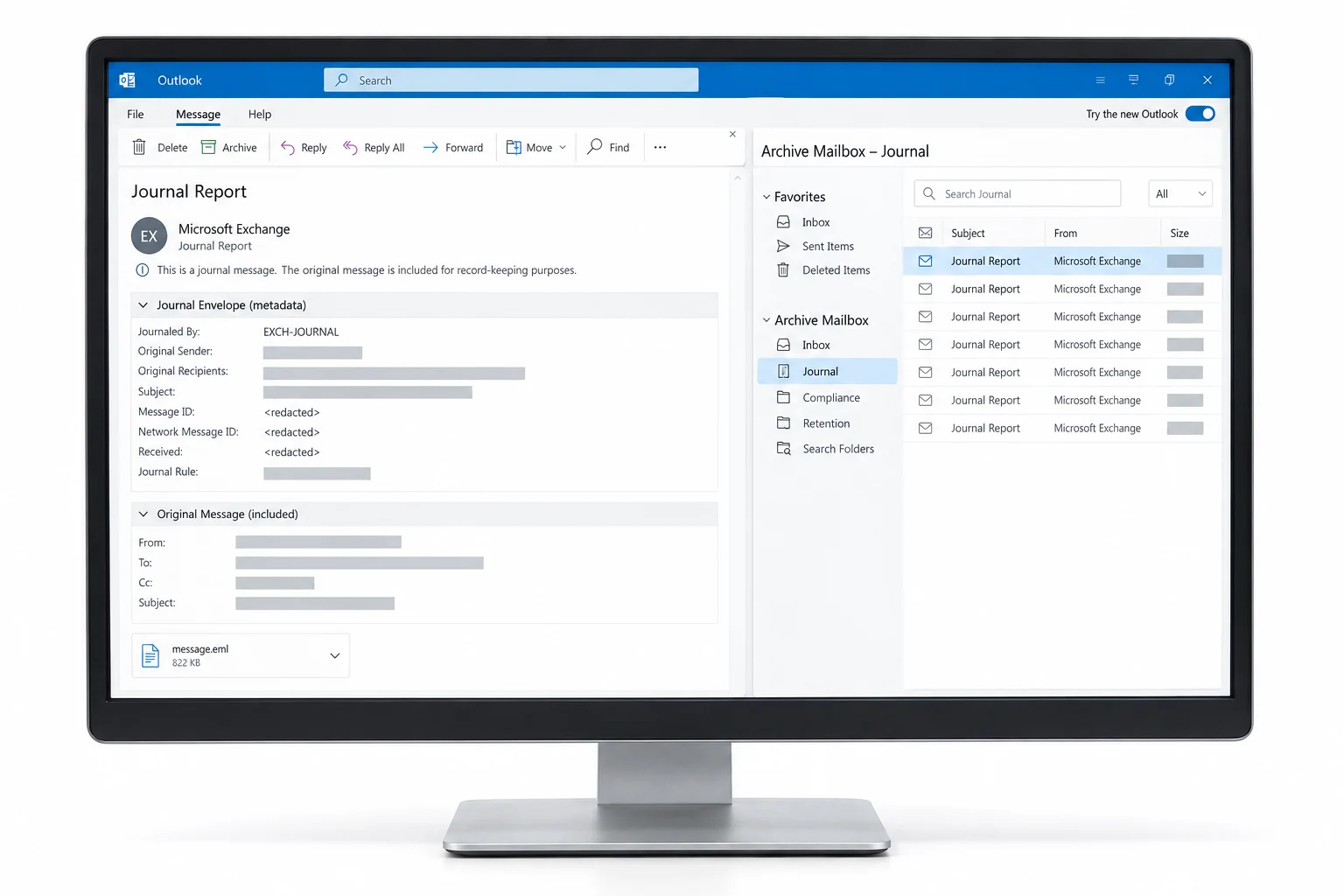
Open any item in a journal archive. You find two messages, not one. The outer one is the journal report, the P1 envelope in Exchange terms. Exchange generated it and its body is a short list: Sender, Subject, Message-Id, then To, Cc and Bcc. Recipient lines follow, showing how each distribution list expanded and whether a message was forwarded or sent on behalf of someone. The inner one, attached unaltered, is the original message (the P2 content) with its own headers and attachments.
That outer report is the whole point. A normal mailbox copy of a message never shows who was on BCC. It never shows which fifty people a list expanded to. The journal does, and it is often the only record. Every route below is judged by one question: does the report come out the other end intact and searchable?
What you are movingThe envelope lists the BCC recipient and the expanded list members. The original message is the attachment.
Why Office 365 Has No Journal Store
Microsoft's position is unambiguous. Exchange journaling in Office 365 is envelope journaling for mail that flows through Exchange Online. The journaling mailbox that receives the reports, though, cannot be an Exchange Online mailbox. It has to be an on-premises mailbox or a third party archive. There is no journal store in Microsoft 365 to import a legacy journal into. There is no single-instance concept either, where one copy of a message counts for everyone named in it. Retention, eDiscovery and holds in Purview are built around mailboxes that belong to people.
So a legacy journal has to be forced into that shape. Route 1: it lives in mailboxes that hold it as ordinary mail. Route 2: it goes to a platform that still understands journals. Route 3: it is rewritten into everyone's own mailbox.
Route 1: Import the Journal into Dedicated Office 365 Mailboxes in 5 Steps
This is the free route and the one most in-house teams take. The journal ends up as searchable mail in Office 365 holder mailboxes, one per year or per quarter, under a retention policy and a hold.
Export the journal archive as PST with the envelopes intact
From Exchange Server, export the journaling mailbox with New-MailboxExportRequest or from Outlook as PST. The items are already reports with attachments. From Enterprise Vault, export the Exchange Journal archive as Unicode PST with Export Archive in the console or the Export-EVArchive cmdlet. From Arctera eDiscovery or Purview, choose PST at export. Whatever the source, open a sample in Outlook and confirm the body is the report and the original is the attachment. If the export offers to convert journal items to plain messages, decline it.
You should seejournal reports as the items, not the original messages. If you see the originals with To and Cc only, the envelope has already been stripped and you are holding SJF data.
Split the journal PST files by year under 20 GB and 100 GB
Two Microsoft limits shape the split. Each PST should be under 20 GB for the Import service. Each archive mailbox takes at most 100 GB per import job. So group the files by year, or by quarter for a busy year, so that no holder mailbox receives more than 100 GB in one job. A converter with a date filter and a split size does this in one pass from the source export. The split a large PST file guide covers the manual way for a small journal.
| Name | Date modified | Type | Size |
|---|---|---|---|
| jnl-2018.pst | 2026-09-06 08:10 | Outlook Data File | 18,874,368 KB |
| jnl-2018_1.pst | 2026-09-06 08:34 | Outlook Data File | 18,874,368 KB |
| jnl-2018_2.pst | 2026-09-06 08:51 | Outlook Data File | 11,010,048 KB |
| jnl-2019.pst | 2026-09-06 09:20 | Outlook Data File | 18,874,368 KB |
| jnl-2019_1.pst | 2026-09-06 09:44 | Outlook Data File | 18,874,368 KB |
| jnl-2019_2.pst | 2026-09-06 10:02 | Outlook Data File | 18,874,368 KB |
| jnl-2019_3.pst | 2026-09-06 10:19 | Outlook Data File | 9,437,184 KB |
| jnl-counts.csv | 2026-09-06 10:21 | CSV File | 4 KB |
Step 2One year, four parts, 62.7 GB. It fits one holder mailbox in one import job.
Create the journal holder mailboxes
Create one Office 365 mailbox per year, such as jnl-2019@contoso.com, as a shared mailbox with an Exchange Online Archiving licence. That gives it an archive mailbox that can grow past 50 GB with auto-expanding archiving. Put every holder under a retention policy that matches the legal requirement and apply a litigation hold. Nothing can then be deleted by a user or a policy. Restrict access to the compliance group. These mailboxes exist for eDiscovery, not for reading.
Import with one mapping file row per part
Follow how to import PST to Office 365: upload the parts with AzCopy and build the mapping file. For a journal, every part of a year points at that year's holder mailbox. IsArchive is TRUE so the data lands in the archive mailbox. TargetRootFolder is the year, which keeps the parts in one tree. The Import service sets a retention hold on each mailbox it writes to; leave it on.
| Workload | FilePath | Name | Mailbox | IsArchive | TargetRootFolder | |
|---|---|---|---|---|---|---|
| 1 | Exchange | imports | jnl-2019.pst | jnl-2019@contoso.com | TRUE | /2019 |
| 2 | Exchange | imports | jnl-2019_1.pst | jnl-2019@contoso.com | TRUE | /2019 |
| 3 | Exchange | imports | jnl-2019_2.pst | jnl-2019@contoso.com | TRUE | /2019 |
| 4 | Exchange | imports | jnl-2019_3.pst | jnl-2019@contoso.com | TRUE | /2019 |
| 5 | Exchange | imports | jnl-2018.pst | jnl-2018@contoso.com | TRUE | /2018 |
| 6 | Exchange | imports | jnl-2018_1.pst | jnl-2018@contoso.com | TRUE | /2018 |
| 7 | Exchange | imports | jnl-2018_2.pst | jnl-2018@contoso.com | TRUE | /2018 |
One holder mailbox per year. Every part of that year points at the same Mailbox and TargetRootFolder.
Step 4Mapping file: every 2019 part goes to jnl-2019@contoso.com, archive mailbox, folder /2019.
Verify the envelope and lock the retention
When the jobs complete, run a Purview eDiscovery search across the holder mailboxes. Search for a known BCC address and a known distribution list name. Both should return hits from the journal report body. Open one item and confirm the original is still attached. Then record the holder mailboxes with their retention policy and hold in the compliance register. Hand the search procedure to legal.
You should seehits on BCC addresses that appear nowhere in the original messages' headers. That is proof the envelope survived. If the search only finds To and Cc addresses, the report was flattened somewhere and the import has to be redone from the source.
Route 2: Send the Journal to Mimecast as EJF
If Mimecast or another compliance archive is in the estate, the journal belongs there. Mimecast's Legacy Archive Data Management service accepts envelope journal PST as not per-user data. Any file name works, 5 to 10 GB per file, placed in the NotPerUser_EJF folder. Mimecast indexes every address in the envelope. A search by any recipient, BCC included, finds the message without anyone's mailbox being involved. Plain copies with no envelope go to NotPerUser_SJF instead and may need recipient resolution, which extends the timeline. The full preparation rules are in the Mimecast import checklist.
| Name | Date modified | Type | Size |
|---|---|---|---|
| jnl-2018-part01.pst | 2026-09-06 11:40 | Outlook Data File | 9,856,000 KB |
| jnl-2018-part02.pst | 2026-09-06 11:52 | Outlook Data File | 9,912,320 KB |
| jnl-2018-part03.pst | 2026-09-06 12:05 | Outlook Data File | 9,478,144 KB |
| jnl-2019-part01.pst | 2026-09-06 12:18 | Outlook Data File | 9,701,376 KB |
| jnl-2019-part02.pst | 2026-09-06 12:31 | Outlook Data File | 9,830,400 KB |
Route 2Journal parts in the NotPerUser_EJF folder. Mimecast reads the envelope; the file names do not matter.
Route 3: Journal Explosion into Each User's Mailbox
The third route rewrites the journal. A migration platform reads each journal report and works out every internal recipient from the envelope. It then writes a copy of the original message into each of those people's Office 365 archive mailboxes, including leavers as inactive mailboxes. The journal disappears as a single object and reappears as per-user history. Purview searches by custodian then behave the way legal expects, because the mail is in the custodian's own mailbox.
The costs are real. Storage multiplies by the average number of internal recipients. The tools are priced per mailbox or per gigabyte and run for weeks on a large archive. Quest Archive Shuttle, TransVault and Cloudficient are the names that come up. A variation called journal splitting keeps the journal whole but spreads it across many holder mailboxes by date. That is route 1 at scale, with the tool doing the mapping. Choose explosion when custodian search is the requirement, and route 1 or 2 when the requirement is to keep the record.
Compare the Three Journal Archive Migration Routes
| Route | Cost | Envelope kept | Search by custodian | Storage | Fits |
|---|---|---|---|---|---|
| 1. Holder mailboxes in Office 365 | Free plus licences | Yes, in report body | By keyword and date | 1x, 100 GB per import job | In-house teams, Microsoft only estates |
| 2. Mimecast as EJF | Professional Services by volume | Yes, indexed | By any address | 1x | Estates that keep a compliance archive |
| 3. Journal explosion | Per mailbox or per GB | Consumed, copies made | Native Purview | Many times 1x | Legal wants per-custodian search in Purview |
Routes 1 and 2 share the same preparation: an envelope-intact PST export split to size. That is where a converter fits. Univik Email Archive Converter reads journal exports from Enterprise Vault, Arctera, Purview and Exchange in PST, MSG or EML form. It keeps the journal report and its attachment together, filters by date and writes Unicode PST parts at the size each destination wants. The per-email log is the chain of custody that legal asks for later.
Univik Email Archive Converter reads journal exports from Enterprise Vault, Arctera, Purview and Exchange as PST, MSG or EML. It keeps the journal report with its attached original, splits by year and size and logs every item. Nothing leaves your network.
Windows Server or Windows 11 / 10 · offline on your own hardware · try it on one year of the export so legal can check an envelope before you buy
After the Journal Archive Migration
- A search for a BCC-only address returns hits in the new home, in Purview across the holder mailboxes or in the Mimecast Administration Console
- The item count per year in the destination matches the export counts, and the difference is explained by the duplicates the destination removed
- The retention policy and hold are recorded against every holder mailbox or Mimecast retention segment, with a named owner
Only then decommission the source. Keep the exported PST parts and the conversion logs for as long as the data itself must be kept, on backed-up storage. They are the fallback if a destination is ever found wanting. The source-specific guides cover the export side: migrating Enterprise Vault to Office 365 for an EV journal archive and exporting Arctera eDiscovery email to PST for a discovery platform export.
Fix Common Journal Migration Problems
Journal migrations fail in three ways, and all three surface late. Read the red You see symptom and the green Do this fix beside it.
Do this: The envelope was stripped. Either the export converted journal items to plain messages or the conversion flattened the report. Re-export from the source with journal items kept as reports, convert with the envelope preserved and reload. There is no way to recover BCC data from plain copies.
Do this: The archive mailbox hit the 100 GB per import job ceiling. Or the mailbox has no archive enabled. Enable Exchange Online Archiving with auto-expanding archiving, or split the year into two holder mailboxes or two jobs. Then rerun the remaining rows.
Do this: The files went into NotPerUser_SJF or the envelope was missing. If the source is envelope journaled, re-export with the report intact and resubmit to NotPerUser_EJF. If it never was, accept the SJF timeline and tell legal that BCC data was never captured.
Weighing the three routes for a journal that runs to several terabytes? Describe the source, the years and the target to our support team and we will suggest the split, the file sizes and which route keeps legal happy.
Journal migration questions
 About This Guide
Written and maintained by Leena Taylor Paul and the Univik team, developers of Windows data conversion and recovery software since 2013. Microsoft's journaling rules and Import service limits in this guide were checked against Microsoft Learn, and the Mimecast journal requirements against Mimecast's Legacy Archive Data Management documentation. Last verified September 7, 2026. Need a hand? Contact our support team.
Sources checked: Microsoft Learn, Journaling in Exchange Online · Microsoft Learn, Journal reports (Exchange) · Microsoft Learn, Overview of importing PST files to Microsoft 365 · Mimecast, Archiving PST Data · Veritas, Journal reports in Enterprise Vault