QuickBooks Auto Data Recovery keeps .QBW.adr and .TLG.adr copies in a QuickBooksAutoDataRecovery folder. Method 2 should recover everything except the final 12 hours of entries.
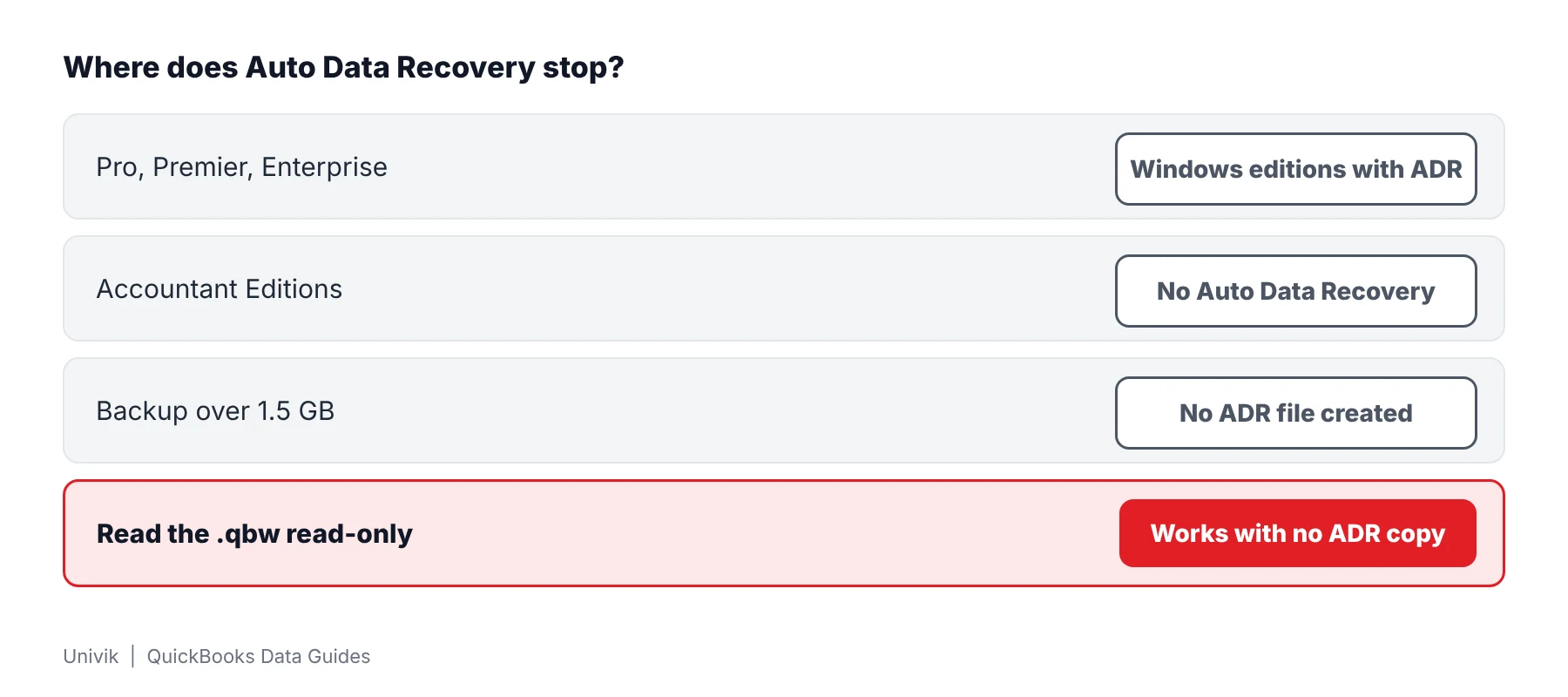
Auto Data Recovery exists in QuickBooks Pro, Premier and Enterprise for Windows. Accountant Editions lack it and a backup over 1.5 GB gets no ADR file.
What Is QuickBooks Auto Data Recovery?
QuickBooks Auto Data Recovery is an Intuit feature that keeps a second copy of a company so a damaged one can be rebuilt. It creates two files named .QBW.adr and .TLG.adr. Intuit lists it for QuickBooks Pro, Premier and Enterprise Solutions on Windows.
Which of these is your week?
QuickBooks stops with a damage message and the last backup is old.
Find the ADR copies →Intuit gives two methods and they use different files.
Compare the methods →The ADR folder is empty or missing and the books still need rescuing.
See what else to try →Where Is the QuickBooks Auto Data Recovery Folder?
The QuickBooksAutoDataRecovery folder sits in the same location as the company file. Intuit says the .QBW.adr and .TLG.adr files live inside it. The original transaction log is a separate .tlg file that carries the company name and sits beside the .qbw.
| Item | What Intuit states |
|---|---|
| Folder | QuickBooksAutoDataRecovery, in the same location as the company file |
| Files created | .QBW.adr and .TLG.adr |
| Editions | Pro, Premier and Enterprise Solutions for Windows. Not Accountant Editions |
| Size limit | QuickBooks will not generate an ADR file when the backup is larger than 1.5 GB |
| Turning it on or off | The article does not describe it |
Every row comes from Intuit's Auto Data Recovery article. Intuit also says to try it only after all appropriate troubleshooting and to follow the solutions in the order shown.
Which Method Recovers Data From Auto Data Recovery?
Intuit gives two methods. Method 1 restores lost transactions from the current transaction log plus a copy of the company. Method 2 uses both ADR files and should recover everything except the final 12 hours of entries.
- Make a test folder Create a folder named QBTest on the Desktop.
- Copy the ADR files For Method 2 copy both the .TLG.adr and the .QBW.adr into QBTest. For Method 1 copy the original .tlg and the .QBW.adr.
- Remove the .adr ending Rename the copies so that .adr disappears from the end of each name.
- Open and check Open the company in QBTest and look for transactions in an account register.
- Verify the data Choose File, Utilities, Verify Data. If the copy is good, move the damaged company out of the way and copy the QBTest company to the original location.
What Are the Limits of QuickBooks Auto Data Recovery?
Auto Data Recovery protects against loss, not against every failure. Three limits come straight from Intuit's article and one is a gap in what the article says.
| Limit | What it means |
|---|---|
| 12 hours | Method 2 leaves out the final 12 hours of entries. Work entered in that window has to be keyed in again. |
| 1.5 GB | A backup larger than 1.5 GB produces no ADR file. |
| Accountant Editions | Accountant Editions do not include Auto Data Recovery. |
| Not stated | Intuit does not say how to switch ADR on or off or whether the folder can be deleted. |
Two other Intuit articles sit around it. The error -6000 guide lists Auto Data Recovery as its last local fix. The data damage article starts with Rebuild Data.
How Do You Read a Damaged Company When No ADR Copy Exists?
Univik QBooks Recovery reads a damaged .qbw with no ADR files and no QuickBooks. The software opens the company read-only and flags every row that came from a damaged page. In the 2024 sample company, 40 corrupted pages still left 144,860 of 145,103 records readable.
- Check for the ADR folder Open the folder that holds the company data and look for QuickBooksAutoDataRecovery. No folder or no .adr files means this route is closed.
- Copy the damaged company aside Place a copy of the damaged .qbw in a separate folder. Intuit tells you to move the damaged one out of the way only after a recovered copy checks out.
- Read the damaged copy Launch setup-qbooks-recovery.exe on a PC running Windows 10 or 11 then press Open File. The reader loads the copy without QuickBooks.
- Check the summary Counts appear for each list. Each row that came from a page failing its check gets a warning mark.
- Export and compare Export to Excel or CSV and compare a few counts with a printout or a bank record. Transactions entered in the last hours before the damage need that check most.
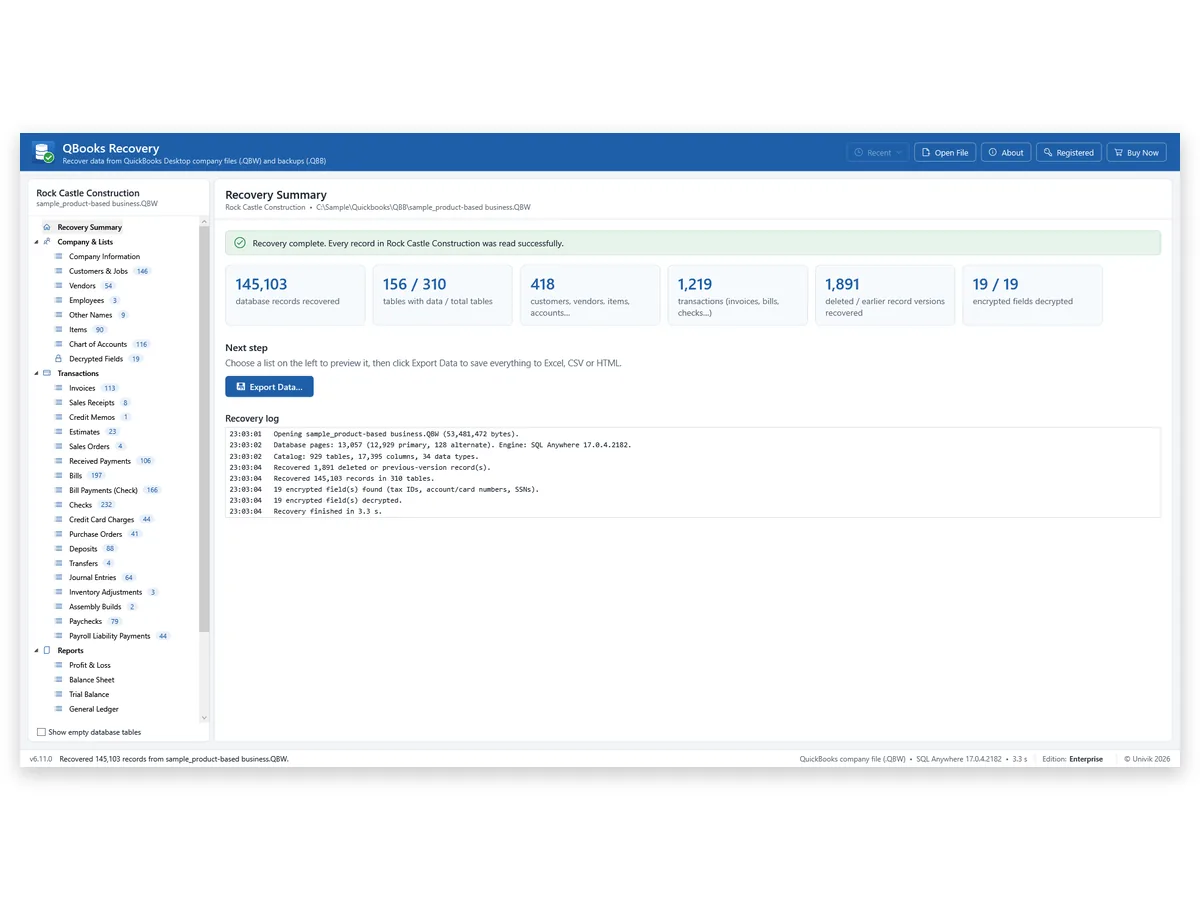
I read a test company with 40 corrupted pages and got 144,860 of 145,103 records with no ADR file in sight. A read like that shows how much work is intact before any ADR copy is tried.
Auto Data Recovery is a good safety net but it leaves out the last 12 hours and it stops at 1.5 GB. When the net is missing, the damaged company is still worth reading. A test company with 40 corrupted pages gave back 144,860 of 145,103 records.
Univik QBooks Recovery reads a damaged .qbw as a read-only source and shows the customers, vendors and transactions that still read.
Download Free Trial Select a Licence - From $99For Windows 10 and 11. The trial shows all data on screen and holds 25 items per list in each export.
What If Auto Data Recovery Does Not Help?
1. The ADR folder is empty or missing
Do this: The company may be larger than 1.5 GB or the edition may be an Accountant Edition. Intuit says both stop ADR. Move to a backup or a read-only look.
2. The recovered company lacks recent entries
Do this: Method 2 leaves out the last 12 hours. Compare the recovered company with bank records and enter what is missing.
3. Only a .qbb backup remains
Do this: A backup has its own restore rules. Read why a QBB file will not restore before overwriting anything.
Key Takeaways: QuickBooks Auto Data Recovery
- Auto Data Recovery is listed for QuickBooks Pro, Premier and Enterprise Solutions on Windows. Accountant Editions do not have it.
- A backup over 1.5 GB gets no ADR file and Method 2 leaves out the final 12 hours of entries.
- A read-only reader still opens a damaged .qbw copy when no ADR file exists. A test company with 40 corrupted pages gave 144,860 of 145,103 records.
Unsure what you are holding? Send the extension and company size to Univik support.
FAQ: QuickBooks Auto Data Recovery
What is QuickBooks Auto Data Recovery?
Intuit describes Auto Data Recovery as a feature that keeps copies of the company file and transaction log. It creates .QBW.adr and .TLG.adr files in a folder named QuickBooksAutoDataRecovery.
Which QuickBooks versions have Auto Data Recovery?
Intuit names QuickBooks Pro, Premier and Enterprise Solutions for Windows. The article says the feature is not available in Accountant Editions.
Why is no .adr file created?
Intuit says QuickBooks will not generate an ADR file when the backup is larger than 1.5 GB. An Accountant Edition does not have the feature at all.
How much work does Auto Data Recovery lose?
Intuit's article says Method 2 should recover everything except the final 12 hours of entries. Method 1 restores lost transactions from the current transaction log plus a copy of the company file.
Where is the QuickBooksAutoDataRecovery folder?
Intuit places it in the same location as the company file. It holds the .QBW.adr and .TLG.adr files.
Can I delete the QuickBooksAutoDataRecovery folder?
Intuit's article does not say. It also does not explain how to turn the feature on or off. Keep the folder until a working backup exists.
What should I do when ADR does not work?
Intuit says to use Auto Data Recovery only after all appropriate troubleshooting. If no .adr copy opens, a file reader can still read the damaged company. Univik QBooks Recovery read 144,860 of 145,103 records from a test company with 40 corrupted pages.
Does reading a damaged company change it?
No. Univik QBooks Recovery reads the source only. Working on a copy keeps other programs away from the original.
Which QuickBooks company files has the reader been tested on?
Univik tested the reader on 2019 and 2024 company data. Mac files and other versions were not part of that test.

Product details and test figures come from Univik's own build and test runs. Statements about QuickBooks follow Intuit help articles that were opened on November 11, 2026.
Sources we read: Intuit: Auto Data Recovery · Intuit: fix data damage · Intuit: error -6000 when opening a file
QuickBooks and Intuit are trademarks of Intuit Inc. Univik has no tie to Intuit.