 Univik QBooks Recovery for Windows
 At a Glance
 Key Features

Recover Data From a Damaged Company File
Univik QBooks Recovery reads a .qbw file page by page. A page that fails its check is worked around. Every row taken from a damaged area carries a warning mark in the list and in the export.
Univik QBooks Recovery for Windows
Univik QBooks Recovery is QuickBooks data recovery software for Windows. Univik software reads a QuickBooks Desktop company file (.qbw) or backup file (.qbb) with no QuickBooks installed, keeps every row it can read and flags the rows that came from damaged areas.
QuickBooks Not NeededDamaged FilesFlagged RowsBackups Open Directly
*The Univik QBooks Recovery trial shows all recovered data on screen and saves 25 items in each export. A licence removes that limit. Licences start at $99 for 2 PCs. Every purchase has a 30-day money-back guarantee.
At a Glance
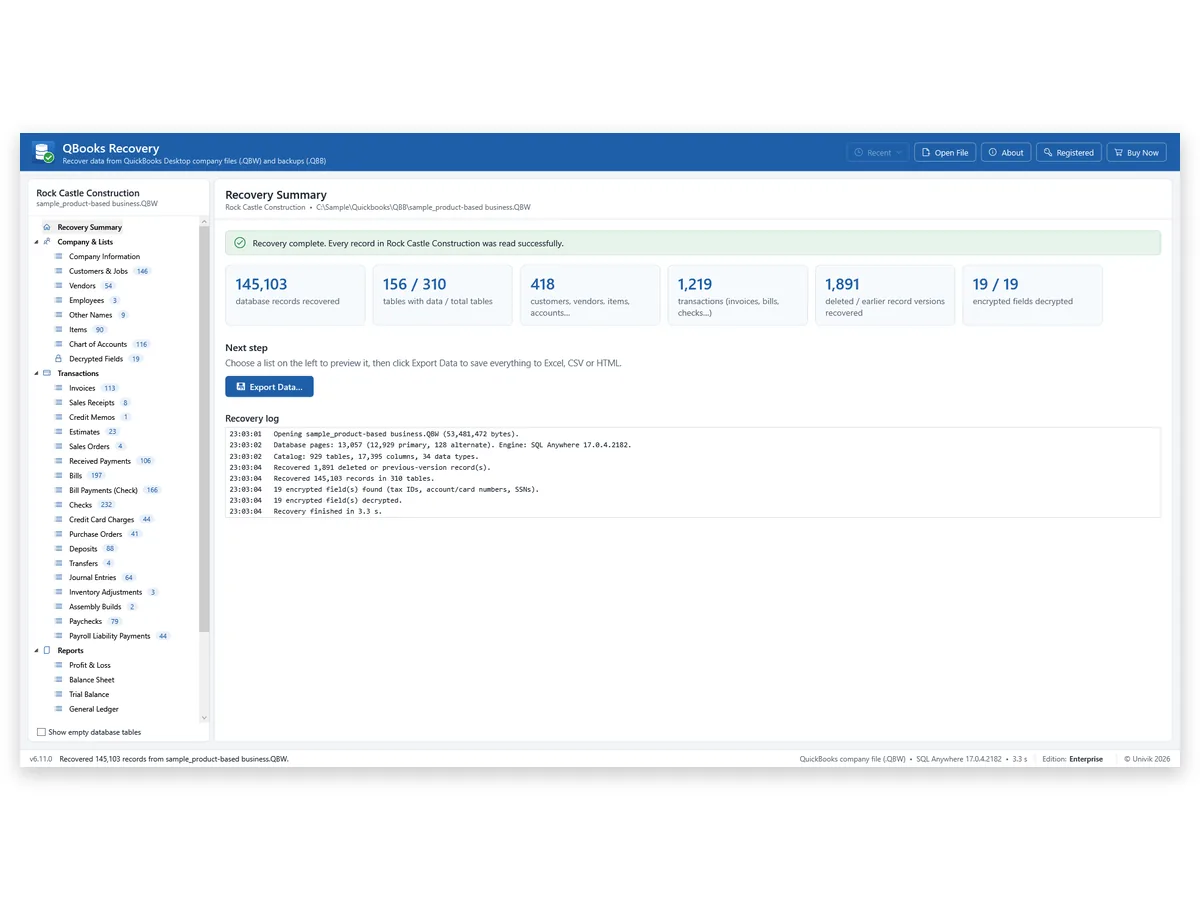
145,103
Records Read
From one QuickBooks 2024 company file with 310 tables, read by Univik software in our tests.
144,860
Kept After Damage
Of those 145,103 records, after 40 pages of the file were corrupted on purpose.
9
Reports Rebuilt
Profit & Loss, Balance Sheet, Trial Balance, General Ledger, Journal and four aging reports.
4
Output Formats
Excel, CSV, HTML and a QuickBooks import file (.iif).
$99
Personal Licence
Covers 2 PCs. Business is $299 and Enterprise is $599.
Key Features
Univik QBooks Recovery reads a .qbw file page by page. A page that fails its check is worked around. Every row taken from a damaged area carries a warning mark in the list and in the export.
A backup file opens directly. Restore Backup Files also writes the company file and the other files stored in that backup to a new folder and never overwrites anything.
Company information, Customers & Jobs, Vendors, Employees, Items and Accounts appear as lists. Selecting a transaction shows its lines. All Database Tables lists every native table, 271 to 310 by version.
Profit & Loss, Balance Sheet, Trial Balance, General Ledger, Journal and A/R and A/P Aging run for any dates on accrual basis. In Univik's test the first three matched a live QuickBooks Enterprise 24 row for row.
An option also looks for rows left in stale pages and deleted-row slots. They show under Possibly Deleted Records. Those rows may be deleted entries or older versions and cannot be verified.
Find anywhere (Ctrl+Shift+F) searches every list for a name, number or amount. Print puts any list or report on paper. Export Data saves one list, the business data or everything.
The Problem First
Start there. Intuit's own tools are free and can put a file back in working order. Two limits send people looking further.
Trap 1: The File Has to Open First
Rebuild Data and Verify Data sit under File > Utilities inside QuickBooks, so both need a company file that still opens. Intuit's article Fix data damage on QuickBooks Desktop company file ends with a call to support when its tools cannot fix the file.
Trap 2: Auto Data Recovery Has Three Limits
Intuit's article Recover lost data with QuickBooks Desktop Auto Data Recovery says the feature is not in Accountant Editions, makes no copy above 1.5 GB and brings back all but the last 12 hours of transactions.
The Way Out: Read the Damaged File Directly
Univik QBooks Recovery reads what the .qbw or .qbb file still holds with no QuickBooks on the PC. Univik software marks every row that came from a damaged area. Our view: try Intuit's tools and your latest backup first. Use Univik software when the file will not open, the backup is old or QuickBooks is no longer on the PC.
Damage
| Damage | What Univik software does | Result in Univik's test |
|---|---|---|
| Corrupted pages inside a .qbw | Keeps rows on good pages and flags rows from damaged pages | 144,860 of 145,103 records with 40 pages corrupted |
| Company file cut short | Reads everything before the cut | 121,495 of 145,103 records from a file cut to 80 percent |
| Damaged .qbb backup | Reads the data before the damage in that compressed stream | 9,096 of 13,474 records from a backup cut to 80 percent |
Figures come from damage Univik made on purpose to its own sample files. A real file can behave differently.
Step by Step
Copy the file, select the copy and check the flagged rows before you rely on a number.
Copy the Company File
Close QuickBooks if it is open. Copy your .qbw company file or .qbb backup to a local drive on a Windows 11 or 10 PC. Work on the copy and leave the original where it is.
Select the File and Preview the Data
Click Select QuickBooks File… or drop the file onto the window. Tick the possibly deleted records option if you want those rows too. Recovery Summary, Company & Lists, Transactions and Reports fill with what was read.
Export the Recovered Data
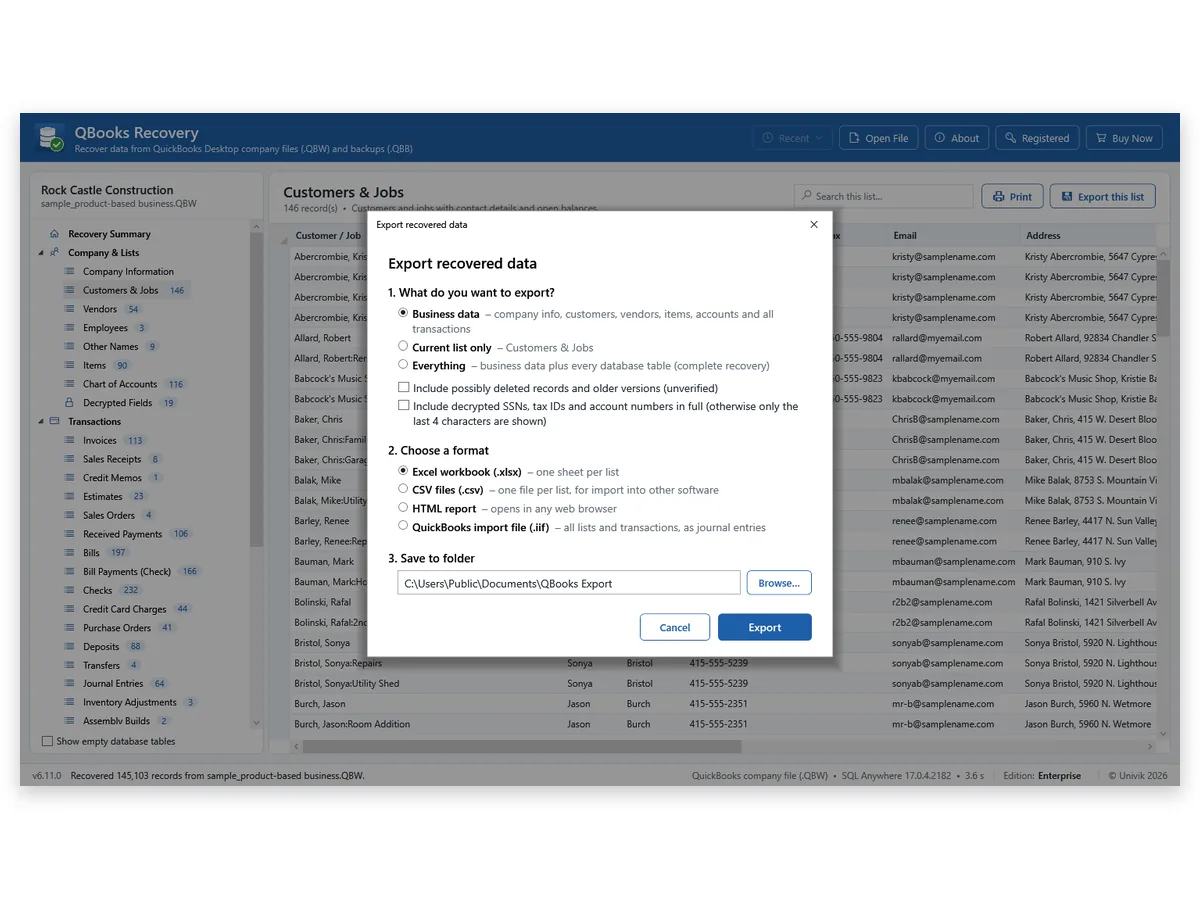
Click Export Data and choose Business data, Current list only or Everything. Then choose Excel workbook, CSV files, HTML report or QuickBooks import file. Rows from damaged areas keep their warning mark in the export.
Windows 11 or 10 · your file is only read · no QuickBooks needed · support by email
Our Test
Univik tested the software on four files: a QuickBooks 2024 company file (53 MB) with 145,103 records in 310 tables that Univik software read in 3.3 seconds, two QuickBooks 2019 company files and one .qbb backup with 13,474 records. On the intact files every table and record count matched the reference. A field-by-field check of 13,119,060 fields found no mismatch.
Then we damaged the files on purpose. With 40 pages corrupted, the 2024 file gave back 144,860 of its 145,103 records. Cut to 80 percent of its length, it gave back 121,495. The backup cut to 80 percent gave back 9,096 of 13,474 records, with every list and invoice among them. No wrong row came out without a warning mark.
The catch: these are four files and damage we made ourselves. Only QuickBooks Desktop 2019 and 2024 company files were tested, so your own file can give a different result. The trial shows what it holds before you pay.
Limits
Not repaired
The File Is Not Repaired
Univik software copies your data out. It does not produce a .qbw that QuickBooks opens again.
Lost
Cut-Off Data Is Lost
Data after the cut in a shortened file is not there to read. Damage inside a compressed .qbb makes the rest of that stream unreadable.
Not read
Some Files Are Not Read
Portable files (.qbm), QuickBooks for Mac files and the older binary .qbb format are not supported.
Tested
Two Versions Tested
Tests covered QuickBooks Desktop 2019 and 2024 company files. Other versions and editions may differ, so try your file in the trial first.
Who It Is For
Bookkeepers With a File That Will Not Open
Rebuild Data needs a file that opens. Read the damaged copy, export lists and transactions to Excel and point the client to the flagged rows.
Businesses That No Longer Run QuickBooks
QuickBooks is gone from the PC, yet the company file still holds years of invoices and bills. Select the file and export what your accountant asks for.
IT Support After a Disk or Network Failure
A crash left the company file cut short and the last backup is weeks old. Recover what the cut file holds and use the backup for the rest.
Side by Side
A repair inside QuickBooks or a good backup beats everything else. Reach for Univik QBooks Recovery when neither works.
| What you need | Rebuild and Verify Data | Auto Data Recovery | Univik QBooks RecoveryTRIAL |
|---|---|---|---|
| Works when the file will not open | No | Yes, from its own copies | Yes, from the damaged file |
| Needs QuickBooks installed | Yes | Yes | No |
| File size | Not stated | No copy above 1.5 GB | A 2.2 GB test file was read |
| Recent work | Stays in the file | All but the last 12 hours | What the file still holds |
| Gives back a working .qbw | Yes, when the repair works | Yes | No, exports the data |
| Cost | Free | Free | Free trial, licence from $99 |
Intuit columns follow Intuit's help articles as read on 11 November 2026.
Checklist
Windows 11 or 10
Any PC with Windows 11 or 10. The .NET Framework 4.8 runtime is part of Windows 11 and of current Windows 10.
No QuickBooks Needed
No QuickBooks program or licence is needed on the PC.
A Local Copy of the File
Put a copy of the .qbw or .qbb file on the PC's own disk and select that copy.
Admin Password, Only for Protected Fields
Tax IDs, card numbers and SSNs are shown after you enter the QuickBooks Admin password. Everything else is read without it.
| Product | Univik QBooks Recovery, release 6.11 |
| Platform | Windows 11 and Windows 10 |
| Input | QuickBooks Desktop company files (.qbw) and backup files (.qbb) |
| Framework | .NET Framework 4.8 |
| Output files | Excel (.xlsx), CSV, HTML and QuickBooks import file (.iif) |
| Tested on | QuickBooks Desktop 2019 and 2024 company files |
| Licences | Personal $99 for 2 PCs, Business $299 for 10 PCs, Enterprise $599 for 50 PCs |
Questions
Related Software
Checked by Nick Rogers Founder of Univik
Facts Reviewed 11 November 2026
Nick Rogers, founder of Univik, checked the facts here on 11 November 2026. Every figure above comes from Univik's own tests on four sample files and is labelled as our test. QuickBooks facts follow the help articles Intuit publishes, with links in the text. The software only reads your file.
Updated on 11 November 2026
Univik Since 2013File Only ReadQuickBooks Not Needed30-Day Refund
QuickBooks and Intuit are trademarks of Intuit Inc. Univik has no tie to Intuit.


 The Problem First
 Step by Step
 Limits
 Who It Is For


 Side by Side
