 Univik QBooks Recovery as a Converter for Windows
 At a Glance
 Key Features

An Excel Workbook With One Sheet per List
Every list becomes its own sheet. A table longer than the 1,048,576 rows Excel allows continues on a second sheet with the headings repeated.
Univik QBooks Recovery as a Converter for Windows
Univik QBooks Recovery is QBW file converter software for Windows. Univik software reads a company file (.qbw) or backup (.qbb) and saves its lists, transactions and reports as an Excel workbook, CSV files, an HTML report or a QuickBooks import file. No QuickBooks is needed.
Free TrialFour Output FormatsSource File UntouchedNo QuickBooks Required
*Each Univik QBooks Recovery trial export saves 25 items from every list. A licence from $99 lifts that cap and comes with a 30-day refund window.
At a Glance
4
Output Formats
Excel, CSV, HTML and an import file for QuickBooks Desktop (.iif).
3
Export Scopes
Business data, current list only or everything.
9
Reports Included
Reports go out with the business data and the full export.
0
Cells That Differed
Read-back of the 2024 sample exports in Excel, CSV and HTML.
25
Items per Trial Export
A licence removes the cap. Prices start at $99.
Key Features
Every list becomes its own sheet. A table longer than the 1,048,576 rows Excel allows continues on a second sheet with the headings repeated.
One CSV file per list. Long text and binary values stay whole in CSV. The Journal CSV carries debits and credits by line, laid out for other accounting software.
One report opens in any web browser. Each list shows as a table, so a client or auditor needs no spreadsheet program.
Accounts, customers, vendors, classes and every transaction as a balanced journal entry. Items and payroll are not included.
Business data and Everything add the all-dates reports to the export. The Profit & Loss and Balance Sheet sit beside the lists they came from.
Decrypted tax IDs and SSNs export as the last 4 characters unless you opt in. Whole numbers over 15 digits are written as text, so Excel cannot round them.
The Problem First
QuickBooks can save reports and lists to Excel and IIF files while the file opens. Two limits send people looking for a converter.
Trap 1: Transactions Do Not Export to IIF
The Intuit help article on IIF files lets lists leave as IIF files. It says you can import transactions but you cannot export them from QuickBooks, so a full transaction file needs another route.
Trap 2: A Backup Must Be Restored First
The Restore a backup of your company file article restores a .qbb file inside QuickBooks into a new .qbw file. Without QuickBooks on the PC the backup stays closed.
The Way Out: Convert the File Itself
Univik QBooks Recovery reads the .qbw or .qbb file and saves lists, transactions and reports together. Our view: for one report from an open company, QuickBooks is faster. Use Univik software when you need everything at once or have no QuickBooks.
Output Formats
| Format | What you get | Good for | Good to know |
|---|---|---|---|
| Excel workbook (.xlsx) | One sheet per list | Filtering and checking numbers | Excel opened the test workbooks with no repair message |
| CSV files (.csv) | One file per list | Loading into other software | Long text and binary values stay whole |
| HTML report | One report with a table per list | Sharing a read-only view | Opens in any web browser |
| QuickBooks import file (.iif) | Accounts, names and every transaction as a journal entry | Loading data into QuickBooks Desktop | Not imported into QuickBooks in Univik's tests |
Univik software has no PDF, JSON, SQL or XML output.
Step by Step
Select a copy of the file, choose a scope and save to a folder.
Select the Company File or Backup
Press Select QuickBooks File… and choose a copy of the .qbw or .qbb file. The Recovery Summary then shows how many records and tables were read.
Choose What to Export
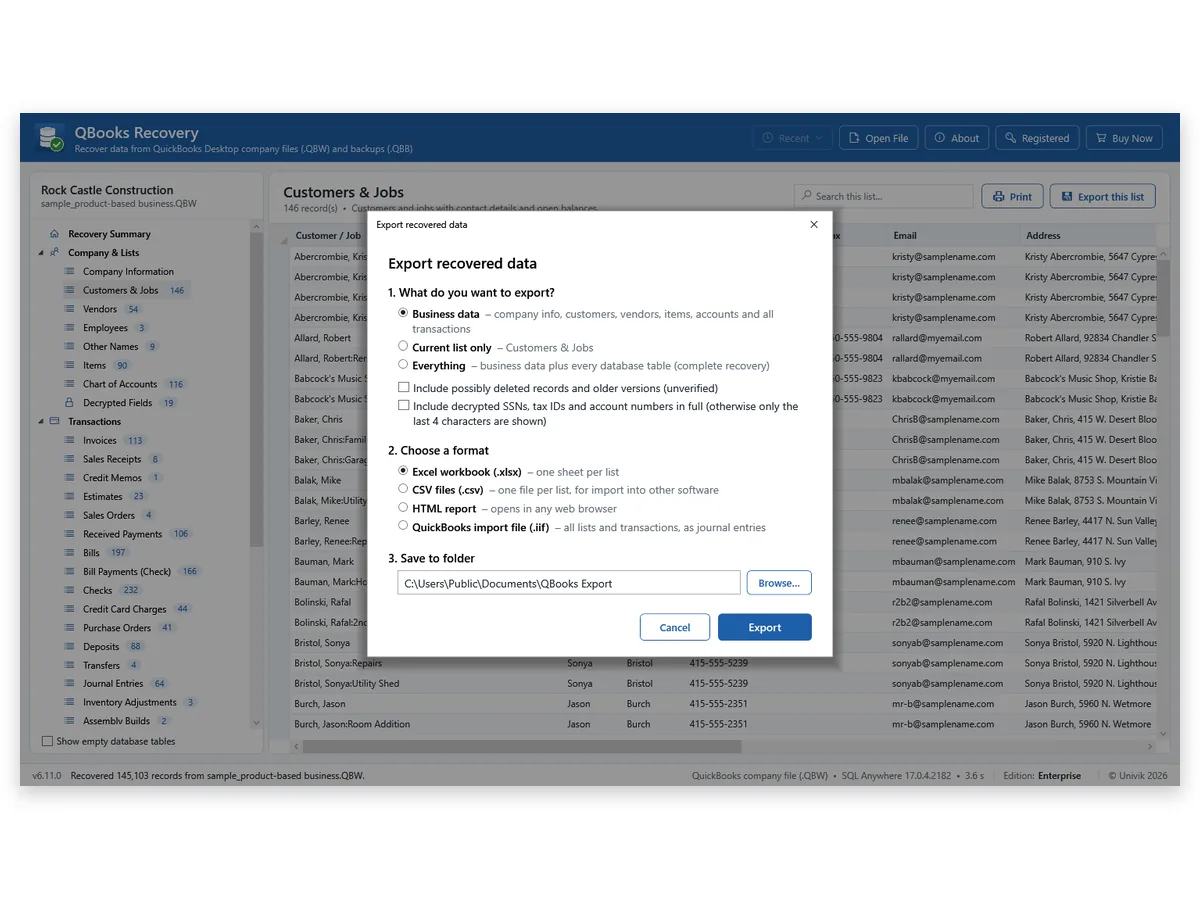
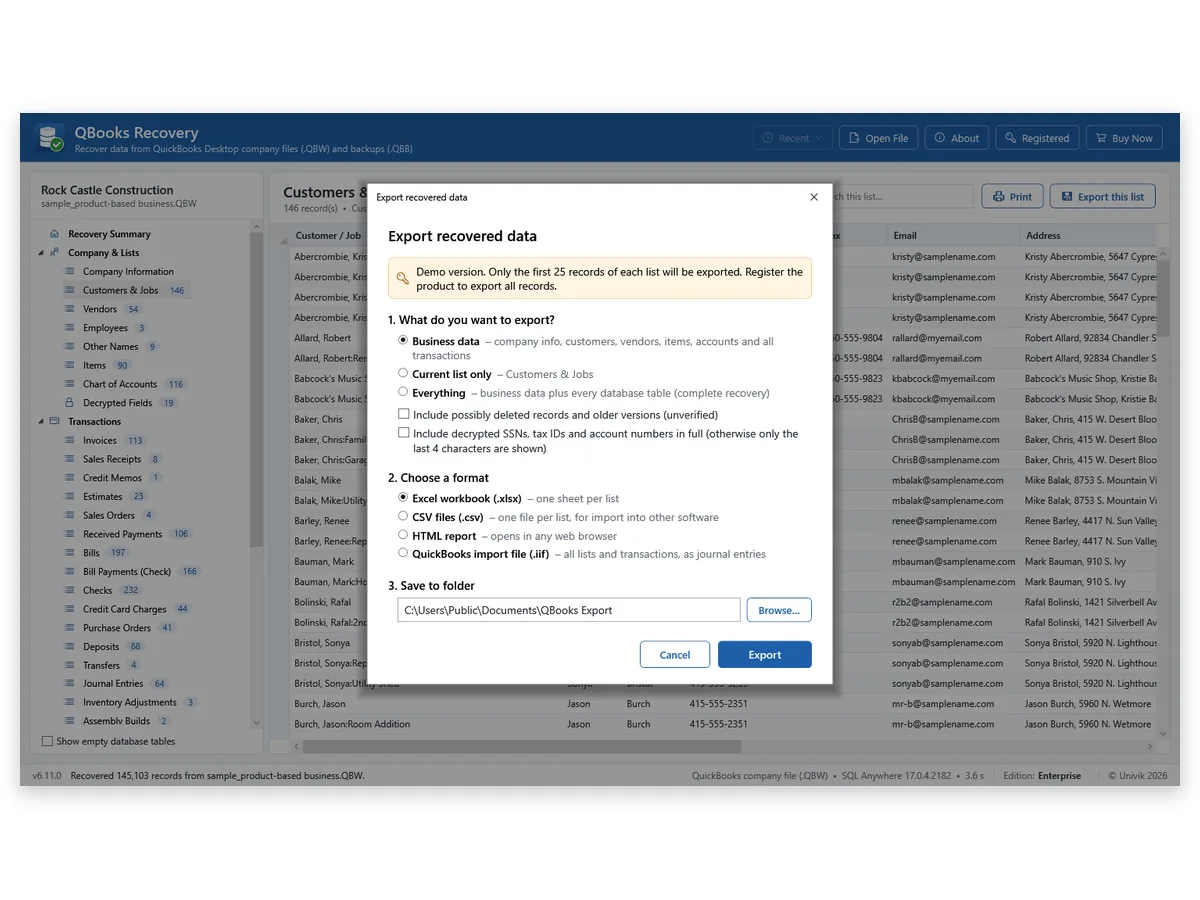
Press Export Data. Pick Business data, Current list only or Everything. Tick the box for possibly deleted rows only if you want them. Tick the full-values box only when you need unmasked tax IDs and SSNs.
Pick a Format and a Folder
Select a format: Excel workbook, CSV files, HTML report or an import file for QuickBooks Desktop (.iif). Browse to a folder and press Export. The trial stops each list at 25 items.
Runs on Windows 11 or 10 · your file stays unchanged · QuickBooks not required
Our Test
Univik exported four test files in Excel, CSV and HTML. A separate program then read each export back and compared it with the recovered data, cell by cell. On the 2024 sample file that was 7,051,801 cells. All three formats matched in every cell. The other three test files matched as well. Excel also opened the workbook with no repair message.
The check found two real problems. A 63-bit number like 471664500994548925 would have shown as 471664500994549000 in Excel, so numbers over 15 digits are now written as text. A table longer than one sheet had been cut off, so it now continues on more sheets.
The catch: these are four files. The .iif file has not been imported into QuickBooks. Preview your own file in the trial and open one export before you buy.
Who It Is For
Accountants Taking On a New Client
The client hands over a .qbw file. Export the lists and every transaction to Excel and start the work without installing a matching QuickBooks.
Owners Moving to Other Software
Save the Chart of Accounts, customers, vendors and the Journal CSV. Your new accounting package can import the lines from there.
Teams Archiving a Closed Company
Keep one HTML report and one Excel workbook of a company you no longer run. Both open without QuickBooks.
Limits
No PDF
No PDF, JSON, SQL or XML
Output is Excel, CSV, HTML and .iif. Print can put a list on paper.
.iif
The .iif File Is Untested in QuickBooks
Its structure and totals were checked. Nobody has imported it into QuickBooks yet, so use a copy of a company.
Trial
The Trial Caps Each Export
Everything shows on screen, but each export holds 25 items until you add a licence.
Online
QuickBooks Online Is Not Covered
The .iif layout is for QuickBooks Desktop. Univik has not tested an import into QuickBooks Online.
Side by Side
Exporting from an open QuickBooks is quick for one report. Univik QBooks Recovery fits the jobs it cannot do.
| What you need | Export inside QuickBooks | Univik QBooks RecoveryTRIAL |
|---|---|---|
| Works with no QuickBooks on the PC | No | Yes |
| Transactions in an IIF file | No, lists only | Yes, as journal entries |
| Every list in one run | One list or report at a time | Yes, with Everything |
| A .qbb backup with no restore step | No, restore first | Yes |
| Cost | Part of QuickBooks | Free trial, licence from $99 |
The Intuit column follows its IIF and restore articles, checked 11 November 2026.
Checklist
Windows 11 or 10
The software runs on Windows 11 or 10. Windows 11 and current Windows 10 already include .NET Framework 4.8.
No QuickBooks Needed
Converting needs no QuickBooks program and no Intuit licence.
Space for the Output
Pick a folder with room for the export. An Everything export of a large file can hold many tables.
A Copy of the File
Select a copy of the company file or backup so the original stays in place.
| Software | Univik QBooks Recovery 6.11 for Windows |
| Reads | .qbw company files and .qbb backups |
| Writes | Excel workbooks, CSV files, HTML reports and .iif import files |
| Scopes | Business data, Current list only or Everything |
| Trial | 25 items in each export, all data on screen |
| Licence prices | Personal $99 covers 2 PCs, Business $299 covers 10 PCs and Enterprise $599 covers 50 PCs |
Questions
Related Software
Checked by Nick Rogers Founder of Univik
Facts Reviewed 11 November 2026
On 11 November 2026 Nick Rogers, founder of Univik, reviewed each claim on this page. Export results are Univik's own read-back tests. Intuit statements are linked to the help articles they come from.
Updated on 11 November 2026
Univik Since 2013Source File UntouchedFour Output Formats30-Day Refund
QuickBooks is a trademark of Intuit Inc. Univik has no tie to Intuit.


 The Problem First
 Step by Step
 Who It Is For


 Limits
 Side by Side
 Questions