 Univik QBooks Recovery for Forensics on Windows
 At a Glance
 Key Features

Audit Trail Lists From the File
The audit trail tables stored in a company file open as the lists Audit trail and Audit trail lines. Search them, print them or export them like any other list.
Univik QBooks Recovery for Forensics on Windows
Univik QBooks Recovery works as QuickBooks forensics software for Windows. Univik software opens a company file (.qbw) or backup (.qbb) read-only, lists its audit trail tables and marks rows that may be deleted entries as unverified.
Read-OnlyAudit Trail ListsPossibly Deleted RowsQuickBooks Not Needed
*In the Univik QBooks Recovery trial every list opens in full. Exports are limited to 25 items. A licence from $99 removes the limit and carries a 30-day refund window.
At a Glance
2
Audit Trail Lists
Audit trail and Audit trail lines open as lists.
1,891
Possibly Deleted Rows
Found in one 2024 sample file with the option on.
0
Writes to the File
The source file is only read.
310
Tables Readable
The 2024 sample held 310. Other versions hold 271 and up.
3
Export Formats
Excel, CSV and HTML carry the findings out.
Key Features
The audit trail tables stored in a company file open as the lists Audit trail and Audit trail lines. Search them, print them or export them like any other list.
A tick box adds rows found in older pages and emptied row slots. They show in their own group and carry the word unverified.
The source file is opened for reading only. A restored backup goes to a new folder and never replaces an existing file.
A row taken from a page that failed its check is flagged in the list, in the printout and in every export. Damage tests found no wrong row without a mark.
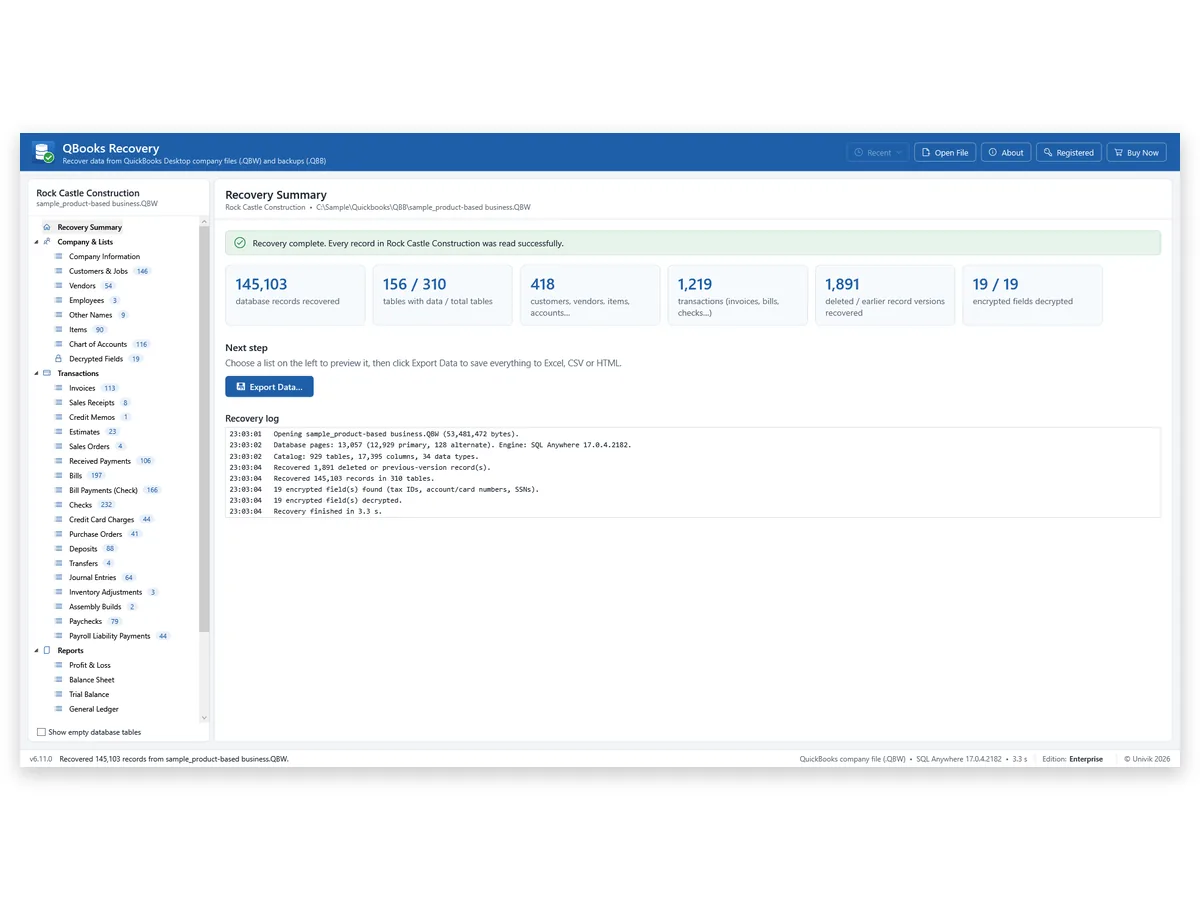
The log lists the file size, the tables read, the encrypted fields found and the possibly deleted rows recovered, with the time the run took.
Find anywhere (Ctrl+Shift+F) can search every database table as well as every list, so a name or an amount turns up wherever the file stores it.
The Problem First
An examiner often holds only a copy of the company file. Two facts make the audit trail hard to use from there.
Trap 1: The Report Lives Inside QuickBooks
Intuit places the Audit Trail report under Reports > Accountant & Taxes. A file that will not open in QuickBooks cannot produce it. Neither can a PC with no QuickBooks.
Trap 2: Condense Data Can Remove Entries
The Use the Condense Data utility article says condensing cannot be undone. Its option to remove audit trail info takes edited, voided and deleted transactions out of the audit trail report.
The Way Out: Read the File Itself
Univik QBooks Recovery opens the stored audit trail tables and the rows left in older pages without QuickBooks. Our view: this is a lead finder. Use it to decide where to look and prove each finding with records you can verify.
Possibly Deleted Records
| Source in the file | What a row may be | How to use it |
|---|---|---|
| Stale pages | An older version of an entry that was later changed | Compare it with the live record |
| Deleted-row slots | An entry that was deleted | Look for support in a backup or paper |
| Pages that failed a check | A row read from damaged data | Look for the warning mark before you rely on it |
None of these rows can be verified by the software. Each one is a lead.
Step by Step
Copy the file, load it with the option on and export what you find.
Work on a Copy
Copy the file to a local folder and keep the original as you received it. Write the date and source of the copy in your own log.
Read the File With the Deleted-Records Option On
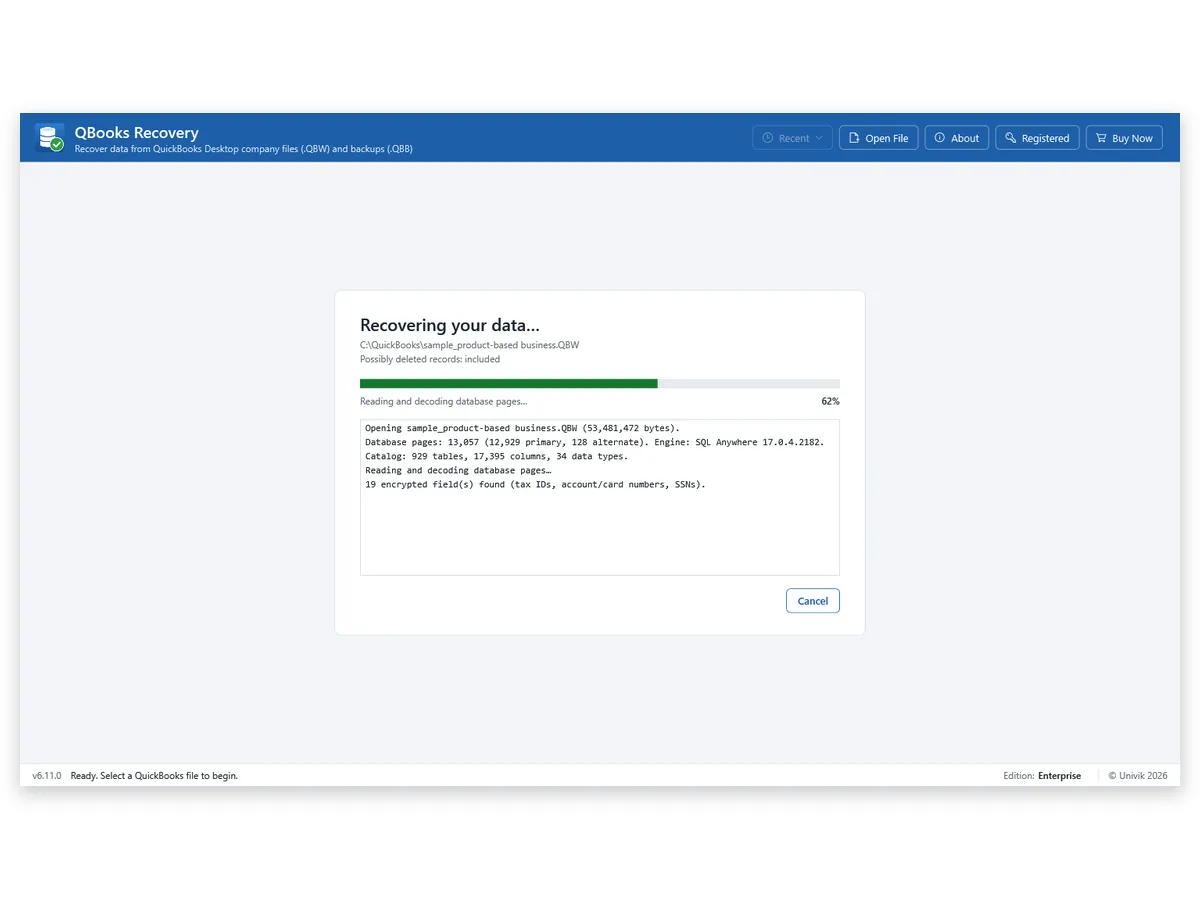
Press Select QuickBooks File… and tick Also look for possibly deleted records and older versions (unverified) before the file loads. The Recovery log lists what was read and what was found.
Review the Lists and Export Your Findings
Open the audit trail lists and the Possibly Deleted Records group from the left panel. Press Export Data and tick the possibly deleted box so those rows reach the Excel, CSV or HTML file.
Needs Windows 11 or 10 · examine a copy · QuickBooks not required
Our Test
Univik read a 2024 sample company file of 53 MB with the possibly deleted option on. The run took 3.3 seconds and recovered 145,103 records in 310 tables. It also listed 1,891 deleted or earlier record versions and found 19 encrypted fields.
In Univik's damage tests every row that came out wrong carried a flag. That covers the data the software reads. It says nothing about who changed a record or when.
The catch: every one of the 1,891 rows is unverified. We cannot tell a deleted entry from an older version of a live entry. The software also did not read any condensed company file in these tests.
Who It Is For
Forensic Accountants With a Client File
A dispute needs the books as they stood. Read the file, list the possibly deleted rows and take the leads to the records that can confirm them.
CPAs Reviewing a New Engagement
Before you trust a prior bookkeeper's file, scan it for rows that were removed. Export the findings to Excel and raise questions with the client.
IT Teams Helping an Internal Review
Management asks IT to look at a company file after a departure. Read a copy read-only and hand over an HTML or Excel file.
Limits
Who
No User or Time Claims
The software does not state who changed or deleted a record or when.
Unverified
Possibly Deleted Means Unverified
A row may be a deleted entry or an older version. Confirm it elsewhere.
Compare
No Backup Comparison
Two files cannot be compared in one view. Read each file on its own.
Condensed
Condensed Files Were Not Tested
Nothing here says what remains after Condense Data. Try an older backup too.
Side by Side
Start with the Audit Trail report when QuickBooks is installed and the file opens in it. Use Univik QBooks Recovery for any file that will not open.
| What you need | Audit Trail report in QuickBooks | Univik QBooks RecoveryTRIAL |
|---|---|---|
| Reads a file that will not open in QuickBooks | No | Yes |
| Needs QuickBooks installed | Yes | No |
| After Condense Data | May no longer list removed entries | Not tested |
| Cost | Included in QuickBooks | Free trial, then from $99 |
The Intuit column follows its Condense Data article.
Checklist
Windows 11 or 10
A PC with Windows 11 or 10 and .NET Framework 4.8 is enough. Windows 11 includes the framework.
No QuickBooks Needed
QuickBooks and an Intuit licence are not needed to read the file.
A Working Copy
Examine a copy so the original stays as received. Write down where the copy came from.
A Folder for Exports
Choose a folder that you control for the Excel, CSV or HTML files.
| Product | Univik QBooks Recovery release 6.11 |
| Input | Company files (.qbw) and backups (.qbb) |
| Shows | Audit trail lists, possibly deleted rows and the Recovery log |
| Output | Excel workbooks, CSV files and HTML reports on request |
| Trial limit | Exports hold 25 items per list. Screens are not limited |
| Licence prices | Personal at $99 for 2 PCs, Business at $299 for 10 PCs and Enterprise at $599 for 50 PCs |
Questions
Related Software
Checked by Nick Rogers Founder of Univik
Facts Reviewed 11 November 2026
Nick Rogers, founder of Univik, signed off every claim above on 11 November 2026. Counts come from Univik's own run on a sample file and carry no claim about any real company. Intuit statements link to the article they come from.
Updated on 11 November 2026
Univik Since 2013No Edits to the FileUnverified Rows MarkedRefund Within 30 Days
Intuit Inc. owns the QuickBooks trademark and has no tie to Univik.


 The Problem First
 Who It Is For


 Limits
 Side by Side

