 Univik QBooks Recovery as a File Viewer for Windows
 At a Glance
 Key Features

A QuickBooks File Viewer With No QuickBooks
Select a .qbw company file and its data loads on screen. Univik QBooks Recovery needs no QuickBooks program or licence on the PC and never changes the file it reads.
Univik QBooks Recovery as a File Viewer for Windows
Univik QBooks Recovery works as a QuickBooks file viewer for Windows. Univik software shows a .qbw company file or a .qbb backup as lists, transactions and reports. The trial shows all of it on screen.
Read-OnlyTrial Shows All DataBackups Open DirectlyQuickBooks Not Needed
*The Univik QBooks Recovery trial shows all data on screen. Each export saves 25 items until you add a licence. Licences from $99 cover 2 PCs and come with a 30-day refund window.
At a Glance
0
QuickBooks Installs
Needed on the PC to view a .qbw company file or a .qbb backup.
21
Transaction Types
Each type opens as a list and shows its lines when you select a row.
9
Reports Built
Profit & Loss, Balance Sheet, Trial Balance and six more, for any dates.
2
File Types
Company files (.qbw) and backup files (.qbb) open the same way.
All
Data in the Trial
The trial shows everything on screen. Only exports stop at 25 items.
Key Features
Select a .qbw company file and its data loads on screen. Univik QBooks Recovery needs no QuickBooks program or licence on the PC and never changes the file it reads.
A .qbb backup loads in one step. Nothing is restored and no new company file appears on the disk.
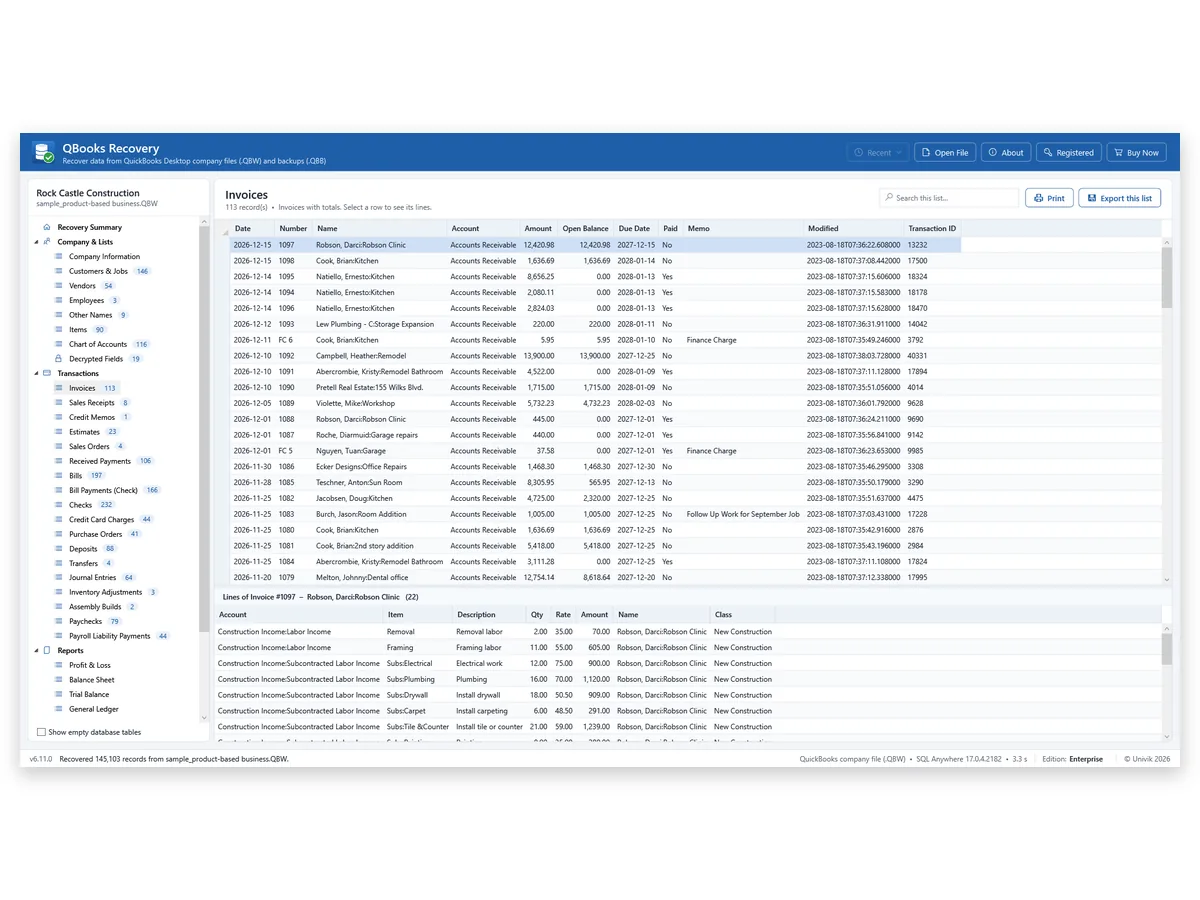
Customers & Jobs, Vendors, Employees, Other Names, Items and the Chart of Accounts each show a record count beside the name in the left panel.
Invoices, Bills, Checks, Deposits, Journal Entries and Paychecks are among 21 transaction types. A selected row shows its account, item, quantity and amount lines.
A search box above each list narrows it as you type. Find anywhere looks through all lists and can include every database table.
Print (Ctrl+P) lays a list on paper with its title and column headings on every page. Numbers that are encrypted in the file print masked.
The Problem First
Double-click a .qbw file on a PC with no QuickBooks and Windows asks which app should open it. Two facts explain the dead end.
Trap 1: The File Is a Database
Intuit's File types and extensions used by QuickBooks Desktop names .QBW the QuickBooks Company file and .QBB the QuickBooks Backup file. Both hold database data, so Windows has no built-in way to show what is inside.
Trap 2: A Backup Needs QuickBooks to Restore
Intuit's Restore a backup of your company file runs inside QuickBooks under File > Open or Restore Company. A .qbb file restores into a new .qbw file, so a PC without QuickBooks cannot look inside it.
The Way Out: Read the File Directly
Univik QBooks Recovery reads a .qbw or .qbb file by itself and shows its data on screen. Univik software never writes to the file you select, so a copy is enough. Our view: when QuickBooks is on the PC and the file opens, use QuickBooks. This viewer is for every other case.
Left Panel
| Group in the left panel | What it lists | In our 2024 sample file |
|---|---|---|
| Recovery Summary | Record count, tables with data and the Recovery log | 145,103 records in 310 tables |
| Company & Lists | Company Information, Customers & Jobs, Vendors, Employees, Other Names, Items, Chart of Accounts | 146 customers and jobs, 54 vendors, 116 accounts |
| Transactions | 21 transaction types, each with its lines | 113 invoices, 197 bills, 232 checks |
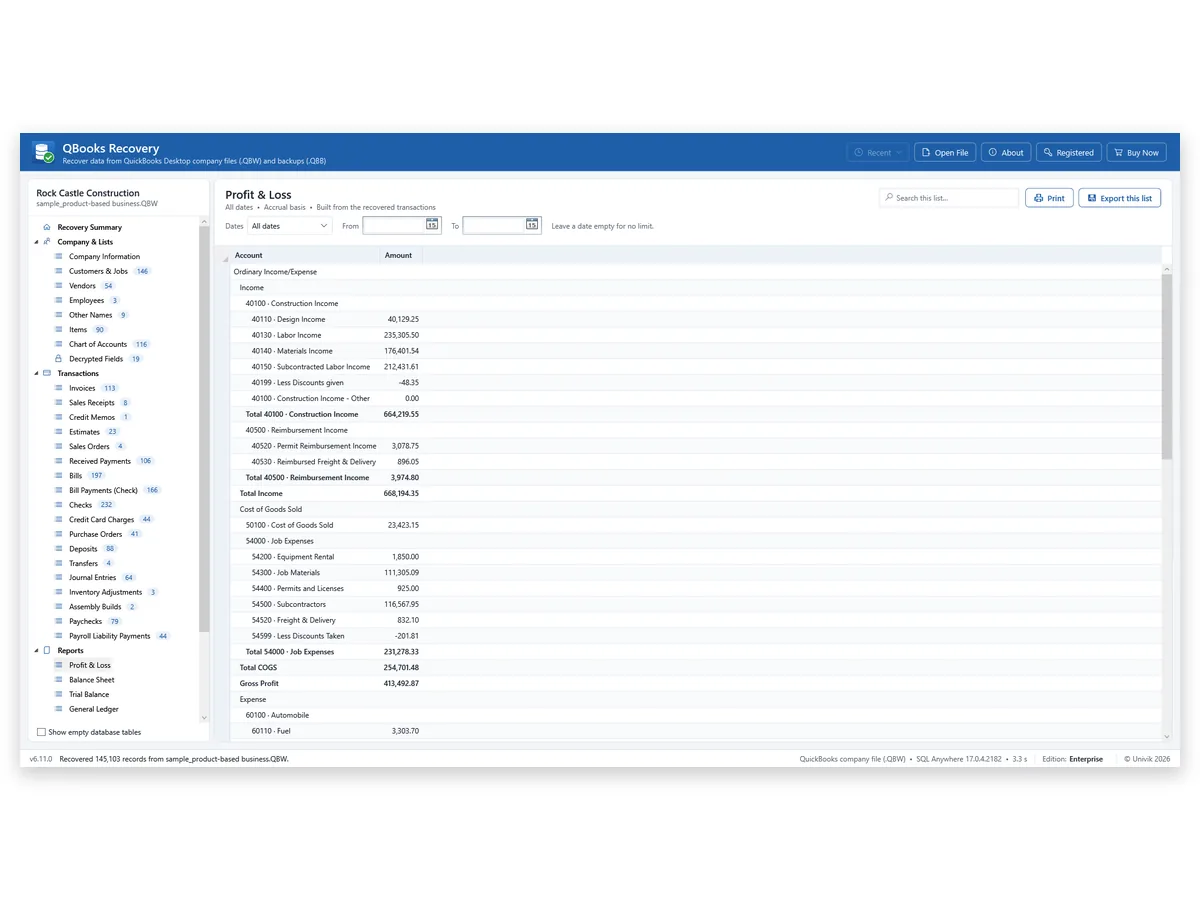
| Reports | Nine reports built from the transactions, from Profit & Loss to A/R and A/P Aging | Accrual basis, any dates |
| Possibly Deleted Records | Rows that may be deleted entries or older versions, marked unverified | 1,891 rows with the option on |
| All Database Tables | Every table the file holds | 271 to 310 tables by version |
Counts come from one QuickBooks sample company file that Univik tested. Your file will show its own counts.
Step by Step
Copy the file, select the copy and browse from the left panel.
Copy the File to a Local Drive
Copy the .qbw or .qbb file from the email, USB drive or old PC to a folder on a Windows 11 or 10 PC. Viewing the copy keeps the original safe.
Load the File in the Window
Press Select QuickBooks File… or drag the file into the window. A file with protected fields shows a box for the QuickBooks Admin password. Press Skip and every other list still loads.
Browse Lists, Transactions and Reports
Pick a list in the left panel. Select a row in a transaction list and its lines show underneath. Use the search box above a list or Find to look through all lists at once.
For Windows 11 or 10 · read-only on your file · QuickBooks not needed
Who It Is For
Accountants Who Receive a Client File
A client emails a .qbb backup and your PC has no matching QuickBooks. Browse the lists, check the transactions and export what the return needs.
Owners Whose QuickBooks Has Ended
The books sit in a .qbw file and the program is gone. Intuit ended support for QuickBooks Desktop 2023 after 31 May 2026, as its QuickBooks Desktop 2023 service discontinuation policy says. Old invoices and bills stay readable here.
Lawyers and Examiners Handed a Disk
Someone supplies a company file on a drive. View it read-only, print the lists you need and leave the original untouched.
Our Test
A viewer helps only when its numbers match. Univik opened the 2024 sample company file in a live QuickBooks Enterprise 24 and compared three of its reports row for row with the ones Univik software builds. The Trial Balance matched on all 80 rows, the Balance Sheet on 71 rows and the Profit & Loss on 74 rows. There were 0 differences.
The A/R aging was checked invoice by invoice. QuickBooks reports 21 open invoices and the aging report here holds the same 21, with the same customers, dates and amounts.
The catch: this is one 2024 file and accrual-basis reports. Cash-basis reports are not built. Select your own file in the trial and compare a report you know before you rely on it.
Limits
Read only
No Edits or Postings
A transaction on screen cannot be changed, posted or deleted. The file stays exactly as it was.
Accrual
Accrual-Basis Reports
Profit & Loss, Balance Sheet and Trial Balance follow accrual basis. A cash-basis report is not built.
Formats
Some Files Do Not Load
Files made by QuickBooks for Mac and portable company files (.qbm) are outside what Univik tested or supports.
Versions
Two Versions Tested
Company files from QuickBooks Desktop 2019 and 2024 were tested. Files from other versions may show differences.
Side by Side
QuickBooks itself is the first choice when it is installed and the file opens. Univik QBooks Recovery covers the other cases.
| What you need | Install QuickBooks and restore | Ask the owner for reports | Univik QBooks RecoveryTRIAL |
|---|---|---|---|
| No QuickBooks on this PC | No | Yes | Yes |
| Every list and transaction | Yes | Only what is sent | Yes |
| Backup (.qbb) without a restore | No, restore first | Not needed | Yes |
| Waiting on someone else | No | Yes | No |
| Cost | A QuickBooks licence | Free | Free trial, licence from $99 |
Restore steps are taken from Intuit's help article, checked 11 November 2026.
Checklist
Windows 11 or 10
Any PC running Windows 11 or 10 works. The .NET Framework 4.8 runtime comes with Windows 11 and with current Windows 10.
No QuickBooks Program
Neither QuickBooks nor an Intuit licence is needed to view the file.
A Copy on a Local Disk
Keep a copy of the file on a local disk and select it from there.
Admin Password, Protected Fields Only
A password box appears for tax IDs, card numbers and SSNs. Skip it and the rest of the file still loads.
| Software | Univik QBooks Recovery 6.11 for Windows |
| Runs on | Windows 10 or 11 plus .NET Framework 4.8 |
| Opens | Company files (.qbw) and backups (.qbb) from QuickBooks Desktop |
| Trial | All data on screen, 25 items in each export |
| Checked with | Files from QuickBooks Desktop 2019 and 2024 |
| Licence prices | $99 Personal (2 PCs), $299 Business (10 PCs), $599 Enterprise (50 PCs) |
Questions
Related Software
Checked by Nick Rogers Founder of Univik
Facts Reviewed 11 November 2026
Founder Nick Rogers went through the facts on this page on 11 November 2026. Test numbers are Univik's own and say so. Screens show a sample company file named Rock Castle Construction. Statements about QuickBooks come from the Intuit articles linked above.
Updated on 11 November 2026
Univik Since 2013Read-Only ViewingNo QuickBooks Install30-Day Refund
Intuit Inc. owns the QuickBooks trademark. Univik has no tie to Intuit.


 The Problem First
 Step by Step
 Who It Is For

 Limits
 Side by Side

