 Univik AOL Converter for Windows
 At a Glance
 Key Features
Finds Every Screen Name
Point the software at your AOL data folder and it lists each screen name it finds. No digging for the right database file by hand.
Univik AOL Converter for Windows
AOL Desktop Gold locks your saved mail inside a scrambled database on your PC. This Windows tool reads that store and your My Data backup directly, then writes Outlook and other everyday formats, all without signing in to AOL.
Try It FreeNo AOL Sign-InFully OfflineWorks After You Cancel
*Try it at no cost on a handful of emails from each folder. One licence switches on the full software and is backed by 30 days of money-back cover.

At a Glance
A fast summary of what goes in, what comes out and what a licence runs you.
3
Inputs Read
The live data folder, a lone .v2 account file, or a My Data backup export.
6
Output Formats
Outlook PST, with EML, MSG, MBOX, PDF and HTML alongside it.
0
Logins Needed
No AOL password and no subscription. The tool never touches your account.
0
Emails Uploaded
Every step stays on your machine, so nobody else reads your mail.
$39
Starting Price
Test it free, then a licence from $39 with 30 days to change your mind.
Key Features
Each part of the software keeps your saved AOL mail whole and ready to use.
Finds Every Screen Name
Point the software at your AOL data folder and it lists each screen name it finds. No digging for the right database file by hand.
Saved on My PC Tree Kept
Whatever you filed under Saved on My PC lands in the output with its shape kept, so the result feels like the mailbox you knew.
Attachments Pulled Back In
AOL stores attachments inside the database. The converter puts photos and documents back into each email, with From, To, date and subject intact.
Preview, Filter and Pick
Read any message in the built-in viewer before you convert. Type a name, a subject or a word, then check off only the folders worth keeping.
Reads Backups Directly
A My Data backup opens as it is. You never reinstall the app or run an import that only lands back in AOL.
Originals Never Touched
The software only reads your AOL store and drops fresh files next to it. What you had stays put and safe from the first click.
The Short Version
Your Saved on My PC mail does sit on your machine, yet AOL wraps it in a shape only its own program understands. Two hurdles stand between you and those messages.
Trap 1: A Scrambled Database
Your saved mail sits in an encrypted SQLite database that AOL locks on disk. Copy that .v2 file to another PC and no email app, browser or reader opens it, even with the app reinstalled.
Trap 2: An Export That Loops Back
My Data then Export makes a backup that only imports into another AOL Desktop Gold. Its own Save As writes one PDF or text file at a time, never a full archive.
The Way Out: Read the Store Directly
Univik AOL Desktop Gold Email Converter opens the local store by itself and saves your mail in formats normal apps understand. The AOL converter tool takes the live data folder, a single account file or a My Data backup, unlocks the messages inside and gives them to you. No AOL password and no login is ever part of it.
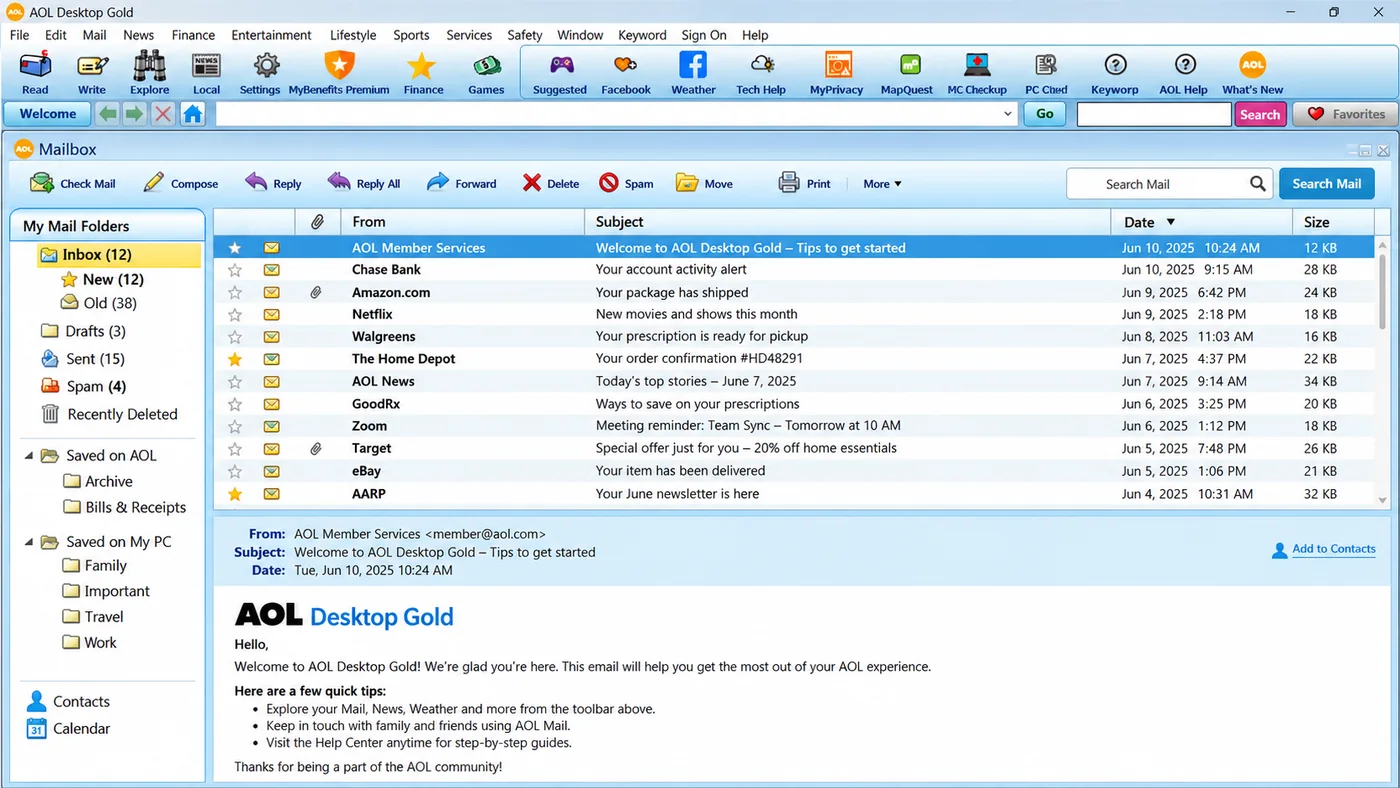
AOL Desktop Gold keeps your kept mail under Saved on My PC. That is the tree the converter reads and rebuilds in Outlook or another app.
Three Inputs
Whatever you still have from the app, one of these three routes gets your mail out.
Data folder
The Live Store
The AOLDesktopData folder on the PC where AOL runs. The tool reads the db folder inside and finds every screen name.
.v2 file
A Lone Account File
One screen name's database, such as blueharbor2026.v2, copied off an old or dead computer. The converter opens it on its own.
.AolSave
A My Data Backup
The backup that My Data then Export creates. The software reads it directly and converts the saved mail packed inside.
Older mail from classic AOL Desktop or AOL 9 is kept in a Personal Filing Cabinet, not a Desktop Gold database. For a .pfc file, use the Univik AOL PFC Converter instead.
Three Steps
No app to install, no login and no exporting a folder at a time.
Point at Your AOL Data
Open your AOL Desktop Gold data folder, or load a .v2 account file or a My Data backup, and it lists every screen name.
Pick the Output Format
Pick Outlook PST. EML and MSG suit other clients. MBOX fits Thunderbird and Apple Mail. PDF keeps a fixed copy.
Convert and Open Your Emails
Kick off the run, then load your saved mail into Outlook or whatever app suits you, with folders and attachments kept too.
Built for Windows 11 and 10 · AOL Desktop Gold and Outlook stay optional · zero uploads · the people who built it answer your questions
New to the Outlook side? Follow our step-by-step guide on moving AOL Desktop Gold to Outlook.
Real Situations
Folks reach for an AOL Desktop Gold converter in one of these three spots.
Cancelling the Subscription
The price keeps climbing and you want to stop paying, but years of Saved on My PC mail must stay with you. Convert it to PST once and it moves to Outlook, folders and all.
A File From an Old PC
A .v2 file for one screen name is left on a drive whose PC will not start. The converter opens that file by itself and pulls the emails out.
Keeping Emails as Records
A few messages you keep forever: a receipt, a signed contract, a note from family. As PDF they open on any device and print clearly a decade later.
Finding Your Files
AOL Desktop Gold keeps your saved mail on your own computer under AppData\Local\AOLDesktopData in a db folder. Inside sits one database per screen name, named like blueharbor2026.v2, holding your Saved on My PC emails and folder tree.
A My Data backup is its own file, dropped in whatever spot you picked back then. Move either the data folder or that backup off an old disk onto any Windows machine and the converter picks it up there. The old PC can stay switched off, and AOL never asks you to log in.
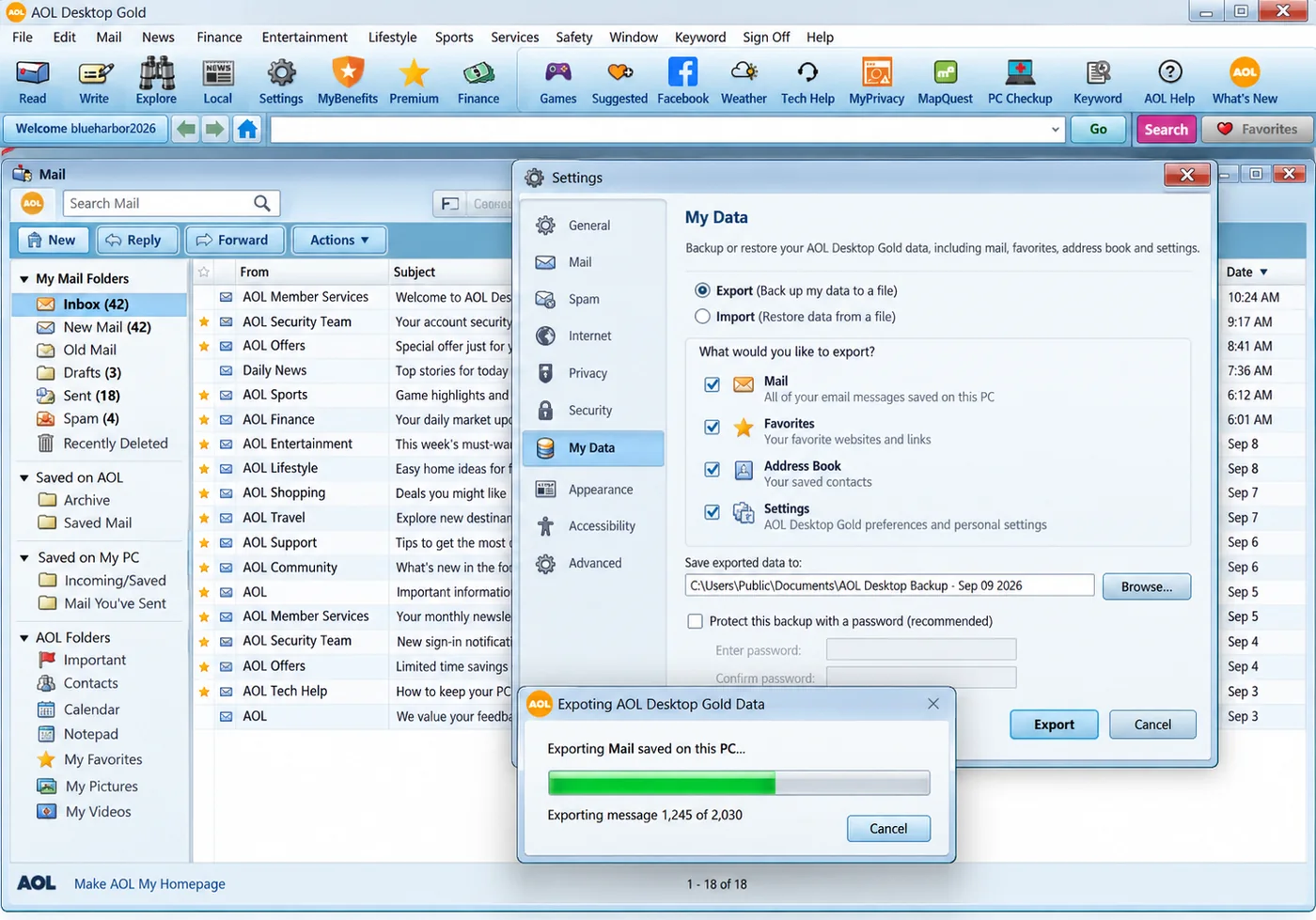
AOL Desktop Gold's own My Data Export writes a backup that only reopens in AOL. The converter reads that same backup and gives you PST, MBOX or PDF instead.
Weigh Your Choices
Every option covers a slice of the task. One of them is made for all of it.
| What you need | AOL's My Data Export | IMAP Backup Tools | Univik ConverterTRIAL |
|---|---|---|---|
| Works after you cancel | Yes | Needs sign-in | Yes |
| Reaches Saved on My PC mail | Yes | No | Yes |
| Makes PST files for Outlook | Never | Sometimes | Yes |
| No AOL password needed | Signed in | App password | Yes |
| Mail never leaves your PC | Yes | Sent to a server | Yes |
IMAP tools log in to live AOL Mail and never see your Saved on My PC folders. This converter reads them straight from disk.
What You Need
Operating System
Any 64-bit machine on Windows 11 or Windows 10. An up-to-date Windows already includes the .NET Framework 4.8 this software needs.
AOL Desktop Gold Not Required
The software handles the AOL store and backup on its own. There is no AOL Desktop Gold to run, no Outlook and no account login.
Memory and Disk
4 GB of RAM covers everyday mailboxes. Hand 8 GB to a huge store loaded with attachments.
Works Fully Offline
The internet is needed once, to fetch the installer. After that the run finishes on a machine with no network of any kind.
| Software Information | Univik AOL Desktop Gold Email Converter |
| Version | 6.8 (Latest) |
| Licence | Free trial, then licences from $39 |
| Platform | 64-bit Windows 11 and Windows 10 |
| Framework | Needs .NET Framework 4.8 or above |
| Reads | AOL Desktop Gold data folder, .v2 account files and My Data backups |
| Writes | PST, MBOX, EML, MSG, PDF and HTML |
Questions
More Tools
MBOX Converter
Change MBOX mailbox files from a range of mail apps into PST, PDF and more.
MBOX Converter »Thunderbird Converter
Shift Thunderbird mail into Outlook and other formats, folder tree and all.
Thunderbird Converter »AOL PFC Converter
Convert classic AOL 9 Personal Filing Cabinet (.pfc) files, the older cousin of Desktop Gold.
AOL PFC Converter »Who Made This Page
Fact Checked
The Univik team put this page together. Our group has shipped conversion and recovery tools since 2013. What it states about AOL Desktop Gold, the AOLDesktopData store, the encrypted per-screen-name .v2 database and the My Data backup comes from our own study of a real revision 11.1.5138 install and of the program code inside AOL Desktop Gold on Windows.
Since 2013Tested on WindowsUnivik Team


 Three Inputs
 Three Steps
 Real Situations