AOL Desktop Gold keeps your Saved on My PC mail in an encrypted database that Outlook cannot read. To reach it in Outlook you save that mail as a PST. The Univik AOL Desktop Gold Converter writes the PST for you and keeps your folders and attachments, with no AOL sign-in. The free IMAP route only pulls mail still on the AOL server, not your local folders.
You are stepping away from AOL Desktop Gold. Perhaps the price has gone up too far. Either way your mail is stuck, because the messages you filed under Saved on My PC and the folders you built for years sit inside an AOL database that only the app can read. Outlook cannot see it. The way in is a PST file, and the rest of this guide walks the fast route to Outlook, the no-cost routes and where each one runs out.
Where AOL Desktop Gold Keeps Your Mail
AOL Desktop Gold keeps the mail you save on your computer in AppData\Local\AOLDesktopData, inside a db folder. Each screen name gets its own database there, with a name such as yourname.v2, holding your Saved on My PC folders, the mail in them and every attachment. The catch is the encryption AOL wraps around that file, so a plain copy will not open in a mail app, a browser or a reader. That is why the move to Outlook needs a step in the middle rather than a drag and drop.
The Fastest Way to Convert AOL Desktop Gold to PST
The direct route is a tool built for this store. It opens the database, pulls your Saved on My PC mail out and makes an Outlook PST, so the folders show up in Outlook straight away. There is no sign-in step, no printing a message at a time to PDF and nothing dropped along the way. The Univik AOL Desktop Gold Converter runs it in four steps, which is the whole move in one place.
- Point at your AOL data Open the AOLDesktopData folder, or load a single .v2 file or a My Data backup. Every screen name is then listed.
- Set the output to PST Select Outlook PST so the result opens in Outlook without another step.
- Keep folders and attachments Tick the boxes that carry the folder layout and files so your Saved on My PC tree lands whole.
- Convert and open Start the run, bring the finished PST into Outlook and the mail sits in the folder list.
The Univik AOL Desktop Gold Converter reads your local store, rebuilds every Saved on My PC folder and saves a tidy Outlook PST that still carries its attachments. It asks for no AOL sign-in and needs no live subscription.
Free Download See All FeaturesWhat the AOL Desktop Gold to PST Conversion Keeps
A tool built for this store carries much more than the plain message text. Your Saved on My PC tree arrives the way you filed it, sub-folders included. Attachments stay on their messages, since AOL keeps them inside the same database. Mail You've Sent comes over as a folder. The sender and date hold and the read marks stay set, so the PST reads like the mailbox you had. Load it into Outlook and the layout is familiar from the first click.
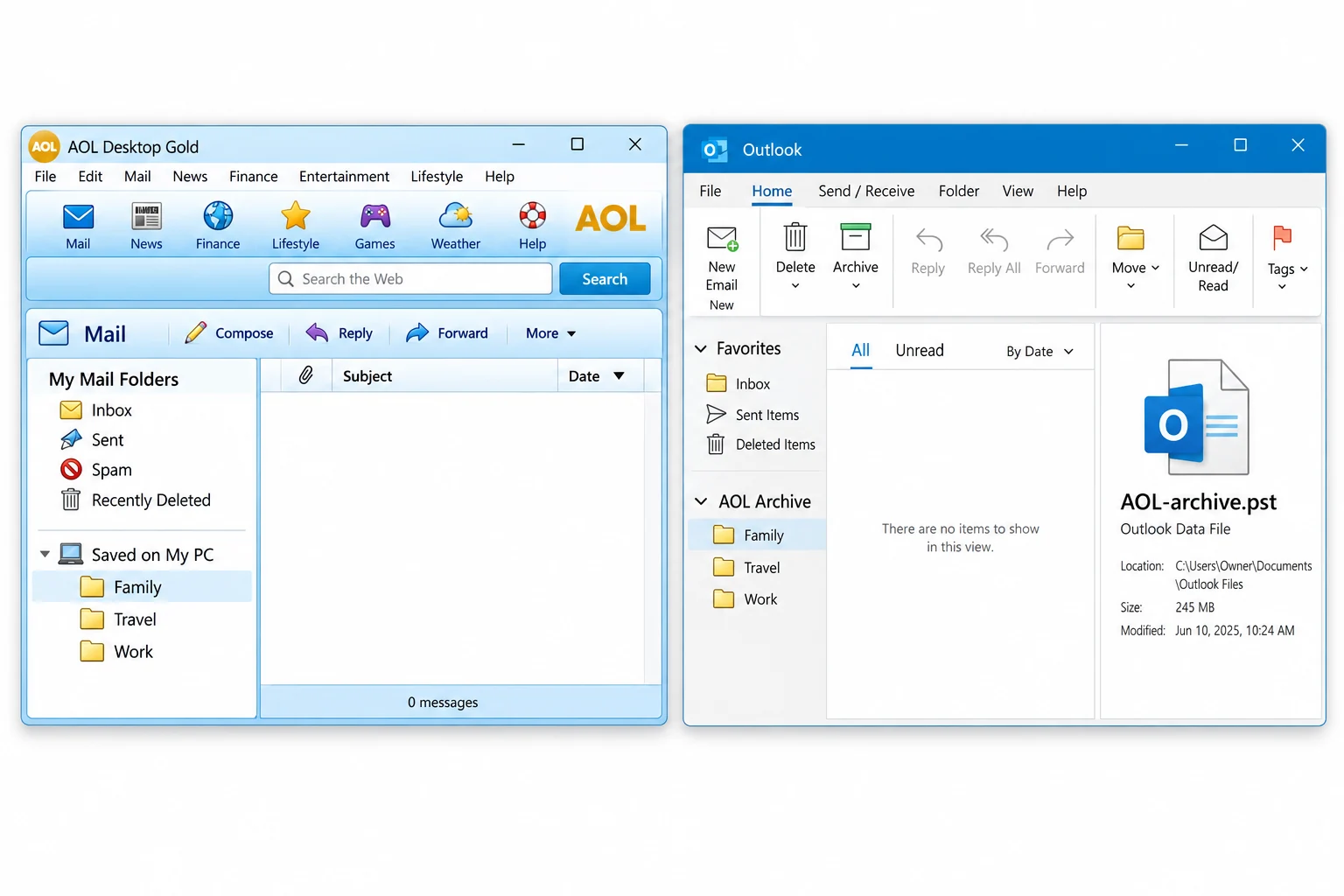
Why AOL Desktop Gold Mail Is Hard to Move to Outlook
The trouble starts with the file itself. Your Saved on My PC mail lives in an encrypted database, so nothing outside the app can read it as it sits. On top of that, the app never shipped a real export. Its own Save As writes one message at a time to PDF or text, and there is no EML, MBOX or PST option anywhere in the menus. The My Data backup looks like a way out, but it only reopens in another copy of the app. And once a subscription lapses the app locks, though the database stays on disk. A tool made to read that store is what closes the gap to Outlook.
The Free Routes to Outlook and Their Limits
There are free ways to reach some of your mail, and it helps to know where each one stops. The first is IMAP. You add your AOL account to Outlook with the AOL server settings and an AOL app password, then Outlook pulls the mail that is still on the server. The gap is that your Saved on My PC folders never lived on the server, so IMAP cannot see them. It brings the online inbox across and leaves your local archive behind.
The second is the app itself. It can print a single message to PDF or save it as text from the File menu. That is fine for one receipt you want to keep. For years of folders it turns into a long chore and still gives you no PST. The My Data backup, meanwhile, only loads back into the app, so it moves your mail sideways rather than out. For the local folders in one pass, a converter is the route that finishes the job.
Pick the Right PST: ANSI or Unicode
Outlook writes PST files in two types, and the choice matters once a mailbox gets big. ANSI is the old one. It runs out of room close to 2 GB and misses some character sets. Unicode is the modern one, standard from Outlook 2003 onward, with a 50 GB allowance from Outlook 2010 that the Windows registry can lift higher. Unless your mailbox is tiny, go with Unicode. The PST size limits and the larger Unicode ceiling are both set out by Microsoft. Should a PST ever grow too big or start throwing errors, our guide to repairing corrupt PST files walks through the repair.
Why People Move from AOL Desktop Gold to Outlook
The most common reason is the bill. The software is a paid product, and when the price rises people look for a home for their mail that costs nothing to keep open. A PST loads in any current Outlook with nothing running behind it, so years of mail stay readable at no cost. Others want an archive they can carry between machines, or they are moving a household or a small office onto Microsoft 365. Once you have the PST, our guide on importing PST to Office 365 and the email migration service cover the wider move.
When AOL Desktop Gold to Outlook Comes Up
This job tends to land for a handful of reasons. Someone cancels the subscription to stop the rising cost but wants to keep years of Saved on My PC mail. A family member is clearing an older relative's PC and needs the mail out before the machine goes. A hard drive from a computer that no longer starts holds the only copy of an AOL archive. In each case the mail must turn into a form Outlook can open, and that form is a PST. If your old mail sits in a classic AOL 9 Personal Filing Cabinet rather than Desktop Gold, our AOL PFC Converter handles that older .pfc format instead.
AOL Desktop Gold to Outlook Questions
Can I open AOL Desktop Gold emails in Outlook without AOL?
Not directly. AOL Desktop Gold keeps your Saved on My PC mail in an encrypted database, and Outlook has no way to read that file. A converter changes it into a PST, which Outlook then treats like any mailbox. A good tool manages this whether AOL Desktop Gold is closed or no longer on the machine.
How do I move AOL Desktop Gold to Outlook for free?
For mail that still sits on the AOL server, adding your AOL account to Outlook over IMAP costs nothing. That path never touches your Saved on My PC folders, because they exist only on your own disk. The app will also save a single message as PDF or text. To bring the local folders across in one go, a converter is the sensible choice.
Does converting AOL Desktop Gold to PST keep attachments and folders?
A capable converter holds on to both. It recreates your Saved on My PC tree within the PST and returns each attachment to its message. Because AOL parks attachments inside the database, a tool that reads that store carries them over, where the manual routes leave them behind.
Can Outlook import an AOL Desktop Gold file directly?
No. There is no setting in Outlook that opens the .v2 database AOL Desktop Gold uses. It must be converted to a PST beforehand. With a PST in hand you add it in Outlook like any data file, and the mail appears in the folder list. So every road to Outlook passes through a PST.
Will this work after my AOL Desktop Gold subscription ends?
Yes. The mail under Saved on My PC stays in the database on your disk after the app locks. A converter reads that file without a live subscription and without an AOL login, so you can copy the data folder to any Windows PC and make a PST there, even once you stop paying.
Can I move AOL Desktop Gold mail to Microsoft 365?
Yes, using the PST as the bridge. First save your Saved on My PC mail as a PST. Then import it into a Microsoft 365 mailbox, or hand it to a migration that uploads PST files to Exchange Online. When it is one old mailbox, the direct PST import is the simpler path.
Do I need my AOL password to convert AOL Desktop Gold to Outlook?
No. The file route reads the Saved on My PC database on your own computer, so it needs no AOL password and no app password. Only the IMAP route asks for an AOL app password, and that route reaches server mail, not your local folders.
Can I convert an AOL Desktop Gold Save My Data backup?
Yes. Save My Data in AOL Desktop Gold writes a .AolSave backup of your mail. A converter reads that backup the same way it reads the live store, which helps when you carried only the backup to a new computer.

Written and maintained by Leena Taylor Paul and the Univik team, developers of Windows data conversion and recovery software since 2013. The facts here about the AOLDesktopData store, the .v2 database and the app's PDF-only Save As come from our own hands-on study of a real AOL Desktop Gold 11.1.5138 install. Last verified September 2026. Cannot get into an old AOL mailbox? Contact our support team.