PFC Converter Univik PFC File Converter

New
Excellent 4.8 TrustRating (186 Verified Reviews)

Convert & Export AOL PFC Emails

Univik PFC File Converter is a professional tool to convert and export emails from AOL Personal Filing Cabinet (PFC) files to industry-standard formats including PST, PDF, EML, MBOX and more. Preserves attachments, folder hierarchy and supports batch conversion for complete email migration.

*Free trial converts first 25 emails per folder. Full version for unlimited conversion.

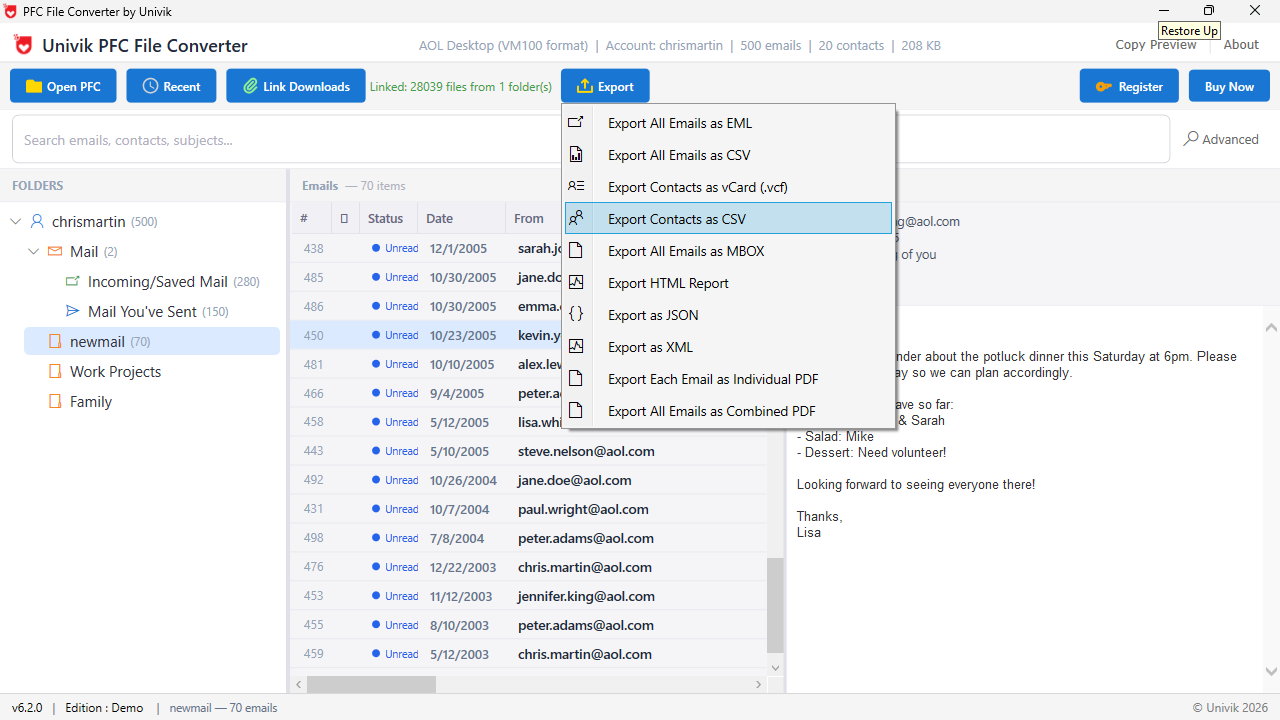
  • Multiple Export Formats: Convert PFC emails to PST, PDF, EML, EMLX, MBOX, HTML, RTF, DOC and plain text formats.
  • Complete Data Migration: Preserves email headers, body content, attachments, embedded images and folder structure during conversion.
  • Batch Processing: Convert multiple PFC files simultaneously with consistent formatting across all exported emails.
  • 100% Offline & Secure: Desktop software works without internet - your AOL emails never leave your computer.


Univik PFC Converter Box

Award

VirusTotal Verified Safe

Certified Clean by 70+ Antivirus Engines. No malware, spyware or adware.

 Supported Export Formats

 Key Features

Why use Univik PFC Converter

Migrate your AOL email archive to any format with complete data preservation. Professional conversion tool designed for seamless email migration from legacy AOL systems.

PST Export

Export to Outlook PST

Convert AOL PFC emails directly to Microsoft Outlook PST format. Creates fully compatible PST files that can be imported into Outlook 2021, 2019, 2016, 2013 and Office 365. Preserves folder structure, email metadata, attachments and formatting.

PDF Export

Export to PDF Documents

Generate professional PDF documents from AOL emails for archival, legal discovery or documentation purposes. Each email converts to a separate PDF with headers, body, and attachments embedded or linked. Supports batch PDF generation.

EML Export

Export to EML/EMLX Format

Convert PFC emails to standard EML format compatible with Windows Mail, Thunderbird, eM Client and other email applications. EMLX export available for Apple Mail users. Individual email files for easy organization and portability.

MBOX Export

Export to MBOX Format

Create MBOX files compatible with Thunderbird, Apple Mail, Postbox and other Unix-based email clients. Consolidates emails into single archive files per folder. Ideal for cross-platform email migration and long-term archival.

Attachments

Complete Attachment Handling

Preserves all email attachments during conversion including documents, images, archives and multimedia files. Attachments can be embedded in output files or extracted to separate folders with organized naming conventions.

Folder Structure

Folder Hierarchy Preservation

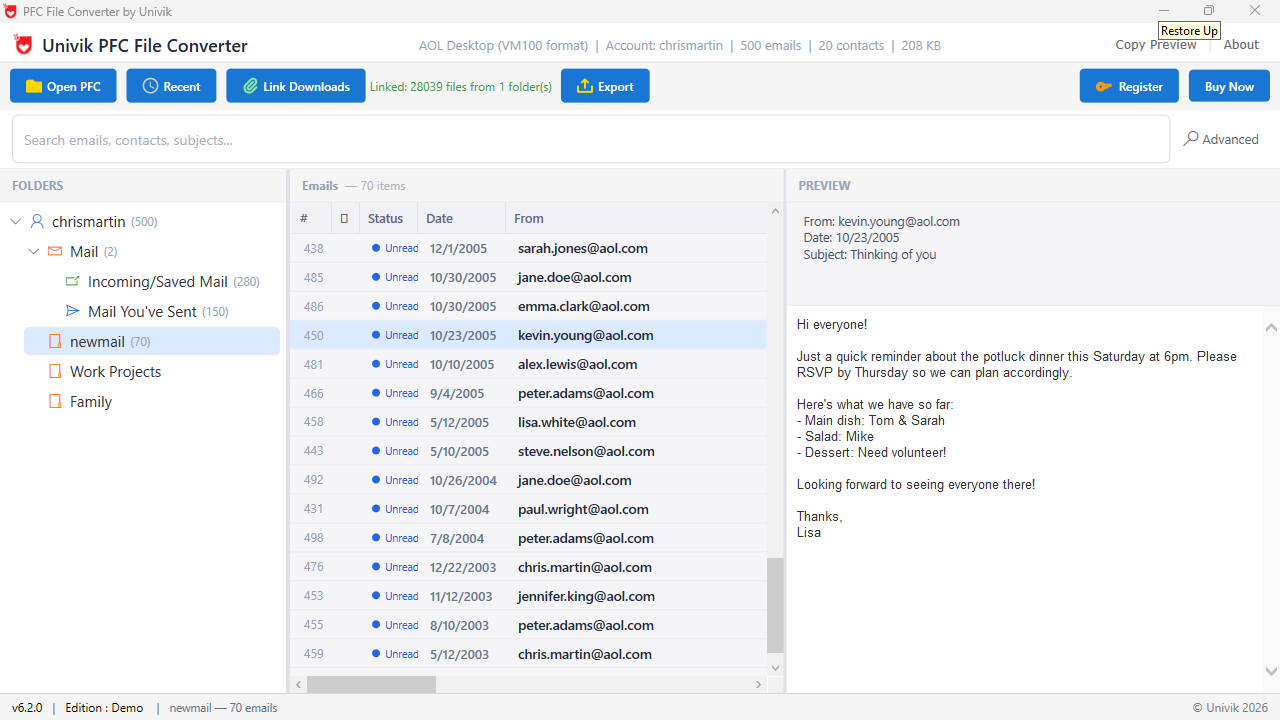
Maintains the complete folder structure from your AOL Personal Filing Cabinet. Inbox, Sent, custom folders and subfolders are recreated exactly in the exported format, keeping your email organization intact.

Batch

Batch Conversion Support

Process multiple PFC files simultaneously with consistent settings. Load entire folders containing PFC archives and convert thousands of emails in a single operation. Essential for migrating complete AOL email history.

Date Filter

Date Range Filtering

Convert emails from specific time periods using date range filters. Export emails from a particular year, quarter or custom date range. Useful for compliance requirements, legal holds or selective migration projects.

 Simple Steps for Conversion

How to Convert PFC Files

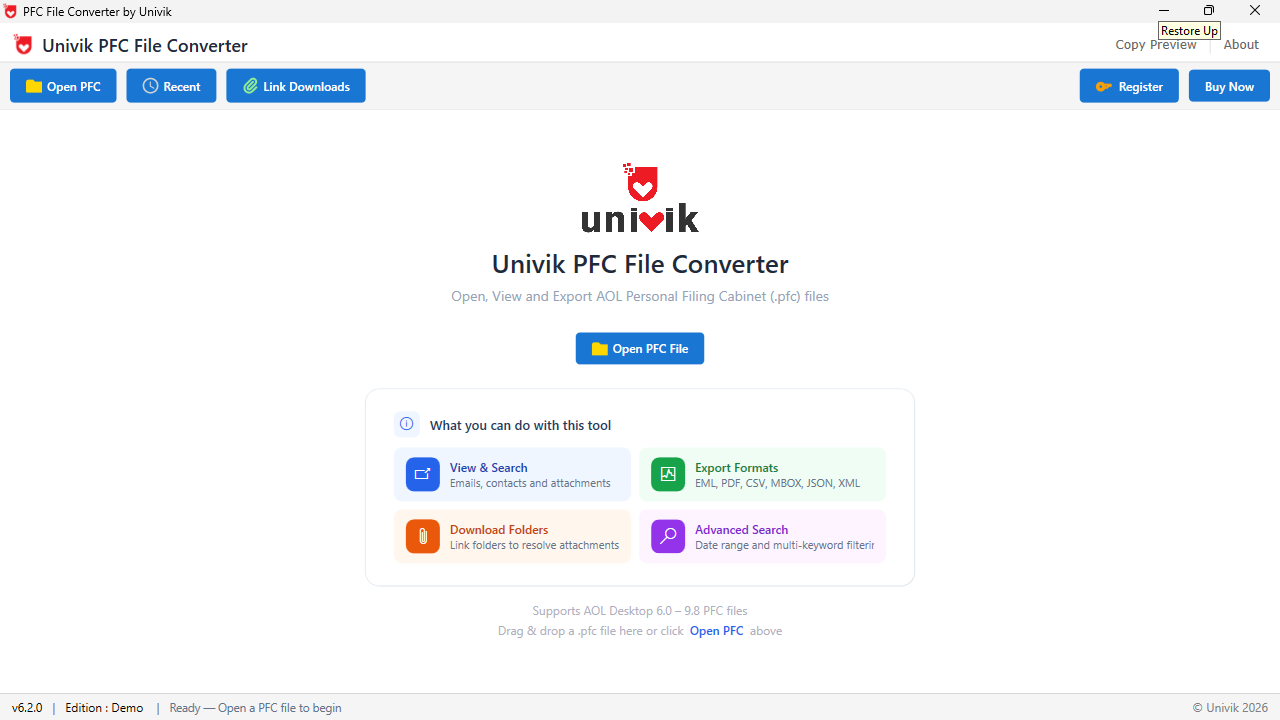
Add AOL PFC files, preview email content, choose your target format and export with a single click.

Quick Start Guide


  1. Download & Install: Download Univik PFC Converter and install on Windows. Takes less than a minute.
  2. Locate PFC Files: Find your AOL PFC files in the AOL Desktop installation folder or backup location.
  3. Add Files: Click "Add Files" for individual PFC files or "Add Folder" for batch processing.
  4. Preview Content: Browse folder structure and preview emails to verify data before conversion.
  5. Select Format: Choose export format - PST, PDF, EML, MBOX, HTML, RTF or Text.
  6. Convert: Click Export button, select destination folder. Progress bar shows conversion status.

 Export Format Details

Detailed Export Options

Choose the right export format based on your target email client or archival requirements.

 Email Client Formats

PST

PST Format

Microsoft Outlook

Import directly into Outlook 2021, 2019, 2016, 2013 and Microsoft 365.

EML

EML Format

Windows Mail, Thunderbird

Standard email format compatible with most desktop email clients.

MBOX

MBOX Format

Thunderbird, Apple Mail

Unix-based email archive format for cross-platform compatibility.

 Document Formats

PDF

PDF Format

Portable Documents

Archival-quality PDFs for legal, compliance and documentation.

HTML

HTML Format

Web Pages

Browser-viewable emails with formatting and images preserved.

RTF

RTF Format

Rich Text Format

Formatted text compatible with Word, WordPad and text editors.

TXT

Plain Text

Text Files

Simple text export for data extraction and text processing.

 Migration Scenarios

Common Conversion Use Cases

Real-world scenarios where Univik PFC Converter provides the ideal solution for AOL email migration and archival needs.

Outlook Migration

AOL to Outlook Migration

Moving from AOL Desktop to Microsoft Outlook? Export all PFC emails to PST format for direct import into Outlook with complete folder structure and attachments preserved.

Thunderbird Migration

AOL to Thunderbird Migration

Switching to Mozilla Thunderbird? Convert PFC files to MBOX or EML format. Import directly into Thunderbird maintaining your email organization and history.

Legal Archive

Legal & Compliance Archive

Need emails for legal discovery or compliance? Export to PDF format for permanent, unalterable records with timestamps. Suitable for court submissions and audits.

Backup

Email Backup & Archival

Create portable backups of your AOL email history before discontinuing the service. Export to EML or MBOX for long-term storage independent of any email client.

Business

Business Email Migration

Migrating business emails from legacy AOL accounts to corporate email systems? Batch convert multiple PFC archives to PST for enterprise Outlook deployment.

Data Recovery

Legacy Data Recovery

Recovering emails from old AOL backups or archived PFC files? Extract and convert to modern formats for access in current email applications or document archives.

 Comparison

Why Choose Univik PFC Converter

Professional-grade conversion tool vs limited alternatives for AOL email migration.

Univik PFC Converter

  • 10+ Export Formats: PST, PDF, EML, EMLX, MBOX, HTML, RTF, DOC and plain text options.
  • Complete Preservation: All email headers, body formatting, attachments and folder structure maintained.
  • Batch Processing: Convert multiple PFC files and thousands of emails simultaneously.
  • Date Range Filter: Export emails from specific time periods for targeted migration.
  • Unicode Support: Perfect handling of international characters and multilingual content.
  • Selective Export: Choose specific folders or emails rather than converting everything.
  • Offline & Private: Desktop software works without internet, ensuring email privacy.

Manual & Alternative Methods

  • Limited Formats: Most methods only support one or two export formats.
  • Data Loss Risk: Manual copying often loses formatting, headers or attachments.
  • One-by-One: No batch capability - each email must be handled individually.
  • No Filtering: Cannot filter by date or selectively export specific content.
  • Encoding Issues: International characters and special symbols often corrupted.
  • All or Nothing: Cannot choose specific folders - exports entire archive or nothing.
  • AOL Required: Many methods require active AOL Desktop installation.

 Technical Details

Software Specifications

System Requirements

Operating SystemWindows 11, 10, 8.1, 8, 7
Processor1 GHz or faster
RAM1 GB minimum (2 GB recommended)
Disk Space100 MB + space for converted files
.NET Framework4.5 or higher

Software Information

Version25.1 (Latest)
Release DateJanuary 2025
File Size22.5 MB
LicenseSingle User / Enterprise
SupportEmail & Live Chat

Supported Formats

Input Format

  • PFC - AOL Personal Filing Cabinet
  • All AOL Desktop versions supported
  • AOL 9.x, 10.x and newer archives

Email Client Formats

  • PST - Microsoft Outlook
  • EML - Standard Email Format
  • EMLX - Apple Mail Format
  • MBOX - Thunderbird/Unix Format

Document Formats

  • PDF - Portable Document Format
  • HTML - Web Page Format
  • RTF - Rich Text Format
  • TXT - Plain Text Format

 Frequently Asked Questions

Common Questions

PFC Converter supports 10+ export formats including PST (Outlook), PDF, EML, EMLX (Apple Mail), MBOX (Thunderbird), HTML, RTF and Plain Text. Choose the format that best matches your target email client or archival requirements.

AOL PFC files are typically stored in the AOL Desktop installation directory. Common locations include C:\Users\[Username]\AppData\Local\AOL\ or C:\Program Files\AOL Desktop\. You can also search your computer for files with the .pfc extension. The software includes a built-in file browser to help locate PFC archives.

Yes, all email attachments are fully preserved during conversion. Attachments are either embedded in the output files (PST, EML, MBOX) or can be extracted to separate folders with organized naming. PDF exports can include attachments as embedded files or links. No attachment data is lost during the conversion process.

Yes, the complete folder hierarchy from your AOL Personal Filing Cabinet is preserved. Inbox, Sent Mail, custom folders and all subfolders are recreated in the exported format. When importing to Outlook or Thunderbird, your email organization remains exactly as it was in AOL Desktop.

Yes, PFC Converter supports batch processing. You can add multiple PFC files individually or select an entire folder to process all PFC archives at once. This is especially useful when migrating complete email history from multiple AOL accounts or backup archives.

No, AOL Desktop is not required. PFC Converter works independently and directly reads the PFC file format. This means you can convert archived PFC files even after uninstalling AOL Desktop or on computers where AOL was never installed.

Yes, the date range filter allows you to export emails from specific time periods. Set start and end dates to convert only emails from a particular year, quarter or custom date range. This is useful for compliance requirements, legal holds or selective migration.

The free trial allows you to preview all emails and test all export formats, but limits conversion to the first 25 emails per folder. The full licensed version removes this restriction, allowing unlimited email conversion from any number of PFC files.

 Customer Reviews

What Users Say About Us

DT

David T.

IT Administrator

"We had 15 years of AOL emails to migrate to Office 365. PFC Converter handled everything perfectly - 50,000+ emails converted to PST with all attachments intact. Saved us weeks of manual work."

ML

Margaret L.

Legal Assistant

"Needed to convert old AOL emails to PDF for a court case. The PDF export preserved all timestamps and headers exactly as required. The date filter feature helped us export only the relevant time period."

RH

Robert H.

Retired Professional

"I've used AOL since the 90s and had decades of family emails. The converter let me export everything to Thunderbird without losing a single message. Even old emails with special characters converted perfectly."

Ready to Convert Your AOL Emails?

Download the free trial and start exporting PFC emails to PST, PDF, EML and other formats today.

 Related Products

Explore More Univik Tools

PFC Viewer

PFC File Viewer

Free tool to open and view AOL PFC emails without conversion. Preview content and attachments.

Learn More
MBOX Converter

MBOX Converter

Convert MBOX email archives to PST, PDF, EML and other formats for email migration.

Learn More
PST Converter

PST Converter

Convert Outlook PST files to multiple formats including PDF, EML, MBOX and HTML.

Learn More