Open PST Without Outlook
Our standalone PST parser reads Outlook data files independently. No Microsoft Outlook, Office subscription or Exchange connection required. Access PST archives on any Windows PC.
 Univik PST File Converter

Univik PST Converter opens and converts Microsoft Outlook PST files into 15+ formats. No Outlook installation required. Extract emails, contacts, calendars and tasks with complete attachment preservation.
*Free trial exports first 25 items per folder. Full version for unlimited conversion.


VirusTotal Verified Safe
Certified Clean by 70+ Antivirus Engines. No malware, spyware or adware.
 What We Extract From Your PST File

Email Messages

Attachments

Contacts

Calendar

Tasks
Notes

Folder Structure

Deleted Items
 Key Features
Professional-grade software designed to handle any PST file with precision and reliability.
Open PST Without Outlook
Our standalone PST parser reads Outlook data files independently. No Microsoft Outlook, Office subscription or Exchange connection required. Access PST archives on any Windows PC.
Batch PST Processing
Load multiple PST files simultaneously. Convert entire collections in one operation. Perfect for IT departments handling employee archives or migrations involving many PST files.
Selective Folder Export
Don't need everything? Browse the PST structure, select only the folders you want (Inbox, specific projects, date ranges) and convert only those. Skip unwanted data entirely.

Complete Data Preservation
All email properties preserved: attachments, embedded images, HTML formatting, headers, read/unread status, timestamps, categories, flags and importance levels. Nothing lost in conversion.

Handle Large PST Files
Optimized for massive archives. Process PST files up to 50GB+ without crashes or memory issues. Streaming architecture means consistent performance regardless of file size.
Built-in PST Viewer
Full preview without converting: browse folders, read email content, view attachments, inspect headers. Works as a standalone PST viewer even if you never export anything.

Unicode & ANSI PST Support
Handles both modern Unicode PST (Outlook 2003+) and legacy ANSI PST formats. Full international character support including Chinese, Japanese, Arabic, Hebrew and Cyrillic.
Recover Deleted Items
Advanced scanning finds soft-deleted emails that still exist in the PST file. Recover accidentally deleted messages that haven't been permanently purged from the archive.
 Export Options
Export your Outlook data in the format that best suits your destination platform or archival needs.
📁
.PST
Outlook Archive
⚙️
Univik
Converter
📄
EML, MBOX, PDF...
Universal Output
 Available Export Formats
Universal Email
EML, EMLX, MBOX, MHT
EML for any email client. MBOX for Thunderbird/Mac. EMLX specifically for Apple Mail import.
Most VersatileOutlook Formats
MSG
Individual MSG files for specific emails, ready to drop straight into any Outlook profile.
Outlook UsersDocument Formats
PDF, HTML, RTF, TXT
PDF for legal compliance and permanent archives. HTML for web viewing. TXT for data extraction.
ArchivalCloud Upload
Gmail, Office 365, IMAP
Direct upload to Gmail or any IMAP server. Migrate PST archives to cloud without intermediate files.
Cloud Migration How It Works
Intuitive interface, four steps, no technical expertise required.
Step 1: Add PST File
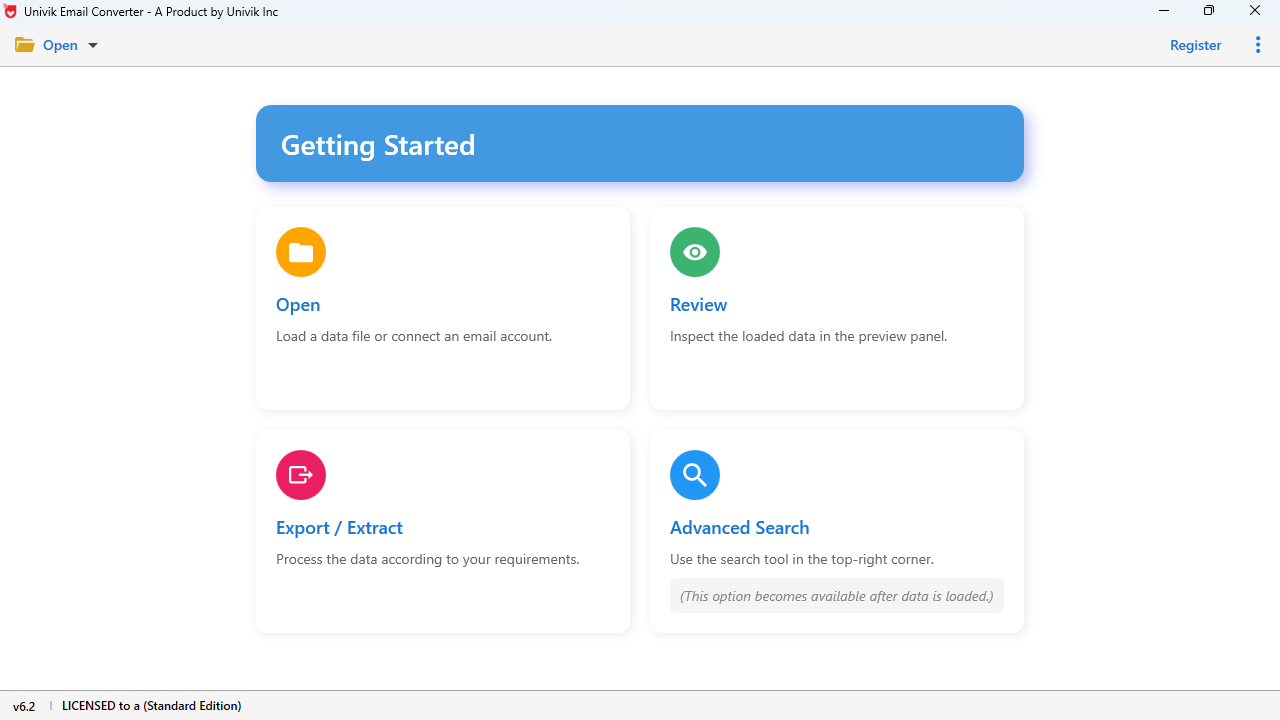
Launch PST Converter and click "Add File" to browse and select your PST file.
Step 2: Browse & Preview
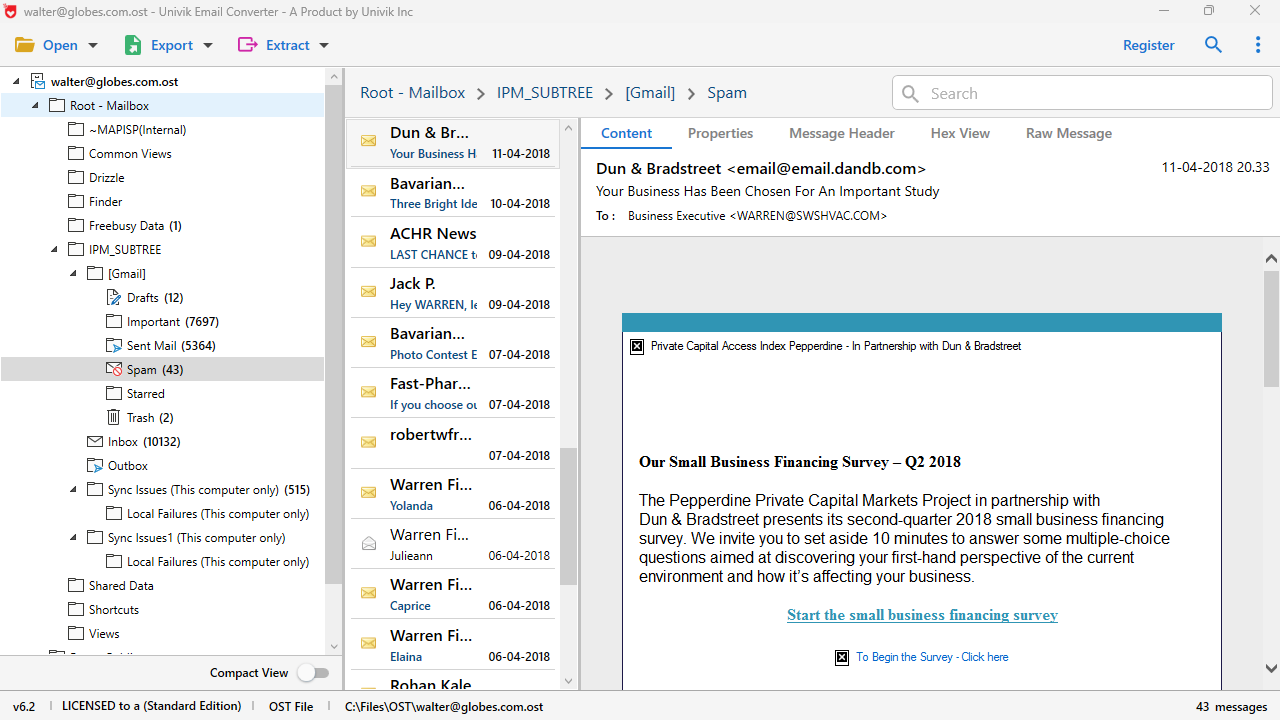
Explore folders. Click emails to preview content, attachments and headers.
Step 3: Select Format
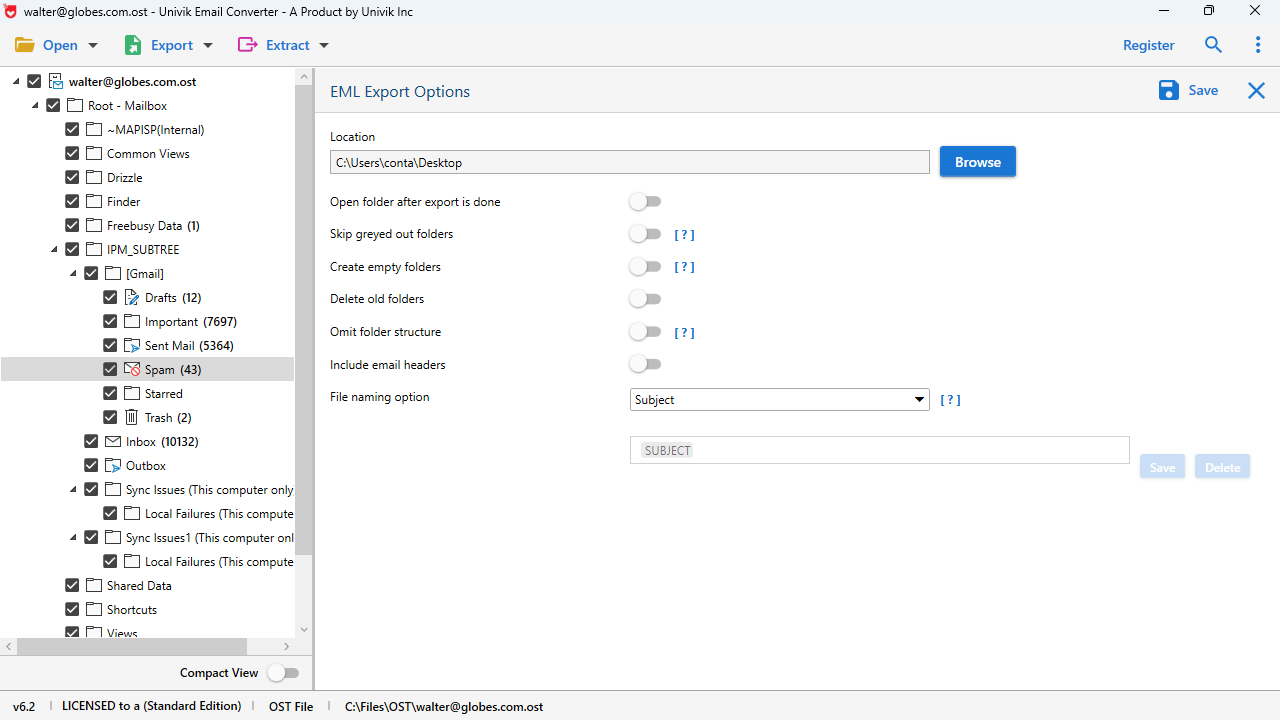
Choose output format: EML, MBOX, PDF, MSG, HTML or cloud upload.
Step 4: Convert & Save
Click Convert. Progress bar shows status. Files ready when complete!
Quick Start Guide
Documents\Outlook Files\ or use our auto-detect feature. Understanding the Challenge
PST files are powerful Outlook archives, but they lock your data into the Microsoft ecosystem. Converting unlocks your emails for universal access.
Common Reasons to Convert PST Files:
The Challenge: Outlook Lock-In
Your PST file contains years of valuable email data, but accessing it has limitations:
The Solution: Univik PST Converter
Our software liberates your data by converting PST to universal formats:
 Migration Scenarios
See how professionals use Univik PST Converter for common email migration and archival scenarios.
🔄 Scenario 1: Outlook to Thunderbird
Source: Outlook PST
Years of emails in Outlook archive. User wants to switch to free, open-source Thunderbird.
Target: MBOX
Convert PST to MBOX format. Import into Thunderbird using ImportExportTools extension. All folders preserved.
Conversion Time (10GB PST):
~15 minutes
🍎 Scenario 2: Windows to Mac Migration
Source: Outlook PST
Switching from Windows PC to Mac. Need to access old emails in Apple Mail.
Target: EMLX / MBOX
Convert to EMLX for direct Apple Mail import or MBOX for universal Mac client compatibility.
Conversion Time (10GB PST):
~15 minutes
⚖️ Scenario 3: Legal Discovery
Source: Outlook PST
Law firm needs to produce emails for litigation. PST from former employee or client.
Target: PDF
Convert specific date ranges to PDF with full headers preserved. Bates numbering ready.
Conversion Time (10GB PST):
~30 minutes (PDF rendering)
☁️ Scenario 4: PST to Gmail
Source: Outlook PST
Company moving from on-premise Exchange to Google Workspace. Old PST archives need migration.
Target: Gmail Upload
Convert and upload directly to Gmail via IMAP. Labels created from folder structure.
📁 Scenario 5: Archive Individual Emails
Source: Outlook PST
Need to extract specific emails as standalone files for sharing or archiving.
Target: EML / MSG
Export as individual EML (universal) or MSG (Outlook format) files. One file per email.
💼 Scenario 6: No Outlook License
Source: Outlook PST
Received PST backup but don't have Outlook installed. Need to access the emails.
Target: HTML / PDF
Convert to HTML for web browser viewing or PDF for permanent archive. No email client needed.
Technical Insight
Understanding PST file structure helps appreciate what we extract and why specialized software is required.
📧
Message Store
Email messages with MAPI properties including headers, body (HTML/RTF/plain) and inline content stored in B-tree structure.
📎
Attachment Table
Binary attachment data with metadata: filenames, MIME types, sizes and modification dates all preserved.
📁
Folder Hierarchy
Complete tree: Inbox, Sent Items, Drafts, Calendar, Contacts, Tasks, Notes, Journal and all custom folders.
📇
Contact Records
Address book entries with names, emails, phones, addresses, photos and custom fields in vCard-compatible format.
📅
Calendar Events
Appointments, meetings, recurrence patterns, attendees, reminders. Export to ICS for cross-platform calendars.
🔐
Encryption Layer
Optional password protection (we handle it). Compressible/High encryption modes supported with password.
PST File Technical Specifications
 Customer Reviews
Real testimonials from professionals who converted their PST archives using Univik PST Converter.

David K.
IT Administrator, Chicago, USA
"We migrated 200+ employees from Outlook to Thunderbird. This tool converted all their PST archives to MBOX flawlessly. The folder structure was preserved exactly, and even the calendar events came through. Saved us weeks of manual work."
Sarah M.
Paralegal, Boston, USA
"The PDF export is perfect for document production. I can filter by date range, convert only the relevant emails, and the headers are preserved exactly as needed for authentication. This is now essential in our eDiscovery toolkit."
Michael T.
Freelance Developer, London, UK
"Client gave me a 25GB PST file but I dont have Outlook. This tool opened it instantly, let me browse everything, and I exported just the emails I needed as EML files. The preview feature alone is worth the price - its basically a full PST viewer."
 Comparison
See why professionals choose Univik PST Converter over alternatives and manual methods.
| Feature | Univik PST Converter | Free Online Converters | Manual Export (Outlook) | Open Source Tools |
|---|---|---|---|---|
| Opens PST Without Outlook | ✓ Yes | ✓ Yes | ✗ Requires Outlook | ~ Some tools |
| Batch Processing | ✓ Unlimited | ✗ One file at a time | ~ Limited | ~ Varies |
| Large PST Support (50GB+) | ✓ No limit | ✗ 50-100MB max | ~ Crashes often | ~ Unreliable |
| Output Formats | 15+ formats | 2-3 formats | Limited options | 3-5 formats |
| Attachment Preservation | ✓ 100% | ~ Often lost | ✓ Yes | ~ Varies |
| Folder Structure Maintained | ✓ Complete | ✗ Flattened | ✓ Yes | ~ Partial |
| Data Privacy | ✓ 100% Offline | ✗ Uploads to server | ✓ Local | ✓ Local |
| Preview Before Convert | ✓ Full preview | ✗ No | ✓ In Outlook | ~ Basic |
| Selective Folder Export | ✓ Yes | ✗ All or nothing | ✓ Yes | ~ Limited |
| Calendar/Contact Export | ✓ ICS, vCard | ✗ Email only | ~ Separate process | ~ Varies |
| Deleted Item Recovery | ✓ Yes | ✗ No | ✗ No | ✗ No |
| Technical Support | ✓ 24/7 Live Chat | ✗ None | ~ Microsoft forums | ~ Community |
| Price | $29 (Lifetime) | Free (with limits) | $150+/year (Office 365) | Free |
⚠️ Why Avoid Free Online Converters?
⚠️ Why Not Use Outlook's Built-in Export?
✓ Why Choose Univik?
Target Platforms
Convert once, access everywhere. Your PST emails can migrate to any of these platforms.

Mozilla Thunderbird
via MBOX

Apple Mail
via EMLX/MBOX

Gmail
via IMAP upload

Office 365
via IMAP upload

Windows Mail
via EML

eM Client
via EML/MBOX

Postbox
via MBOX

Mailbird
via EML
📄 PDF Viewers
Adobe Reader, any PDF app
🌐 Web Browsers
HTML export for any browser
📝 Text Editors
TXT/RTF for simple access
🖥️ Any IMAP Server
Direct server upload
Use Cases
Real-world scenarios where Univik PST Converter provides the ideal solution.
IT Departments
Migrating organizations from Outlook to open-source alternatives. Batch convert employee PST archives to MBOX for Thunderbird deployment.
Legal Professionals
Preparing email evidence for litigation. Convert PST to PDF with preserved headers for court submissions. Filter by date for targeted discovery.
Compliance Officers
Creating searchable archives for GDPR, HIPAA, SOX compliance. Convert PST to accessible formats for audit trails and retention policies.
Non-Outlook Users
Mac users, Linux users or anyone without Outlook who needs to access PST archives. View and convert to cross-platform formats.
Personal Archival
Individuals preserving years of Outlook emails in universal formats. Convert to PDF for permanent archives that dont require email software.
Cloud Migration
Moving from on-premise Outlook to Gmail or other cloud services. Upload PST contents directly to IMAP servers without intermediate steps.
Technical Data Sheet
Complete product specifications, system requirements and compatibility information.
VirusTotal Score: Clean
Verified by 70+ antivirus engines. 100% safe to download and use.
Supported Input Files
PST Files:
Unicode PST (Outlook 2003+)
ANSI PST (Outlook 97-2002)
Password-protected PST
Large PST files (50GB+)
All Outlook versions supported.
| Product Name: | Univik PST Converter |
| Current Version: | 25.1 |
| File Size: | 21.4 MB |
| License Delivery: | Instant via Email |
| Free Trial: | Free Download 100% Safe |
Latest Release
Version 25.1 Features

| Trial Limitations: | Free demo allows unlimited preview. Export limited to first 25 items per folder. Purchase license for unlimited conversion. |
| Hard Disk: | 100 MB free (additional space for output, depends on PST size) |
| RAM: | 4 GB minimum (8 GB recommended for large PST files) |
| Processor: | Intel Core i3 or equivalent |

| Platforms: |
|

| Prerequisites: |
|
Related Tools
Need to convert other email formats? Explore our full range of tools.
 Help and Support
Find answers to common questions about Univik PST Converter.
Yes, absolutely! Univik PST Converter works completely independently of Microsoft Outlook. It has its own PST parsing engine that reads both Unicode and ANSI PST files directly. You can open, view, preview and convert PST files on any Windows computer without Outlook or any Office products installed.
PST (Personal Storage Table) is a portable archive that you can open anywhere Outlook runs. OST (Offline Storage Table) is a cache file that syncs with Exchange/Microsoft 365 and becomes inaccessible if you lose server access. PST files are self-contained and dont require any server connection. Our PST Converter handles PST files; for orphaned OST files, see our OST Converter tool.
Univik PST Converter supports 15+ output formats: EML (universal email), MBOX (Thunderbird/Unix/Mac), MSG (individual Outlook messages), PDF (document archive), HTML (web viewing), RTF (rich text), TXT (plain text), EMLX (Apple Mail), MHT (web archive), plus direct upload to Gmail, Office 365, Yahoo and any IMAP server.
Yes, 100% data preservation! All email components are fully maintained during conversion: attachments (documents, images, archives), HTML formatting, inline images, email headers, folder structure, read/unread status, timestamps, categories, flags, importance levels and all metadata. Nothing is lost in the conversion process.
Univik PST Converter can handle PST files of any size, including large archives up to 50GB or more. The software uses optimized streaming architecture and efficient memory management to process large files without crashing or excessive RAM usage. Weve tested with files exceeding 50GB with consistent performance.
Yes! The converter supports password-protected PST files. Youll need to enter the correct password when adding the file. For PST files where youve forgotten the password, the software can often still access the content because Outlooks PST password protection is relatively weak encryption.
Yes, you have complete control! Browse the PST folder structure, check only the folders you want (Inbox, specific projects, certain date ranges) and convert only those. You can also filter by date range, sender, recipient or keywords to export only the emails you need.
Your data is completely safe and private. Univik PST Converter is a desktop application that works 100% offline. Your PST files are never uploaded to any server. All processing happens locally on your computer. The original PST file is never modified - we only read from it.
Yes! Our advanced scanning can find soft-deleted emails that still exist in the PST files internal structures. These are items that were deleted but not permanently purged. The recovery feature can extract these hidden items and include them in your conversion output.
The free trial provides full functionality for evaluation: unlimited file loading, complete folder browsing, full email preview, all features available. Export is limited to the first 25 items per folder. Purchase a full license ($29) for unlimited conversion. Volume discounts available for enterprise deployment.
Still have questions? Contact support or Live Chat