Email Converter  Univik Email Converter

Excellent TrustRating 4.8 | 2,456 reviews

Convert Emails from Any Email Client

Universal email converter software that supports all major email clients including Thunderbird, Outlook, Gmail, Apple Mail, Yahoo and more. Convert emails with 100% data integrity, attachments, folder structure and metadata fully preserved.

  • Supports 50+ email clients - Thunderbird, Outlook, Gmail, Apple Mail, Yahoo.
  • Converts MBOX, EML, PST, OST, EMLX and other email formats.
  • 20+ export formats available for different use cases.
  • Automated batch email conversion to process thousands of emails at once.

*Free trial converts first 10 emails per folder. Upgrade for unlimited conversion.

Univik Email Converter Box

CIO Choice Award

Virus Total Safe

Download with Confidence: Certified Clean by 70+ Antivirus Engines

50+ Email Clients
20+ Export Formats
Attachments Preserved
Folder Structure
100% Integrity

Preserves All Items  Preserves All Email Data

Key Features  Key Features

Powerful Email Conversion Features

A complete email and mail converter for Windows that runs automated, bulk conversion from any email source. Industry-leading software with professional features for accurate, fast and secure email migration and archiving.

Email Clients

Universal Email Client Support

Convert emails from Thunderbird, Outlook, Gmail, Apple Mail, Yahoo Mail, Windows Live Mail, Zimbra, SeaMonkey, Postbox, eM Client and 50+ email clients.

Input Formats

Multiple Input File Formats

Import MBOX, EML, EMLX, PST, OST, MSG, MBX, MBS and other email file formats. Handles mailbox files and complete email archives.

Batch Processing

Batch Email Processing

Convert thousands of emails simultaneously with high-speed batch processing. Process entire mailboxes and multiple accounts in one operation.

Attachments

Complete Attachment Preservation

Preserves all email attachments including documents, images, PDFs, spreadsheets, archives (ZIP, RAR), videos and embedded inline images.

Folder Structure

Folder Hierarchy Retention

Maintains complete email folder structure including Inbox, Sent, Drafts, custom folders, subfolders and nested directory hierarchies.

Headers

Email Header Preservation

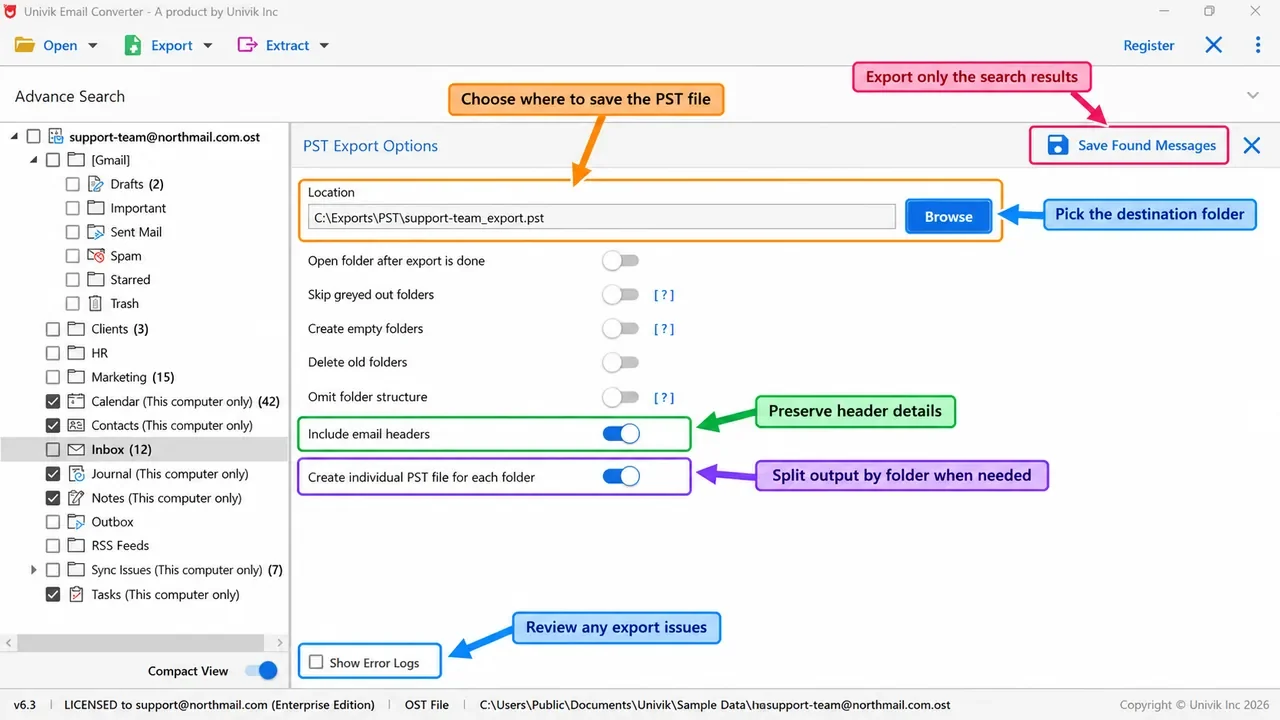
Retains all email headers including From, To, CC, BCC, Subject, Date, Message-ID, X-Headers, MIME headers and routing information.

Date Filter

Advanced Date Range Filter

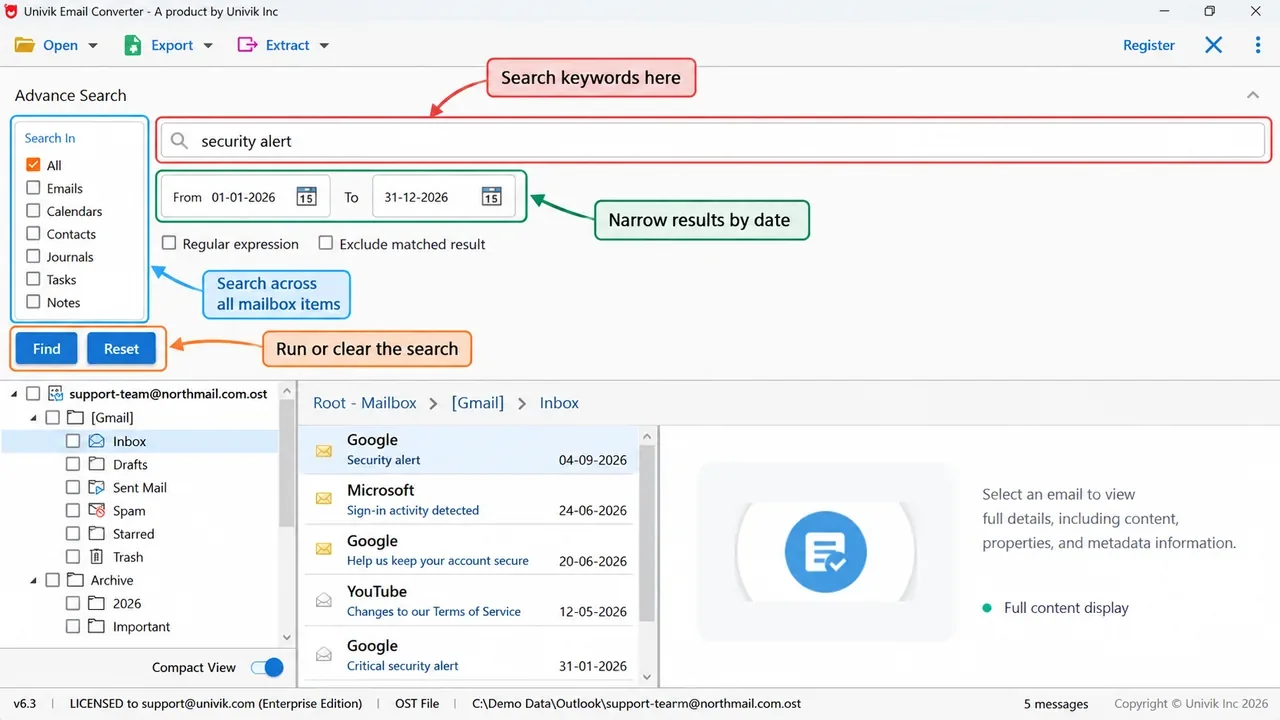
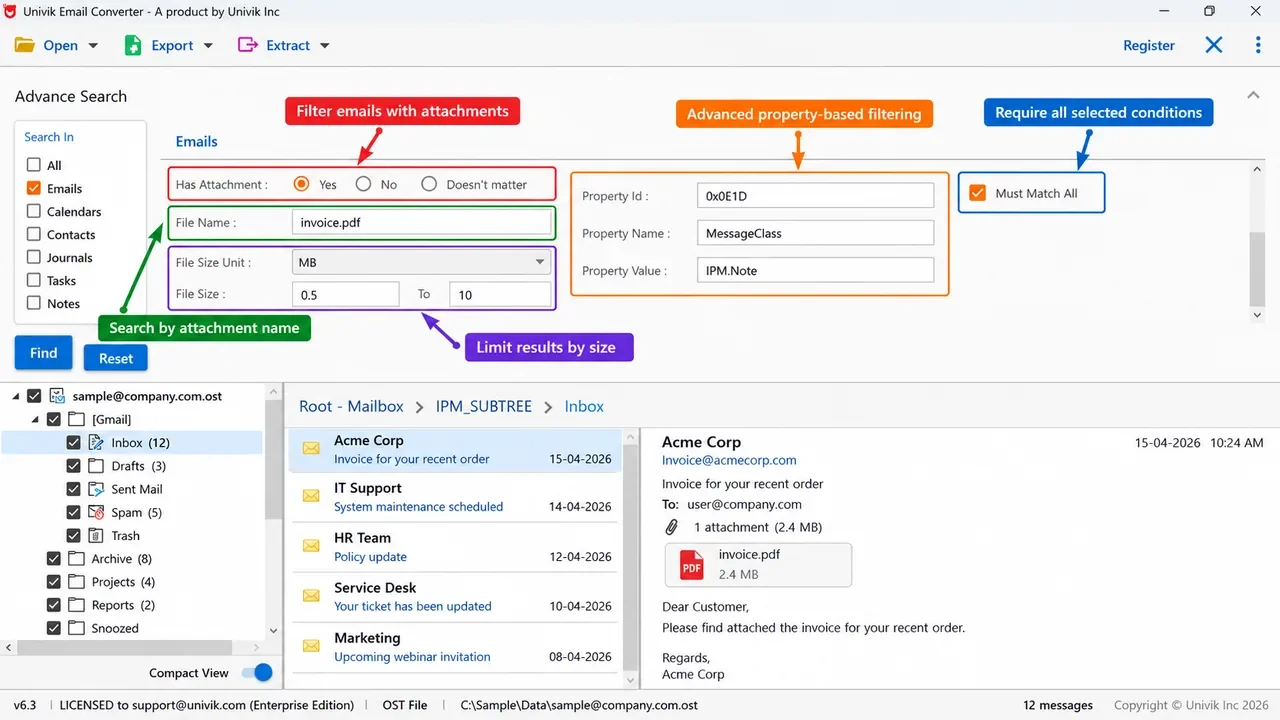
Filter emails by specific date range, time period or custom dates. Export only emails from a particular quarter, year or between specific dates.

Sender Filter

Sender & Recipient Filter

Filter by email address, domain name, sender or recipient. Export only emails from specific contacts, clients or organizations.

Search

Subject Line Search Filter

Search and filter emails by subject keywords, phrases or text patterns. Export only emails containing specific topics or project names.

Naming

Custom File Naming Options

Configure output filenames using Subject, Date, Sender, Message-ID or custom naming patterns for easy file management.

Preview

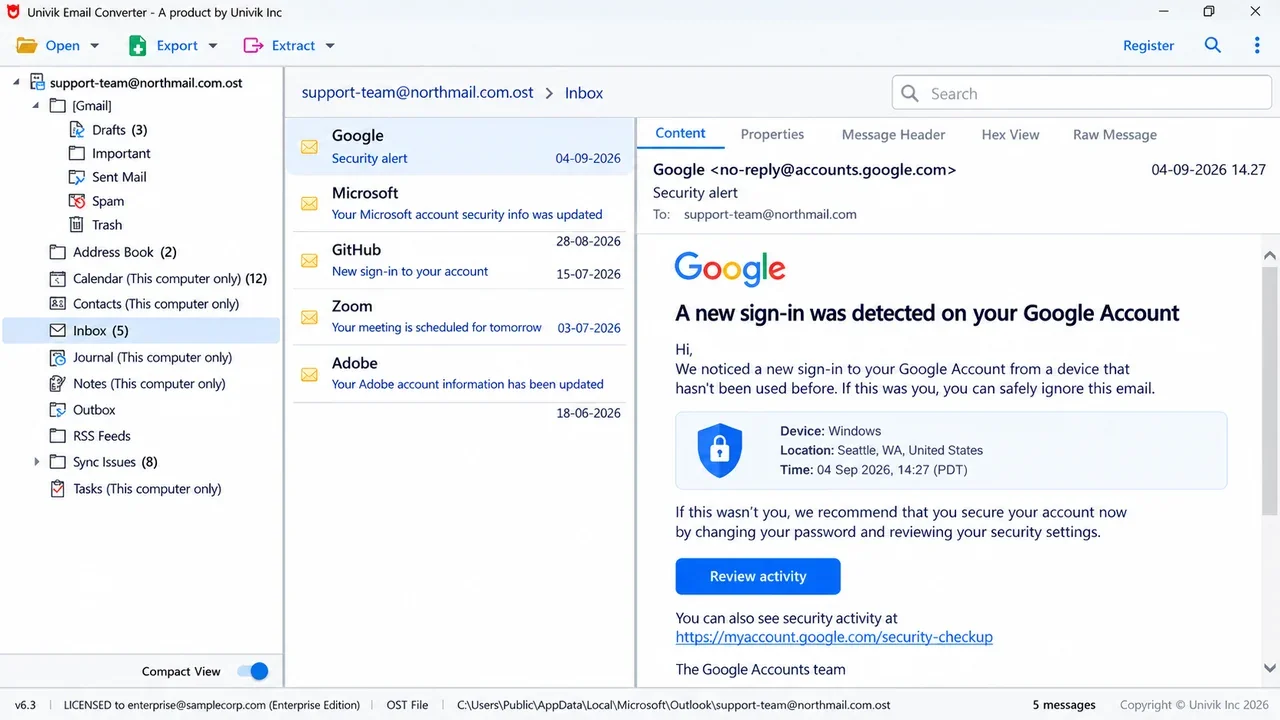
Built-in Email Preview

Preview emails before conversion with full message body, HTML formatting, attachments list and header details.

Status

Read/Unread Status Retention

Preserves email read/unread status, flagged messages, starred items, priority markers and importance levels.

Offline

100% Offline Processing

Complete offline email conversion with no internet required. Your emails are processed locally, never uploaded to external servers.

Unicode

Full Unicode & Multi-Language

Complete support for Unicode characters, international languages, Chinese, Japanese, Korean, Arabic, Hebrew, Cyrillic.

Large Files

Large Mailbox Handling

Efficiently processes large MBOX files, oversized PST archives, mailboxes with 100,000+ emails. Optimized memory management.

Duplicates

Duplicate Email Detection

Automatically identifies and removes duplicate emails based on Message-ID, content hash or custom criteria.

Split

Output Split Options

Split converted output by size (MB/GB), email count, date, folder or year. Create manageable archive chunks.

Forensic

Forensic Analysis Mode

Export emails with complete forensic metadata, MD5/SHA hash verification, chain of custody information for legal discovery.

Preserved Everything Preserved During Conversion

Read/Unread Read/Unread Status
Attachments All Attachments
Flagged Flagged/Starred
Folders Folder Structure
Priority Email Priority
Recipients From/To/CC/BCC
Images Inline Images
Subject Subject Line
Signature Email Signatures
DateTime Date & Time
Links Hyperlinks
Headers Email Headers
HTML HTML Formatting
Local Local Folders
Names Folder Names
Metadata MIME Metadata

How It Works  Simple Process

Convert Emails in 3 Easy Steps

No technical knowledge required. Add your email files, select output format and convert in minutes.

1

Add Email Files

Click "Add Files" or "Add Folder" to import MBOX, PST, EML or other email files. Drag & drop is also supported for quick file addition.

2

Select Output Format

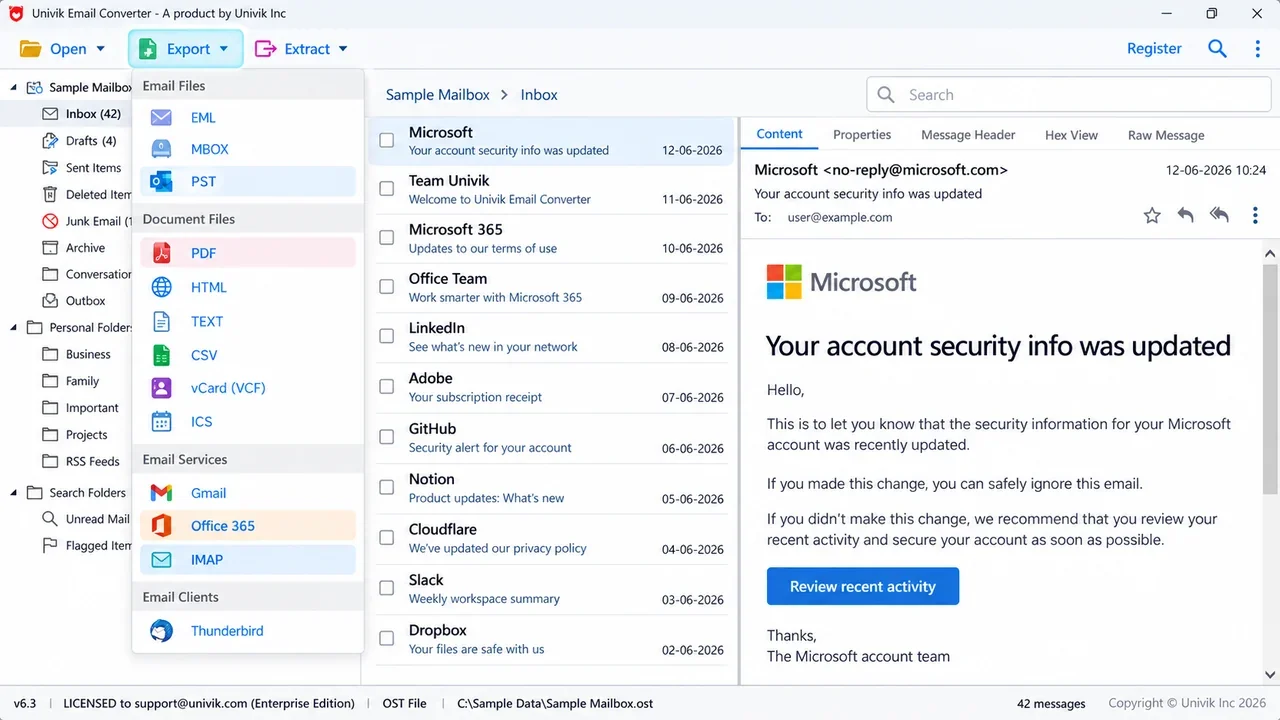
Choose your desired export format from 20+ options. Configure naming conventions, folder handling and date filters as needed.

3

Convert & Export

Click "Convert" and watch real-time progress. Access your converted files immediately with a detailed conversion report.

Email Clients  Supported Email Clients

Convert from Any Email Client

Univik Email Converter supports all major desktop email clients, webmail exports and standard email file formats.

Thunderbird

Mozilla Thunderbird

MBOX files, Local Folders

✓ Fully Supported
Outlook

Microsoft Outlook

PST and OST files

✓ Fully Supported
Gmail

Gmail

Google Takeout MBOX

✓ Fully Supported
Apple Mail

Apple Mail

EMLX and MBOX formats

✓ Fully Supported
Yahoo Mail

Yahoo Mail

MBOX export files

✓ Fully Supported
MBOX

MBOX Files

Universal mailbox format

✓ Fully Supported
EML

EML Files

Individual email messages

✓ Fully Supported
More

50+ More

All standard formats

✓ Fully Supported

Supported Sources  All Supported Sources

Every Email Source Univik Can Open

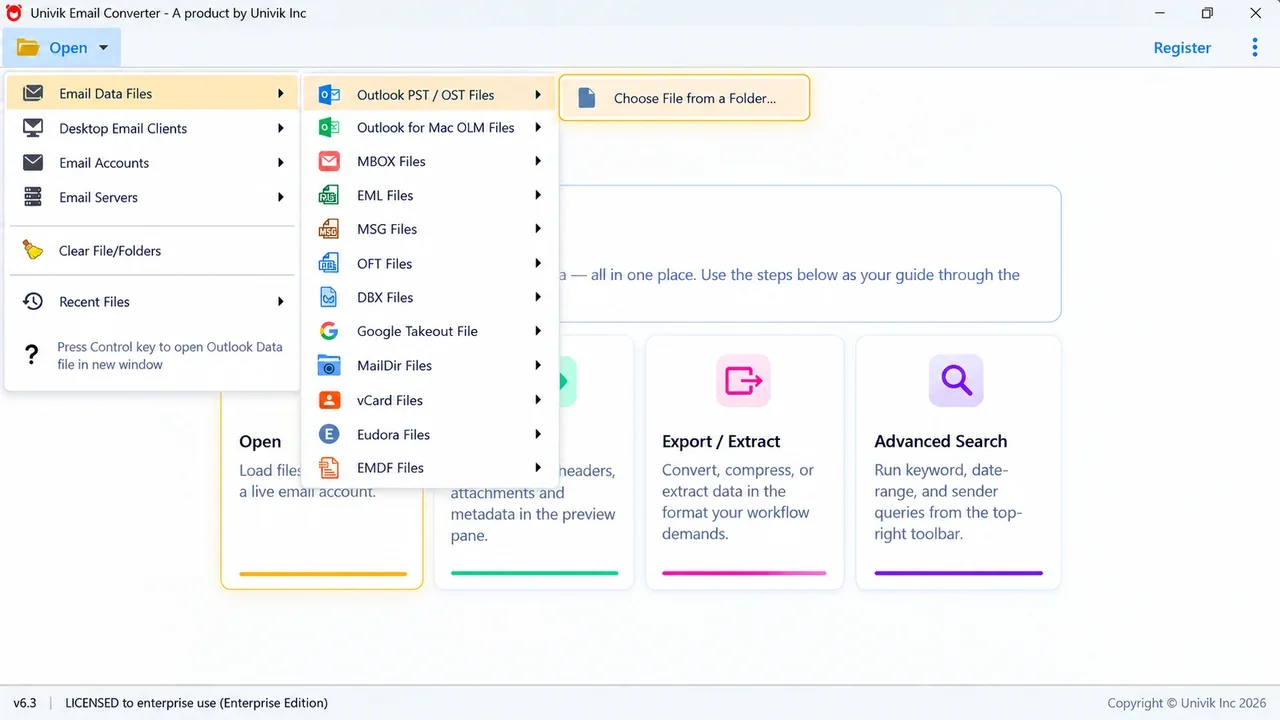
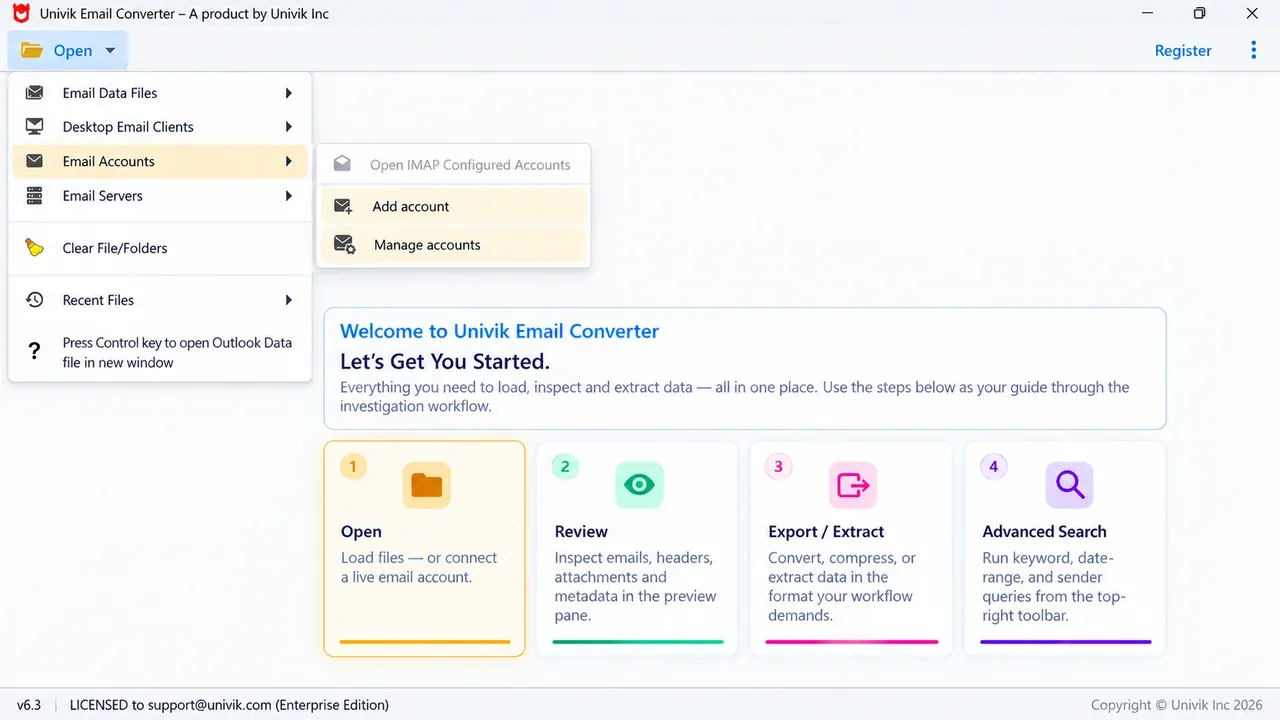
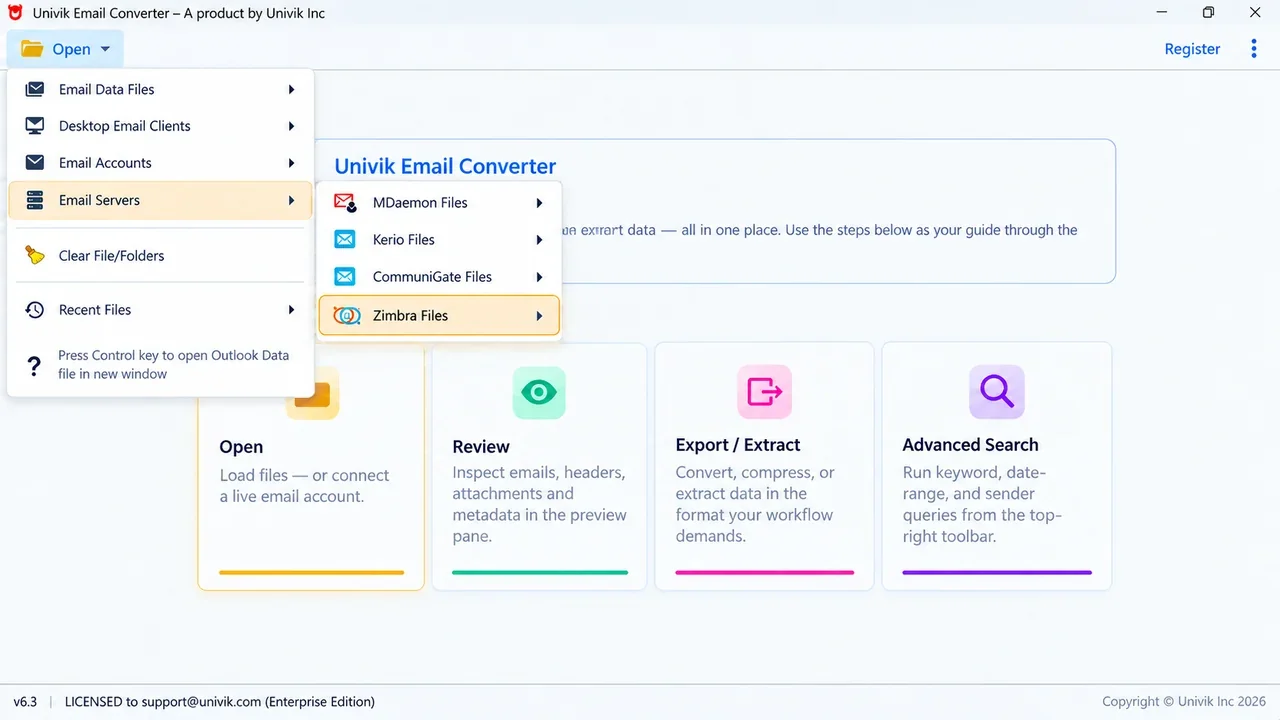
Univik Email Converter reads email from four kinds of sources. Open saved data files, read installed desktop clients, connect live IMAP accounts or pull from on-premise mail servers.

Email Data Files

Saved mailbox and message files from any computer.

PST, OST, OLM, MBOX, EML, MSG, OFT, DBX, Google Takeout, MailDir, vCard (VCF), Eudora, EMDF (Poco Mail)

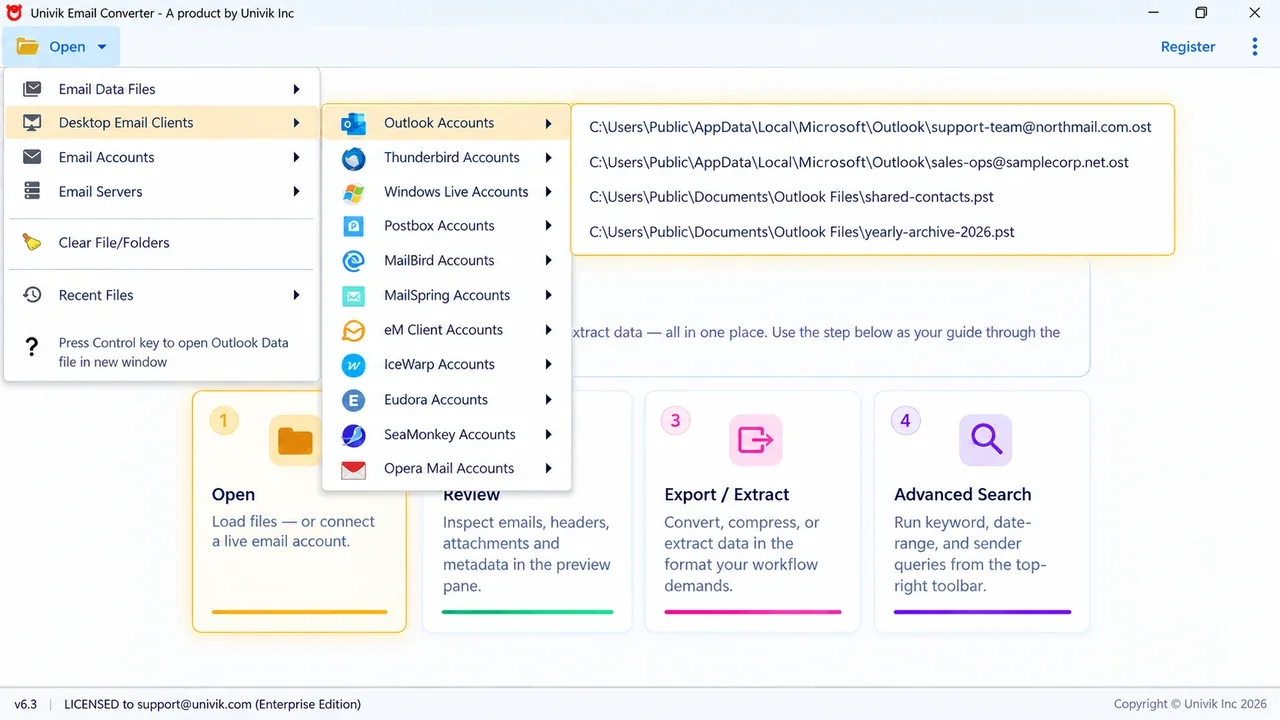
Desktop Email Clients

Reads accounts straight from the installed program.

Outlook, Thunderbird, Windows Live Mail, Postbox, MailBird, MailSpring, eM Client, IceWarp, Eudora, SeaMonkey, Opera Mail

IMAP Email Accounts

Live connection by username and password.

Gmail, Google Workspace, Exchange with IMAP turned on plus any other IMAP server

Email Servers

Reads server data files or configured accounts.

MDaemon, Kerio, Communigate, Zimbra

Apple Mail and Yahoo Mail work through their MBOX exports. Any IMAP mailbox connects by account login.

Why You Need  Why You Need This

Why Convert Your Emails?

Different email clients use incompatible formats. Reliable email converter can help access emails across platforms.

Format Compatibility

Incompatible Formats

Thunderbird MBOX, Outlook PST, Apple Mail EMLX - each email client uses different formats that don't work with others. Manual conversion is complex and risky.

✓ Convert between any formats instantly

Archiving

Email Archiving

Export emails from any client into standard formats like PST, PDF and EML for long-term storage or compliance. Migrating an enterprise archive platform such as Mimecast, Enterprise Vault or MailStore? Use the Email Archive Converter.

✓ Universal archive formats supported

Switching Clients

Switching Email Clients

Moving from Thunderbird to Outlook? Gmail to Apple Mail? The converter ensures all your emails, folders and attachments transfer perfectly to any email client.

✓ Seamless email client switching

Data Integrity

Risk of Data Loss

Manual conversion methods often lose attachments, break folder structures or corrupt metadata. One wrong step and years of emails could be damaged.

✓ 100% data integrity guaranteed

Forensic Analysis

Forensic Analysis

Digital forensics and legal investigations require emails in specific formats with preserved metadata, headers and timestamps for evidence integrity.

✓ Forensic-grade conversion

Bulk Conversion

Bulk Conversion Needed

Converting thousands of emails manually is impractical. Batch processing converts entire mailboxes, multiple accounts or years of emails in minutes.

✓ Batch convert thousands at once

Export Formats  Export Formats

Export to 20+ Formats

Convert email to PDF, MBOX, MSG, HTML, TXT and 15+ other formats. Choose the right output for email archiving, forensic analysis, legal discovery or switching email clients.

📊
PST
Outlook Data
📧
EML
Email Message
📨
MSG
Outlook Message
📄
PDF
Document
🌐
HTML
Web Page
📦
MBOX
Unix Mailbox
📝
RTF
Rich Text
📋
TXT
Plain Text
📑
MHTML
Web Archive
📊
CSV
Spreadsheet

Forensic and eDiscovery  Forensic and eDiscovery

Built for Forensic and eDiscovery

Univik Email Converter keeps email in its original form during conversion. Investigators and legal teams get the details they need for review.

Original details kept

Keeps Email Details Intact

Original headers, real sent and received dates, sender and receiver names and message IDs stay the same. Nothing is changed during conversion.

Folders and attachments

Saves Folders and Attachments

Full folders export with every attachment in place. The mailbox stays in the same order you found it.

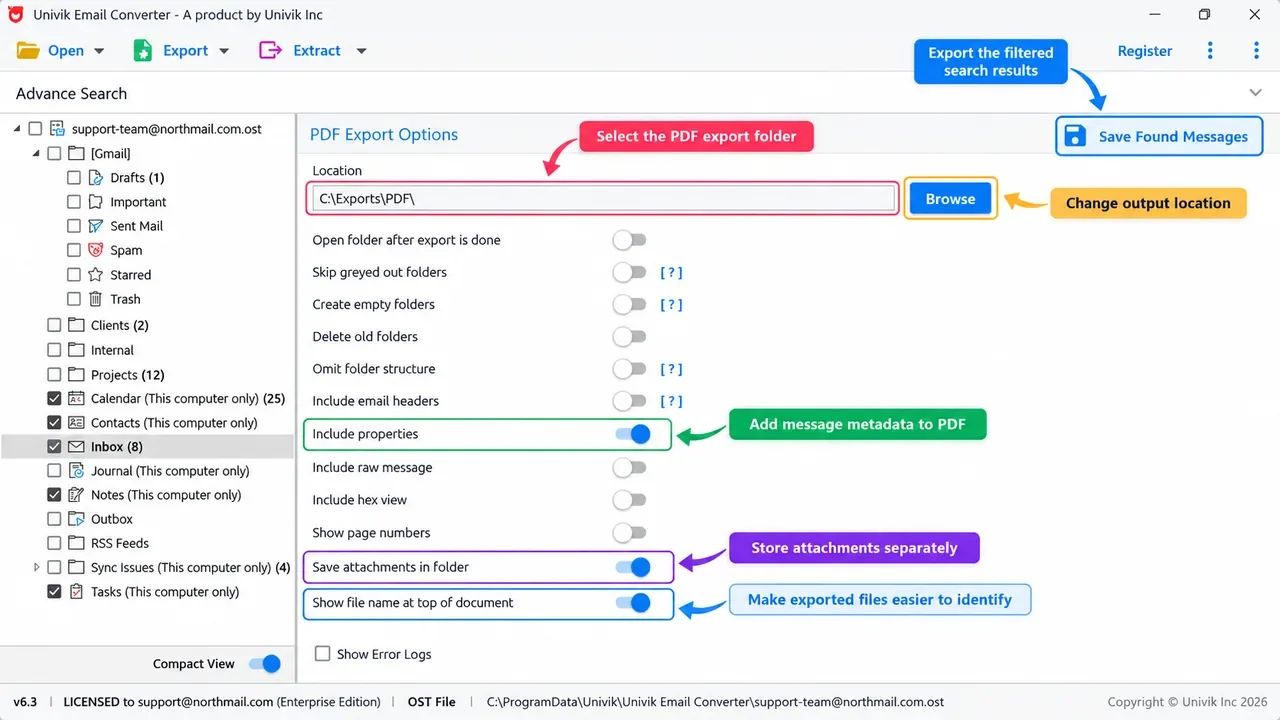
Export to PDF

Export to PDF for Review

Save email as PDF for case files and legal review. Export to EML or MBOX when you need to load mail into other forensic tools.

Extract data

Extract Evidence Data

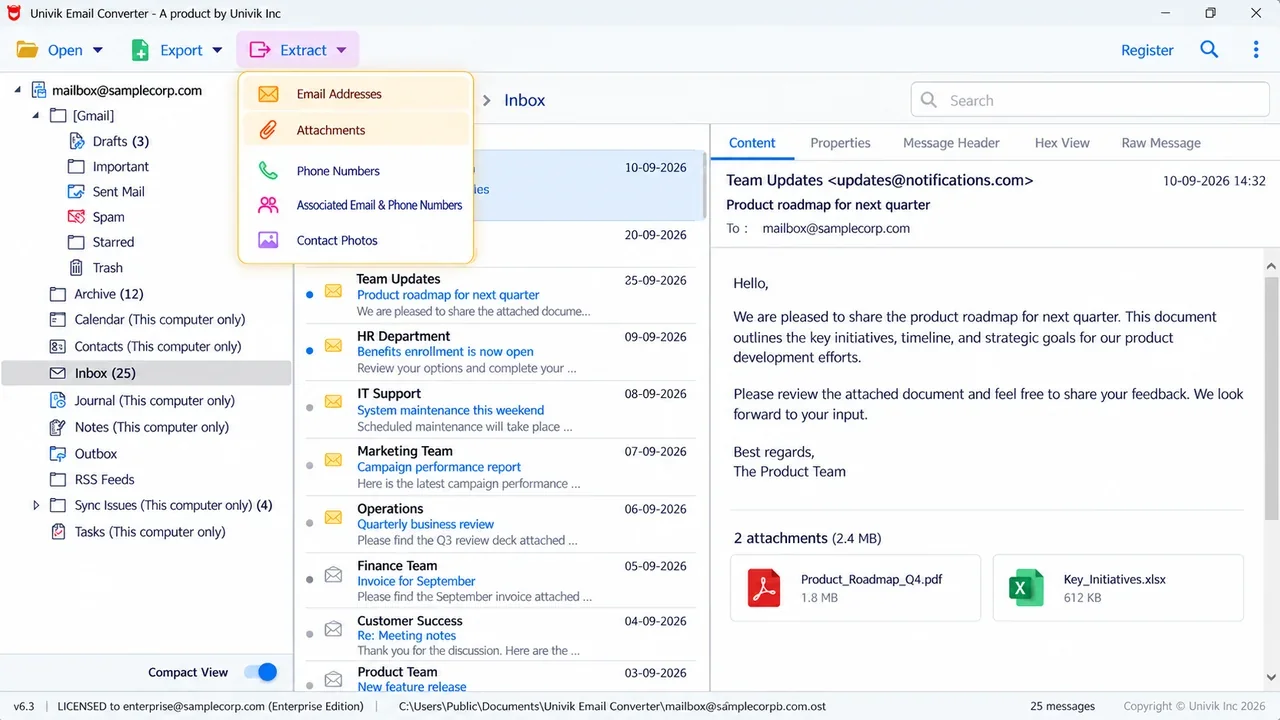
Pull email addresses, phone numbers, attachments and contact photos straight from a mailbox for quick lead work.

Large data sets

Handles Large Evidence Sets

Big data files and live accounts process one folder at a time. Large mailboxes finish without dropped items.

Runs offline

Runs on Your Own Machine

This is a Windows desktop tool. Your evidence stays on your computer and never goes to a third party.

Use Cases  Professional Use Cases

Who Needs an Email Converter

Trusted email conversion solution for IT administrators, forensic investigators, legal professionals and individual users.

🏢

IT Administrators

Convert corporate email systems during platform changes. Process employee mailboxes with complete data preservation and folder structure intact.

🔍

Forensic Investigators

Extract and convert email evidence for legal proceedings. Export emails with preserved headers, timestamps and metadata for forensic analysis.

⚖️

Legal Professionals

Prepare email discovery documents for litigation. Convert client emails to searchable formats with Bates numbering support for legal compliance.

💼

Business Users

Archive important business correspondence when switching email clients. Create searchable archives of years of business emails for compliance.

🏠

Personal Users

Convert personal emails before changing email providers. Create offline archives of important family correspondence and receipts.

📚

Researchers & Archivists

Preserve historical email correspondence for academic research. Convert legacy email formats to modern standards for long-term preservation.

Reviews  Customer Reviews

Trusted by Thousands Worldwide

Read verified reviews from IT professionals, forensic analysts and business users who rely on Univik Email Converter, one of the best email converter software tools for Windows.

"
★★★★★

Converted 50,000 emails from our legacy Thunderbird server in under 2 hours. Folder structure and attachments perfectly preserved. Saved us weeks of manual work.

JM

James Mitchell

IT Director, TechCorp Inc.

"
★★★★★

Essential tool for our digital forensics lab. Email headers and timestamps are preserved exactly as required for legal evidence. The metadata preservation is invaluable.

SK

Sarah Kim, CFCE

Digital Forensics Analyst

"
★★★★★

Simple interface that just works. I converted my 15 years of personal emails when switching from Thunderbird. Everything came through perfectly - even old attachments.

RP

Robert Patterson

Retired Professor

Pricing  Simple Pricing

Choose Your License

One-time payment, lifetime license. No subscription fees. Free updates included.

Free Trial

$0

Try before you buy

  • 10 emails per folder
  • All export formats
  • Full preview features
  • No time limit
Download Free

Business License

$299/lifetime

For organizations

  • Everything in Personal
  • 5 PC activations
  • Commercial use allowed
  • Priority phone support
  • Volume discounts available
Buy Business

Help Desk  Help Desk

Frequently Asked Questions

Common questions about using the Univik Email Converter software.

All major email clients are supported:

  • Mozilla Thunderbird - MBOX files, Local Folders, all profiles
  • Microsoft Outlook - PST and OST data files
  • Apple Mail - EMLX and MBOX formats
  • Gmail - via Google Takeout MBOX export
  • Yahoo Mail, Windows Mail, Zimbra and 50+ more

Any email client that uses standard MBOX, EML or similar formats is supported.

Yes, batch conversion is fully supported:

  • Add multiple email files or folders in a single session
  • Mix different source formats - MBOX, EML, PST together
  • Convert thousands of emails simultaneously
  • Each source maintains its original folder structure

This saves significant time when converting emails from multiple accounts.

Yes, 100%. Every attachment is preserved during conversion:

  • Documents (Word, Excel, PDF, etc.) - fully preserved
  • Images (JPEG, PNG, GIF, etc.) - preserved with original quality
  • Archives (ZIP, RAR, 7z) - preserved intact
  • Inline images and embedded content - preserved in email body

All attachment types remain accessible in the converted output.

Yes, completely offline. Univik Email Converter is a desktop application:

  • No internet connection required for conversion
  • Your emails are processed locally on your computer
  • No data is ever uploaded to external servers
  • Complete privacy and security for sensitive emails

This makes it ideal for converting confidential correspondence.

Minimal requirements:

  • OS: Windows 11, 10, 8.1, 8 or 7 (32-bit and 64-bit)
  • RAM: 4GB minimum (8GB recommended for large mailboxes)
  • Disk Space: 100MB for installation
  • Framework: .NET Framework 4.8 or higher

The software handles large email archives efficiently.

Free trial converts up to 10 emails per folder:

  • All features are fully functional during trial
  • All 20+ export formats available
  • Preview, filtering and batch processing included
  • No time limit on the trial period

This allows you to verify the software meets your needs before purchasing.

Select PDF as the output format, then convert. Each email is saved as a separate PDF with the message body, headers and attachments preserved. You can batch convert a whole mailbox to PDF in one run, which is the simplest way to save emails as PDF for archiving, printing or legal records.

Yes. Univik works as a universal email source converter, so you can convert mail from any client or file format, including MBOX, EML, EMLX, PST, OST and MSG. Point it at the files or folders from any email source and it converts them to your chosen format with folders and attachments intact.

Still have questions? Contact support or Live Chat

Ready to Convert Your Emails?

Download free trial and join thousands of professionals who trust Univik Email Converter.

✓ Free trial (10 emails/folder)   ✓ No credit card required   ✓ Instant download