 Univik BAT Email Converter for Windows
 At a Glance
 Key Features
Loads Configured The Bat! Accounts
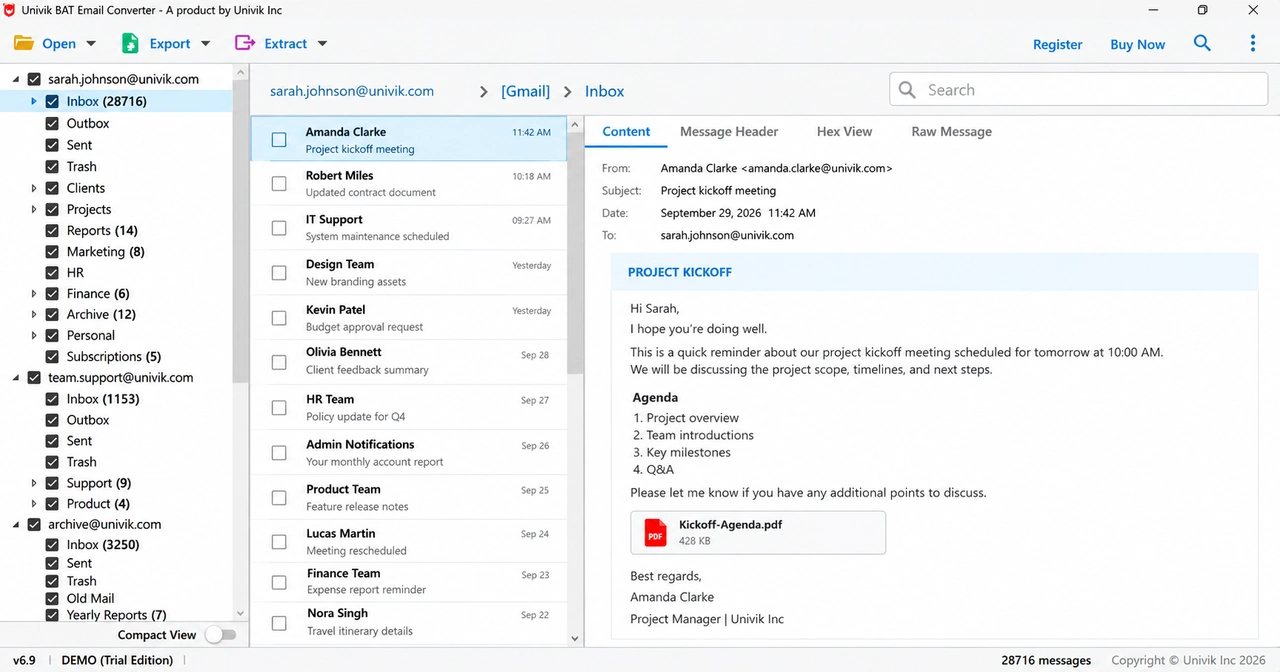
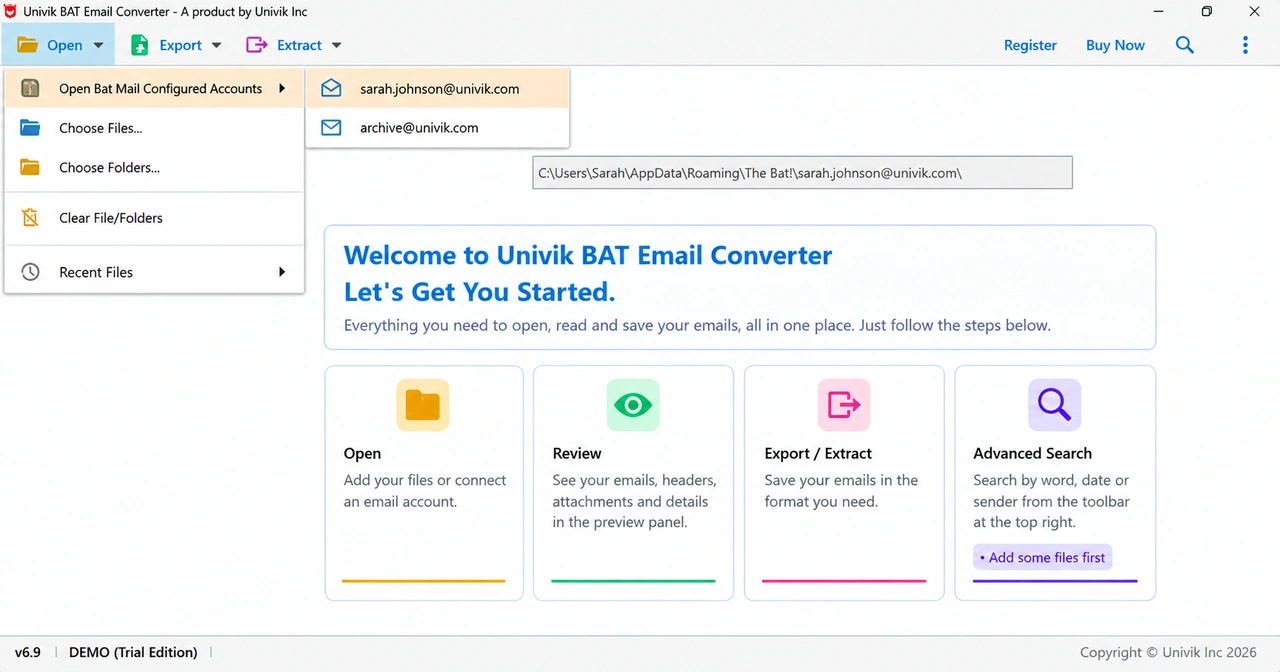
Open Bat Mail Configured Accounts lists every account set up in The Bat! on this PC. Pick one and all its folders load.
Univik BAT Email Converter for Windows
Univik BAT Email Converter is a Windows tool for The Bat! users. It converts configured accounts, .tbb mailboxes and .tbk backups to PST, EML, PDF or any IMAP mailbox in one batch, without Outlook.
Try It FreeWhole-Archive BatchOffline File ExportsThe Bat! Not Needed
*The free trial converts 10 items from each folder. A licence unlocks the full software with a 30-day guarantee.

At a Glance
3
Ways to Load Mail
Configured The Bat! accounts, .tbb mailboxes and .tbk backups (Pro and Enterprise).
12
Export Targets
Eight file types from EML to SQL Script, plus Gmail, Office 365, IMAP and Thunderbird.
0
Servers in Between
File exports run on your PC. Cloud uploads go from your PC to your own mailbox.
6.9
Current Version
Windows 11 and 10 in 64-bit, with .NET Framework 4.8 or higher.
$29
Starting Price
The trial converts 10 items per folder. Licences start at $29 with a 30-day guarantee.
Key Features
Eight things this The Bat! converter tool does.
Open Bat Mail Configured Accounts lists every account set up in The Bat! on this PC. Pick one and all its folders load.
Inbox, Sent, Trash and your own folders come out in the same order as in your old mailbox.
Photos, documents and other attachments stay inside their emails, with From, To, date and subject intact.
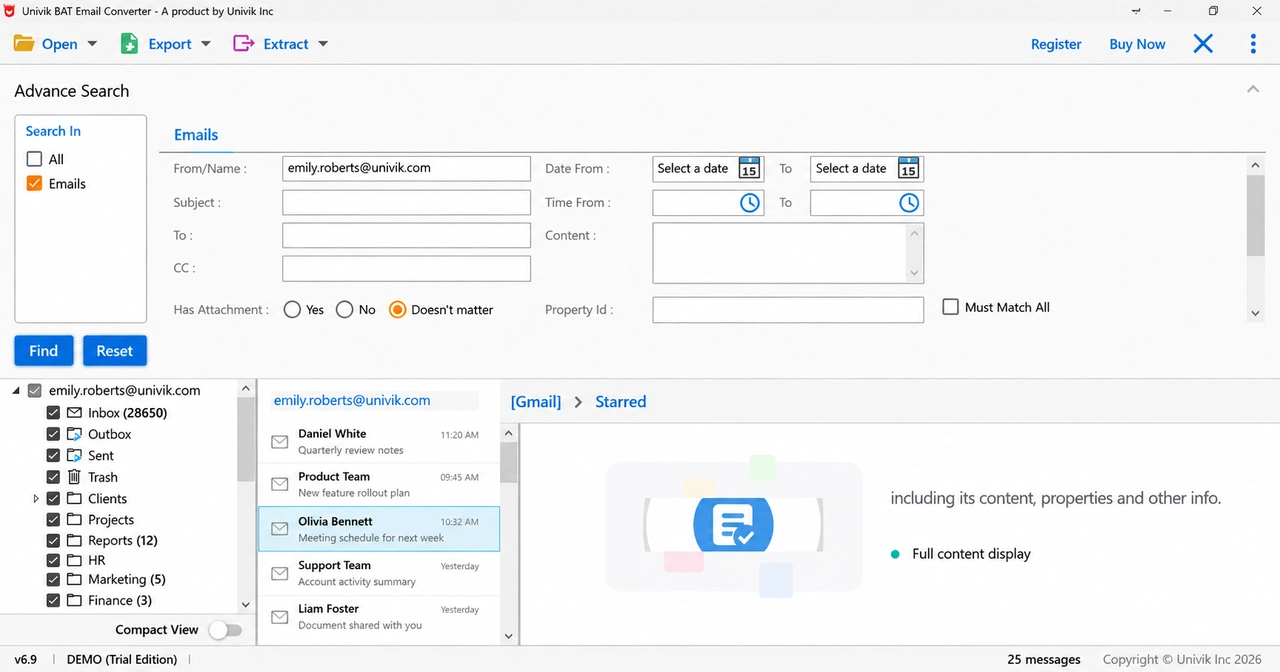
Filter by sender, subject, To, CC, date or time range, body text or attachments. Tick the folders to search.
A .tbk backup opens as it is with a Pro or Enterprise licence. No reinstall and no restore.
The Bat! file converter reads your files and writes new ones beside them. Your The Bat! mail stays as it was.
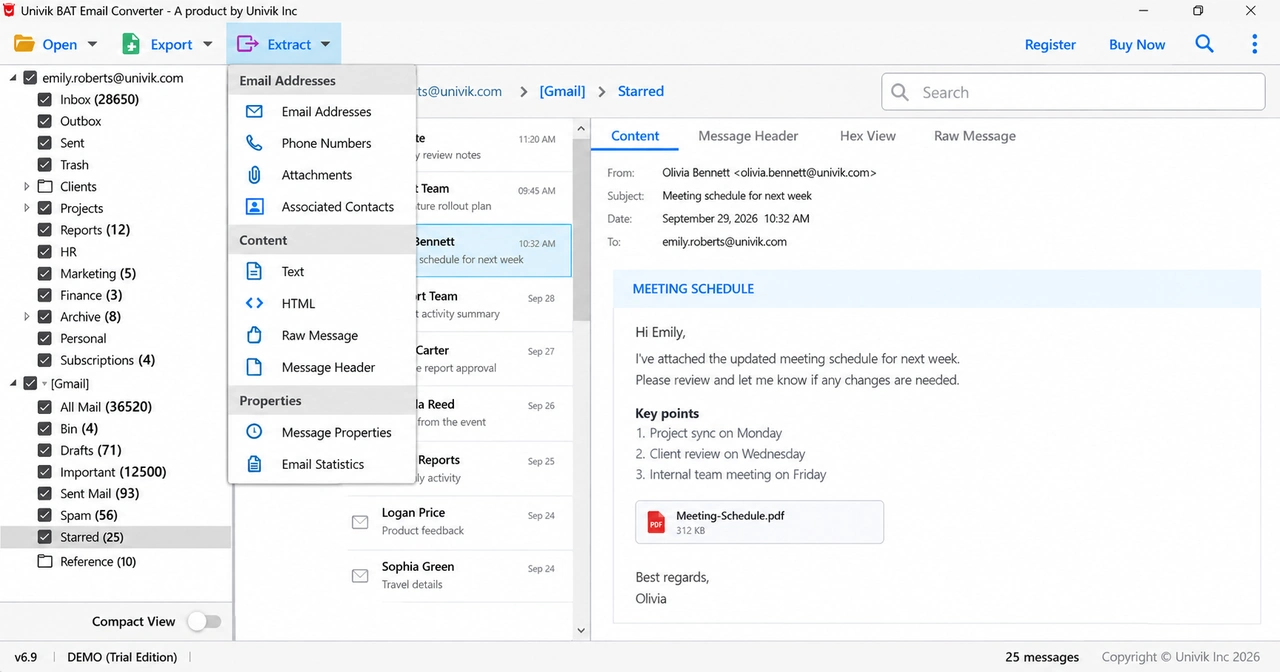
The Extract menu pulls email addresses, phone numbers, contact photos and attachments. Address and phone lists save as CSV.
Every email opens in four tabs. Message Header shows the routing lines. Hex View and Raw Message show the source.
The Short Version
The Bat! saves your mail in its own format. Two things keep it locked in.
Trap 1: A Format Only The Bat! Reads
A .tbb mailbox will not open in Outlook or any other mail app. On a PC without The Bat!, double-clicking it gets you nowhere.
Trap 2: A Fiddly Built-In Export
The Bat! can export messages, but it works one folder at a time and never produces a PST file for Outlook.
The Way Out: Read the Files Directly
Univik BAT Email Converter reads the mail files directly and writes formats everyday apps open. The TBB converter tool works through a whole account in order.
Three Extensions
.tbb
A Mailbox Folder
Each local folder, like your Inbox, is stored as a messages.tbb file with its emails and attachments. IMAP folders use coded file names instead. For a quick look first, open it in the free Online The Bat! Viewer.
.tbk
A Backup Package
The file The Bat! makes when you back up your mail from its menu. The converter opens it directly. Included in the Pro and Enterprise licences.
.tbn
A Small Index File
Sits next to each .tbb file and lists every message with its sender, date and flags. The converter reads it together with the .tbb file.
Three Steps
The tool needs no folder-by-folder exporting and no The Bat! for file mode.
Add The Bat! Files
Click Open to load a configured The Bat! account, pick .tbb or .tbk files or choose a whole mail folder.
Pick the Output Format
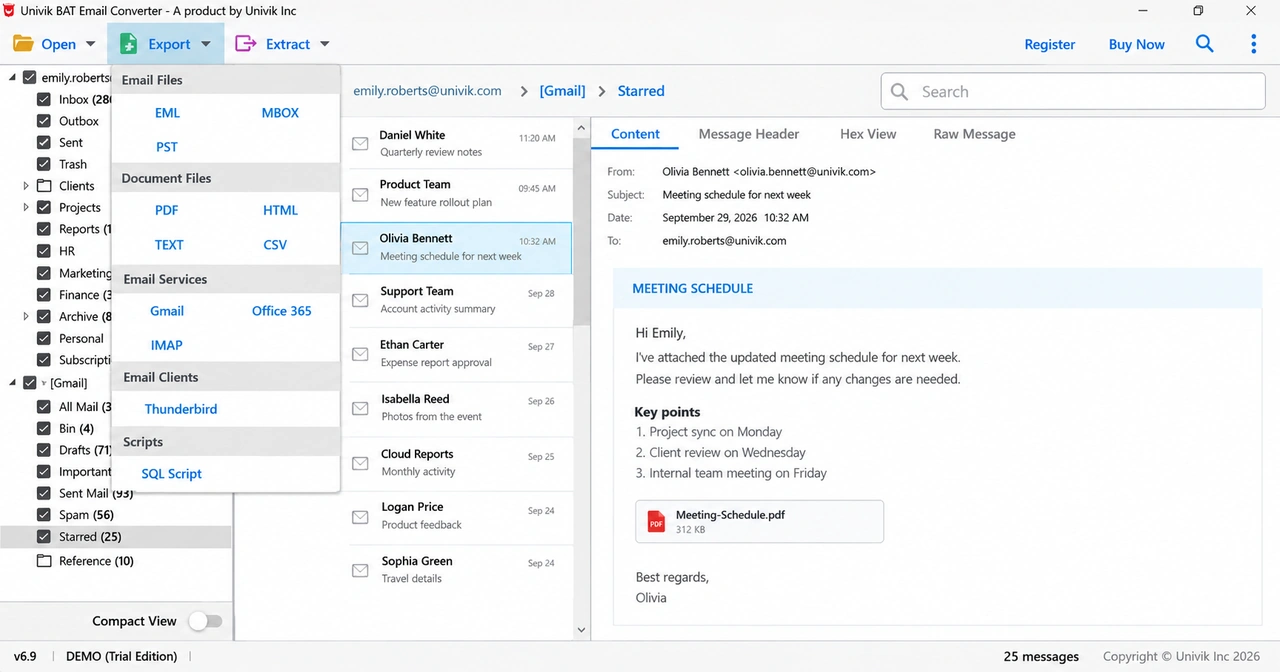
Open the Export menu and pick PST for Outlook, EML or MBOX for other mail apps, PDF for records or Gmail and Office 365 to upload.
Convert and Open Your Emails
Run the batch and open the results in Outlook or any app you like, folders and attachments included.
Runs on Windows 11 and 10 · no The Bat! or Outlook needed · no middle server · help comes straight from the developers
Real Situations
People look for a The Bat converter for one of three reasons.
Switching to Outlook
A new job or PC moves you to Outlook. Convert your mailboxes to PST once and years of email follow you, folders and all.
An Old Backup You Cannot Open
A The Bat backup file (.tbk) sits on an old drive and a restore in The Bat! shows nothing. The converter reads the backup itself.
Keeping Emails as Records
Some emails must be kept for good: receipts, contracts, family letters. PDF copies open on any device and print cleanly.
Finding Your Files
The Bat! keeps your mail on your own computer. Unless you picked a different spot when you installed it, everything sits under AppData\Roaming\The Bat! in your user folder, with one folder per email account named after its address. Local folders hold a messages.tbb file. IMAP folders sit in an IMAP subfolder under coded names.
Backups from The Bat!'s Backup menu are .tbk files, saved wherever you chose (see where The Bat! stores emails for the full file map). Copy them from an old drive to any Windows PC and the converter reads them there.
Compare Your Options
Each route gets you part of the way. Only one is built for the whole job.
| What you need | The Bat!'s Own Export | The Bat! Export + Thunderbird | Univik BAT Email ConverterTRIAL |
|---|---|---|---|
| Cost | Free | Free | From $29 |
| Works without The Bat! installed | No | No | Yes |
| Makes PST files for Outlook | Never | Never | Yes |
| Whole archive in one run | Folder by folder | Folder by folder | One batch |
| Reads .tbk backup files | Restore only | Restore only | Yes (Pro) |
| Final mail app runs on Mac or Linux | No | Yes | No |
The Thunderbird route is free and its mail app runs on Mac and Linux. It needs one export per folder and the ImportExportTools NG add-on.
What You Need
Operating System
Windows 11 or 10 in a 64-bit edition. The needed .NET Framework 4.8 comes with updated Windows.
The Bat! Not Required
The Bat! converter software reads .tbb and .tbk files on its own. The Bat! is only needed to load configured accounts.
Memory and Disk
Normal mailboxes convert fine with 4 GB RAM. Give big attachment-heavy archives 8 GB.
File Exports Offline
Internet is only needed for the installer and cloud uploads. File exports run offline too.
| Software Information | Univik BAT Email Converter |
| Version | 6.9 (Latest) |
| Licence | Trial at no cost, licences from $29 |
| Platform | Windows 11 and 10, 64-bit editions |
| Framework | .NET Framework 4.8 or higher |
| Reads | Configured The Bat! accounts, .tbb mailbox files and .tbk backups (Pro and Enterprise) |
| Writes | EML, MBOX, PST, PDF, HTML, TEXT, CSV and SQL Script for SQL Server, MySQL, SQLite, PostgreSQL, Oracle or MariaDB |
| Tested With | The Bat! 12.3.1 and older releases on Windows 11 and 10 |
| Moves To | Gmail, Office 365, Thunderbird and any IMAP email service |
Questions
The Bat! Guides
More Tools
Reviewed by Nick Rogers Founder of Univik
Fact Checked
Nick Rogers founded Univik in 2013 and reviewed this page. Version 6.9 was tested on a The Bat! 12.3.1 profile with 43,572 messages in All Mail. Facts about The Bat! by Ritlabs are checked against Ritlabs documentation and public references.
Last reviewed on 30 September 2026
Since 2013Sources VerifiedNick Rogers


 Three Extensions
 Three Steps
 Real Situations
