To switch from The Bat!, decide where your mail should live next, then use the export route for that place. Webmail, a desktop program, a PDF archive and a database each need a different route.
The Bat! itself saves only MSG, EML or mbox files, one folder per run. It has no PST option.
People leave The Bat! for many reasons: a new PC, a new job mailbox or a wish to read mail on the phone. The move goes smoothly once you know where the mail is headed.
Where can your mail go after The Bat!?
Seven common places take The Bat! mail. The table shows the free route, the converter route and the guide with full steps for each.
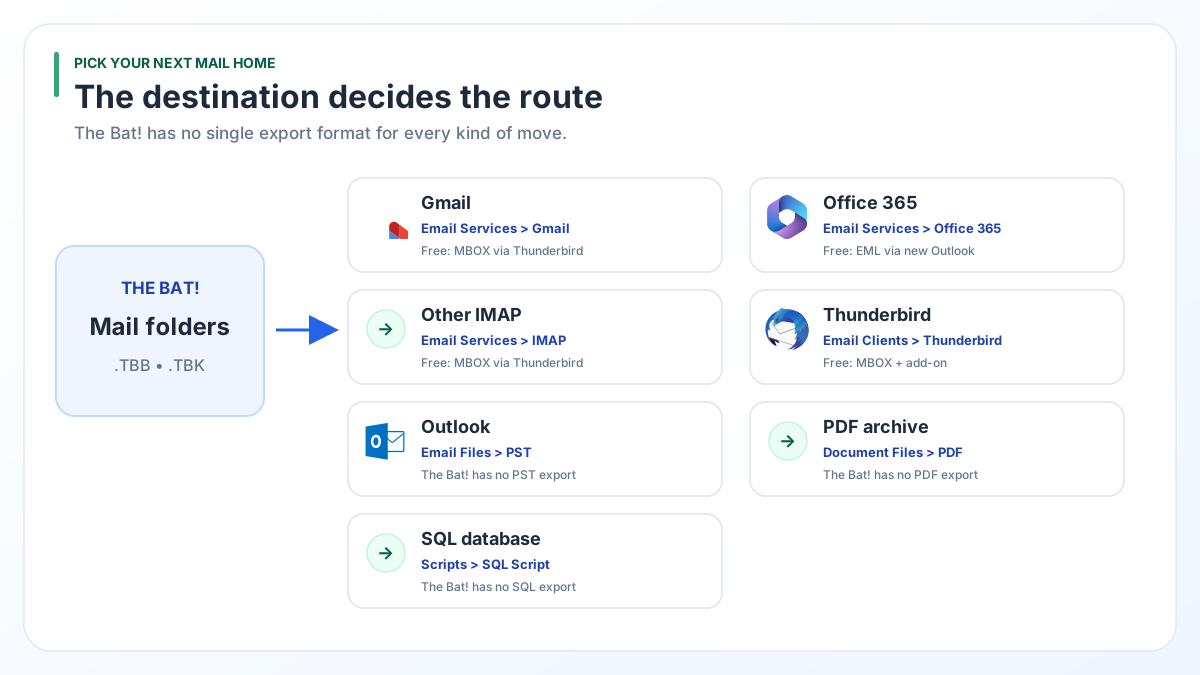
| New home | Free route | Converter route | Full guide |
|---|---|---|---|
| Gmail | mbox files, Thunderbird, then drag into Gmail | Email Services > Gmail | Gmail and Office 365 |
| Office 365 | EML files, then new Outlook import | Email Services > Office 365 | Gmail and Office 365 |
| Other IMAP service | mbox files, Thunderbird, then drag across | Email Services > IMAP | Gmail and Office 365 |
| Thunderbird | mbox files plus the ImportExportTools NG add-on | Email Clients > Thunderbird | Thunderbird |
| Outlook | No PST export in The Bat! | Email Files > PST | Outlook PST |
| PDF archive | No PDF option in the export menu | Document Files > PDF | |
| SQL database | None | Scripts > SQL Script | SQL |
The free route is the better choice for a few folders headed to Thunderbird, Gmail or Office 365. The converter covers the rows where The Bat! has no export of its own.
Which new home suits the way you work?
Pick the place that matches how you read mail day to day. The file format follows from that choice.
Phone and browser first. Gmail or Office 365 keeps mail on a server, so every device sees the same folders. A work account usually decides this for you.
A desktop program like The Bat!. Thunderbird is free and keeps mail on your own PC. Outlook suits you if your office already pays for Microsoft 365.
Records you rarely open. A PDF archive opens on any computer with no mail program at all, and it prints cleanly.
Search and reports across years of mail. A SQL database lets you query senders, dates and subjects in bulk. The converter writes scripts for Microsoft SQL Server, MySQL, SQLite, PostgreSQL, Oracle Database and MariaDB.
What should you check before you switch from The Bat!?
Before you switch from The Bat!, find out which mail lives only on your PC and whether it is complete.
- POP3 and local folders exist only on your PC, in The Bat! folder under
AppData\Roaming. This is the mail that has to travel. - IMAP accounts keep their mail on the server. Add the same account to your new program and the mail appears there.
- Missing bodies. For IMAP accounts The Bat! keeps many messages as headers without the message text. Our test Inbox showed 41,452 messages but held 33 bodies on disk. Download full messages before any export.
- Password backups. A .tbk file made with the password option is encrypted. No tool outside The Bat! can read it.
- Folder counts. Write down the message count of your main folders so you can check the result later.
What can The Bat! export by itself?
The Bat! writes mail out in three formats through Tools > Export messages to: MSG, EML and UNIX mailbox (mbox). Each run covers one folder.
Those three formats cover Thunderbird and, with some help, Gmail and Office 365. There is no PST, PDF or SQL option, as a Ritlabs forum thread confirms for PST.
Contacts leave through the address book, which exports to vCard, LDIF or CSV. Most mail programs read at least one of those.
Tools > Backup... is not a way out. A .tbk backup only restores into The Bat!. Ritlabs warns that older releases refuse backups created by newer ones.
Should you keep The Bat! installed after the move?
Yes. Keep The Bat! and its profile folder until the counts in your new home match the old ones.
Once they match, copy the whole The Bat! folder from AppData\Roaming to an external drive. That copy holds every account folder with its .tbb and .tbn files. Years later you can still open it with the converter, even with The Bat! long gone.
When does a converter save you time?
A converter saves time when you have many folders, a PC where The Bat! no longer starts, a .tbk backup or a target The Bat! cannot export to.
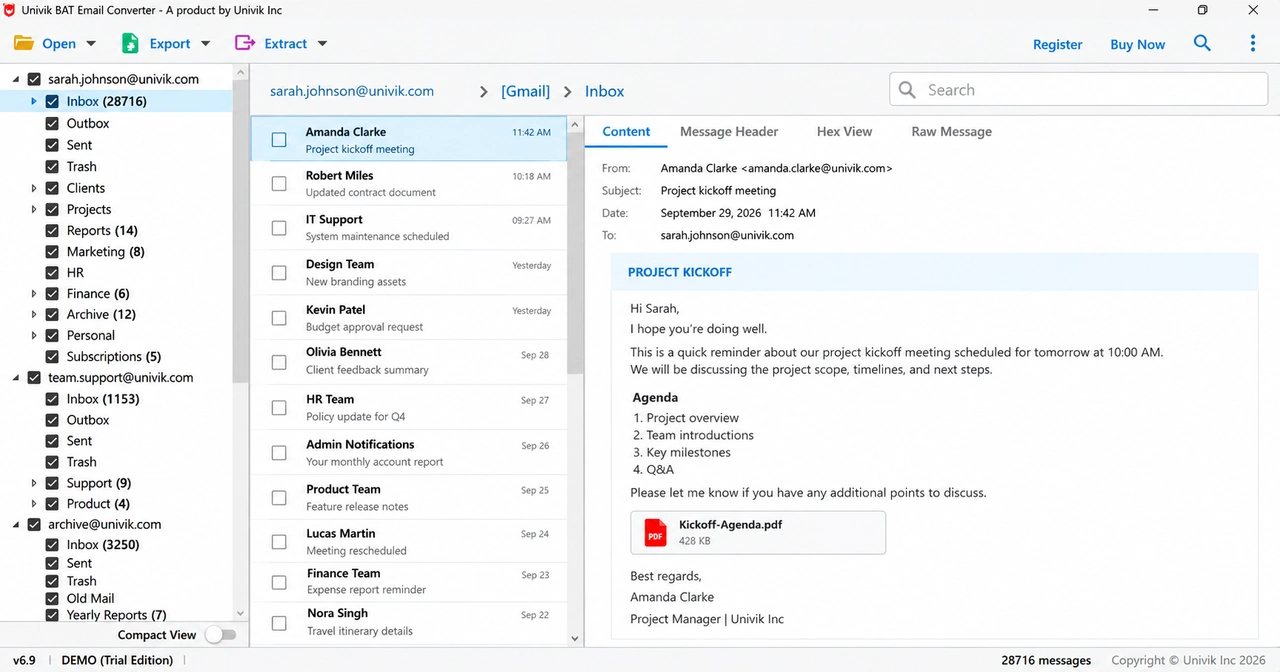
Univik BAT Email Converter reads The Bat! files without The Bat! installed. We ran it on the owner's real mail. Every one of the 40 folders showed the same count as The Bat!, and a 37 MB .tbk backup produced files identical byte for byte to the live profile.
One copy covers every row in the table above. Standard costs $29 for .tbb files and configured accounts. Pro at $49 adds .tbk backups.
Try every destination on your own folders. The trial moves 10 items from each folder without charge.
Free Download See all features- Choose the new home first. The export route depends on it.
- The Bat! saves MSG, EML or mbox files one folder per run and has no PST, PDF or SQL export.
- IMAP mail already sits on the server. POP3 and local folder mail needs moving.
- Download missing IMAP bodies and avoid password-protected backups before you start.
- Keep a copy of the profile folder after the move so the old mail stays reachable.
Questions about leaving The Bat!

Leena Taylor Paul wrote this guide with the Univik team, which has shipped Windows mail tools since 2013. This guide helps you pick where your mail goes after The Bat! and points to the full steps for each place. Last checked October 2026. Stuck? Contact our support team.