No SQL Server or Live Connection
Convert a detached or offline database straight from disk, with no SQL Server, no ATTACH and no live connection. You do not even need admin rights.
 Univik SQL Database Converter
 Built for Microsoft SQL Server databases
Convert Any SQL Server Database Without SQL Server
Univik SQL Database Converter reads your SQL Server database straight from disk and exports it to the format you need. It reads the primary MDF, the secondary NDF files and even BAK backups, so you convert the whole database with no SQL Server, no attach and no instance. Export to nine formats or restore the data into a live server.
*Free trial lets you load the database and preview every table. A license unlocks unlimited export, starting from $99.


VirusTotal Verified Safe
Certified clean by 70+ antivirus engines. No malware, spyware or adware.
 Converts Every SQL Server Version

SQL Server 2025
SQL Server 2022
SQL Server 2019
SQL Server 2017
SQL Server 2016
SQL Server 2014
SQL Server 2012
SQL Server 2008
SQL Server 2008 R2
SQL Server 2005
SQL Server 2000
 Product Screenshots
See the Converter In Action
The app in action, from opening a database to sending every table out to your chosen format.
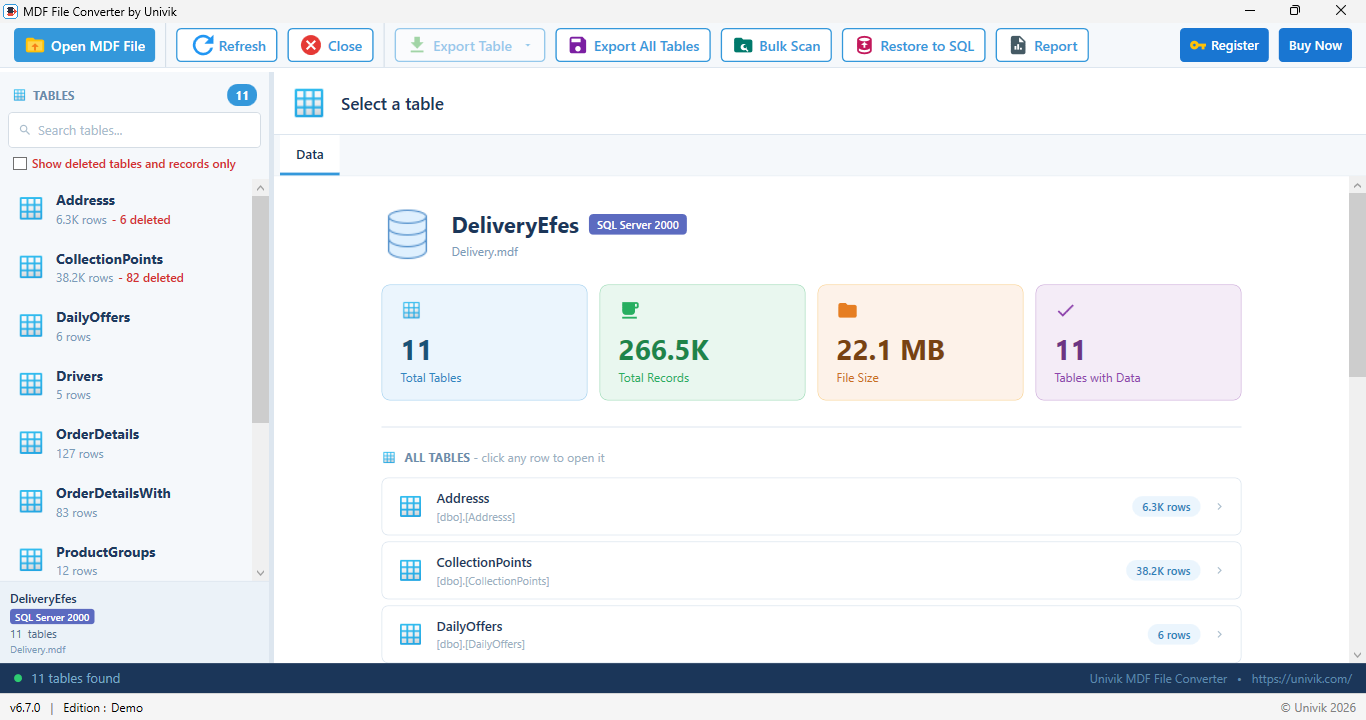
Open a SQL Server database and load every table
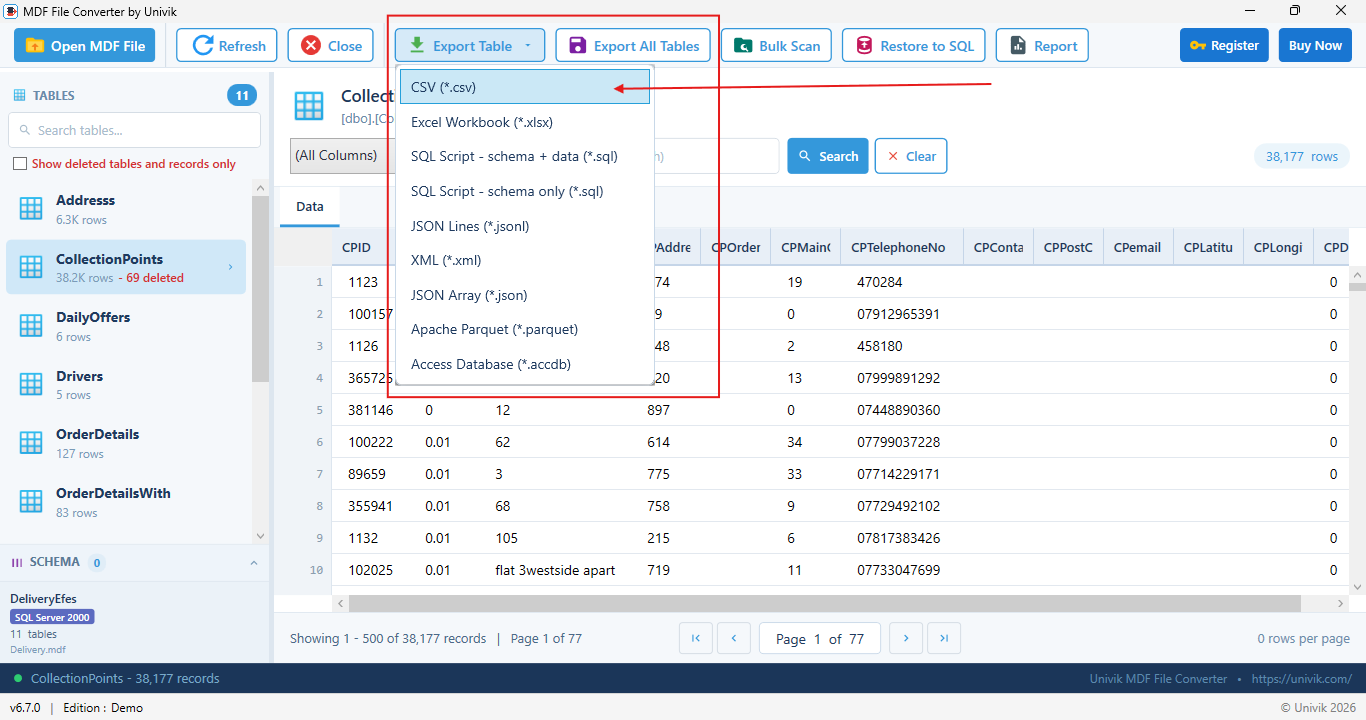
Export any table to nine formats or restore to SQL Server
 Key Features
For teams that need a whole SQL Server database out as files, with the schema intact and no server left running.
No SQL Server or Live Connection
Convert a detached or offline database straight from disk, with no SQL Server, no ATTACH and no live connection. You do not even need admin rights.
Reads the Whole Database
Not just one file. It reads the primary MDF plus every secondary NDF file and filegroup and reassembles data that spans several files.
Reads Backups Too
Open a SQL Server BAK backup directly and export the data, with no RESTORE. It reads the common compressed backup format as well, which most tools cannot.
Nine Export Formats
Save any table as CSV, Excel, SQL script, JSON, XML, Apache Parquet or Access. Parquet and JSON are ready for analytics and SQL scripts rebuild the data on any server.
Schema Accurate
Every column keeps its true data type, length and nullability. Dates, money, Unicode and large values all decode correctly.
Restore to Live SQL Server
Push the tables straight into a running SQL Server with CREATE TABLE and bulk copy, turning a file back into a working database.
Batch Export
Export one table or every table in the database in a single run, each to its own file, with a live progress report.
Read Only and Offline
The database is never changed and nothing leaves the machine. Safe for production data and suited to confidential and regulated work.
 Export Formats
Convert SQL Server to CSV, Excel, SQL, JSON, XML, Parquet or Access. Pick the format your next tool needs.
CSV
One table or the whole database
XLSX
Excel workbook
SQL
Script with schema and data
SQL
Script schema only
JSONL
JSON Lines
JSON
JSON array
XML
Structured XML
PARQUET
Apache Parquet for analytics
ACCDB
Access database
Working with a single MDF file rather than a whole database? Use the MDF File Converter.
Your schema comes with the data
The SQL script export is a faithful copy of the database, not only its rows. It keeps the full structure and every programmable object, so nothing is lost in the conversion.
 How It Works
Four steps from a database file to your data in the format you need.
Step 1: Load the Database File
Select the SQL Server MDF, NDF or BAK file. No SQL Server and no attach is needed.
Step 2: Export or Restore
Preview the tables, pick one of the nine formats and either export or restore the data to a live SQL Server.
Quick Start Guide
 Under the Hood
Univik does not depend on SQL Server to read your data. It reads the database the way SQL Server does, at the page level, straight from the file. We studied the on-disk format in depth and tested every part of the reader in our own data recovery lab, so the data you export matches the source.
Checked against ground truth. Each decoder is validated against known databases in our data recovery lab, so a value in the file and the value you export are the same. Because the reader understands the format at this level, the conversion stays faithful on real, complex databases, not only simple ones.
Written and reviewed by
Nick Rogers Founder of Univik
Nick founded Univik in 2013 and leads the team that reverse-engineered the SQL Server on-disk format. He oversees the testing of every release against known databases in the Univik data recovery lab.
 Comparison
See how it compares to scripting the export by hand.
Univik SQL Database Converter
BCP, Scripts and SSIS
 Technical Data Sheet
Product details, system requirements and compatibility.
| Product Name: | Univik SQL Database Converter |
| Version: | 6.7 (Latest) |
| File Size: | 18.4 MB |
| License Delivery: | Instant via Email |
| License Price: | Starting from $99 Buy Now |
| Free Trial: | Free Download 100% Safe & Secure |
Export Engine
What It Exports To
| Input Files: | SQL Server MDF (.mdf primary), NDF (.ndf secondary) and BAK (.bak backup, standard compressed or uncompressed). Collation detected automatically. |
| Output: | CSV, Excel XLSX, SQL script (schema and data or schema only), JSON Lines, JSON array, XML, Apache Parquet, Access ACCDB or a restore to a live SQL Server. |

| Platforms: |
|

| Prerequisites: |
|
 Pricing
Try it free, then unlock unlimited export starting from $99.
Free Trial
$0
Most Popular
Personal License
$99
Business License
$199
 Customer Reviews
What Our Customers Say
Feedback from DBAs, developers and data teams.
Marcus T.
Database Administrator
"The database was spread across a primary file and three NDF files. Univik pulled them together and exported every table in one pass, with no reattach and no server."
Elena V.
Data Engineer
"Our warehouse loads from Parquet. This wrote every table to Parquet with the correct types straight from the file, so I skipped the whole staging step."
Rahul M.
Software Developer
"A client handed me a compressed backup and no server to restore it on. Univik read the BAK on the spot and I had the tables in Excel in minutes."
 Help & Support
Common questions about converting a SQL Server database.
Yes. Univik SQL Database Converter reads the database files directly from disk, with no SQL Server, no ATTACH and no instance. You only need read access to the files and .NET Framework 4.8 or higher on Windows.
There are nine targets. CSV and Excel for spreadsheets, a SQL script with data or schema only, JSON Lines and a JSON array, XML, Apache Parquet for analytics and an Access database. Each table can use a different one.
Yes. Export any table straight to an Excel workbook or a CSV file. You can export a single table or every table in the database in one run, with the correct data types kept.
Yes. It reads the primary MDF plus any secondary NDF data files and reassembles data that spans several files and filegroups, so you export the complete database, not just one file.
Yes. It opens native SQL Server backups directly and lists the databases and files inside, without running RESTORE. It reads the standard compressed backup format as well as uncompressed backups, which most third party tools cannot do. Backups that use ZSTD compression or a non standard transfer size are detected and you are guided to restore them first.
It converts databases from SQL Server 2000 through 2025, including 2005, 2008, 2008 R2, 2012, 2014, 2016, 2017, 2019 and 2022. The version and collation are read from the file so text stays in the right code page.
Yes. Export a SQL script with schema and data to run on any server. You can also use the built in restore tool to push the tables straight into a live SQL Server database.
It reads healthy databases for export. To repair a corrupt or suspect file and bring back deleted records and dropped tables, use Univik SQL Database Recovery, which runs the same engine with recovery turned on.
The database files open in read only mode and are never modified. All output goes to new files you choose, which makes the tool safe for production data and for forensic work.
Still have questions? Contact support or Live Chat
Related Products
Explore More Univik Tools
