 Extract & Save Guide
 By
By Act! Pro, the one-time purchase edition, stopped being sold on 15 September 2023 and support for the last version ended in August 2024. Versions up to v22 are 32-bit and do not run on Windows 11. Your database is not affected by any of this. It is a file on your disk that a reader built for the format can open, so you can export the contacts and move on without buying a subscription.
You bought Act! Pro once and used it for years. Now the PC is being replaced. Windows 11 refuses the old installer. The notice on act.com says your version is retired. The only path Act! offers is a subscription at $30 to $45 per user every month.
If you still want a CRM, that path may suit you. If you only want the contacts, notes and history you already own, there is a cheaper way. This guide lays out both, with the dates and prices that apply.
- What Exactly Did Act! Retire?
- Why Does Act! Pro Not Run on Windows 11?
- Is Your Act! Pro Database Affected?
- What Are Your Options and What Do They Cost?
- How Do You Keep Your Data Without a Subscription in 3 Steps?
- Step 1: Copy the .adf and .alf pair off the old PC
- Step 2: Open the .adf on the new Windows 11 PC
- Step 3: Export to Excel, Outlook or your next CRM
- Which Option Should You Choose?
- How Do You Check You Are Safe to Retire Act! Pro?
- Act! Pro Retirement Questions
What Exactly Did Act! Retire?
Act! Pro was the one-time purchase edition, the one many small businesses bought instead of a subscription. According to the notice on act.com, Act! Pro sales ended on 15 September 2023. Pro v24 customers could keep using it, but support and updates stopped on 31 August 2024. Anyone on Pro v22 or earlier is told their version is retired.
There is a sharper detail for older versions. The notice says v17 and earlier contain a retired licensing component, so a reinstall can block access to the program completely. In plain words: if you move an old Pro to a new PC, it may never activate again.
Why Does Act! Pro Not Run on Windows 11?
Windows 11 is 64-bit only. Act! resellers state that every 32-bit Act! release that shipped with SQL Server 2014, which covers Pro v21 and v22, is incompatible with Windows 11. Act!'s compatibility matrix and its resellers put dependable Windows 11 support at v24 and later. So a Pro v21 installer either fails on a new PC or installs and then cannot start its database service.
Pro v24 does run on Windows 11, but it was only ever sold to existing customers, sales ended in 2023 and it no longer gets fixes.
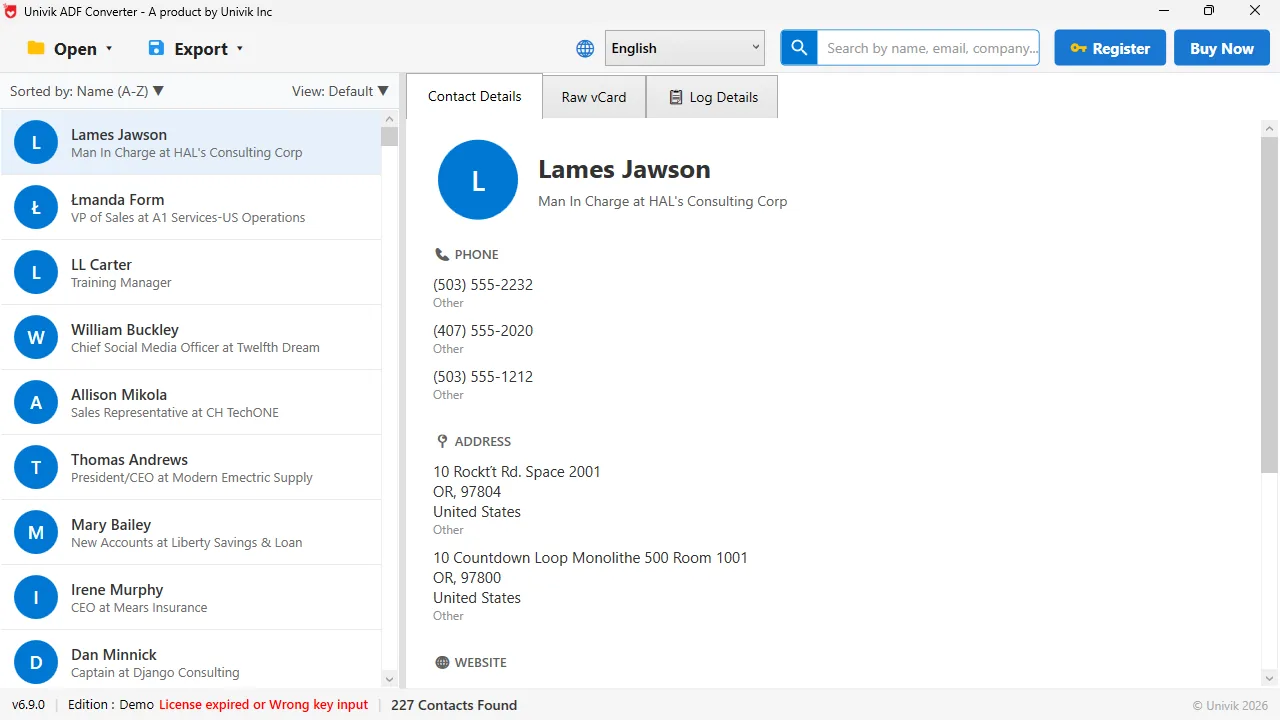
Windows 11, no Act! Pro needed The database from a retired Act! Pro install, read on a new PC. 227 contacts came up with no subscription and no installer.
Is Your Act! Pro Database Affected?
No. Act! keeps your data in an .adf file with an .alf beside it, stored under Documents, ACT, ACT Data, Databases on the PC that ran Act!. Retiring the software did nothing to that file. Every contact, company, note, history entry and opportunity is still in it.
What changed is the number of programs that can open it. Act! Pro cannot install on the new PC, and the subscription editions want money every month. A reader that parses the .adf directly is the third choice, and it needs neither.
What Are Your Options and What Do They Cost?
Act!'s pricing page in September 2026 lists Act! Premium Desktop at $40 per user per month billed yearly, and the Act! Advantage cloud plans at $30, $45 and $60 per user per month billed yearly, with a 14-day free trial. For one user that is $480 a year for the desktop edition before any add-ons.
Keeping the old Pro alive on a Windows 10 machine works for a while, but Windows 10 itself left support in October 2025, so it is a stopgap and not a plan. The last route costs $39 once: read the .adf directly, export everything to files you own and retire Act! Pro for good.
How Do You Keep Your Data Without a Subscription in 3 Steps?
This works even if the old PC no longer starts Act!, because it only needs the files.
Copy the .adf and .alf pair off the old PC
On the old machine, open Documents, then ACT, ACT Data and Databases. Copy the .adf and the .alf that share your database name to a USB stick or a network folder. If the old PC is dead but the drive works, plug the drive into another PC and copy from the same path under the old user profile.
Open the .adf on the new Windows 11 PC
Install Univik ACT ADF Converter on the new PC and open the copied .adf. It reads the database with no Act!, no SQL Server and no activation. The summary tells you how many contacts and history records the file holds, so you can see at once that nothing was lost in the copy.
Export to Excel, Outlook or your next CRM
Choose Excel for a workbook with every table on its own sheet, PST to put the contacts in Outlook, vCard for your phone or CSV for a CRM such as HubSpot or Zoho. Each note and history row keeps its date and names the person it was written about. From here Act! Pro is no longer needed for anything.
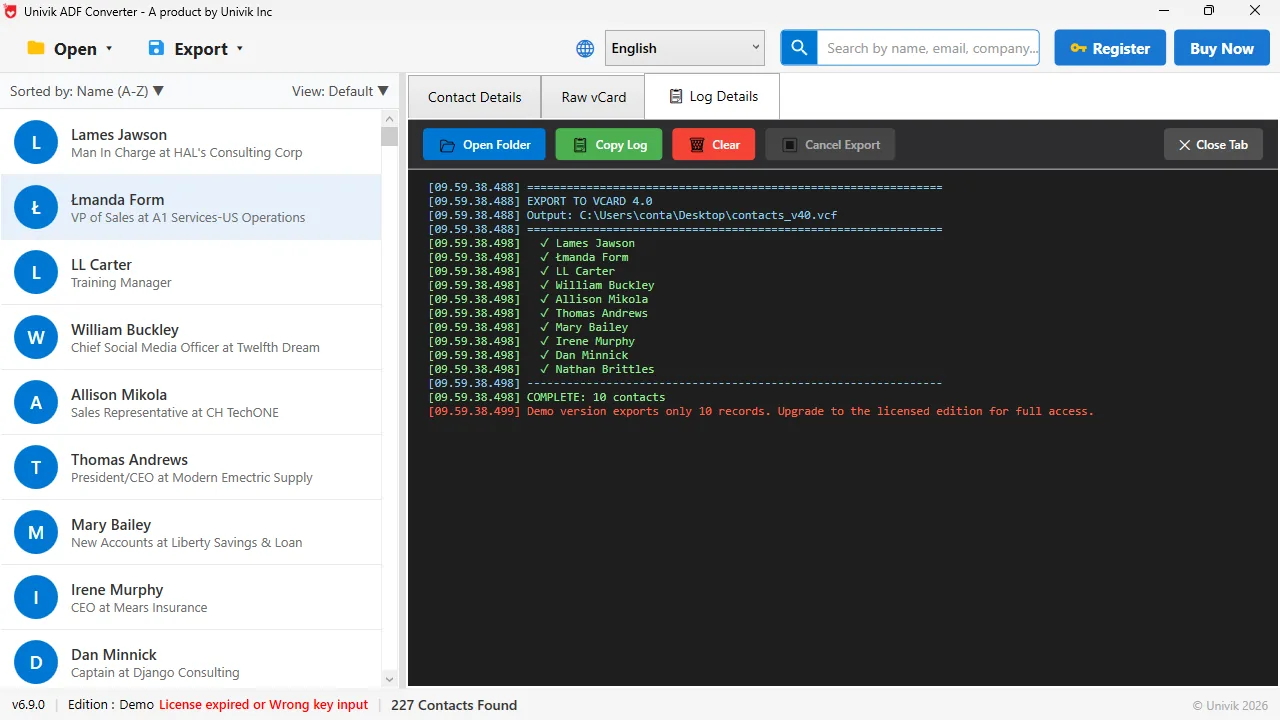
Done in one run Each name is ticked as it is written. The demo caps at 10 records so you can test on your own file before paying.
Act! Pro customers paid once and expected to keep what they bought. The program has gone, but the database file they paid to build is still theirs. Reading that file directly is how they keep it.
Univik ACT ADF Converter opens Act! Pro databases on Windows 11 with no Act! installed. Export the contacts, notes, history and opportunities once for $39 and never renew again.
Windows 11 / 10 / 8 / 7 · reads Pro v17 to v24 databases · the free trial exports the first 10 contacts, the full version has no limit
Which Option Should You Choose?
Here are the four routes side by side.
| Option | Cost | Runs on Windows 11 | Keeps notes and history | Best when |
|---|---|---|---|---|
| Subscribe to Act! Premium Desktop | $40 per user per month, billed yearly | Yes | Yes, inside Act! | You use Act! every day and want new features |
| Subscribe to Act! Advantage (cloud) | $30 to $60 per user per month, billed yearly | Yes, browser | Yes, after migration | You want Act! in the cloud |
| Keep old Pro on a Windows 10 PC or VM | Free, but Windows 10 support ended in October 2025 | No | Yes, while it runs | A short stopgap only |
| Export once with Univik ACT ADF Converter | $39 one time | Yes | Yes, exported to files | You want the data, not the software |
If your team still logs calls and deals in Act! every day, the subscription is the honest answer. The free trial lets you test it. If Act! is only where the old contacts live, paying every month to look at them makes no sense. Export once and use the files.
How Do You Check You Are Safe to Retire Act! Pro?
- The contact count in the export matches the count the old Act! showed on its status bar
- The notes and history sheets have entries from the first year you used Act! as well as the last
- You have kept the .adf and .alf pair in two places, one of them off the old machine
Keep the database files even after the export. They are small, and a second export later is free.
The short version
- Act! Pro sales ended on 15 September 2023. Support for Pro v24 ended on 31 August 2024. Pro v22 and earlier are retired.
- Act! versions up to v22 are 32-bit and are not compatible with Windows 11.
- The retirement changes the program, not the .adf database file on your disk.
- Act! offers a subscription. Premium Desktop is $40 per user per month billed yearly.
- If you only need the data, copy the .adf and .alf, open them without Act! and export once for $39.
Try Univik ACT ADF Converter free
Act! Pro Retirement Questions
Is Act! Pro still sold?
No. According to act.com, Act! Pro sales ended on 15 September 2023. Existing Pro v24 customers could keep using it, and support for v24 ended on 31 August 2024.
Does Act! Pro v21 work on Windows 11?
No. Act! resellers state that the 32-bit Act! releases that shipped with SQL Server 2014, including Pro v21 and v22, are not compatible with Windows 11. Dependable Windows 11 support starts at v24.
Can I reinstall my old Act! Pro on a new computer?
Act!'s notice says v17 and earlier include a retired licensing component, so a reinstall may block access. Resellers add that v16 and older cannot be activated at all. Back up the .adf and .alf before you try.
What does the Act! subscription cost after Pro?
In September 2026 act.com lists Act! Premium Desktop at $40 per user per month billed yearly and the Act! Advantage cloud plans at $30, $45 and $60 per user per month billed yearly.
Can I keep my Act! Pro contacts without subscribing?
Yes. Copy the .adf and .alf files, open the .adf in Univik ACT ADF Converter on any Windows PC and export the contacts, notes and history to Excel, CSV, vCard or PST. It costs $39 once.
Which Act! Pro versions can the converter read?
Any Act! Pro database from ACT! 2005 onward, which covers Pro v17 through v24, because they all use the same .adf and .alf pair. ACT! 3 to 6 used .dbf files, a different format.
 About This Guide
Written and maintained by Leena Taylor Paul and the Univik team, developers of Windows data conversion and recovery software since 2013. We opened ACT! databases on a Windows 11 PC in September 2026 and checked every date and price in this guide against act.com and Act! reseller pages on the same day. Last verified September 19, 2026. Need a hand? Contact our support team.
Sources checked: Act!: Important Notice for Act! Pro Customers · Act! CRM pricing · Act! Compatibility Matrix · Univik ACT ADF Converter