 Email Backup Guide
 By
By Back up your mail first, then close the account. Add it to desktop Outlook, set the sync slider to All and export a PST. Then sign in on Microsoft's closing page, tick each item on the list, choose a 30 or 60 day reopen window and click Mark account for closure. When the window ends, Microsoft deletes your data and content. After that the account cannot be reopened.
Closing takes a few clicks, and that is the risk. When you close your Microsoft account, the last button starts a countdown. When it ends, Microsoft deletes it and the mail inside it. Nobody wants to learn that after the window has closed. This guide puts the steps in a safer order: save a copy of your email, check it and then close the account.
- Before you close your Microsoft account
- What happens to your emails
- Back up your Outlook.com emails first
- Route 1: Export a PST with Outlook
- Route 2: Save the mail in more formats
- How to close your Microsoft account
- How long you can reopen it
- Business, work or school accounts
- Backup route comparison
- Check before you close
- Fix common problems
- Microsoft account closing questions
Before You Close Your Microsoft Account
Which kind of account are you closing? That decides the steps, so pick the card that fits.
- Your sign-in detailsMicrosoft asks you to sign in and verify before it lets you close the account. If you have reset all your verification details, you must wait 60 days before you can close it.
- Desktop Outlook for the exportMicrosoft's own export needs a desktop version of Outlook. Its page points to a free 30-day trial of Microsoft 365 if you do not have one.
- Room on a drive for the copyThe copy is a file on your PC. Save it to a normal folder and not to OneDrive, because OneDrive blocks automatic sync of Outlook PST files.
- A list of what else the account holdsThis guide saves the email. Rewards points, your Xbox gamertag, purchased content and subscriptions sit on the same account. Check them against Microsoft's list.
- Reopen window
- The 30 or 60 days you choose when you mark the account for closure. You can sign in and reopen it inside the window.
- Mark account for closure
- The last button on Microsoft's closing page. It starts the countdown to deletion.
- Outlook Data File
- A PST. It holds a copy of mail, contacts and calendar items. Outlook writes one when you export.
- Modern Auth
- Also called OAuth2. It is the sign-in method that Outlook.com requires from mail apps.
- Inactive account
- An account with no sign-in for two years. Microsoft may close it.
What Happens to My Emails When I Close My Microsoft Account?
Microsoft deletes them. Its help page says that once the account is closed and the reopen window has passed, it deletes your data and your content. The mailbox is part of that data.
Searches for close, delete and cancel all point to one process. You close the account, then Microsoft deletes it when the window ends. The closing page closes the whole account and not only the mailbox. Xbox, subscriptions and purchased content sit on the same account.
That covers every address you read through Outlook.com. Microsoft says Hotmail.com and Live.com addresses are now reached through Outlook.com. A Hotmail or Live mailbox needs the same backup as an Outlook.com one.
Do not count on reading mail once you press the last button. Take the copy before the countdown starts.
Reopening works only inside the window you chose. After the window passes, Microsoft's page says you can no longer reopen the account.
How to Back Up Your Outlook.com Emails Before You Close the Account
Add the account to desktop Outlook, set the sync to All and export the mailbox to a PST. Microsoft documents this as its route for an Outlook.com mailbox. The file holds a copy of your email, contacts and calendar up to the day you create it.
Two routes follow. The first is Microsoft's own export. The second adds more file formats.
Route 1: Export a PST with Outlook
- Get desktop OutlookMicrosoft says you need a desktop version of Outlook for this. If you do not have one, use the free 30-day Microsoft 365 trial that its page offers.
- Add your Outlook.com addressOpen Outlook, add the address as an account and sign in with your Microsoft account. Wait until every folder has loaded. Microsoft warns that a large mailbox can take a long time.
- Set the sync to AllOutlook downloads only the past 1 year of mail by default. Open Account settings, then Account Name and Sync Settings, and move the slider to All. Without this the PST misses older mail.
- Export the accountIn classic Outlook choose File, Open & Export, Import/Export, Export to a file, then Outlook Data File (.pst). Select the Outlook.com account, keep Include subfolders ticked and click Finish. In new Outlook go to Settings, Files, Export and select Get started.
- Check the copyCount the messages in Inbox and Sent Items. The totals should match Outlook.com in your browser. Open a few messages that have attachments.
Outlook exports one account at a time and includes the attachments. It does not export message rules or the blocked senders list, so write those down if you need them.
Route 2: Save the Mail in More Formats with Univik Email Converter
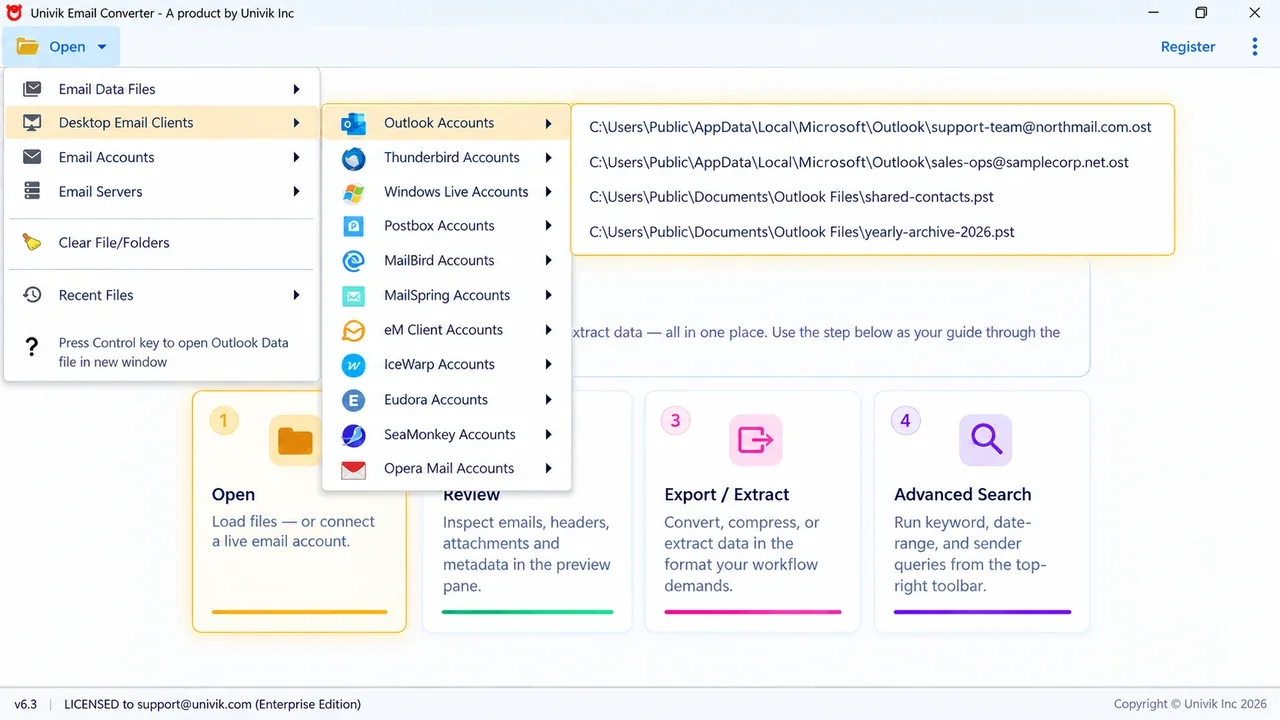
A PST is an Outlook file. If the copy must open in Thunderbird, move to another provider or sit in a folder as PDF, convert it. Univik Email Converter reads the Outlook data file already on your PC and writes the mail to the format you choose.
- Finish Route 1 steps 1 to 3 firstInstall the software on the Windows PC where Outlook holds your Outlook.com account. Set it up in Outlook with the sync slider on All, or the data file holds only 1 year of mail.
- Open the Outlook data fileClick Open, then Desktop Email Clients and Outlook. The software lists the OST and PST files it finds on the PC. Pick the file for your Outlook.com address.
- Choose folders and datesTick only the folders you want to keep. Set a date range if the mailbox is large.
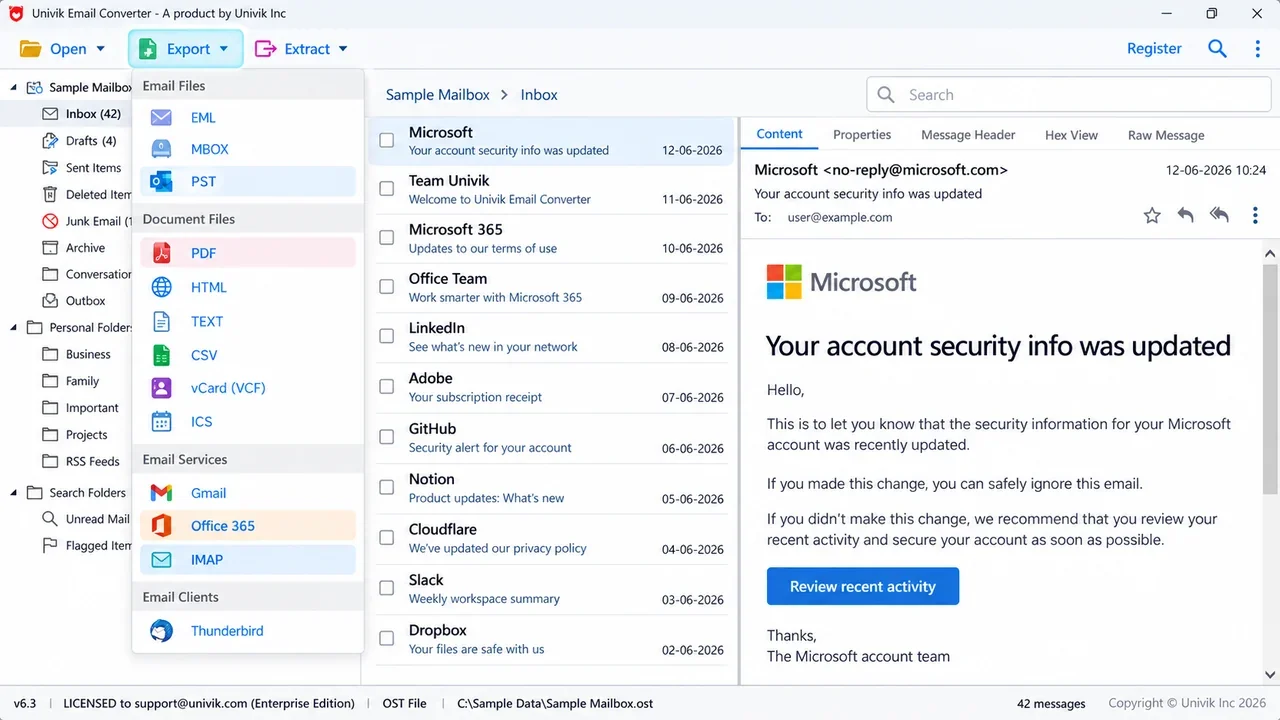
- Pick the outputThe Export menu offers EML, MBOX and PST, then PDF, HTML, TEXT, CSV, vCard and ICS. It can also send mail straight to Gmail, Office 365, an IMAP account or Thunderbird.
- Preview the resultThe three-pane view shows the folder tree, the message list and a preview. Spot-check a few messages before you close the account.
Everything is converted on your PC. Nothing is uploaded. If PST is all you need, Route 1 is free and enough. Use the converter when the copy has to open outside Outlook.
Univik Email Converter reads your Outlook data file and saves the mail as PST, EML, MBOX or PDF. Check the output with the free trial first.
Windows 11 / 10 · the free trial handles 10 emails per folder · Personal licence $99 once for 2 PCs with a 30-day money-back guarantee · See all features
How Do I Close My Microsoft Account?
Sign in on Microsoft's closing page, confirm every item on its list, pick a reopen window and click Mark account for closure. Do this only after you have checked the backup. These steps close a personal Microsoft account.
- Check the backupOpen the PST or the converted files and confirm your mail is in them.
- Sign in on Microsoft's closing pageOpen Microsoft's page How to close your Microsoft account and use its Close account button. You must be able to sign in. If you cannot, use Microsoft's Sign-in helper first.
- Confirm the accountCheck that the page shows the right Microsoft account and click Next.
- Read the list and tick each boxMicrosoft asks you to tick a box for each item on its list. Read each one before you tick it.
- Choose the reopen windowPick 30 days or 60 days. Pick 60 if you are not sure.
- Select a reasonChoose an explanation from the Select a reason drop-down list.
- Mark the account for closureClick Mark account for closure. The countdown starts.
How Long Can I Reopen a Closed Microsoft Account?
You choose 30 or 60 days when you mark the account for closure. To reopen it, go to account.microsoft.com, sign in and enter the security code Microsoft sends. Your subscriptions, profile and content come back, including rewards points, your Xbox gamertag, your Gamerscore and purchased content.
Time left on a subscription returns too. You do not get back the days that passed while it waited to close. After the window ends it is permanently deleted.
Microsoft can also close an account you never use. Its activity policy asks you to sign in at least once in two years. An account with no sign-in in that time counts as inactive. A current subscription or an unspent balance keeps an account active. If an old mailbox still matters to you, back it up even if you do not plan to close it.
How Do I Close a Microsoft 365 Business, Work or School Account?
You cannot close it yourself. An administrator removes the user account from the Microsoft 365 admin center. Microsoft tells staff to contact the technical support at their work or university.
The admin has 30 days to restore a deleted user before the data is permanently deleted. Microsoft tells admins to move the user's email to another place before they delete the account. If the user is already deleted and 30 days have not passed, the admin can restore it, move the mail and then delete it again.
With an Enterprise subscription such as Office 365 Enterprise E3, an admin can keep the mailbox by turning it into an inactive mailbox. An admin who needs PST files can use our guide to exporting an Office 365 mailbox to PST.
If you are leaving the company and want a copy of your own mail, ask IT first. Work mail is usually the company's property, so check the rules before you copy it.
Which Backup Route Should You Use Before You Close the Account?
Pick by the format you need and by who owns the account.
| Route | Who | Output | Needs Outlook | Cost | Watch for |
|---|---|---|---|---|---|
| Classic Outlook export | Personal account owner | PST | Yes | Free with Outlook | Sync slider must be on All |
| New Outlook, Settings, Files, Export | Personal account owner | PST | Yes | Free with Outlook | Microsoft says PST support in new Outlook covers email only |
| Univik Email Converter | Account owner or IT | Email files (PST, EML, MBOX) or document files (PDF, HTML, TXT, CSV, vCard, ICS). It can also send mail to Gmail, Office 365, IMAP and Thunderbird | Yes, it reads Outlook's data files | Trial: 10 emails per folder. Licence: $99 | Windows only |
| Purview eDiscovery export | Microsoft 365 admin | PST | No | Included in E3 and E5 | Needs an eDiscovery role |
Check the Backup Before You Close the Account
- The Inbox and Sent Items counts in the copy match what Outlook.com shows in your browser
- A few messages with attachments open from the PST or the converted files
- The copy sits on a second drive or a USB stick as well as your PC
- You have listed every site and app that uses this address to sign in or reset a password
- Your contacts and calendar are saved if you still need them
Keep the copy for as long as you might need the mail. Name the file with the date you created it so you know how recent it is.
Fix Common Problems When You Close Your Microsoft Account
Three problems come up most often. Each box names the symptom and then gives the repair.
Do this: Microsoft says you must be able to sign in. Use its Sign-in helper. If you have reset all your sign-in verification details, you must wait 60 days before you can close the account.
Do this: Outlook downloads only the past 1 year by default. Move the slider in Account Name and Sync Settings to All and wait for the mail to load. Then export again. Microsoft adds that if Cached Exchange Mode is on, Outlook exports only what is in its cache.
Do this: Outlook.com turns POP and IMAP off by default. Turn them on under Settings, Mail, Forwarding and IMAP. Microsoft also says Outlook.com requires Modern Auth, with the server outlook.office365.com on port 993 for IMAP. If the app cannot use OAuth2, Microsoft says you may need an app password. If that fails too, use the Outlook route.
Unsure which route suits your mailbox? Contact our support team with the mailbox size and the format you need, and we will suggest one.
Microsoft Account Closing Questions
 About This Guide
Guide by Leena Taylor Paul with the Univik team. Univik has made Windows tools for converting and recovering data since 2013. The closing steps, the 30 and 60 day window, the two-year rule and the Outlook.com export route were checked against Microsoft's published help pages on October 11, 2026. The converter details come from the Univik Email Converter product page.
Sources checked: Microsoft: how to close your account · Microsoft: reopen your account · Microsoft: account activity policy · Microsoft: export your Outlook.com mailbox · Microsoft: export mail to an Outlook .pst file · Microsoft: Outlook.com POP and IMAP settings · Microsoft: Hotmail and Outlook.com · Microsoft Learn: delete a user from your organization