 Google Vault Guide
 By
By Google Vault exports Gmail as MBOX or PST, neither of which is a fixed record you can file or produce. Convert the export to PDF for one PDF per email, or a single bundled file, with the headers, dates and attachments kept. Use a converter that reads the Vault metadata XML so the custodian and Gmail labels stay attached to each page. This runs on Windows with no Outlook needed.
PDF is the format a court file, a regulator or a records team expects, because it opens on any machine and reads the same for everyone. A Vault mailbox export does neither of those on its own. So the job is to turn the matter export into PDFs without losing the header and custodian detail that makes each email hold up as evidence, not only text.
The steps below do that from the download onward. After them is a note on the PDF layout choices and an honest look at the slower routes people try first.
Why Turn Vault Email into PDF?
A Google Vault export hands you a mailbox file. To read it you need a mail client. The messages can be altered. Every custodian's mail may sit in one folder. None of that suits a filing, a production or a retention archive, where the reader wants a page that cannot change and opens without special software.
PDF is that page. Each email becomes a fixed document with the From, To, Subject and date printed on it and the attachments carried along. It is the same reason legal and compliance teams ask for PDF rather than a PST. The trick is doing it in bulk while keeping the Vault metadata, which the steps handle.
How Do I Convert a Vault Export to PDF?
Four steps, about fifteen minutes plus the download. Nothing else needs to be installed on the machine.
Run and download the Vault export
In Google Vault open the matter, run the search and click Export. When it finishes, download the ZIP from the Exports tab. Do it inside 15 days, after which Google removes the export. Unzip it to find the Gmail as MBOX or PST, plus the metadata XML that holds the custodian, labels and dates.
Open the export in the converter
Launch Univik Google Vault Converter and load the unzipped export with the Add ZIP or Add Folder control. It parses the Gmail messages together with the metadata XML, so every email keeps its custodian and header data as it moves toward PDF. The program runs on Windows with no Outlook and no Google sign-in.
Choose PDF and set the layout
Select PDF as the output. Decide the layout: a separate PDF for each email, or one combined PDF for a whole folder or custodian. Turn on attachment handling so files inside the mail are embedded or saved alongside. A naming pattern by date, sender or subject keeps a large set in order.
Convert and check the PDF set
Start the conversion. Each PDF shows the From, To, Subject and date at the top, the message body below and the attachments kept with it. Open a few to confirm the custodian and dates read correctly against the Vault metadata before you file or produce the set.
One PDF per Email or a Bundle?
Both have a place. A separate PDF per email suits a production where each document is tracked on its own, tagged and numbered. Name them by date, sender or subject and a thousand-message set stays navigable. A single combined PDF suits a reviewer who wants to page through a custodian's mail in one file, or a records copy that lives as one document.
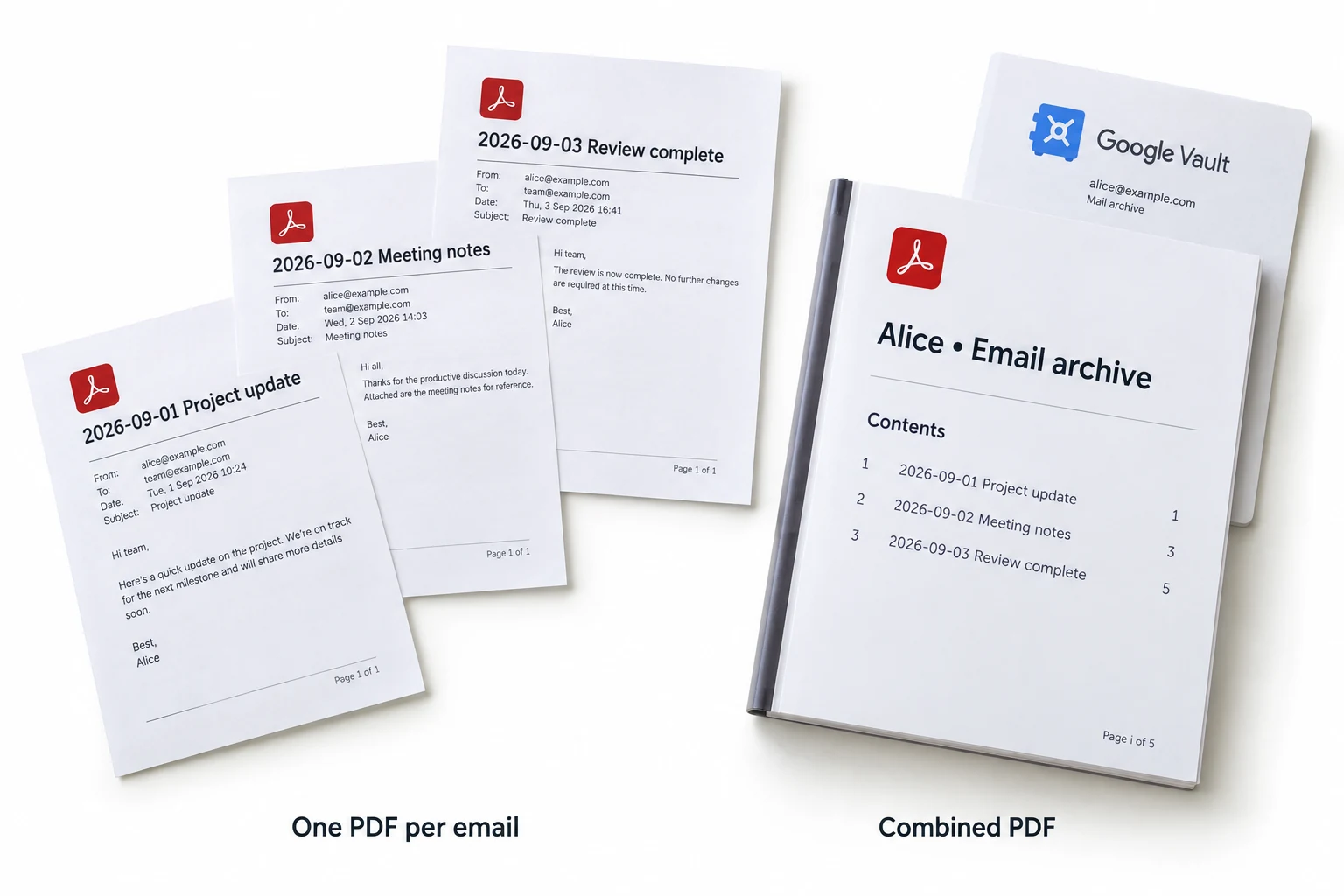
Univik Google Vault Converter offers both from the same export, so you are not locked into one shape. For a large matter, a per-custodian bundle is a common middle ground: one PDF for each person, each holding their messages in date order.
People try to print emails one by one and give up around the tenth. The value of a converter here is not the PDF itself, it is doing a whole matter in one pass with the header block and attachments still on every page.
What About Vault Email Attachments?
Attachments are where a print-to-PDF shortcut falls down, because it captures the message but drops the files. In a Vault export the attachments are inside the mail, and a proper conversion keeps them: embedded in the PDF or saved beside it, with inline images left in the body where they belong.
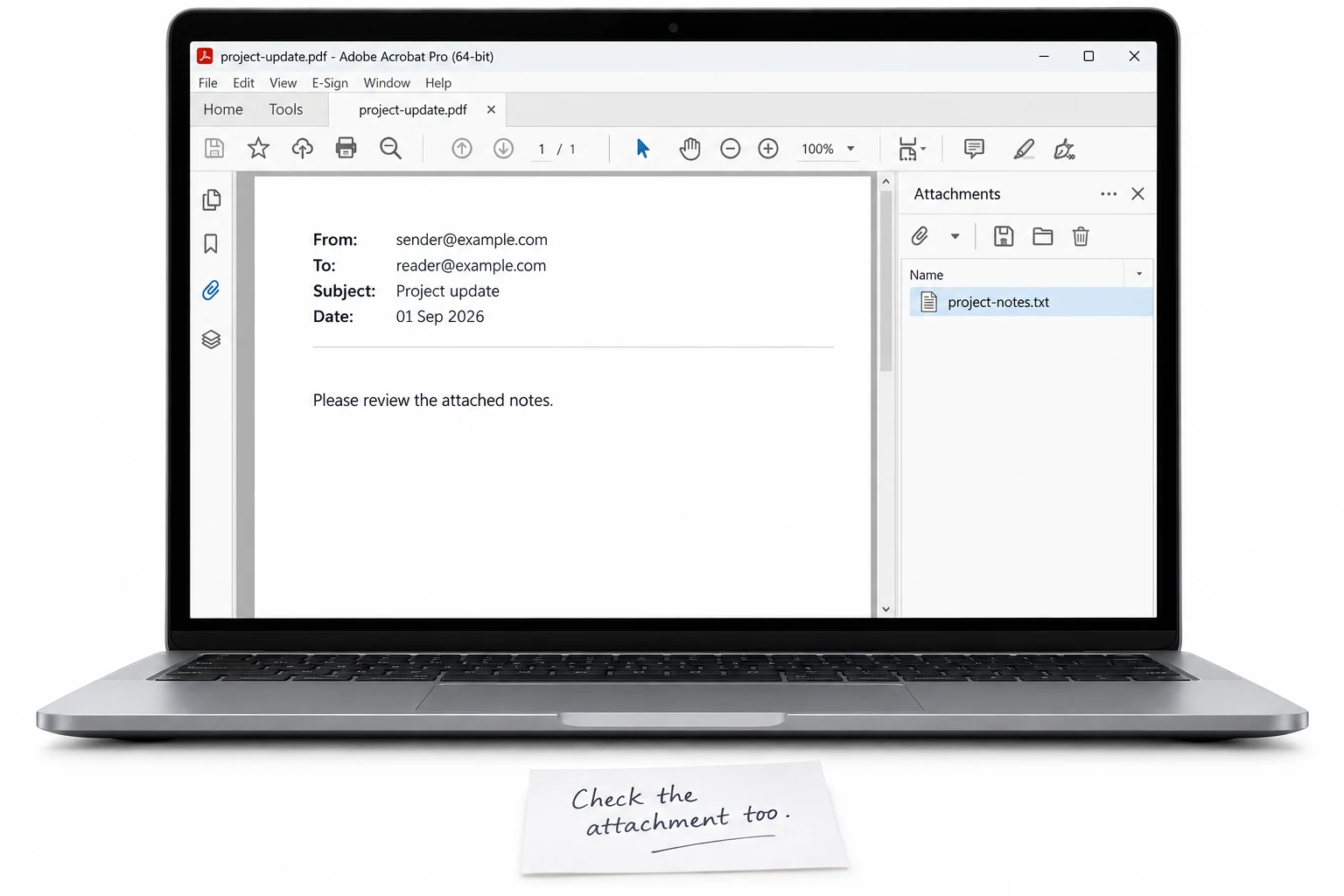
One caveat from Google's own export. If an attachment was deleted from Gmail before the Vault export ran, Vault notes it in the error report rather than inventing a file. Univik Google Vault Converter surfaces those flags, so a missing attachment shows up as a known gap instead of a silent one.
Which PDF Route Is Best?
Three ways reach a PDF from a Vault export. Only one does it in bulk with the evidence detail intact.
| What you need | Read the MBOX | Print from Outlook | Convert to PDF |
|---|---|---|---|
| Fixed, non-editable record | No | Yes | Yes |
| One file per email option | No | One at a time | Yes, batch |
| Attachments kept with the email | N/A | Manual | Yes |
| Custodian and header data on the page | No | No | Yes, from the XML |
| Filter by custodian or date | No | No | Yes |
| Good for | Reading only | A few emails | Review, records, court |
Univik Google Vault Converter reads the export ZIP and its metadata XML, then writes one PDF per email or a bundled file, with headers, attachments and custodian data kept. It also saves PST, MBOX, MSG and EML. It can filter by custodian or date.
PDFs are built with no Outlook present · supports Windows 7 through 11 · the trial covers 25 messages per export
The short version
- Vault gives MBOX or PST, which is not a fixed record for a filing or a production.
- Convert the export to PDF: one PDF per email, or a combined file.
- Keep the headers, dates and attachments. Read the metadata XML for the custodian.
- Filter by custodian, date or label to produce only what a review needs.
- Deleted attachments show as flagged gaps from Vault's own error report.
Convert Google Vault email to PDF, free trial
Google Vault PDF Questions
 About This Guide
Written for Univik by Leena Taylor Paul, from Univik's work with email exports since 2013. The Vault export contents, the metadata XML fields and the deleted-attachment error behaviour were verified against Google’s published Vault Help pages in September 2026. The PDF layout options were tested on a Gmail matter export that carried attachments. 23 September 2026. A PDF not showing an attachment? Support is a click below.
Sources: Export data from Google Vault · What a Vault export contains · Univik Google Vault Converter page