 Recovery Guide
 By
By To recover mailboxes from a crashed Zimbra server, stop trying to boot the old install. Copy /opt/zimbra from the old disk to a Windows PC: at least store and db/data, plus redolog if it exists. Open the copy in offline recovery software that reads the .msg blobs and the MariaDB InnoDB tables together, then export each mailbox as a Zimbra TGZ archive with its folders, read state, flags, tags, dates, contacts and calendar. Import the TGZ into a fresh Zimbra 10.1 through Preferences, Import/Export or with zmmailbox postRestURL. A Zimbra Desktop profile folder works the same way.
The disk failed. The power went out mid-write. A ransom note appeared in the store folder. Zimbra will not start, and the one thing everyone wants after a Zimbra server crash is the mail. The good news: Zimbra Collaboration keeps every message as a plain file under /opt/zimbra/store and the folder tree, flags and tags in MariaDB tables under /opt/zimbra/db/data. If you can copy those two folders, you can get the mailboxes back without the old operating system, the old Zimbra build or a working LDAP.
This guide covers what to copy from the dead disk, why Zimbra's own restore routes fail without a running server and how to rebuild every mailbox with Univik Zimbra Mailbox Recovery, which opens the copy on a Windows PC and exports TGZ, PST or an IMAP upload. It then shows the import into a new Zimbra, with links for Outlook, Thunderbird and Microsoft 365. The discontinued Desktop client gets its own section. If the server is encrypted or you would rather hand the job over, our team recovers the mailboxes for you. Already have a clean export and only need it in Outlook? See how to convert Zimbra to PST.
- Before you start a crashed Zimbra server recovery
- Where Zimbra keeps the mail on disk
- Why the usual Zimbra restore routes fail (with a route comparison)
- Recover the mailboxes in 6 steps
- Step 1: Copy the Zimbra data folder to a Windows PC
- Step 2: Open the folder in Univik Zimbra Mailbox Recovery
- Step 3: Tick the Zimbra mailboxes and folders you need
- Step 4: Search the mailboxes when only some messages matter
- Step 5: Export to Zimbra TGZ, EML or MBOX
- Step 6: Import the recovered mailboxes into Zimbra
- Zimbra recovery test results and benchmarks
- Zimbra Desktop data folder recovery
- Zimbra ransomware recovery
- Done-for-you Zimbra recovery service
- Fix common Zimbra recovery problems
- Crashed Zimbra server recovery questions
Before You Start a Crashed Zimbra Server Recovery
You need a copy of the Zimbra data, a Windows PC with space and a target for the mail. Three situations bring people here. Pick the card that matches yours.
- The copied Zimbra data folderFor a server, the /opt/zimbra tree (store, db/data and redolog; index is optional). For the Desktop client, the whole profile folder. Copy, never move.
- A Windows PC with free disk spaceRoom for the copied folder plus the export: count on the size of the store folder twice over. An external drive is fine, USB 3 or faster.
- A list of the mailboxes people need firstAccounts are recovered one by one, so the order matters when the sales inbox is wanted today and the rest next week.
- A target for the recovered mailA fresh Zimbra install takes TGZ. Thunderbird takes EML or MBOX. Outlook and Microsoft 365 take PST.
Where Zimbra Keeps the Mail on Disk
Zimbra keeps mail in two places: message blobs as files under /opt/zimbra/store and the mailbox structure in MariaDB tables under /opt/zimbra/db/data. Both survive a crash far more often than the running services do.
| Folder on the server | What is inside | If it is missing |
|---|---|---|
/opt/zimbra/store | One .msg blob per message at store/0/<mailbox ID>/msg/0/<item ID>-<revision>.msg; the two 0 levels count up once an ID passes 4096. A message sent to several local users is stored once and hard-linked into each mailbox folder. store/incoming holds mail delivered seconds before the crash. | No recovery Nothing to rebuild from. Check the old disk again or an older backup. |
/opt/zimbra/db/data | MariaDB or MySQL InnoDB .ibd files. The zimbra database maps mailbox IDs to addresses in the comment column of its mailbox table. mboxgroup1 to mboxgroup100 hold folders, flags, tags, dates and the SHA-256 blob digest of each item in mail_item. | Partial Messages come back as loose files with no folder tree, no read state and no owner name. Contacts and calendar are lost. |
/opt/zimbra/index | Lucene search index per mailbox. | Fine Rebuilt by the server after import. Not needed for recovery. |
/opt/zimbra/redolog | redo.log plus archive/redo-*.log, rolled over every 100 MB: operations not yet committed to the database, readable with zmredodump on a Zimbra install. | Fine Copy it when it exists; only the final operations before the crash are at risk. |
/opt/zimbra/data/ldap | OpenLDAP in mdb/db/data.mdb: zimbraId, mail address, aliases and display name per account, plus passwords, domains and server settings. | Fine for mail Mailboxes recover without it. Accounts are recreated on the new server before import. |
/opt/zimbra/backup | Network Edition only: accounts.xml plus sessions/full-* and incr-* sets. Zextras Backup writes its tree under backup/zextras. | Fine A zmrestore or Zextras restore from it onto a fresh server covers everything up to the backup date. |
/opt/zimbra/conf/localconfig.xml | zimbra_mysql_password, LDAP keys and service settings. | Fine Only needed to revive the old install, which this guide does not attempt. |
The Desktop client uses the same layout on a smaller scale. On Windows the profile lives in C:\Users\<name>\AppData\Local\Zimbra\Zimbra Desktop, with a store folder of .msg files, a sqlite folder for the metadata database and an index folder. On a Mac it is ~/Library/Zimbra Desktop, on Linux ~/zdesktop. Copy the whole folder, not only the store. Carbonio, the Zextras fork, uses the same store plus MariaDB layout, so the same copy list applies.
Never run zmfixperms, a reinstall or a repair script on the only copy you have. Stop the services with zmcontrol stop, copy the folder, then work on the copy. A recovery tool that opens the copy read-only cannot make things worse.
Why the Usual Zimbra Restore Routes Fail on a Dead Server
Zimbra's own restore routes all need either a running server of the same release or a backup taken before the crash. Forum threads go through the same four ideas; each works in a narrow case.
The official Open Source route. It needs the exact old build on the same operating system, a healthy LDAP and the old passwords. An 8.8.12 copy and an 8.8.15 installer give a version mismatch. The old builds are also out of support: 8.8.15 reached end of technical guidance on 31 December 2024, 9.0 and 10.0 ended on 30 June 2025 and only 10.1 is current, so a rebuilt old server starts life unpatched. The copy often carries the fault that crashed it.
Only the Network Edition has zmrestore, zmrestoreoffline and zmrestoreldap. All three need a backup session under /opt/zimbra/backup made before the crash and a working server of the same release to run inside. Zextras Backup has zxsuite backup doExternalRestore, which needs the backup/zextras tree, a licence and a running server. On the Open Source Edition with no backup module there is nothing to run.
Scripts walk the store and feed every .msg file into one folder with zmmailbox addMessage, or re-deliver it with zmlmtpinject over LMTP port 7025, which drops everything in the Inbox and runs the filters. Without mail_item there is no owner, no folder, no read state, no tags and no calendar.
innodb_force_recovery, mysqldump of every mboxgroup, zmblobchk to reconcile blobs, the btactic zmblobrescue script to match lost+found files to blob_digest, db_recover on data.mdb. It can work when the damage is small. When the tables are marked crashed or LDAP reports MDB_CORRUPTED, the advice from Zimbra staff is the same: LDAP is restorable but not repairable.
The offline route avoids all four. It reads the InnoDB .ibd files without MariaDB running and the blobs as plain mail (gzip-wrapped above a size threshold). No old build, old OS or LDAP is needed.
Which Zimbra restore route to choose
| Route | What it needs | Folders, flags and tags | Choose it when |
|---|---|---|---|
| zmrestore or Zextras restore from a pre-crash backup | Network Edition or Zextras licence, a backup session, a fresh server of the same release | Kept | A backup exists and a server is ready. The best route for everything up to the backup date. |
| Reinstall the old build and copy /opt/zimbra back | The exact old build and OS, a healthy LDAP, the old passwords | Kept if LDAP and MariaDB start | Installation media on hand and LDAP intact. You accept an unsupported build. |
| zmmailbox addMessage or zmlmtpinject | A running server and the store files | Lost One folder, no owner | A handful of loose messages and nothing else to work from. |
| Offline rebuild from the copy (this guide) | The copied store and db/data, a Windows PC | Kept | No backup. The old build is gone, LDAP or MariaDB is damaged or the server ran the Open Source Edition. |
Recover Zimbra Mailboxes in 6 Steps
The six steps rebuild every mailbox on a Windows PC. Zimbra does not need to be installed or running anywhere, and the copied folder is opened read-only.
Copy the Zimbra data folder to a Windows PC
On the old server, or on its disk mounted in a rescue system, stop what is left of Zimbra (zmcontrol stop) and copy /opt/zimbra to an external drive or a network share, for example rsync -aH /opt/zimbra/ /mnt/usb/zimbra/. The -H switch keeps the hard links of the single-copy store, so a message sent to ten local users is copied once, not ten times. If space is short, take store, db/data and redolog, in that order; index is rebuilt by the new server. Keep the folder names and the tree as they are. A tar archive is fine, unpack it on the PC. For a Desktop client recovery, close it and copy the whole Zimbra Desktop folder from the user's profile.
You should havea folder on the PC that contains store and db (server) or store and sqlite (Desktop). Size on disk close to what the server reported for its mail volume.
Open the folder in Univik Zimbra Mailbox Recovery
Start the tool and click Open Zimbra Folder to pick the copied folder. Dropping the folder on the window works too. It detects a Zimbra Server tree (Zimbra 7 through Zimbra 10, Open Source or Network Edition) or a Desktop 7 profile on its own, reads the database files offline and lists every mailbox it finds.
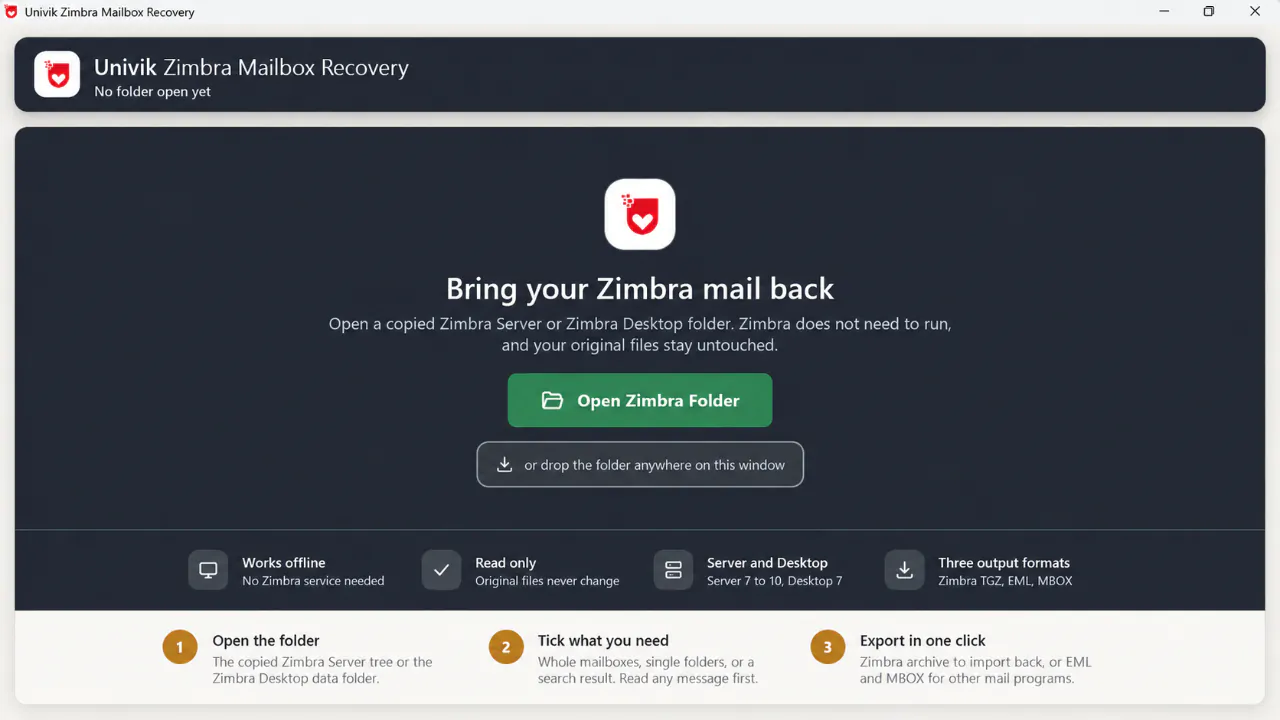
Step 2The start screen. Open the copied folder or drop it on the window. Nothing in the source is written to.
You should seethe Mailboxes tab with one row per account, each with its email address. If the list shows numbers instead of addresses, the zimbra database with its mailbox table is missing from the copy. Go back to the server disk and fetch db/data in full.
Tick the Zimbra mailboxes and folders you need
Every mailbox is ticked at the start. Untick the ones you do not need, or expand a mailbox and tick single folders such as Inbox and Sent. The item count, folder count and size next to each account come from Zimbra's own tables, so they match what the admin console used to show. Mailboxes that show 0 items and 16 folders are the spam-training and system accounts the server creates for itself.
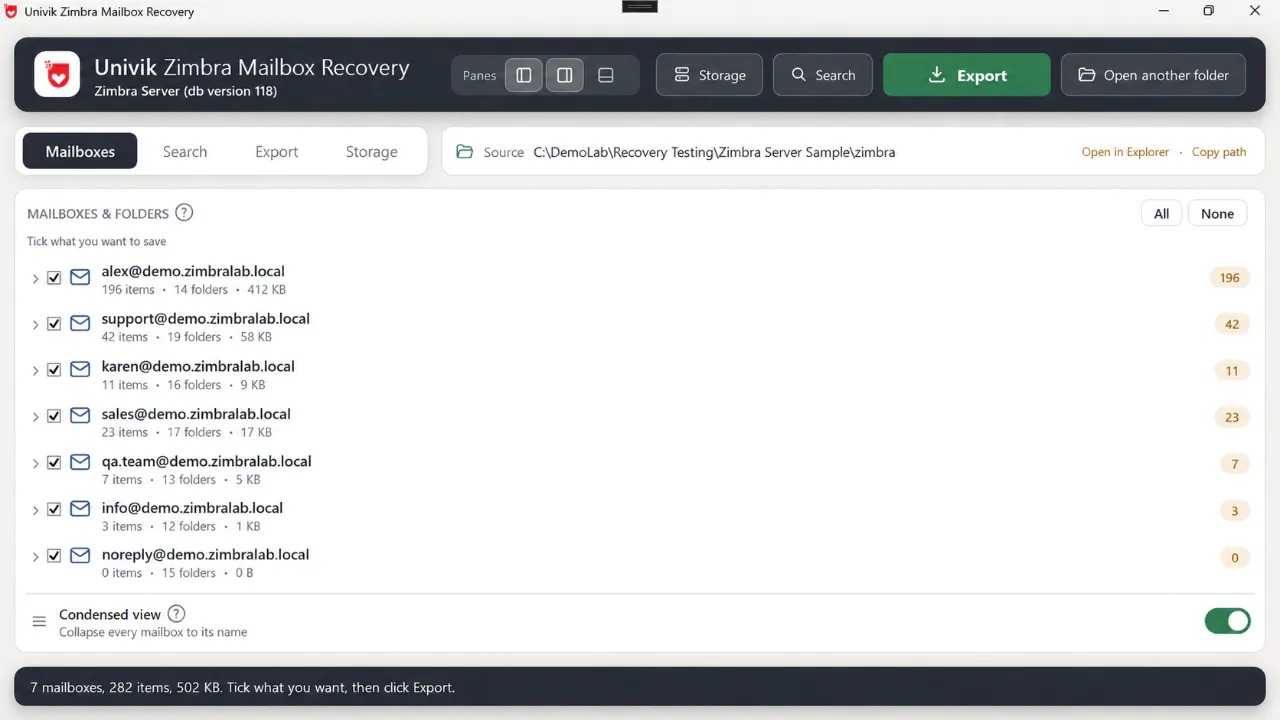
Step 3Every account the database knows, with item count, folder count and size. Expand a mailbox to tick single folders.
For a large server, open the Storage tab first. It ranks mailboxes by size, shows where the space goes folder by folder and gives a one-click Untick Trash and Junk everywhere. Save the report as CSV when the client wants a list before the export runs.
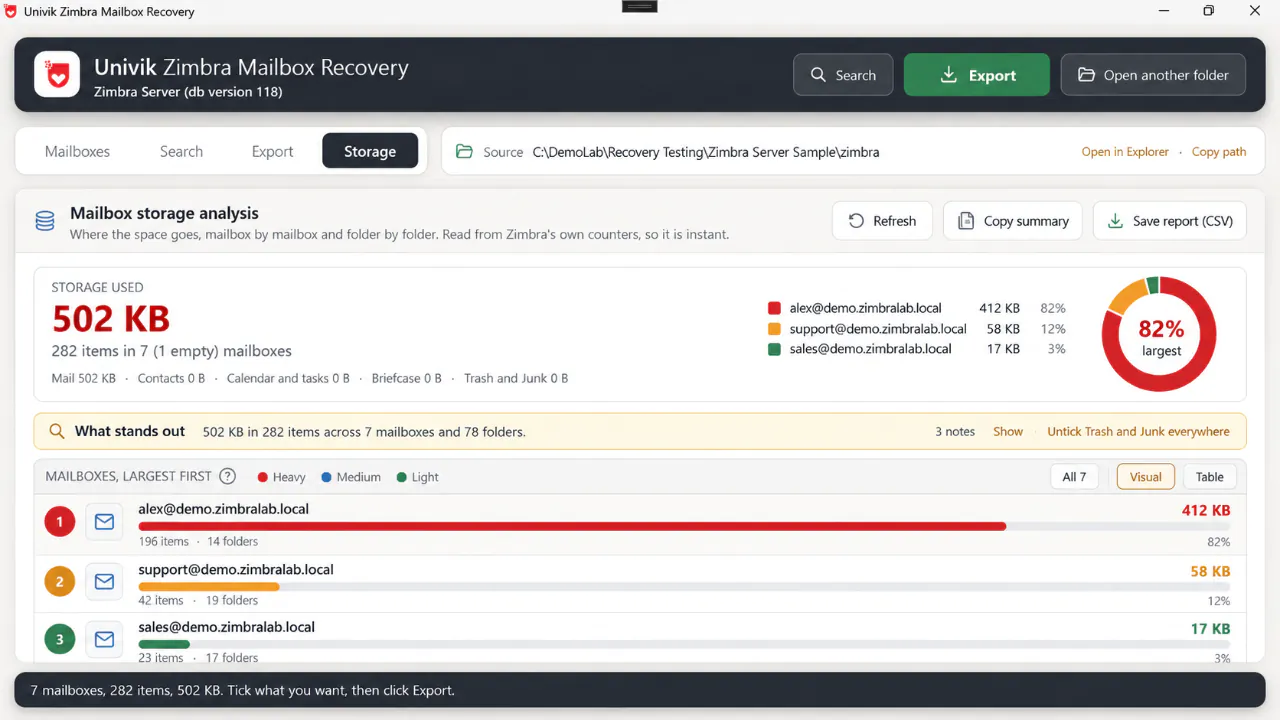
Step 3The Storage tab ranks mailboxes by size and offers one click to untick Trash and Junk everywhere before a big export.
Search the mailboxes when only some messages matter
Sometimes the job is one contract thread, one custodian or the last three months. The Search tab searches subject, sender, recipients, contact names, attachment file names and tags across all mailboxes, with filters for mailbox and date. Open any hit in the reading pane to check it, then export the matches only. Skip this step for a full recovery.
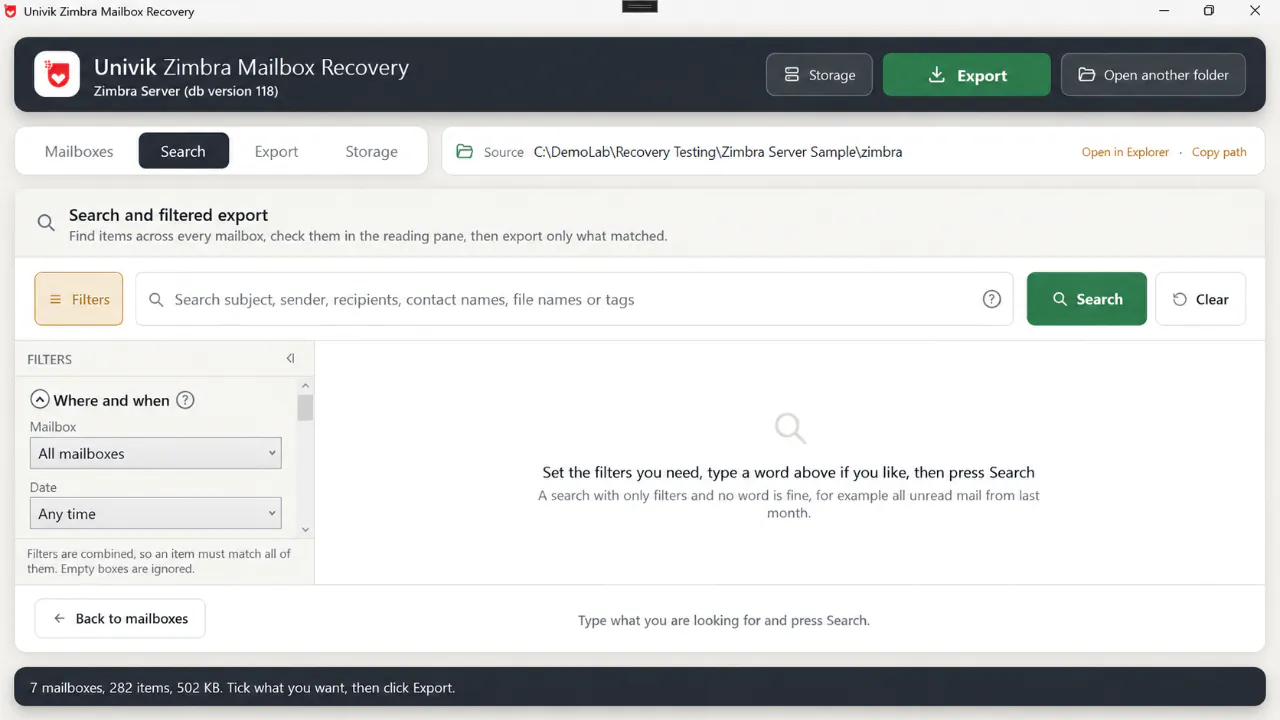
Step 4Search across every mailbox, read the hits in the preview pane, then export only what matched.
You should seea result list with the mailbox name beside each hit and the reading pane showing the message with its headers and attachments.
Export to Zimbra TGZ, EML or MBOX
On the Export tab choose a format. Zimbra archive (.tgz) is the right choice when the mail goes back into Zimbra: folders, read state, flags, tags, dates, contacts and calendar are all kept. EML files give one file per message in the same folder tree, with contacts as .vcf and calendar as .ics, ready for Outlook, Thunderbird or a converter. MBOX files give one file per folder for Thunderbird and Apple Mail. Pick a save folder, click Export selected and let the space check run.
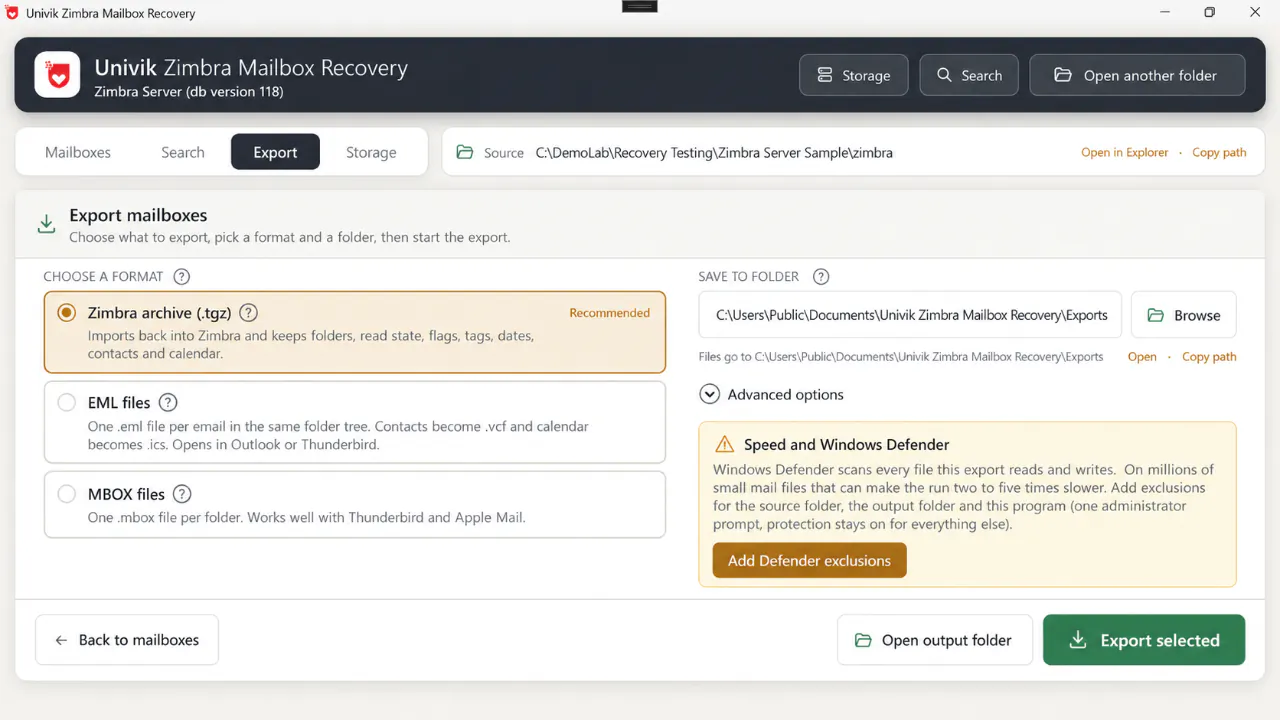
Step 5Zimbra archive (.tgz) is the default because it imports straight back into Zimbra. EML and MBOX are for other mail programs.
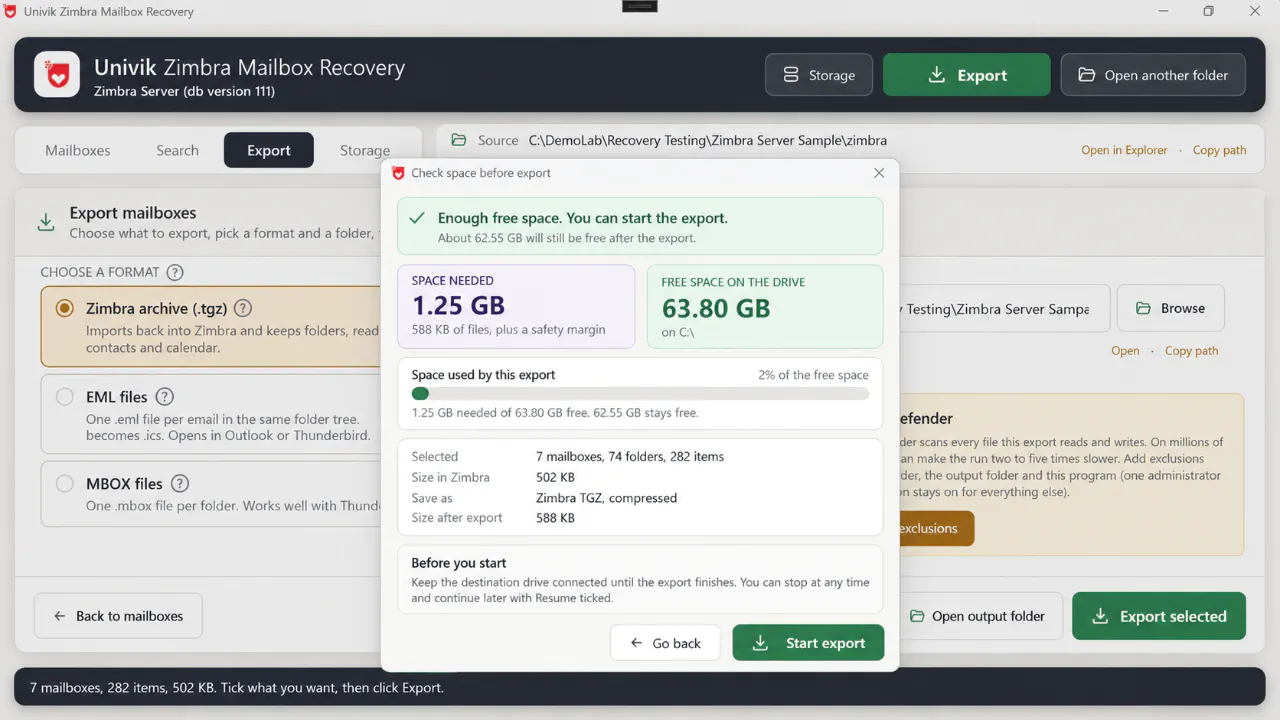
Step 5The space check runs before anything is written. It adds a safety margin and warns when the target drive is too small.
On a store of millions of small files, Windows Defender scans every read and write and can make the run two to five times slower. The Add Defender exclusions button adds the source folder, the output folder and the program with one administrator prompt. If the run has to stop, start it again with Resume ticked and it carries on where it left off.
You should seeone .tgz per mailbox (or one folder tree of EML or MBOX files) in the output folder, and a log with the item count per mailbox that you can compare with the counts from Step 3.
Import the recovered mailboxes into Zimbra
Install a fresh Zimbra, create the accounts, then sign in to each one and use Preferences, Import/Export, Import with the account's .tgz. For many accounts use the command line as the zimbra user: zmmailbox -z -m user@example.com -t 0 postRestURL "//?fmt=tgz&resolve=skip" user.tgz. The -t 0 switch removes the timeout that silently drops messages from large files. Use resolve=reset only on an empty mailbox, because it clears what is there first.
Moving away from Zimbra instead? EML and MBOX open in Thunderbird and Apple Mail as they are, and how to import Zimbra to Thunderbird covers that route step by step. For Outlook or Microsoft 365 you need PST: the Export tab writes it per mailbox on the Technician and Enterprise licences, or convert the EML tree with Univik Email Archive Converter, then follow how to import PST to Office 365. To move a whole mailbox across, see how to migrate Zimbra to Office 365. For Gmail, see import PST to Gmail.
- Every account on the new server shows the same folder tree and item count that the Mailboxes tab listed for it
- Old messages open with the original date, sender and attachments. Read or unread state matches what users remember
- Contacts and calendar appear in their own tabs after a TGZ import, not as loose files in the Inbox
Zimbra Recovery Test Results and Benchmarks
The screenshots above show our lab sample: a seven-mailbox Zimbra 8.8.15 server and a Zimbra Desktop 7.3.1 profile that synced two of those accounts. We audit the tool against that sample with a script that re-derives every item from the database files and checks it against the counters Zimbra itself left behind.
| Lab audit, 4 September 2026 | Zimbra Server 8.8.15 | Zimbra Desktop 7.3.1 |
|---|---|---|
| Items the database lists | 306 in 7 mailboxes | 295 in 4 mailboxes |
| Items rebuilt, SHA-256 digest verified, parsed as mail | 306 of 306 | 295 of 295 |
| Partial or lost items | 0 and 0 | 0 and 0 |
| Message files on disk claimed by a database row | 288 of 288, no orphans | 283 of 283, no orphans |
| Folder counters reproduced (item count, unread, bytes) | Every folder | Every folder |
| Folders accounted for | 187 of 187 rows: 135 written as folders, 52 internal system nodes applied as tags and conversation links | |
| Same message on both copies | 276 of 276 shared messages byte-identical between the server export and the Desktop export | |
Two limits of that 100 percent. Messages users deleted before the crash are not in the database, the dumpster or the tombstones, so no tool can count or return them. And a lab sample is small and clean. On a real store the rate is set by how many blobs the copy physically holds, which the export log reports per item.
Client stores of 500 GB, 2 TB and 77 TB have gone through the same reader and come back as TGZ, EML or PST. The 77 TB job is why the tool loads one mailbox at a time, logs a failed item without stopping and resumes after a halt instead of holding everything in memory.
One line per mailbox with its item count and one line per problem item with the expected blob path and digest. A re-run after a better copy arrives fills the gaps.
Source copy and output on two different drives, both SSD if you can. Archive compression set to Fast or None. Mailboxes at a time raised on SSD and kept at 2 to 4 on a spinning disk. Defender exclusions added from the Export tab. Output kept out of OneDrive and other synced folders.
Univik Zimbra Mailbox Recovery reads Zimbra Server 7 to 10 and Zimbra Desktop 7 data folders on any Windows PC, read-only, with no Zimbra install. Export to TGZ, EML or MBOX with folders, flags, tags, dates, contacts and calendar intact.
Windows 11 / 10 · runs offline, your data stays on your PC · the trial lists every mailbox before you buy
Zimbra Desktop Data Folder Recovery
Zimbra Desktop was the free offline client that synced Zimbra, Gmail, Yahoo and IMAP accounts to a local copy. Version 7.3.1 was the last release and support ended on 1 October 2019. Three things go wrong. An upgrade or a reinstall creates a fresh profile and the old one sits in a renamed folder. Local Folders never existed on any server. And the client's own Import/Export writes a .tgz with only metadata and no messages once an account has more than about 79 folders, a bug that was never fixed.
A Desktop profile follows the same steps as a server, one mailbox per account. Close the client, copy the whole Zimbra Desktop folder from AppData\Local\Zimbra (or the renamed old profile) and open it in the tool. The SQLite database inside gives every account, folder and flag. The store gives the messages. Export Local Folders and the account mail as TGZ to load into a Zimbra account, or as EML or MBOX to move into Thunderbird or Outlook. Opening the .msg files from the store in Outlook does not work, because they are internet mail files, not Outlook message files.
Zimbra Ransomware Recovery
These servers have been a favourite target since 2022. Mass exploitation of CVE-2022-27925 hit more than a thousand servers, MalasLocker encrypted mail stores in 2023 and left a README.txt in /opt/zimbra/store, and CVE-2024-45519 was exploited within weeks of its patch. Zimbra's own advice after a breach is to rebuild the server, not to clean it, because webshells planted before the patch survive the update. Zimbra ransomware recovery therefore means rebuilding the mailboxes from a copy, never repairing the infected install.
The question is how many mailboxes the attacker touched and how many you can still recover. Take the server offline and image the disk before anything else. Then copy /opt/zimbra from the image and open the copy in the recovery tool. Messages the encryptor skipped export as usual. Messages it reached fail to parse, and the log lists them by mailbox, which is the list you give to insurers and to the people whose mail is gone. Encrypted blobs cannot be rebuilt without the key, and there is no public decryptor for the Zimbra campaigns.
When an old backup exists, run the same tool on the backup copy of /opt/zimbra and merge both exports: the backup for everything up to its date, the live copy for anything newer the encryptor missed.
Done-for-you Zimbra Recovery Service
The Univik team recovers mailboxes for companies, schools and hosting providers that would rather hand the job over, with the same software and a specialist at the keyboard. We need one thing from you: the Zimbra data folder, copied from the server disk or the Zimbra Desktop profile. No admin access to your network, no working Zimbra, no old passwords.
Crashed or unbootable servers. Ransomware and breach clean-ups. Failed upgrades. Mailboxes pulled from an old backup. Zimbra Desktop profiles. Open Source and Network Edition, versions 7 to 10.
Ship a drive, or upload an archive to a private link we provide. We keep spare drives in stock, so a recovery starts the day the data arrives.
One TGZ per mailbox for a new Zimbra server. PST, EML or MBOX when the target is Microsoft 365, Outlook, Thunderbird or Google Workspace. A count report per mailbox and a list of anything that could not be read.
Your copy is worked on offline and never uploaded to a third party. It is wiped after you confirm the import. A signed NDA is available first.
Open live chat and tell our recovery expert the Zimbra edition, the number of mailboxes and the size of the store folder. You get a fixed quote and a turnaround in the same conversation.
Also moving off Zimbra? The same recovery feeds a migration to Microsoft 365 or Google Workspace, so the mail is rebuilt once.
Fix Common Zimbra Recovery Problems
Four faults account for most stalled recoveries.
Do this: The zimbra database or the mboxgroup tables are missing from the copy. Go back to the server disk and copy /opt/zimbra/db/data in full, including the ibdata file and every mboxgroup folder, then open the folder again.
Do this: Check the first two bytes of the .msg file. 1F 8B means a gzip blob, which Zimbra writes for messages above its compression threshold and the tool unpacks on its own. Anything else unreadable is encrypted or truncated. On a ransomware case that is expected, keep the log as the loss list. On a crash, the file may sit in lost+found on the old disk under an inode number. Copy that folder too: the tool matches blobs by their SHA-256 blob_digest, the same check the btactic zmblobrescue script runs on a live 8.8 server.
Do this: The webmail import times out on large files. Use zmmailbox with -t 0 instead, and import one mailbox at a time. If a mailbox already holds mail, use resolve=skip so nothing is overwritten.
Do this: The upgrade moved the old profile. Look for a folder next to Zimbra Desktop with a name ending in .tmp or a version number, and open that one. The old store and sqlite folders are inside it.
Server too far gone, or the clock is running? Tell our recovery expert on live chat the edition, the mailbox count and the store size.
Crashed Zimbra Server Recovery Questions
 About This Guide
Written and maintained by Leena Taylor Paul and the Univik team, developers of Windows data conversion and recovery software since 2013. The Zimbra folder layout, the Open Source Edition backup limits, the Zimbra Desktop paths and end of support date, the TGZ import commands and the ransomware timeline in this guide were checked against the Zimbra wiki, the Zimbra product lifecycle page, the Zimbra forums and the security reports linked below. The lab audit figures come from our own audit script run on a Zimbra 8.8.15 store and a Zimbra Desktop 7.3.1 profile on 4 September 2026, and the field figures from client recoveries our team completed with the same tool. Last verified October 9, 2026. Need a hand? Contact our support team.
Sources checked: Zimbra wiki, Account mailbox database structure · Zimbra wiki, Open Source Edition backup procedure · Zimbra wiki, Zimbra Desktop 7.2 FAQ · Zimbra product lifecycle · Zimbra blog, Get your data in and out of Zimbra · Volexity, Mass exploitation of CVE-2022-27925 · Zimbra forums, MalasLocker thread