Univik Zimbra Mailbox Recovery for Windows

Offline Zimbra Mailbox RecoveryRebuild every mailbox from a copied /opt/zimbra store and database or a Zimbra Desktop profile. Export TGZ, EML or MBOX on Windows

No Zimbra NeededServer and DesktopRead-Only SourceRuns Offline

*The free trial opens the copied folder, lists every mailbox and previews messages. It exports a limited number of items per folder so you can judge the result. A licence lifts the limit for good, backed by a 30-day money-back guarantee.

  • Store and Database Together: Reads the .msg blobs and the MariaDB tables offline, so mailboxes come back whole.
  • Server 7 to 10, Desktop Client 7: Open Source or Network Edition trees, plus the desktop profile with its Local Folders.
  • TGZ That Imports Back: Folder tree, read state, flags, tags and dates arrive in the new server as they were, contacts and calendar included.
  • Built for Terabytes: One mailbox at a time, resume after a stop, a log per mailbox, proven up to 77 TB.
Univik Zimbra Mailbox Recovery, offline Zimbra mailbox recovery software for Windows

 At a Glance

Univik Zimbra Mailbox Recovery at a Glance

The numbers that decide whether this Zimbra recovery tool fits your case.

7–10

Zimbra Server Versions

Plus the Desktop client, version 7. Open Source and Network Edition.

3

Output Formats

TGZ for Zimbra, MBOX and EML with VCF and ICS.

0

Files Uploaded

Runs on your Windows PC, source read-only.

77 TB

Largest Store Recovered

Client jobs from 500 GB to 77 TB, with resume and logs.

$999

One-Time Licence

Try it free first. Pay once from $999, with a 30-day refund window.

 Key Features

What Univik Zimbra Mailbox Recovery Does

Six things that separate a Zimbra mailbox recovery tool from a pile of numbered message files.

Reads the Store and the Database, Offline

Other tools read /opt/zimbra/store and stop. This software also reads the MariaDB InnoDB files under /opt/zimbra/db/data, where the mboxgroup databases and the mail_item table hold the mailbox names, folder tree, flags, tags and dates. No MariaDB, LDAP or mail service has to run.

Desktop Client Profiles, Local Folders Included

Zimbra Desktop recovery works the same way: copy the profile folder from the user's PC and open it. The tool reads the SQLite database and store inside, so every synced account, whether Zimbra, Gmail, Exchange or plain IMAP, plus every Local Folder, is recovered even when the discontinued client will not start.

Complete Metadata in Every Recovered Mailbox

Folder placement, read state, flags, tags, received dates, conversation links, contacts and calendar entries are rebuilt from the tables and checked against the server's own folder counters.

TGZ for Zimbra, EML and MBOX for Everything Else

The archive export carries a metadata file per item and imports through the web client or zmmailbox without errors. EML keeps the folder tree with VCF and ICS. MBOX writes one file per folder that Thunderbird and Apple Mail open, which also makes it a capable Zimbra converter.

Search, Storage Analysis and Filtered Export

Search subject, sender, recipients, attachment names and tags across all mailboxes, preview the hits and export only those. The Storage tab sorts mailboxes by size and unticks Trash and Junk in one click.

Originals Never Touched, Terabytes Never a Problem

The source is opened read-only. Mailboxes load one at a time, big attachments stream, free space is checked before each mailbox and a resume marker lets a run continue after a stop. A Defender exclusion helper keeps million-file stores fast.

 The Quick Reason

Why a Copied Zimbra Store Is Not a Mailbox Yet

Each message is a plain file, but what makes it a mailbox lives elsewhere. Two traps catch most Zimbra store recovery attempts.

Trap 1: The Store Is Filed by Number, Not by Name

Messages sit under /opt/zimbra/store as 282-1187.msg inside a folder named after a mailbox ID. Which account owns ID 7, which folder a message sat in and whether it was read are all in the database. Store-only tools hand back loose files.

Trap 2: The Official Restore Wants the Old Server Back

Copying /opt/zimbra onto a fresh install works only with the exact same build, a healthy LDAP and the old passwords. The Open Source Edition has no zmrestore at all. A crashed 8.8.15 box and a version 10 installer do not meet in the middle.

The Way Out: Read Both Halves Where They Are

This Zimbra mailbox recovery tool reads the InnoDB tables without MariaDB and the blobs without a running server, joins them by mailbox and item ID, verifies each message against its stored digest and writes the mailbox out with its structure intact. The same reader handles the desktop client's SQLite profile.

 What It Reads

The Zimbra Data Folders the Software Opens

Two sources in, three formats out. Copy the folder with its tree unchanged.

/opt/zimbra

Server Tree

The store folder with every message blob, the db/data folder with the MariaDB or MySQL tables and the index folder. Zimbra Collaboration Suite (ZCS) 7 through 10, Open Source and Network Edition.

Zimbra Desktop

Desktop Client Profile

The profile folder under AppData\Local\Zimbra on Windows, with its store, sqlite and index folders. Desktop client 7 through the last release 7.3.1, synced accounts plus Local Folders.

.tgz .eml .mbox

What Comes Out

One TGZ per mailbox for a new server. EML in the original folder tree with VCF and ICS. MBOX per folder. A log and a CSV storage report alongside.

 Three Steps

How to Recover Zimbra Mailboxes Offline

No install of the mail server, no Linux shell, no exporting one account at a time.

1

Open the Copied Zimbra Folder

Point the software at the copied /opt/zimbra tree or the Zimbra Desktop profile. It reads store and database offline and lists every mailbox with its folders.

2

Tick Mailboxes or Search

Keep every account or tick single mailboxes and folders to recover Zimbra mailbox data one account at a time. Search across all mailboxes by subject, sender, date or tag when only some messages matter.

3

Export TGZ, EML or MBOX

Export Zimbra mailboxes as TGZ to import back into a server, or as EML or MBOX for Outlook, Thunderbird and Microsoft 365. The space check runs first, then the export.

Try It on Your Copy, Free

Windows 11 and 10, 64-bit · no mail server and no Outlook needed · nothing leaves your PC · support from the developers who wrote the reader

 See the Software

Univik Zimbra Mailbox Recovery Screens

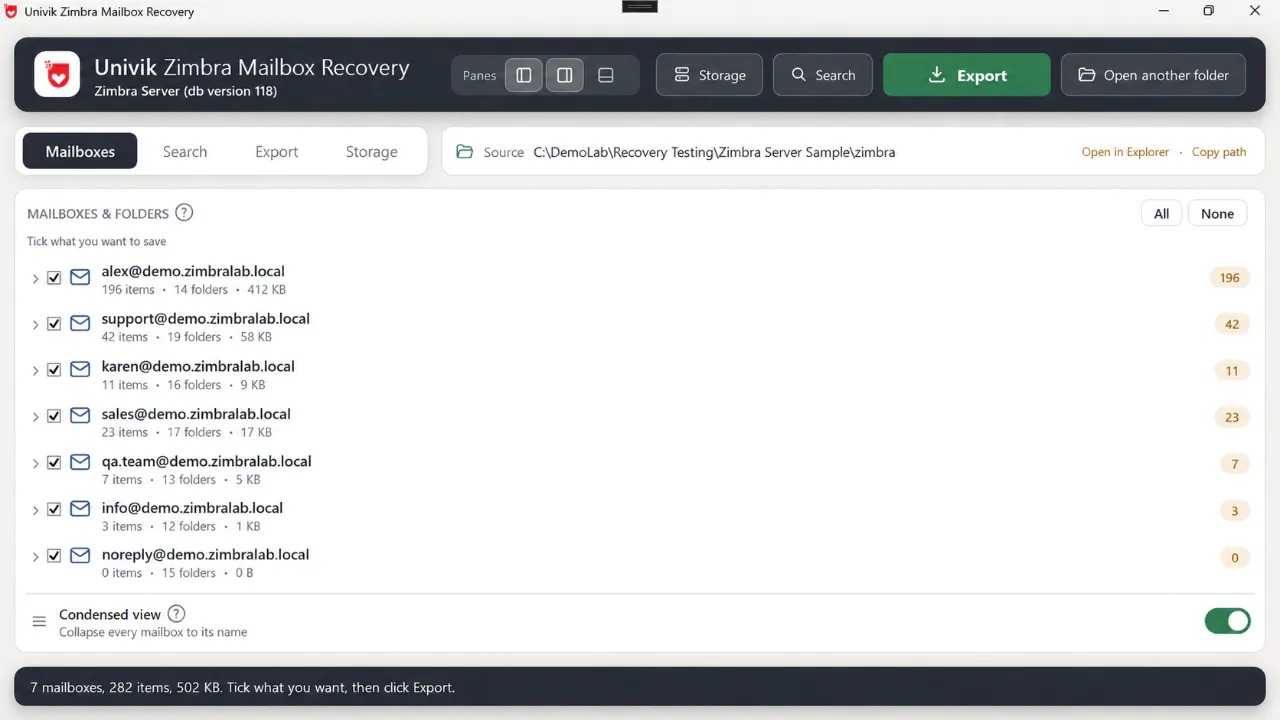
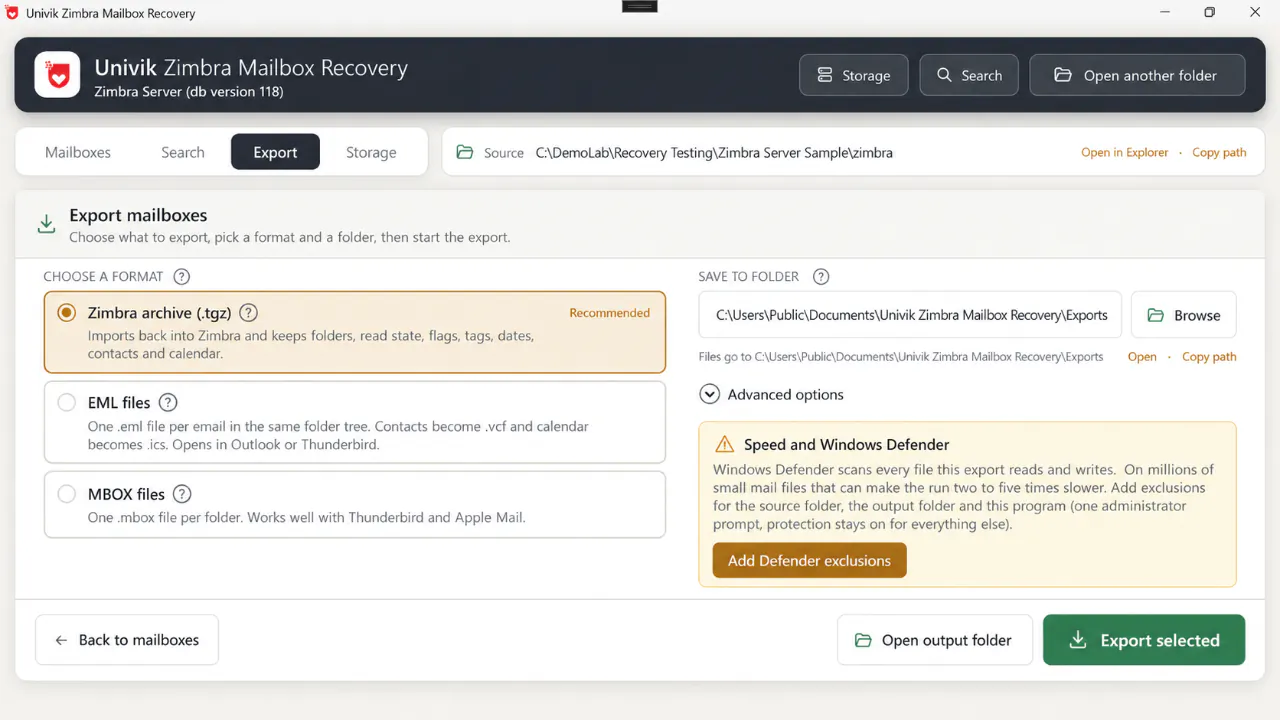
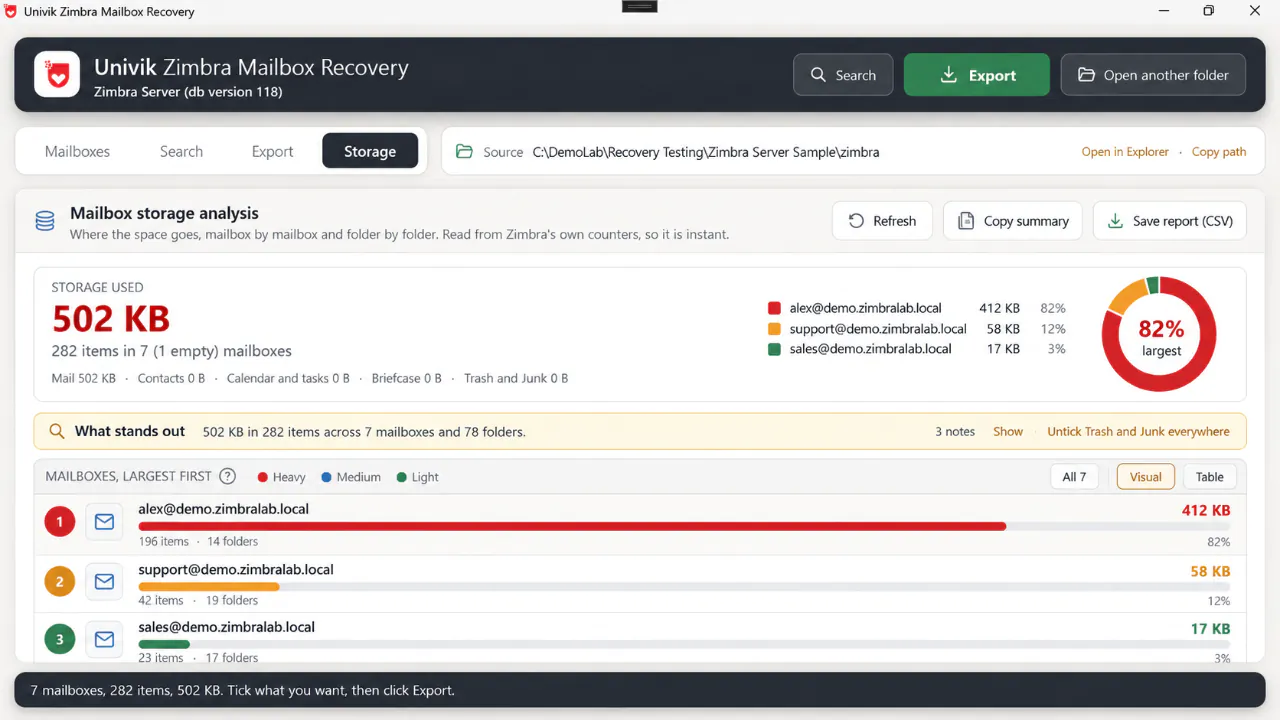
Three views from a lab copy of an 8.8.15 server: mailbox list, export tab and storage analysis.

Univik Zimbra Mailbox Recovery listing seven Zimbra Server mailboxes with item counts, folder counts and sizes read from the database

Mailboxes tab. Every mailbox the database knows, with item and folder counts, ready to recover.

Export tab of Univik Zimbra Mailbox Recovery with Zimbra archive TGZ, EML and MBOX options and a Windows Defender exclusion helper

Export tab. TGZ, EML or MBOX, the output folder and the Defender speed helper.

Storage analysis in Univik Zimbra Mailbox Recovery ranking Zimbra mailboxes by size with a donut chart and CSV report button

Storage tab. Where the space goes, mailbox by mailbox, with a CSV report and one-click Trash and Junk untick.

 Where It Fits

When You Need Zimbra Recovery Software

Three situations bring most people to this page.

Crashed or Unbootable Server

A server crash from disk failure, power loss or a failed upgrade leaves disconnected mailboxes on the old volume. Mount the disk, copy /opt/zimbra and rebuild every orphan mailbox while the new server is built.

Ransomware and Breach Rebuilds

The vendor advises a clean rebuild after a compromise. Image the disk and recover what the encryptor missed. The log names every message it reached.

Zimbra Desktop Retired

Unsupported since 2019, and its own export skips messages past 79 folders. Read the profile directly and move Local Folders to a server, Outlook or Thunderbird.

 Finding Your Data

What to Copy from the Old Zimbra Disk

Good to know

You do not need a working server to recover from it. Mount the disk in a rescue system or another Linux box and copy the whole /opt/zimbra tree to an external drive. If space is short, take /opt/zimbra/store and /opt/zimbra/db/data first, folder names unchanged.

For the desktop client, close it and copy %LOCALAPPDATA%\Zimbra\Zimbra Desktop. After an upgrade the old profile can sit beside it in a renamed folder, so copy that one too. The mailbox list appears within minutes. The full crash procedure is in the crashed Zimbra server recovery guide.

 Compare the Paths

Three Ways to Restore Zimbra Mailboxes

Official copy-back, store-only recovery tools and Univik, side by side.

What you need Reinstall and Copy Back Store-Only Recovery Tools Univik Zimbra Mailbox RecoveryTRIAL
Works with no Zimbra running Needs a rebuilt server Yes Yes
Free of the same-version rule Exact build and OS Yes Yes, 7 to 10
Mailbox names, folders, flags and tags back If LDAP and DB survive Loose files From the database
Contacts and calendar If DB survives Lost Yes
Desktop client profile Not covered TGZ export only Read directly
Data stays on your machine Yes Yes Yes, read-only

Copy-back needs the dead server rebuilt as it was. Store-only tools skip the database. Zimbra recovery software that reads both needs only a Windows PC.

 What You Need

Zimbra Mailbox Recovery System Requirements

Operating System

A 64-bit Windows 10 or 11 PC, or Windows Server, with .NET Framework 4.8, which current systems already carry.

Zimbra Not Required

No mail server, MariaDB, LDAP or Linux. No live licence either, so an end-of-life Zimbra is fine. The copied folder on a local or external drive is the only input.

Memory and Disk

8 GB of memory covers most servers. Terabyte stores want 32 GB and output space close to the store size.

Works Fully Offline

The only download is the setup file. Reading and exporting open no network connection at all.

Software InformationUnivik Zimbra Mailbox Recovery
Version6.8 (Latest)
LicenceFree trial, then a one-time licence from $999
Platform64-bit Windows 10, Windows 11 or Windows Server
Framework.NET Framework 4.8 (x64 build)
ReadsCopied Zimbra Server trees (store, db/data, index) and Zimbra Desktop profiles (store, sqlite, index)
SavesTGZ per mailbox; EML with VCF and ICS; MBOX per folder; CSV storage report
VersionsZimbra Collaboration Suite 7, 8, 8.8.15, 9 and 10 (Open Source and Network Edition); Zimbra Desktop 7 to 7.3.1

 Questions

Common Zimbra Mailbox Recovery Questions

It reads the copied files directly. The blobs in /opt/zimbra/store are plain mail files, and the MariaDB tables under /opt/zimbra/db/data record the mailbox, folder, flags, tags and dates of each one. Both are read on a Windows PC, so no Zimbra install, Linux server or LDAP is needed. Outlook is not needed either; it matters only if you convert to PST later.

Partly. The store alone gives unnamed loose messages with no folder tree or read state, because that information lives in the database. Copy /opt/zimbra/db/data as well and the Zimbra recovery tool rebuilds every mailbox in full. This also works on an old zmbackup or Zextras ZNG backup copy of the tree.

Zimbra Collaboration Suite 7 through 10, Open Source and Network Edition alike, including 8.8.15, 9.0 and the current 10.1 releases, plus Desktop client 7 profiles up to the last release, 7.3.1. The storage layout stayed the same across those versions, so one reader covers them all.

Yes. Copy the Zimbra Desktop folder from AppData\Local\Zimbra on the user's PC and open it. The SQLite database inside lists every account and folder, Local Folders included. The store holds the messages. The client does not need to start. If the profile lives in a OneDrive-synced folder, copy it out first, because placeholder files cannot be read.

Yes. The Zimbra archive format carries a metadata file for every item, so every folder, flag, tag, date, contact and calendar entry lands where it was. Import through Preferences and Import/Export in the web client, or with zmmailbox postRestURL for many accounts. An archive from an 8.8.15 store loads into version 9 or 10.

EML, one file per message inside the original folder tree with VCF contacts and ICS calendar, for Outlook, Thunderbird or a converter. MBOX, one file for each folder, suits Thunderbird and Apple Mail. For Microsoft 365 or a PST, export EML and convert it with Univik Email Archive Converter.

No fixed limit. The Zimbra recovery tool loads mailboxes one at a time, streams large attachments and writes a resume marker after each finished mailbox. Client jobs have ranged from 500 GB to 77 TB. On an NVMe drive expect roughly 1 GB of store a minute.

No. The copied folder is opened read-only and nothing is written into it. Exports go to the folder you choose, with a log of the item count per mailbox and any message that could not be read.

Yes. Tick single folders such as Inbox or Sent, or use Search to find messages by subject, sender, attachment name, tag, mailbox or date across the whole server, then export only the matches.

The trial opens the copied folder, lists every mailbox with item counts and previews messages, so you know the data is there before you buy. Exports are limited per folder until a licence is added. Licences are one-time with a 30-day money-back guarantee.

About This Page

Fact Checked

Since 2013 Univik has written parsers for closed mail formats, and the engineers behind this reader wrote this page. The store layout, database tables, desktop profile paths and version history were checked against the Zimbra wiki and product lifecycle pages. Lab figures come from a September 2026 audit of an 8.8.15 server and a Desktop 7.3.1 profile, where every item the databases listed was rebuilt and digest verified. Field figures come from client recoveries done with this software.

Since 2013Format VerifiedUnivik Team