 Univik Zimbra Converter for Windows
 At a Glance
 Key Features
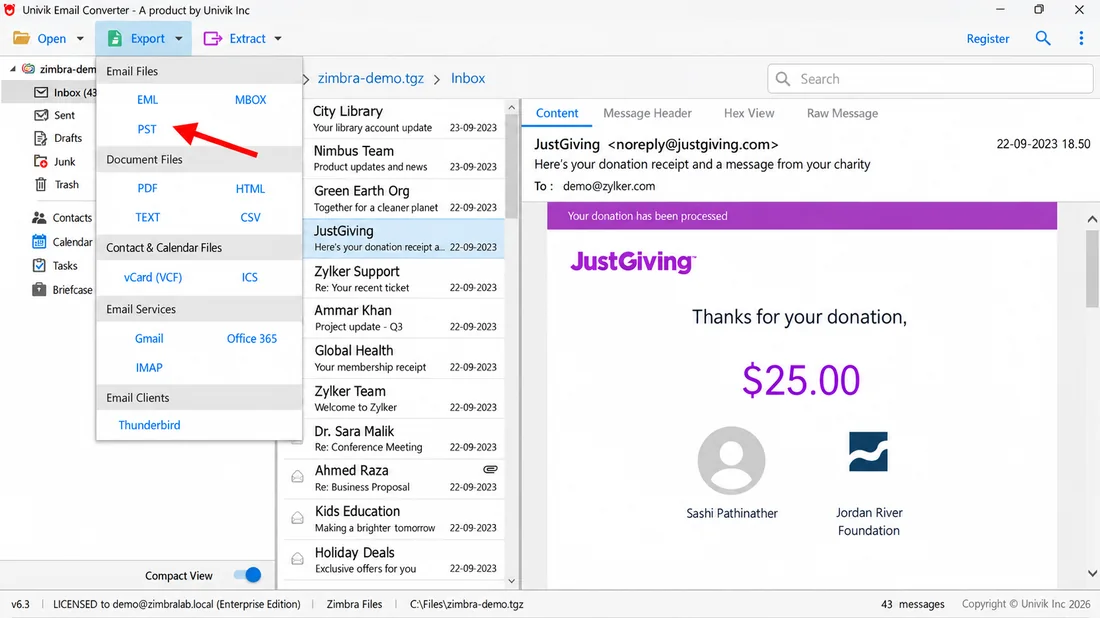
Reads the Whole Export for You
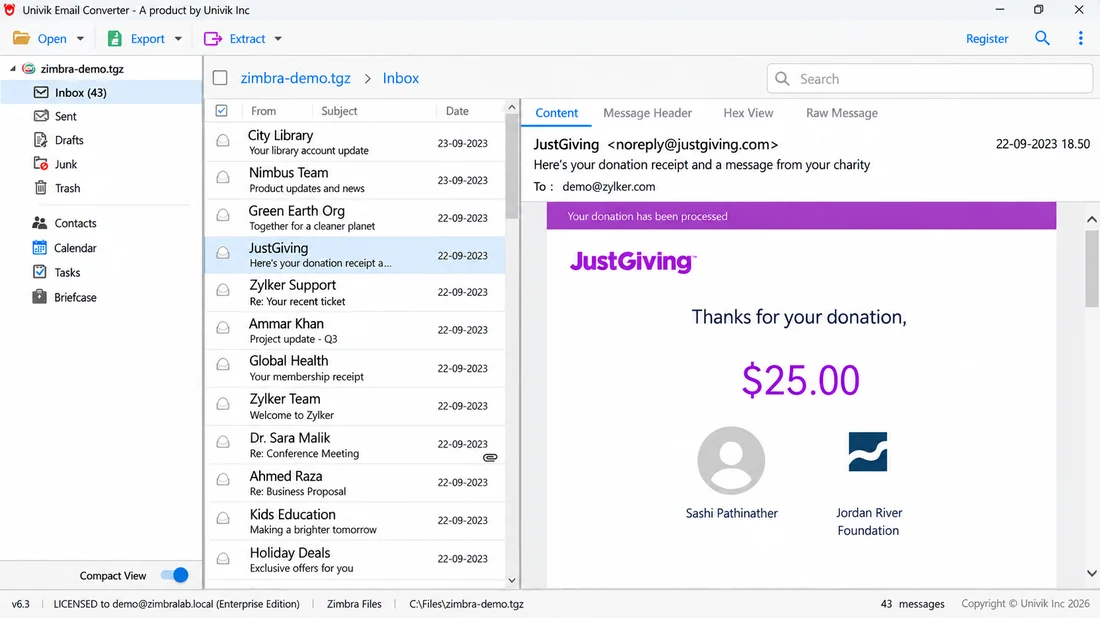
Point the software at your exported .tgz and it lists every folder inside. No unpacking the archive by hand.
Univik Zimbra Converter for Windows
Zimbra saves an exported mailbox as a .tgz archive that Outlook and everyday apps will not open. This Windows Zimbra file converter reads the whole export as it is, so there is no need to unzip it first. It converts every folder into Outlook and standard formats in one offline batch, turning a Zimbra migration into a single run.
Try It FreeWhole-Export BatchFully OfflineZimbra Not Needed
*The trial converts a sample of messages from each folder in the export. Buying a licence removes that cap and comes with a 30-day money-back guarantee.

At a Glance
The numbers that matter for a Zimbra migration: the input it takes, the outputs it writes and the price.
1
File Type Read
The Zimbra .tgz export that Import / Export makes of a mailbox.
15+
Output Formats
PST, PDF, MBOX, EML, HTML, CSV, TEXT, vCard and cloud accounts.
0
Emails Uploaded
Every message is handled on your own PC, so nothing is uploaded and company mail stays with you.
1
Run per Export
One batch covers every folder inside the exported .tgz.
$99
Starting Price
Start on the trial, then a licence from $99 with a 30-day refund.
Key Features
Every part of this Zimbra mail converter brings a converted mailbox over complete and ready to use.
Reads the Whole Export for You
Point the software at your exported .tgz and it lists every folder inside. No unpacking the archive by hand.
Folders and Tags Kept
The nested folder tree is rebuilt as it was, down to Trash and custom folders. Zimbra tags and the read or unread mark stay with each message.
Attachments Travel Along
Pictures shown in the email and file attachments stay inside their message, and the sender, recipient, subject and time are written unchanged.
Preview, Search and Pick
Open any message in the preview before a file is written. Filter by keyword, sender, subject or a date range and pick only the folders this job needs.
Contacts and Calendar Come Across
When the export holds contacts, a calendar, tasks or Briefcase files, EML mode writes contacts as VCF and calendar items as ICS, so the whole address book comes across with your mail.
Originals Never Touched
The archive is opened read-only and fresh output goes to a separate location. The source .tgz is never changed, so it stays a safe backup copy.
Extract Names, Numbers and Files
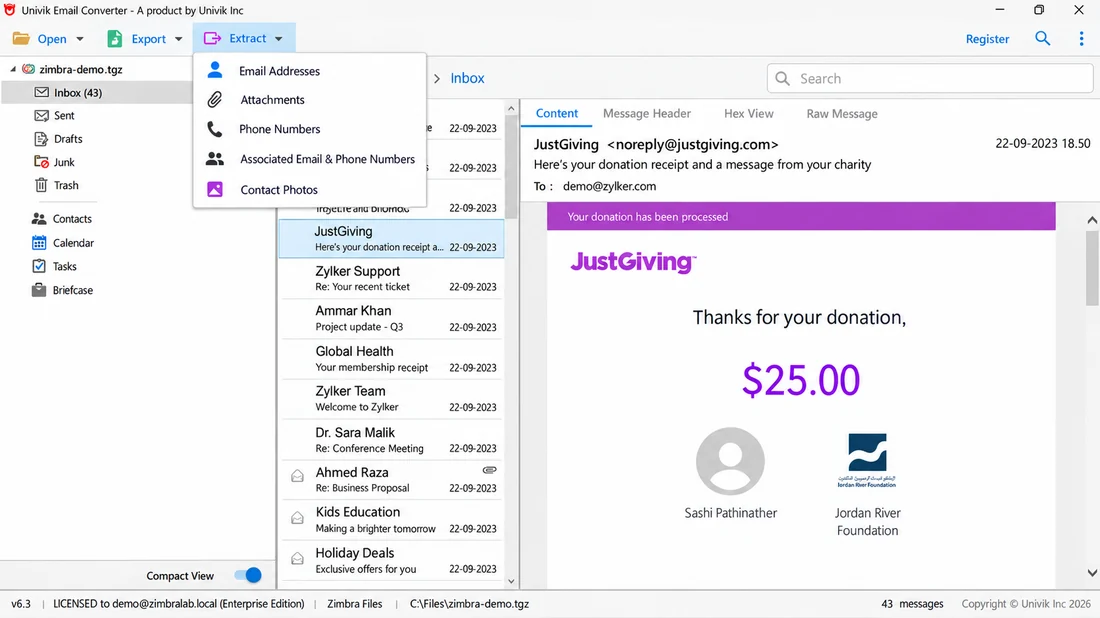
Beyond conversion, the Extract menu pulls every email address, attachment, phone number and contact photo out of the mailbox into a list. Handy for review, discovery and cleanup work.
Inspect Every Message in Depth
The preview opens each message four ways: the readable Content, the full Message Header, a Hex View and the Raw Message source. You see exactly what a mail holds before a file is written.
The Short Version
Zimbra hands you a .tgz archive of your mail. Two things keep those emails locked inside it.
Trap 1: An Archive Nothing Reads
The archive is a special Zimbra file that no mail app on a normal Windows PC can read. Double-click it and Windows can only offer to search for an app that might open it.
Trap 2: Unpacking by Hand Breaks It
Extract it with 7-Zip and you get loose .eml files with a meta.xml. Dragging those into Outlook by hand changes the sent dates and loses the folder tree, tags and read state. There is still no PST file at the end.
The Way Out: Read the Export Directly
Univik Email Converter opens the archive and writes files that Outlook and other apps understand. Reading the meta.xml, the Zimbra converter tool rebuilds the folder tree and tags, then works through the export folder by folder. No Zimbra install or server login is needed.
This works on a healthy export. If the Zimbra server crashed or the store is corrupt before you could export, that is a recovery job. See Univik Zimbra Mailbox Recovery for a damaged server or Desktop store, or the crashed Zimbra server recovery guide.
Inside the Export
A quick guide to what sits inside the archive and how the tool treats each part.
.tgz
The Zimbra Export
A compressed archive that Zimbra's Import / Export or the zmmailbox command makes. It holds a whole account, or a single folder, in one file the converter reads.
.eml
One File per Message
Every message sits inside the archive as a standard .eml file with its headers and attachments. This is the mail the converter turns into PST, PDF and more.
meta.xml
The Folder and Tag Map
A small file beside the mail that records the folder path, tags, flags and read state. The converter reads it to rebuild your layout in the output.
Three Steps
The tool needs no Zimbra, no sign-in and no unpacking of the archive by hand.
Add Your Zimbra TGZ
Load the exported .tgz file, or several at once. The converter then lists every folder inside.
Pick the Output Format
Choose where it goes: PST to open in Outlook, EML for other clients, MBOX for Thunderbird or PDF for a fixed record.
Convert and Open Your Emails
Start the job and let it work through the export. Open a message first to check it, then the finished files go to your chosen folder, with the folder tree and attachments in place.
Windows 11 through 7 · Zimbra and Outlook both optional · runs offline · the people who wrote the tool answer support
Read the full step-by-step guide: how to convert Zimbra to PST
Moving the whole mailbox to the cloud? See how to migrate Zimbra to Office 365.
Prefer a free desktop app? See how to import Zimbra to Thunderbird.
Real Situations
Most people look for a Zimbra file converter or a Zimbra mail converter for one of these three reasons.
Moving Zimbra to Outlook or Microsoft 365
A new job or company rule moves you away from Zimbra. Export once, convert Zimbra to Outlook PST and your mail comes across with folders and all. Short on time? Our Zimbra migration service can do it for you.
Handing Mail to Someone Without Zimbra
A colleague or lawyer needs the mailbox but has no Zimbra. PDF or EML copies open on any device without a server.
Keeping Emails as Records
Receipts, signed agreements and project threads sometimes must be kept for good. A PDF of each message stays portable and prints the same on any device.
Getting the File
In Zimbra webmail you open Preferences and then Import / Export, and the Export button saves your account as one .tgz file. An admin can make the same archive from a shell with zmmailbox getRestURL "//?fmt=tgz".
The Zimbra Desktop client exports the same .tgz from its own menu. The file lands in your Downloads, or a path the admin sets on the server. Copy that .tgz to any Windows PC and the converter opens it there, and the mail server can then go offline for good.
Compare Your Options
Two of these do only part of the job. Only one is built to convert Zimbra to PST and other formats in one run.
| What you need | Extract and Drag into Outlook | Free Online Uploaders | Univik ConverterTRIAL |
|---|---|---|---|
| Produces an Outlook-ready PST | No | Rarely | Built in |
| Keeps folders, tags and read state | Lost | Rarely | Yes |
| Whole export in one run | File by file | File by file | One batch |
| Writes PDF, MBOX and CSV too | No | Some | Yes |
| Data never leaves your desktop | Local | Uploaded | Local |
A company mailbox has no place in a stranger's upload form. Converting it on your own PC keeps it in your hands.
What You Need
Operating System
Any desktop or laptop on Windows 11 through Windows 7 runs it. A patched Windows already carries the .NET Framework 4.8 the tool needs.
Zimbra Not Required
The software reads the .tgz on its own and converts without Outlook. No Zimbra server and no account sign-in are involved.
Memory and Disk
A typical export runs on 4 GB of memory. A multi-gigabyte, attachment-heavy archive does better with 8 GB and spare output disk.
Works Fully Offline
You go online once to download the setup file. After that it runs with the network off, which suits secure offices and PCs kept off the internet.
| Software Information | Univik Email Converter |
| Version | 6.7 (Latest) |
| Licence | Free trial, then a paid licence from $99 |
| Platform | 64-bit Windows, versions 11 through 7 |
| Framework | Microsoft .NET Framework 4.8 or higher |
| Reads | Zimbra export archives in TGZ form |
| Writes | PST, PDF, MBOX, EML, HTML, CSV and more |
Questions
More Tools
Email Converter
The full Univik Email Converter reads 50+ mail clients and services, well beyond Zimbra alone.
Email Converter »Thunderbird Converter
Bring a Thunderbird profile into Outlook or open formats, folder tree preserved.
Thunderbird Converter »MBOX Converter
Convert MBOX stores from a range of mail clients into PST, PDF and more.
MBOX Converter »About This Zimbra Converter Page
Fact Checked
Univik has built email and file conversion software since 2013, and this page is written by that team. Its facts about Zimbra Collaboration, the .tgz export, the .eml messages and meta.xml inside, and the Import / Export and zmmailbox paths that create it, are checked against Zimbra's published documentation.
Since 2013Sources VerifiedUnivik Team


 Inside the Export
 Three Steps
 Real Situations